How to make Claude instantly 28% better + 16 other power user hacks:

98% of all humans don’t use Claude.

Only 157 million do, every month (out of 8.3 billion of us).
Rookie numbers compared to ChatGPT or Gemini:

You’re in the 2%.
You’re early. Early to use the very best AI on the market.

But being early isn’t being good. Nobody showed you how to use Claude. Even their “Claude Academy” is outdated and too long to go through.

So every single day, someone asks me: “I need to start somewhere, but I don’t know how.”
Start here. I spend 4 hours a day on Claude, and these are the 17 tips you need to go from a normal to a power user, starting with the most surprising.
Tip #1 is one setting. It makes Claude 28% better.
And it’s not even from me, but after reading Anthropic engineers on X all day.
1. Keep memory on.
My memory is always on now. Because of this research:
Anthropic gave Claude the same long work test, with and without memory (a score out of 1). With memory, Opus 5.5 went from 0.655 to 0.838. That’s 28% better, just by remembering. And memory helped every model they listed.

So keep your Claude Memory on.

2. But keep it short.
Again, the same research.
They made Claude play Pokémon and let it take notes. In Pokémon, you need to get a lot of badges to win. Sonnet 3.7 wrote 413 memory files in 225 folders. It won 1 badge. Fable 5 kept about 10 files. It won 4 badges.
Opus 5.5 kept a small folder of notes and beat the game.

Anthropic says: “the top layer of the memory hierarchy has to stay relatively small.” So once in a while, clean your memory or you will suffer from context bloat (too much to remember).
Go to Claude and paste this:
Look at everything you remember about me.
Goal: a short, correct memory.
1. List every memory, one line each.
2. Mark each one: KEEP, FIX (wrong or outdated) or DELETE (a one-off, or something you can find again in my chats).
3. Ask me about anything you're not sure of, with clickable options.
4. Then show me the cleaned version, under 30 lines, and tell me where to click to change it.
Here’s an example with me - I’m sorry I had to unzoom a lot to see both the memory and the form Claude generates (you must answer it):

After the first round of questions, Claude went from 105 facts to 26. I then followed up with:
Go through the reviewed facts with AskUserQuestion, and tell me if I want to keep it or not, or change it (take a guess on how).
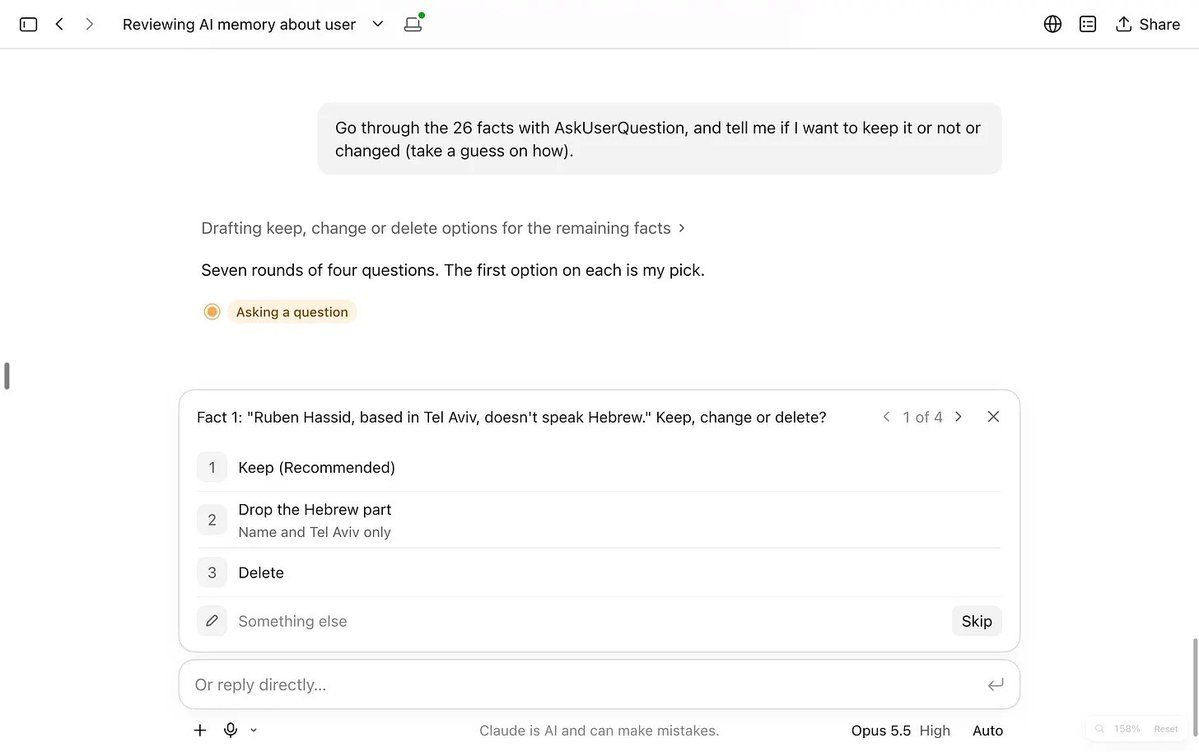

Reminder: a lighter memory is better, and it leaves you more room in the future.
3. A bad answer poisons your chat.
Claude rereads your entire chat before every answer.
So when Claude gives you a bad answer, it stays in there. And Claude reads it again. And again. On every turn.
For example, when you say “no, that’s wrong,” Claude will read it over and over.
Stop arguing.
Go back to your prompt, right before the bad answer, and edit it:


4. Stop the downgrade.
When a message gets flagged, Claude can move your chat to an older model. By older, understand dumber. Turn it off:

5. Empty your instructions box.
Your “about me” file. Your “how I write” file. Your long list of instructions.
Delete them.
They force Claude to answer one way, every time. You get the same answer, again and again. Give one clear goal per prompt instead, and let Claude find the rest (its memory, your past chats, your apps).

6. One Project per client.
You asked me this a lot:

One Project per client. Then open the Project and turn off Use account memory.
Now what Claude remembers about Client A stays out of Client B’s Project.


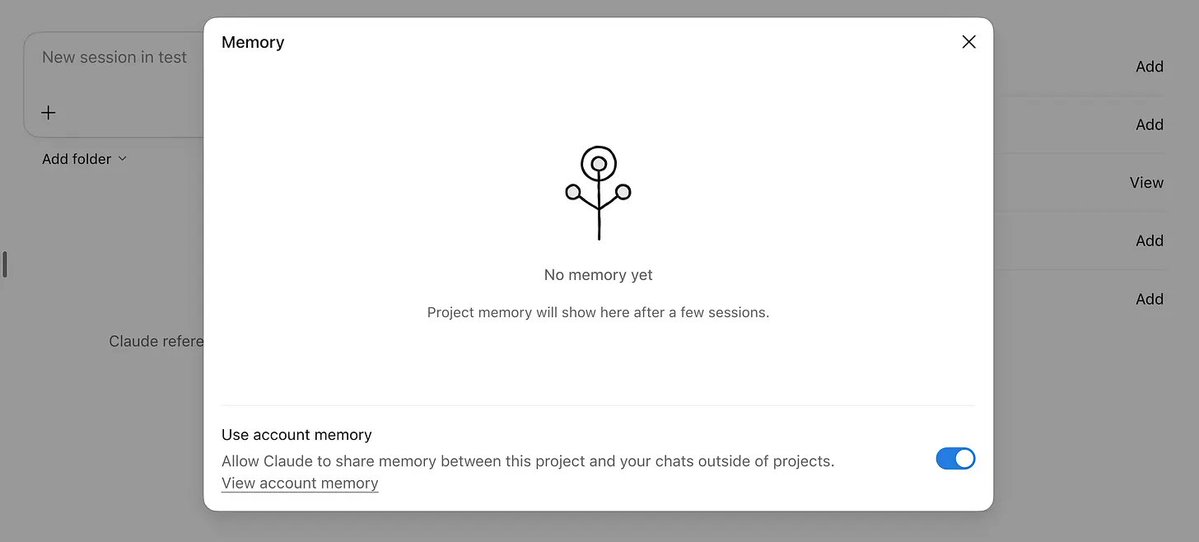
Put the files you reuse in the Project (contracts, brand guide, reports).
But for a new idea, open an empty chat.
7. Claude inside Google Docs.
Claude now lives inside Google Docs, Sheets & Slides:

8. A GitHub link is a skill.
GitHub is like a giant library of code, organized into individual repositories.
Put a GitHub link inside your prompt and Claude reads the repo and follows it.
For eg, to clean the design of any report Claude made for you:
Fix this artifact. Follow github.com/rubenhassid1/grenade
Or this one to remake any website:
/goal Remake [THE WEBSITE URL YOU CHOSE] with github.com/rubenhassid1/remake until its report says REMAKE COMPLETE, or stop after 100 turns.
It will read my GitHub repo made for this. I don’t have access to your files, but you use my own taste. Super useful. You have tons of open-source repos on GitHub.
It’s a rabbit hole; most of you won’t go there, but the few that will, thank me later.
For eg, I like this one lately: https://github.com/emilkowalski/skills.
9. Make dashboard.
We used to ask people to create a dashboard. Now Claude makes it.
Paste your numbers (or a csv.) and ask for a dashboard.

10. Ask for the spread.
Ask Claude for ideas, and you get the 5 ideas everyone else gets.
So ask for the spread:
Give me 20 very different options. For each one, tell me how likely another AI would give it to me. The last two must be under 10%.
It forces AI to think outside of the box. A reminder that a GPT like ChatGPT or Claude, so a Generative Pre-trained Transformer, is simply giving you the most likely answer on something. So force it to give you the less likely ones too.
11. Never press the thumbs.
Under every answer, there’s a thumbs up and a thumbs down.
Never press them. It sends your whole chat to Anthropic. And I am pretty sure you don’t want your chats to be used for training. So don’t :)
Same idea with your money: don’t connect your bank to Claude. Go to your bank → transactions → export a csv. (12 months), and give Claude the file. It can’t do anything on your bank account, but it’s so good at being an analyst!
12. Give it a finish line.
Claude stops when it thinks it’s done. Tell it what done means.
Here are 5 examples:
→ “Done means: a one-page doc my boss can forward without editing.”
→ “Done means: a spreadsheet with one row per client, totals at the bottom, no empty cells.”
→ “Done means: 3 email drafts in my Gmail, under 100 words each, ready to send.”
→ “Done means: a live link I can open on my phone.”
→ “Done means: you checked every number against my file.”
Then add the only reasons to stop: “Stop and ask me only if a number doesn’t match.”
13. Don’t steer the answer.
If you prompt, “Our price should be $49, right?”
Claude reads the “right?” and wants to agree with you.
Do this instead:
I think $49 is right. Give me the 3 strongest arguments against it.
Or the opposite. Or both. You got my point, right?
14. Ask for files.
Guys it’s 2026, you can ask so much to AI.
You can ask for PDFs, docx, csv, xcl, pretty much any files. Even motion design videos (with /motion). Sky is the limit, so test them often. I am trying to create an entire videogame with Claude Code - might write a newsletter on it soon!
15. The one prompt.
The only prompt you need:
Goal: [what I want, in one sentence]
Context: [everything Claude needs]
If you need more context, ask me questions.
I know I could sell you mega prompts and complexity - I mean, sometimes mega prompts are necessary, you can still ask a mega prompt from this simple prompt - but I prefer telling the truth. It’s more fun.
16. Talk. Then show.
You don’t give enough context to AI. And you’re lazy. So don’t type. Talk for 5 minutes: the goal, what you tried, what you love/hate.
I use Wispr Flow for that. I am obsessed.
Ah, and don’t describe a design. Send a screenshot instead of what you want.
17. When Claude gets dumb, move.
Long chats are burning your tokens (the thing that uses your usage).
But there is also something called “cache”. I’ll try to explain both simply:
So before you leave:
Summarize this chat in 10 lines: the goal, what we decided, what's left.
The goal is to paste your answer in a new Claude chat so it takes it from there.
Now paste it into a new chat. Keep going.
Alright. That was 17 hacks.
But I have 10 more. Get them after the paywall, starting with the effort level I use for everything (on the one model you must use - never the other ones). Read more from how-to-ai.guide.
What’s 1% of 1 billion?
I finished the newsletter, so let me be personal for a minute.
We are 8 billion humans.

And about 1 billion of us can read English.
I want to help 1% of them get better or start with AI.
So 10 million people.
You probably don’t care about having 10 million people mastering AI. But having this many people connected to the internet brought up some good things.
And I believe bringing more people to correctly use AI will accelerate new cool things too. Scientific discoveries. New technology. Safe & abundant energy.
Or at least it will prevent them from losing their jobs, being replaceable, or not finding meaning in what they do.
So share this with someone you know will do wonders with AI.

