How to make Claude limitless (22 rules):

ChatGPT is way cheaper than Claude.

On the same tough prompt, ChatGPT’s flagship model (GPT-6.1 Sol) costs $0.21. Claude’s everyday model (Opus 5.5) costs $1.34.
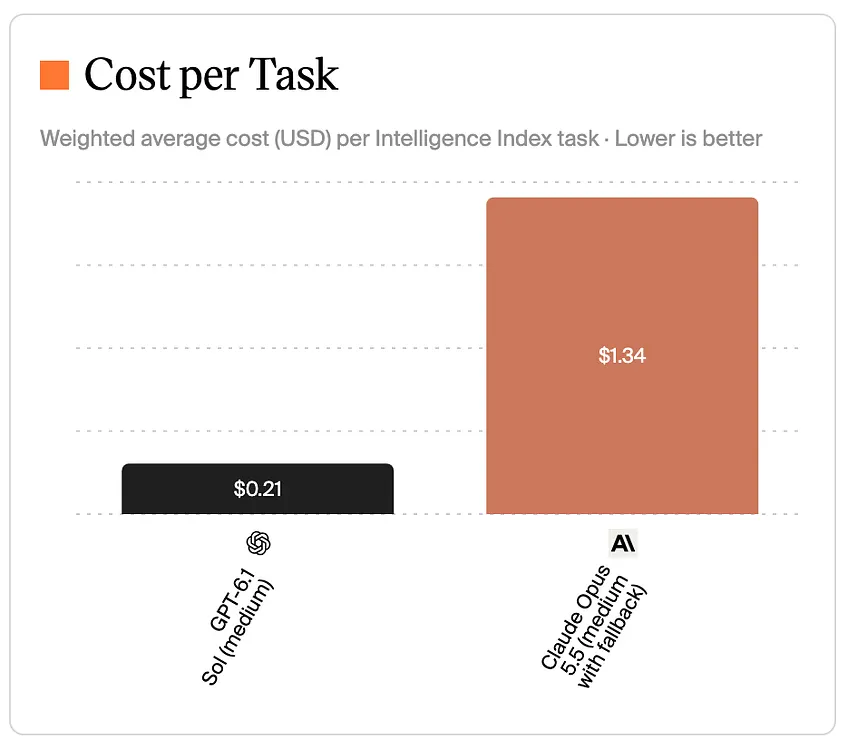
So if you pay ChatGPT $100, you should get 6× more work. Right?
Wrong. It’s the opposite.
On October 5, SemiAnalysis (a research firm that tracks the money behind AI labs) published a test of every AI subscription. They ran prompt after prompt and watched how fast the usage meter moved.
Here’s what $100 a month buys you:
5× more for Claude.
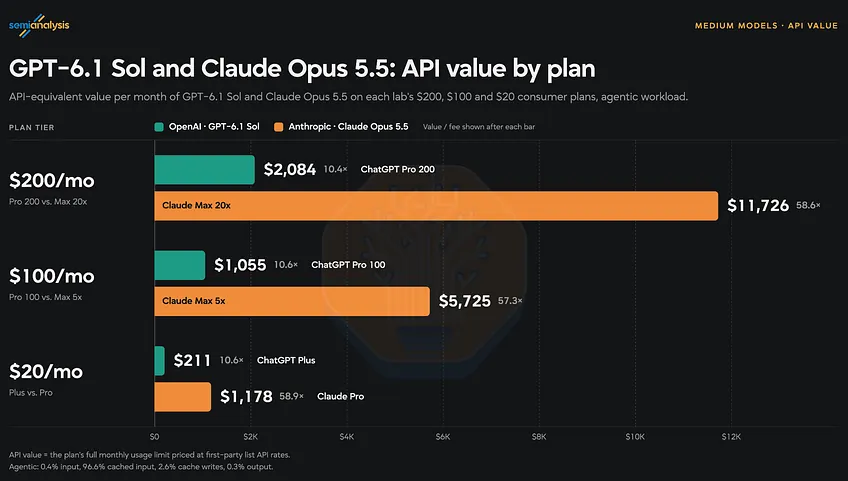
Why? Because you don’t pay per task. You pay a flat $100. And each lab decides how much work that $100 buys.
Anthropic decided to be generous. Very generous.
So here’s how I use AI today:
Claude + the $100 plan + Opus 5.5 (Medium) = as close to limitless as AI gets in October 2026.
And on a Team plan, the $100 business seat (Premium) gives you even more per 5 hours: 6.25× the $20 plan. The personal $100 plan gives 5×.
So yes, Claude Opus 5.5 is the best model today:

But only if you use it right.
People burn it with stupidity. No one told them how to save tokens and avoid hitting limits. Wrong setting. Wrong model. Endless chats. Full-screen screenshots.
So I wrote the 22 rules my team must follow.
Don’t overthink. Just do what we do.
Two things before we start:
How Claude counts.
Claude counts in tokens. A token is a piece of a word.
Every message, Claude pays for 3 things:
Also, Claude keeps a saved copy of what it already read. That’s the cache. It counts much less against your weekly limit.
Every rule below does one of three things:
→ Makes Claude think less.
→ Keeps the conversation short.
→ Protects the cache.
The non-negotiables.
1. Use Medium effort. Never Max.
Click the model name next to the send button. Click Effort.
Never ever use Max. Trust me.
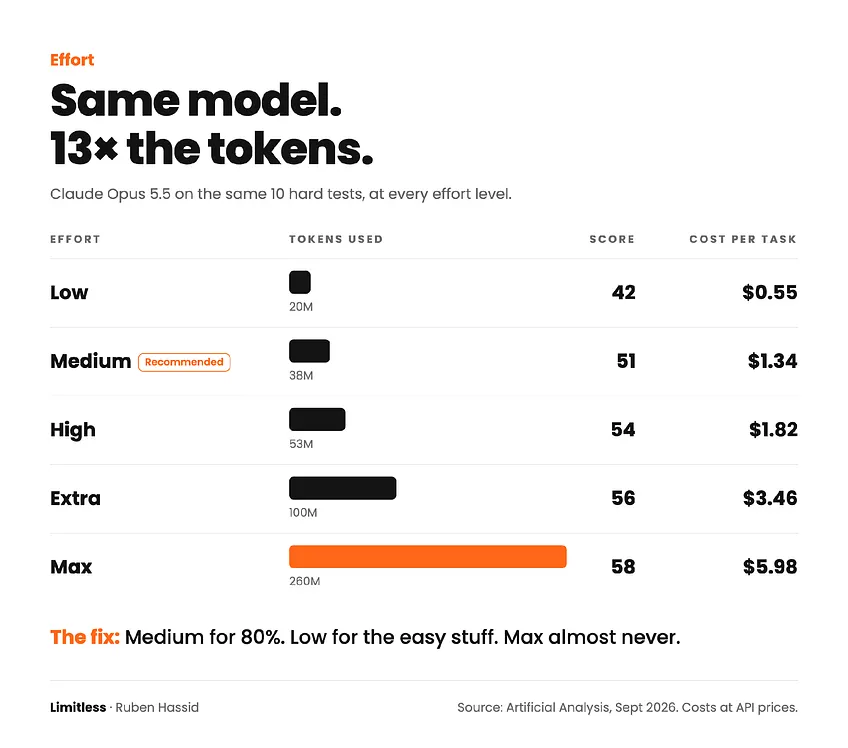
Your level of effort determines (1) how smart the model is, here as an intelligence score and (2) how expensive it is to do a task (so how much of your tokens it will use).
You must use Medium, always:
The rule:
→ Low for grammar, reformatting and translations.
→ Medium for everything else.
→ High for the one-shot prompt for a super-ambitious work.
→ Never Extra. Never Max.
2. Save your free reset for a bad day.
Go to Settings → Usage. Find the Resets section.
Anthropic gave subscribers one free reset.
It’s a one-time reset.
Never use it on a Monday morning. Your limits reset every Sunday.
Also, fun fact: every Sunday I go extra crazy with my Claude (using Extra or Max), so I use up the tokens until the limits. It resets at 5 pm.
3. Use Opus 5.5. Every chat. Never Fable.
On the $100 plan, Opus 5.5 gets you $5,725 worth of work a month. Fable 5.1 gets you $1,273.
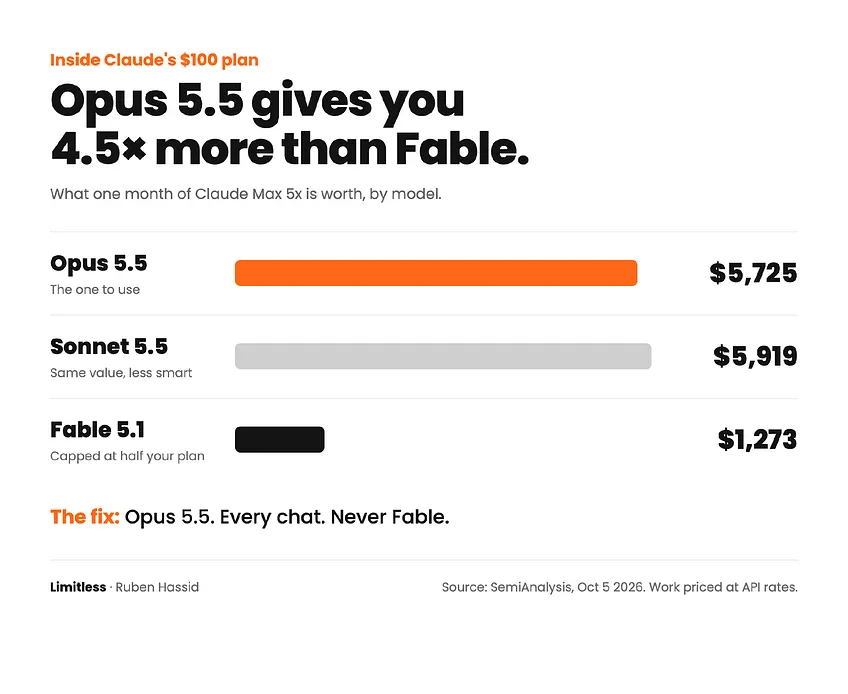
If you need a quick answer, just use the lower effort. Never change the model.
4. Never change model between turns.
Each model has its own cache.
Switch from Opus to Sonnet mid-chat, and Claude re-reads the whole conversation at full price.
Pick Opus 5.5. Start the chat. Never switch.
5. Never come back to an old chat.
The cache expires when you take a break.
Come back hours later, and your next message pays for the whole conversation again. Even a one-line question.

Before you leave a long chat, prompt:
Summarize this chat in 10 lines: what we decided, what’s still open, and the next step.
The next time you need it, open a new chat. Paste the summary. Continue.
6. End quick questions with “No web search. No files.”
The new Claude decides by itself when to search the web, run code, or create files. Those tasks use more of your limit.

So for every quick question, add this line:
Answer here in the chat. No web search. No files. Under 150 words.
Use Research (type /deep-research) only when you need 20+ sources. Never for one.

7. Plan in text. Ask for the file last.
Docs, Slides and Design eat your limit. A long doc “uses more of your limit than a typical message” (Anthropic).
Never open with “Make me a 12-slide deck.”
Plan the outline in plain text first. Agree on every section and the text inside the slides. Then:
Build this exact deck. Don’t change the outline.
8. Highlight. Never ask for a full redo.
When Claude writes a doc, it opens beside your chat.
Highlight the part you want changed. Click Edit with Claude. Type the change. Claude only rewrites what you marked.
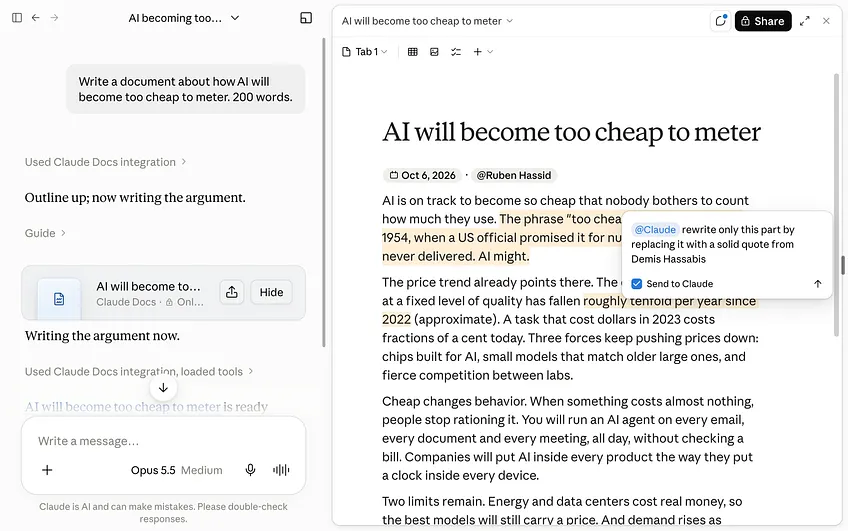
In a plain chat, write:
Only redo this section. Keep everything else.
9. Load your apps on demand.
Every app you connect (Gmail, Drive, Notion, Slack...) takes up room in your chats.
Click the +. Then Connectors → Tool access → On demand. Claude only loads the apps it needs. Then switch off every app this chat doesn’t need.

10. Paste these two sentences into your instructions.
Go to Settings → General → Instructions for Claude. Paste:
Once you have answered something, treat that answer as done. On later turns, focus your thinking on what the user is asking now, and don’t go back over an earlier answer unless the user asks about it or points out a problem with it.
They’re Anthropic’s words. In Anthropic’s tests: less thinking on follow-ups, faster replies, same quality.

Then delete every “think step by step” and “think hard” line you ever wrote. Effort does that job now. No need to prompt it.
11. Crop every screenshot. Convert every PDF.
A full screenshot costs up to 4,784 tokens. A tight crop can cost under 100.
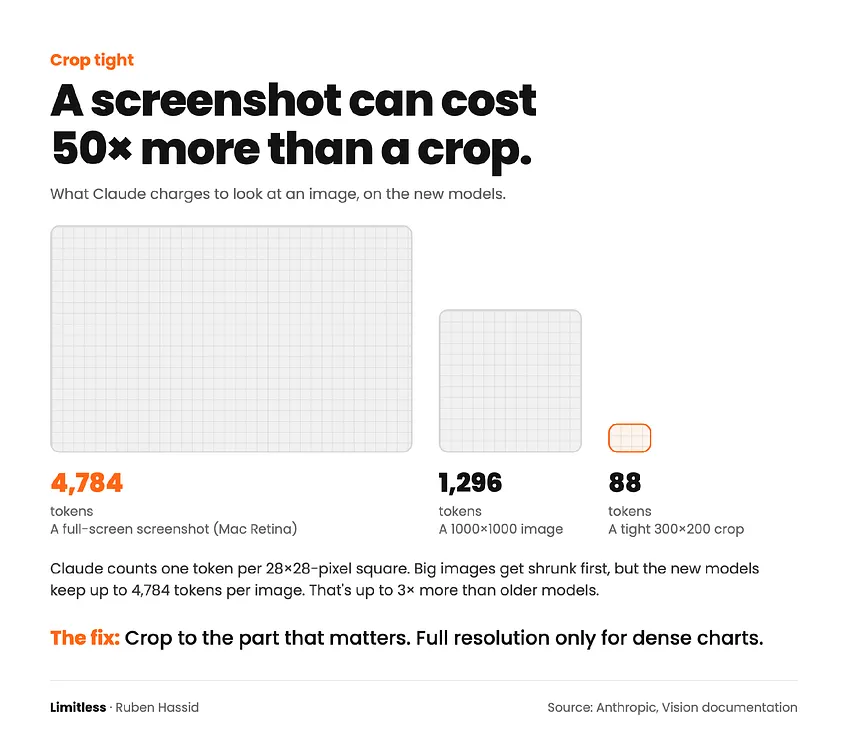
A PDF page costs 1,500 to 3,000 tokens, plus the page as an image.
Convert every PDF to text before you upload it:
12. Pause every scheduled task you don’t read.
Scheduled tasks run in the cloud, even when your laptop is closed. Each run is a full task.
An hourly task = 24 runs a day. Every single day. A lot of tokens.
Click Scheduled in the left sidebar. Pause what you don’t read.
The basics.
13. Start every task with “ask me questions.”
Never write a 500-word prompt. You never need 500 words.
Because it gets re-read with every turn.
Write this instead:
I want to [task] to [success criteria]. Ask me questions using AskUserQuestion before you start.
Claude asks multiple-choice questions. You click. Almost zero tokens.
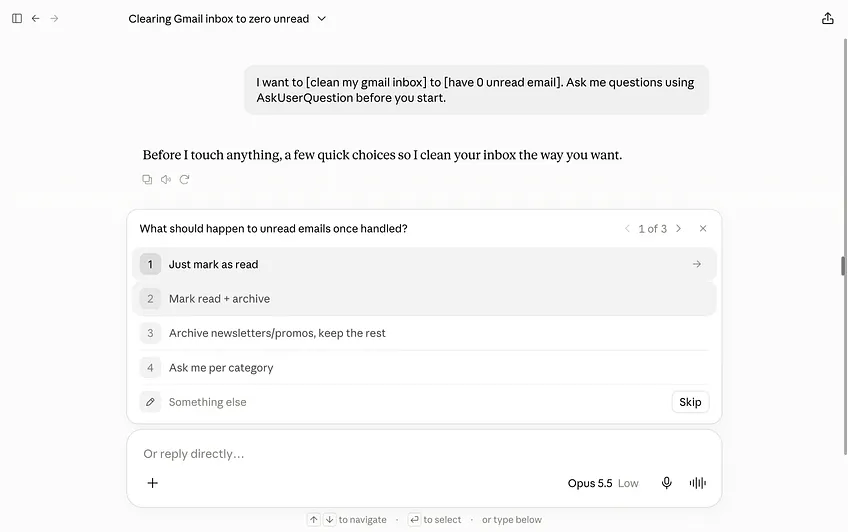
This is part of my favorite prompts.
Access my prompt library by subscribing to my newsletter for free.
If you already subscribed, just comment under this article.
14. Put all your asks in one message.
Three messages = three full re-reads. One message with three asks = one.
So ask three things (or more) in one prompt:
Summarize this article, list the main points, and suggest a headline.
15. Speak. Don’t type.
Typed prompts are lazy: “make it better.” Then you send 5 corrections.
Spoken prompts carry the full picture in one shot.
Use Wispr Flow (a voice-to-text app) or the mic button in Claude.
Wispr Flow is much better though.
16. Never correct Claude. Start over.
Every “No, I meant...” stays in the chat forever. Claude re-reads it with every message. And it confuses Claude sometimes too.
When a chat goes sideways: open a new one. Paste a 3-line brief. Go.
Or my favorite feature: the edit.

17. One topic per chat.
LinkedIn post, then client proposal, then dinner recipe. Same chat.
Never. New topic = new chat. Always.
Unless you want it to be a token vortex.
18. Keep your instructions under 2,000 words.
Your instructions, your project instructions, your about-me file (the file that tells Claude who you are): Claude reads them again and again.
Keep each one under 2,000 words. Put the details of today’s task in the chat.
19. Put every file you reuse in a Project.
Upload a file to 5 chats, and Claude reads it 5 times.
Upload it once to a Project. Anthropic: “Content in projects is cached and counts less against your limits when reused.”
In the desktop app, give Claude one folder. Only one. Never your whole Documents folder.
20. In Claude Code: one task, then /clear.
Give Claude Code one precise task:
Create a bar chart from this CSV showing monthly revenue for 2025. Save it as chart.png.
Then:
21. Split your day into 3 sessions.
Claude gives you a 5-hour window, plus a weekly limit.
Work in 3 blocks: morning, afternoon, evening. Check Settings → Usage before every big task.
22. Ask Claude for images. But rarely.
Claude can’t make images like photos.
But Claude can code an image. It just uses a lot of tokens (compared to the free ChatGPT image generator).
For example, this newsletter cover I made with Claude Code:

I will teach people who pay for my newsletter on a live Zoom call how to use Claude for images and videos. Upgrade here:
Where to start.
I made a quick cheat sheet:

You only need 46 minutes.
You pay Claude $100 a month. $1,200 a year.
SemiAnalysis says it’s worth $5,725 of work. Every month. So technically $68,000 a year, or a very, very good employee available 24/7.
But you use a fraction of it. Not because Claude is hard. Because nobody showed you how. There is no manual or instructions. And the tool changes every week.
I could tell you Claude is very hard. It’s not.
I could charge $200 per class. I won’t.
You need 46 minutes:
→ 23 minutes to go from zero to 80%. My Monday workshop, “AI 101”. We go through the entire UI of Claude, live. Every tab. Every button. Every setting from this guide.
→ 23 minutes to go from 80% to 95%. Our “AI 201” class. Claude Code, connected to GitHub, Vercel and your other apps.
Both are live, every single week. Both are recorded.
Both are in my paid subscription: $200 a year. $17 a month.
Less than a fifth of what you pay Claude. To get all $5,725 out of it.
Upgrade today. Save your seat for next week’s live session:
I connect on Linkedin with everyone who joins the live. I want to stay close to you. See you on the other side.
I am not paid by Claude to write this. I don’t pick sides. I’m sharing, twice a week, how my work is changing (very fast) with AI. ‘How to AI’ went from 56,000 to 971,000 readers in a year. And we intend to do EVEN LESS in 2027.
Yes, less.
You don’t need more noise. You don’t need more news. You don’t need endless streams of “we are all going to die” or “we will be replaced”. We focus on the practical side of AI here. How to do things. How to AI.
Humanly yours, Ruben.
A message from the author, Ruben.
This article exists because 87,000+ people decided AI is too important to leave aside. Not only that, but they shared it around them. They understand they are the sum of the 5 people around them. So better have them using AI.
If this helped you — or if it’ll help someone you know — forward it to them. That’s how this grew. Just readers like you sending it to people like them.
And if you're new here, follow me on X →@rubenhassid (also free!)