17 Skills I Would Install on a Fresh Hermes Setup (10x Powerful Hack)

If I wiped Hermes tomorrow and started from zero, I would not open a blank chat and "figure it out."
I would install skills first.
A raw Hermes install is smart. A skilled Hermes setup is unfair. Skills are the difference between a chatbot that answers questions and an agent that researches, codes, edits video, cleans writing, runs loops, and keeps ten jobs moving without you living in the terminal.
This is the exact set I would load. Not every skill on the internet. The 17 that cover almost every real job I give an agent.
What each one does. When to install it. What to skip on day one.
| # | Tool | One-line job | Stars (approx) |
|---|---|---|---|
| 1 | Agent-Reach | Give your agent internet eyes without paid APIs | ~73k |
| 2 | make-interfaces-feel-better | Fix the tiny UI details that make apps feel cheap | ~3k |
| 3 | oh-my-hermes | Multi-agent planning + verified execution for Hermes | ~270 |
| 4 | Anthropic Cybersecurity Skills | Huge security skill library for agents | ~30k |
| 5 | OpenMontage | Turn your coding agent into a video production crew | ~49k |
| 6 | Minions | Kanban mission control for Hermes tasks | ~625 |
| 7 | Resemble Detect | Spot AI fake audio/image/video | small / niche |
| 8 | addyosmani/agent-skills | Spec → plan → build → test → ship engineering skills | ~89k |
| 9 | Composio skills | Connect agents to real apps (auth, tools, triggers) | Composio ecosystem |
| 10 | youtube-full | Transcripts, search, channels without yt-dlp pain | ~540 |
| 11 | Humanizer | Strip AI writing tells from drafts | popular skill |
| 12 | Defuddle | Clean web pages into readable Markdown | ~9k |
| 13 | Matt Pocock skills | Small composable skills for real engineering | ~224k |
| 14 | SkillClaw | Skills that improve themselves after real work | ~2.5k |
| 15 | Browser Harness | Agent drives your real browser and learns helpers | ~17k |
| 16 | codebase-memory-mcp | Index your repo as a knowledge graph for agents | ~40k |
| 17 | Loopy / Loop Library | Repeatable agent loops with checks and stop rules | ~3k |
What a “skill” even is
Think of a skill like a recipe card your agent can pull when needed.
Without skills:
With skills:
Hermes already ships with many skills. These 17 are the external packs people bolt on when they want a serious setup.
1. Agent-Reach

Repo:Panniantong/Agent-Reach
Stars: ~73k
What it is
A CLI that gives your agent eyes on the public internet - X/Twitter, Reddit, YouTube, GitHub, and more - without you wiring a paid API for every platform.
Problem it fixes
Your agent can write code. Ask it to “check Twitter reactions” or ''summarize this YouTube tutorial'' and it often fails: blocked scrapers, paid APIs, login walls, garbage HTML.
How it helps newbies
Install once. Then say things like:
When to use it
Content research, competitor checks, social listening, tech support research.
2. make-interfaces-feel-better
Repo:jakubkrehel/make-interfaces-feel-better
Stars: ~3k
What it is
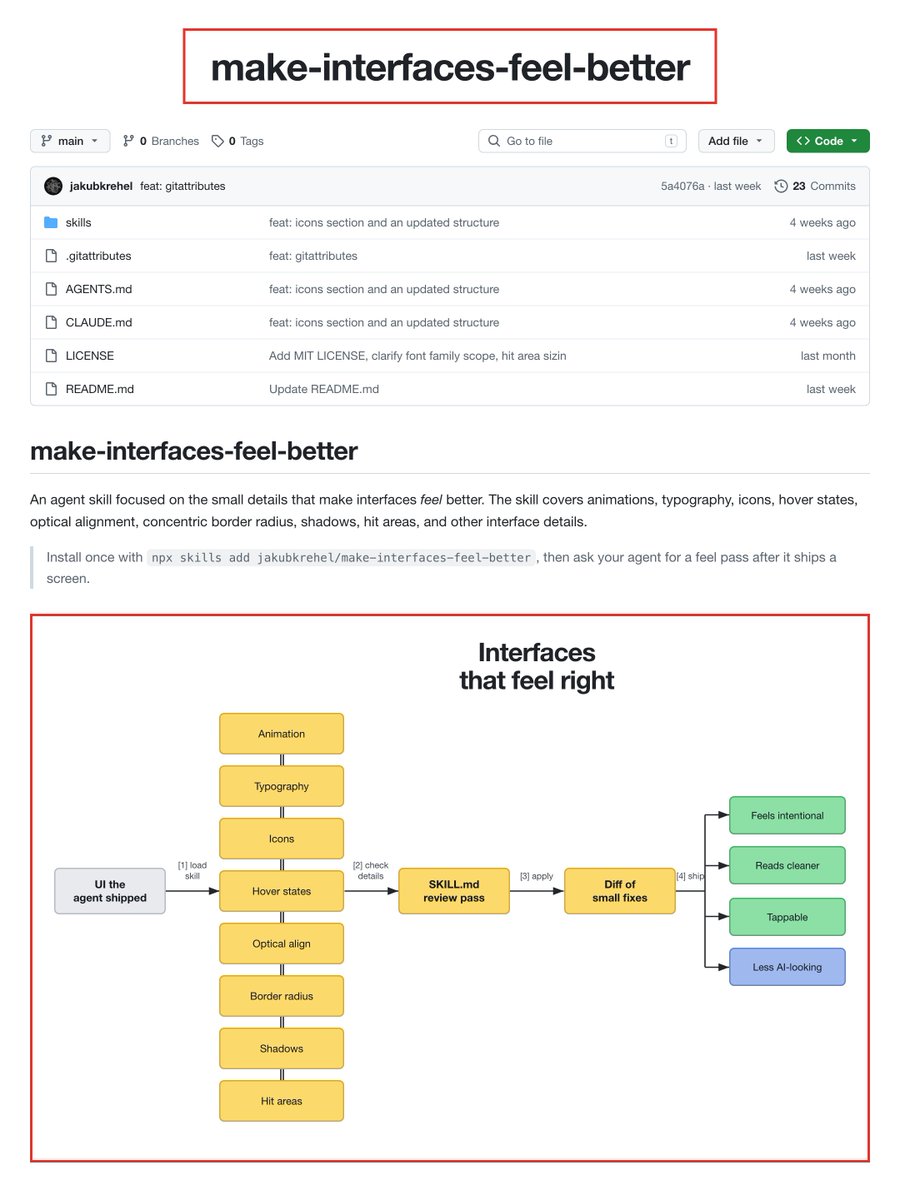
An agent skill focused on UI polish: animation, type, icons, hover states, hit areas, shadows, optical alignment - the stuff that makes an interface feel intentional.
Problem it fixes
AI-built UIs often “work” but feel off. Wrong spacing. Dead hover states. Buttons too small. Text that looks auto-generated.
How it helps newbies
After your agent builds a page, load this skill and ask it to pass over the UI for feel, not features.
When to use it
Landing pages, dashboards, internal tools, any frontend the agent just shipped.
Install idea
npx skills add jakubkrehel/make-interfaces-feel-better3. oh-my-hermes (OMH)

Repo:witt3rd/oh-my-hermes
Stars: ~270
What it is
Multi-agent orchestration skills built for Hermes, inspired by oh-my-claudecode. Skills for research, interviews, consensus planning, and verified execution.
Core skills inside
| Skill | Job |
|---|---|
| omh-deep-research | Split research → parallel search → synthesize → check citations |
| omh-deep-interview | Socratic requirements interview |
| omh-ralplan | Planner / architect / critic debate until a plan holds |
| omh-ralph | Implement → verify → loop until done |
| omh-autopilot | Full pipeline of the above |
Problem it fixes
One agent freestyling a big task often skips requirements, weak-plans, then “finishes” without proof.
When to use it
Unfamiliar domains, multi-day features, anything where you want plan quality before code.
Suggested flow
research → interview → ralplan → ralph4. Anthropic Cybersecurity Skills

Repo:mukul975/Anthropic-Cybersecurity-Skills
Stars: ~30k
What it is
A huge open library of structured cybersecurity skills for agents (~817 skills, many security domains). Mapped to frameworks like MITRE ATT&CK, NIST CSF, ATLAS, D3FEND, AI RMF, and fraud frameworks.
Important honesty
This is a community project, not an official Anthropic product. It includes offensive/dual-use techniques meant for authorized testing, defense, research, and education only.
Problem it fixes
Your coding agent is not a senior security analyst by default. These skills give it playbooks for investigations, detection, forensics-style workflows, and framework-aligned guidance.
When to use it
Security reviews, incident response drafts, threat modeling, authorized red-team prep, learning security workflows with an agent tutor.
Newbie rule
Only point it at systems you own or have written permission to test.
5. OpenMontage
Repo:calesthio/OpenMontage
Stars: ~49k
What it is
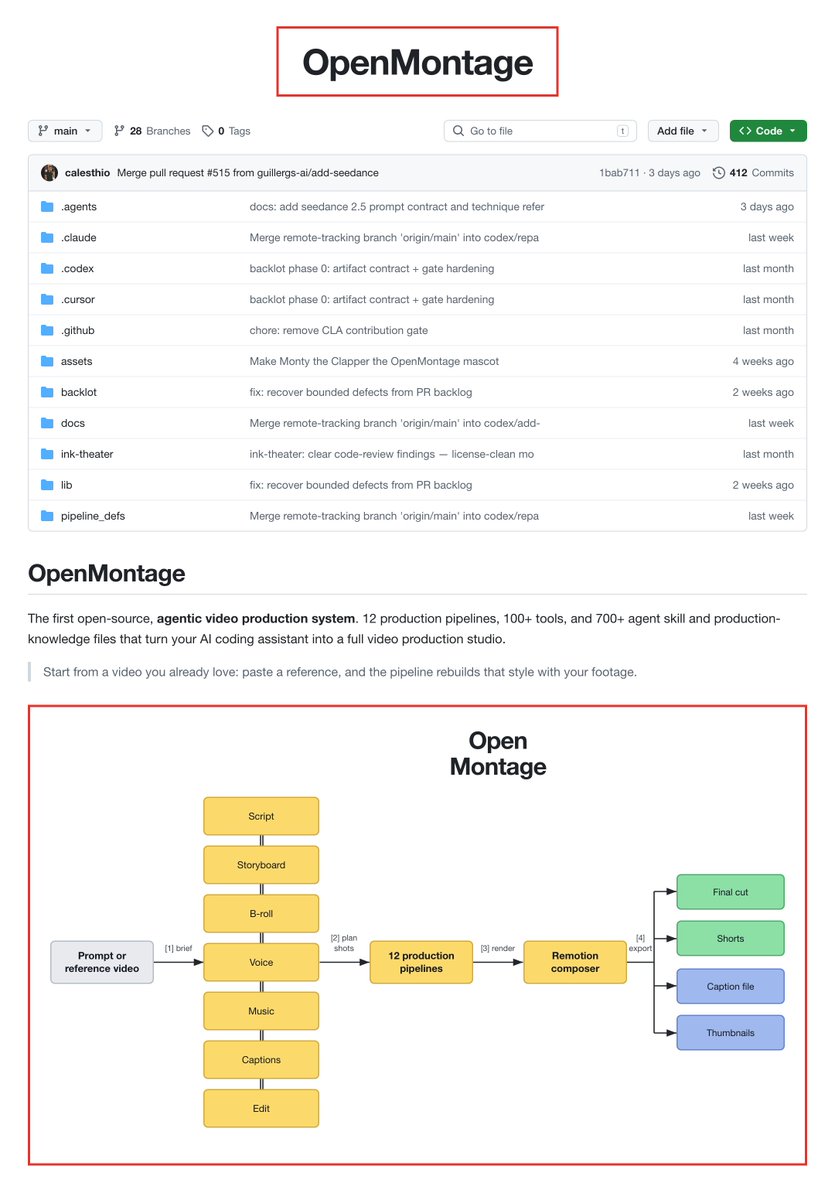
An open-source agentic video production system. Pipelines, tools, and production-knowledge files that turn a coding agent into something closer to a small video crew.
Problem it fixes
Video work is a pile of tools: script, b-roll, edit, captions, export. Most agents can “talk about video.” OpenMontage aims at actual production workflows.
When to use it
Short-form content, explainers, product demos, YouTube-style production with an agent in the loop.
Who it’s for
Creators and marketers who already use agents daily and want media output, not just text.
6. Mission Control / Minions

Repo:agent37-platform/minions
Stars: ~625
What it is
A Kanban-style control panel for Hermes work. Create tasks, watch them run, review results, keep long jobs from disappearing into terminal history.
Problem it fixes
Hermes is strong. Managing five parallel sessions in raw terminals is not. You forget what finished, what’s stuck, and what needs your approval.
Features that matter
Quick start
npx minionsaiThen open http://localhost:6969.
When to use it
Anyone running Hermes as a real worker, not a one-off chat toy.
7. Resemble AI Detect

What it is
An agent skill for media safety - detecting AI-generated or manipulated audio, images, and video using Resemble’s detection stack.
Problem it fixes
Deepfakes and synthetic media are everywhere. If your agent handles UGC, brand safety, or research, you need a check step before you trust a clip.
When to use it
Content moderation pipelines, brand safety reviews, “is this clip real?” checks before you quote or repost something.
Honest note
Treat detection scores as signals, not courtroom proof. Always keep a human judgment step for high-stakes calls.
8. addyosmani/agent-skills

Repo:addyosmani/agent-skills
Stars: ~89k
What it is
Production engineering skills from Addy Osmani’s world: a lifecycle of define → plan → build → verify → review → ship.
Commands mental model
| Command idea | Meaning |
|---|---|
| /spec | Define what to build |
| /plan | Break into small tasks |
| /build | Implement in slices |
| /test | Prove it works |
| /review | Improve code health |
| /webperf | Measure before optimize |
| /ship | Get it live carefully |
Problem it fixes
Vibe coding without gates. These skills force the habits senior engineers already use: specs, small tasks, tests, review.
When to use it
Real products, not throwaway scripts. Especially frontend/web work and multi-day features.
Install idea
npx skills add addyosmani/agent-skills9. Composio skills

Repo:ComposioHQ/skills
What it is
Distributable skills that teach agents how to build with Composio - Tool Router, auth, sessions, triggers, production patterns.
Problem it fixes
Connecting an agent to Gmail, Slack, GitHub, CRMs, etc. is messy. Composio is the integration layer; these skills teach the agent the safe patterns (user IDs, sessions, webhooks, framework wiring).
When to use it
Any Hermes/agent setup that needs real app actions, not just local files.
Install idea
npx skills add composiohq/skills10. youtube-full (YouTube skills)

Repo:ZeroPointRepo/youtube-skills
Stars: ~540
What it is
Skills so your agent can:
Without fighting yt-dlp blocks on cloud IPs.
Problem it fixes
“Summarize this YouTube video” is one of the most common agent fails. This package is built for that job.
Hermes install idea
hermes skills install skills-sh/ZeroPointRepo/youtube-skills/skills/youtube-fullWhen to use it
Learning from tutorials, content research, competitor video breakdowns, course notes.
Free tier note
The underlying transcript API advertises free credits on signup. Confirm current limits on their site.
11. Humanizer

Repo:blader/humanizer
What it is
A skill that rewrites AI-sounding text so it reads like a person wrote it. Based on Wikipedia’s “Signs of AI writing” patterns.
Problem it fixes
Your agent drafts are useful and still sound like a press release: “pivotal,” “landscape,” “it’s not X, it’s Y,” perfect three-item lists, empty hype.
How it works in practice
When to use it
Every public post, docs page, client email, or launch note the agent wrote.
Pro tip
Paste 2-3 paragraphs of your own writing and ask it to match your voice.
12. Defuddle
Repo:kepano/defuddle
Stars: ~9k
What it is
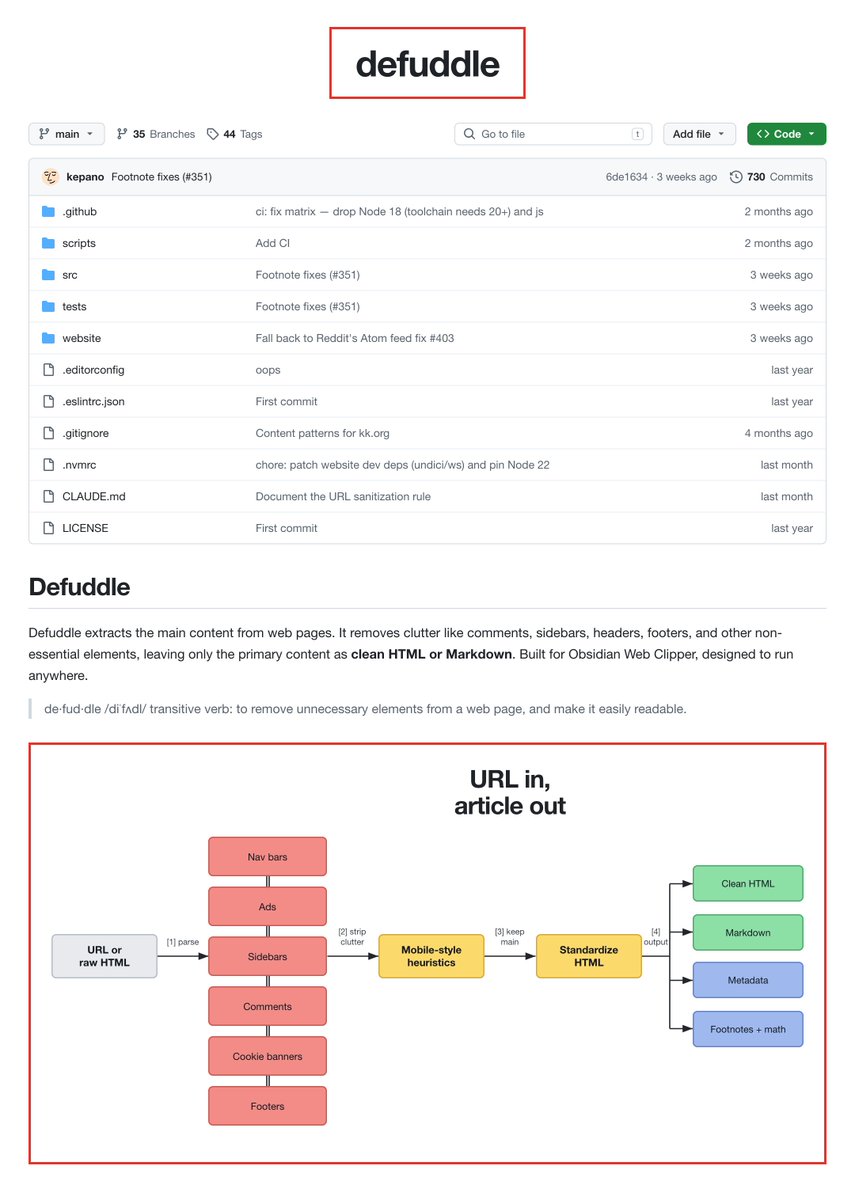
A library/CLI that takes a messy web page and returns the main content as clean HTML or Markdown. Built by the Obsidian Web Clipper world (kepano).
Problem it fixes
Agents fetch pages and choke on nav bars, ads, cookie banners, and nested HTML. Defuddle strips the junk.
When to use it
Research, clipping articles into notes, feeding clean context into Hermes, building your own reader pipeline.
Simple mental model
URL or HTML in → readable article out.
13. Matt Pocock skills

Repo:mattpocock/skills
Stars: ~224k
What it is
Matt’s daily engineering skills: small, composable, editable. Built for real apps, not “vibe coding theater.”
Philosophy in one line
Big process frameworks take control away from you. These skills stay small so you can hack them.
Problem it fixes
Either your agent has no process, or it has a giant process you can’t debug. Matt’s set sits in the middle.
When to use it
TypeScript/app engineering, ticket triage, planning, and day-to-day shipping with an agent.
Install idea
npx skills@latest add mattpocock/skillsThen run the setup skill once per repo.
14. SkillClaw

Repo:AMAP-ML/SkillClaw
Stars: ~2.5k
What it is
A system where skills evolve from real use. You chat normally. In the background it digests sessions, improves skills, dedupes junk, and compounds experience across agents/devices.
Problem it fixes
Your Hermes skill folder becomes a junk drawer: duplicates, half-baked notes, stale steps. Nobody “digests” the learning.
When to use it
If you live in Hermes daily and want the skill library to get sharper over time without manual gardening every week.
Honest framing
This is infrastructure for power users. Worth it after you already have a base skill set.
15. Browser Harness (honourable mention)

Repo:browser-use/browser-harness
Stars: ~17k
What it is
A self-healing browser harness. The LLM connects to your real browser over CDP, does the task, and writes missing helpers when a step isn’t supported yet.
Problem it fixes
Static browser tools break the moment a site changes. This approach improves the harness while working.
Example task energy
“Open my X profile, grab my latest 20 video posts, download them.”
When to use it
Logged-in browser work, repetitive web chores, anything that needs a real session cookie stack.
Caution
Giving an agent your real browser is powerful and risky. Start with a separate profile for experiments.
16. codebase-memory-mcp

Repo:DeusData/codebase-memory-mcp
Stars: ~40k
What it is
A high-performance MCP server that indexes your codebase into a persistent knowledge graph. Agents query structure instead of rereading 40 files every session.
Why that matters
File-by-file exploration burns tokens and still misses architecture. Graph queries answer:
Claims to know
When to use it
Medium/large repos, multi-service codebases, any Hermes coding work where context thrash is killing you.
17. Loop Library / Loopy (honourable mention)

Repo:Forward-Future/loopy
Stars: ~3k
What it is
Two parts:
What a “loop” is
A one-shot prompt says: do the thing once.
A loop says: do a step, measure, keep only if it helped, repeat until a stop condition.
Example:
Find the slowest page, improve one thing, measure again. Keep the change only if it helps. Stop when targets are met or gains die.
When to use it
Perf work, flaky tests, docs cleanup, recurring ops - anything where the first attempt is never the final answer.
Key idea
Loops are powerful because they are bounded. Clear check. Clear stop. Human handoff when judgment is needed.
How these 17 fit together (simple stacks)
Starter Hermes stack
Serious coding stack
Content / media stack
Power-user growth stack
Install order if you’re new
Don’t install all 17 on day one.
Day 1
Day 2
Day 3+
More skills is not automatically better. A small set you actually trigger beats a junk drawer.
Security and common sense
A few of these touch real browsers, real codebases, or security tradecraft.
Simple rules:
A fresh Hermes agent with this set is a smart system:
If I only had one hour on a new machine, I would install in this order:
Then I would ship real work for a week before touching the rest.
Do not collect skills like stickers.
Install the ones that remove the pain you feel this week.
Blind online → Agent-Reach
Fake drafts → Humanizer
Session chaos → Minions
Repo thrash → codebase-memory-mcp
Weak engineering process → Matt or Addy
Video work → OpenMontage
Real browser chores → Browser Harness
That is the fresh setup I would trust
if you found this helpful give a follow. i post free apis and agentic workflows every week.