The five components of building a "company harness"

How do you build a company harness?

We've built internal agents at LangChain across marketing, sales, and engineering, and they have completely changed how those teams work. They weren't easy to get right. We spent a lot of time solving the problems that come with a multiplayer harness, and every team landed on the same core primitives:
Thank you to @caspar_br for help on this blog
LangChain Internal Agents
To ground this discussion, a brief overview of the three main agents we have at LangChain:
GTM Agent: a proactive, always-on agent that assists with GTM activities. Monitors and responds to emails, to new qualified leads, sends daily briefs, can answer questions about accounts, can run outbound motions
OpenSWE: our engineering agent, can work on and draft PRs, but also runs code review over all PRs
Content Studio: our marketing agent, can draft assets (blogs, images, PowerPoints, videos) in our style and with knowledge of our positioning
All of these agents are built in the same way. We think this is a general recipe for building company harnesses.

Problem: User Experience
All our agents live where people already work, which for us is Slack. They each have their own Slack apps, and can be DM’d or tagged in a channel. One benefit of working with these agents in channels is that others can see how people use it.
One nice thing we added was the concept of “breaking” out a conversation in Slack. Oftentimes, a great conversation would be happening and you’d want to add in your agent to get their opinion or get them to do something. But if they ran in that thread it would pollute the human conversation and distract. So we added an easy way for agents to “breakout” into their own thread in the channel.

There are some user experiences that are best NOT done in Slack. For example, when reviewing emails GTM Agent wants me to send, it's fine to do that in a one-off way in Slack, but if there is a big backlog it's not a fun experience at all to track those from Slack messages. For experiences like that, we did end up building a custom UI.

Problem: Identity
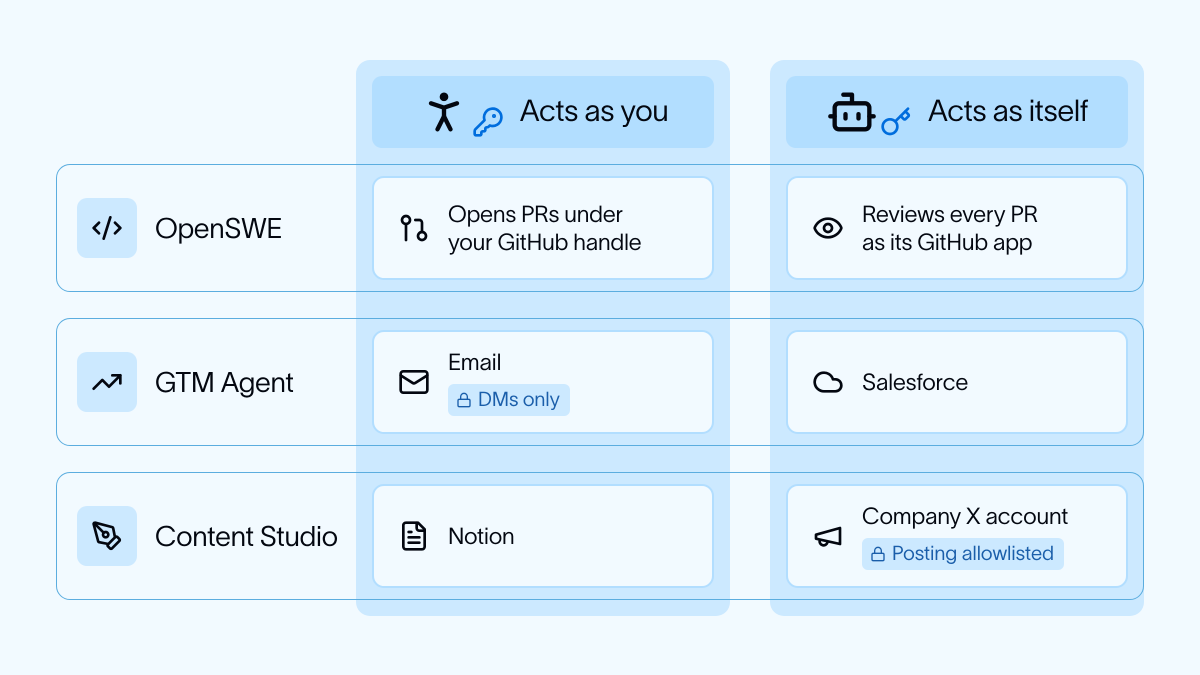
The thorniest and trickiest problem we tackled was identity, specifically: when these agents take actions, who do they take actions on behalf of?
There are two main ways this is handled in the industry:
This is how we handled it for each agent (docs: Add identity to Managed Deep Agents, Manage connections):
OpenSWE:
GTM Agent:
Content Studio:
Problem: Memory
All agents have two tiers of memory:
Agents decide which facts they want to remember to which level of memory.
This is probably the least explored area so far - we have a lot of work we want to do here!
Problem: code execution
All three of our agents can write and execute code, and often need to in order to accomplish tasks. They all follow the pattern of running outside the sandbox, but connecting to it and executing code in there. They all have slightly different base images with different dependencies. OpenSWE (the most coding related agent) is intelligent about which base image it spins up (differs based on channel/user). They all take advantage of the secret proxy on LangSmith Sandboxes (see also Add a sandbox to Managed Deep Agents) to let the agent connect to services in a safe and secure way from inside the sandbox itself.

Problem: scheduled runs
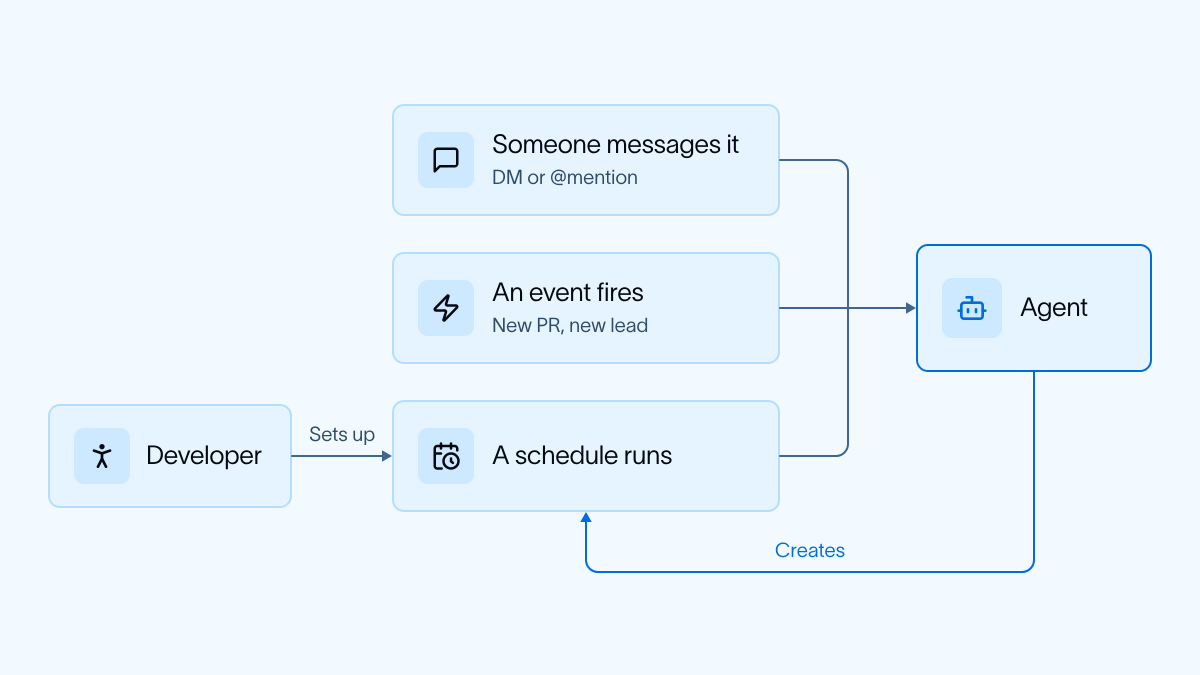
A large percent of runs are scheduled or triggered in the background by events, rather than being directly kicked off by a user.
Some of these are set up by the developer of the agent. For example: OpenSWE listens for PRs and when a new one is created it reviews it.
Others of these are set up by the user asking the agent to do so. For example: I asked GTM agent to send me a daily brief, and it created its own cron to do so.
All built on Managed Deep Agents
All of these agents are built on Managed Deep Agents, which sits on top of the open source Deep Agents harness. It provides infrastructure to solve all these problems (channels, crons, sandboxes, memory, identity) while providing enough flexibility to customize agent behavior as needed. Try it out today with the quickstart!