More Subagents Isn't Better — Manage Context First, Then Paralle

For the past year or so, the agent world has had a pretty clear trend: split whatever you can, parallelize whatever you can. Fan one task out to five or six subagents and it looks very "advanced." In June, Claude Code even shipped nested subagents — agents spawning agents, up to 5 levels deep.
Boris Cherny said at the time that they wanted to see if this could be a better way to manage context.
A few months later, the wind has shifted. Anthropic's Applied AI team recently published a post with a very blunt title: When to fold subagents into your main agent loop. Across comparisons at several enterprises, they found that a single main agent equipped with Skills often beats both "one giant prompt for everything" and "a subagent architecture" on quality — and is often cheaper and faster too.
Dex Horthy (@dexhorthy) was even less polite: subagent abuse has been going on since mid-2025. They have their place, and used right they give you a lot of leverage. But the hype on social media keeps pushing people to run more things in parallel instead of actually managing context.
So for subagents: when to split, when not to, and how to fold them back in once you've split too much. Building MiniMax Code (MCode for short) — and using it to write our own code the whole time — we've chewed on these questions a lot, and I'll share our thinking along the way.
Subagents are for managing context
Thariq from the Claude Code team has a useful framing in Session Management & 1M Context: the end of every turn is a branch point. From there you can keep going, rewind to an earlier message and retry, clear and start a new session, compact the history, or hand the next chunk of work to a subagent. Apart from "keep going," the other four options are all ways of managing context.
Why manage it at all? Because the longer the context, the more easily the model gets pulled off course by earlier, irrelevant stuff — what people call context rot. Thariq mentions that their 1M-context models start showing this decay around 300k–400k tokens, though it depends heavily on the task and isn't a hard rule.
Seen through this lens, a subagent is a way to isolate context: spin up a clean context to do a messy job, and bring back only the conclusion. Thariq gives a simple test: will I need to look at this tool output again later, or do I just need the conclusion? Only if you just need the conclusion is it a good fit for a subagent.
The problem is that many people treat subagents as a way to divide labor: one agent per team, one agent per type of problem. The motivation shifts from "managing context" to "carving up territory," and that's where things go wrong.
Why splitting too much makes things worse
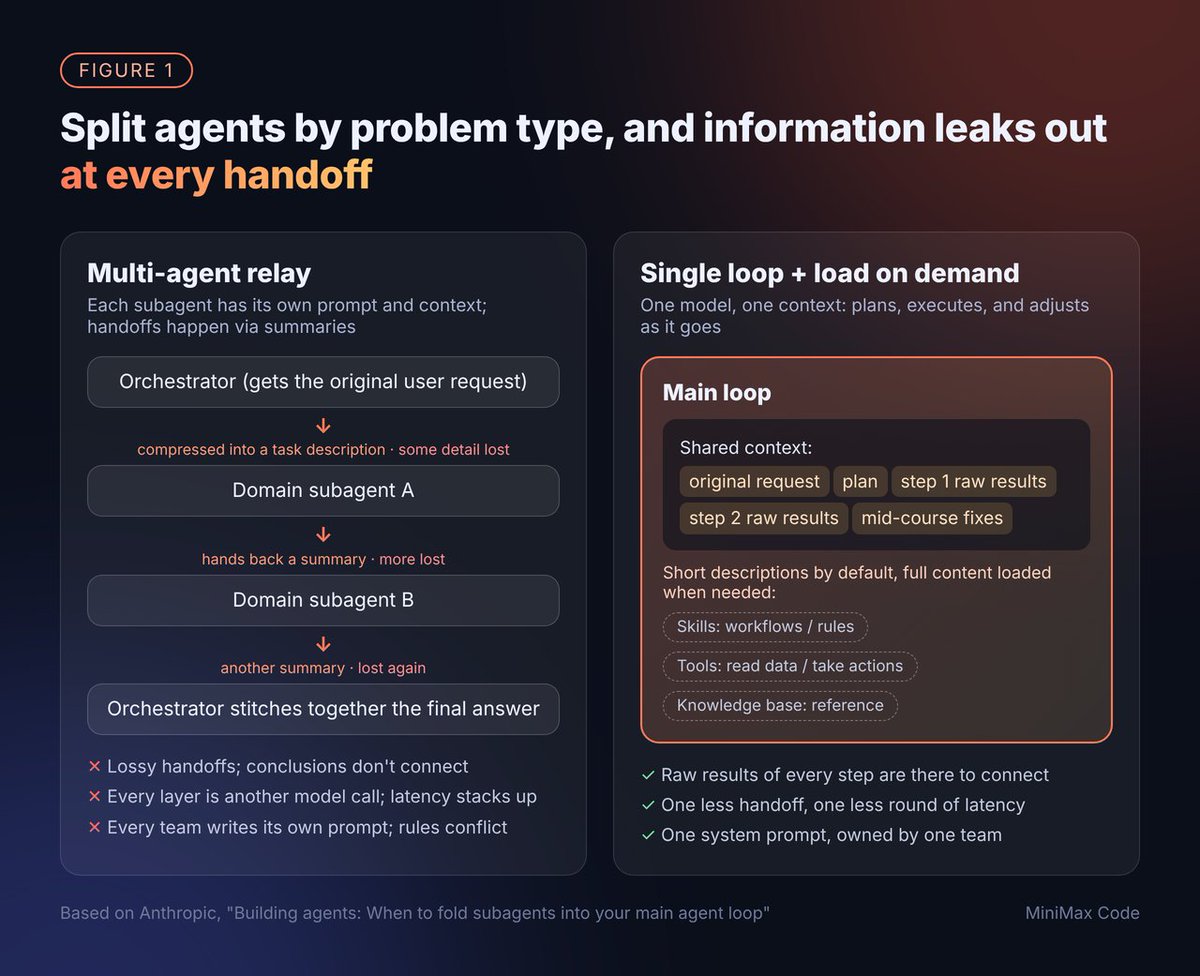
The Anthropic post sums up the most common traps large organizations fall into when building agents. They all looked very familiar to us:
On the flip side, the post gives three reasons a single loop can now hold up:
One more number that's easy to miss: once you go past 30–50 tool definitions, models start getting worse at picking tools. So group tools around user intent — don't do one tool per API.
When you should still use a subagent
Default to the main loop, and only consider splitting if one of these applies:
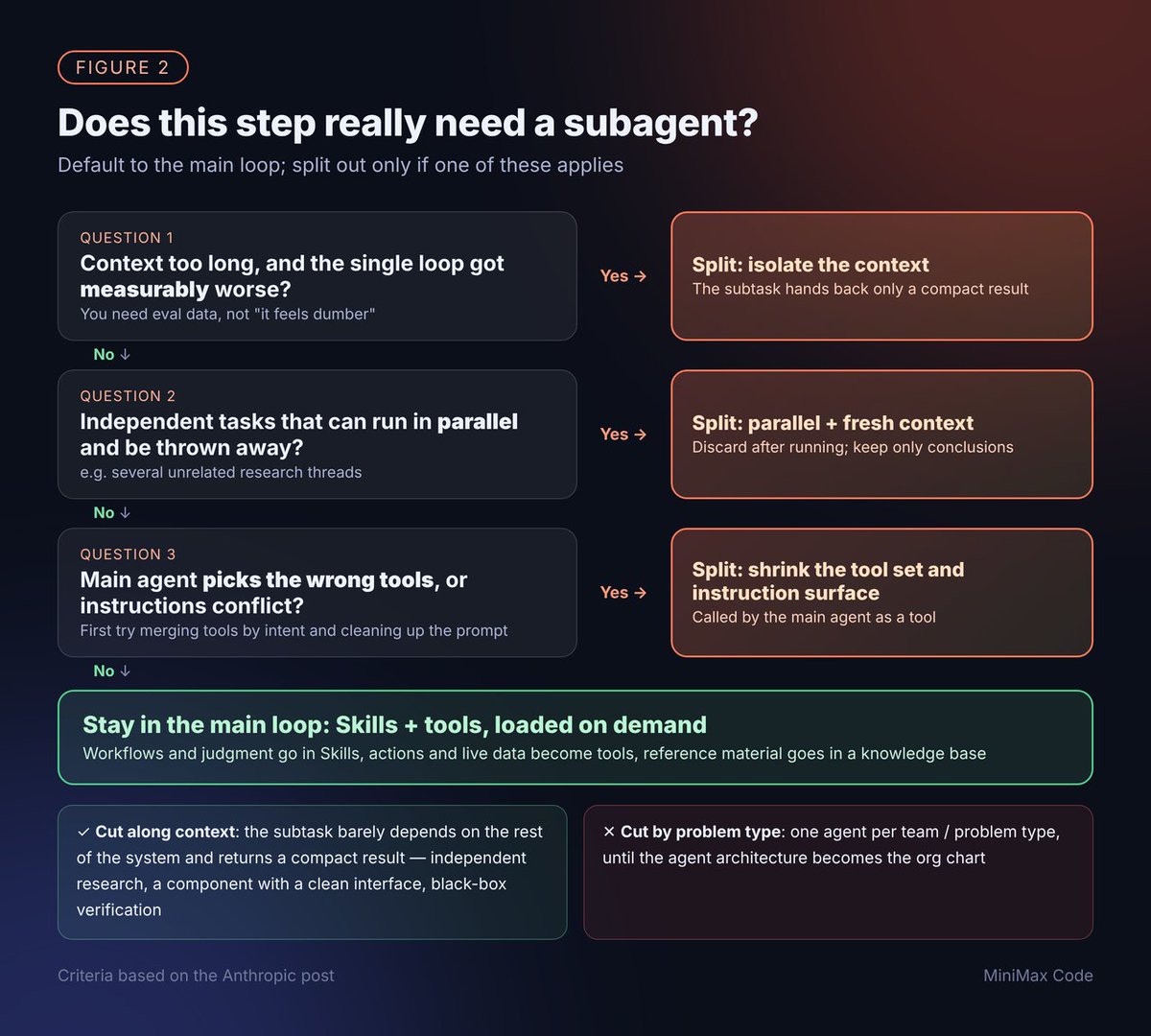
Even once you decide to split, how you cut matters a lot. Cut along context, not along problem type. A good cut is a subtask that barely depends on the rest of the system and hands back a compact result — an independent research thread, a component with a clean interface, a black-box verification. Cut by problem type and you're right back in the game of telephone.
Subagents you do split out are best exposed to the main agent as tools, so the main agent always holds the conversation with the user. It's only worth handing over the whole conversation when the subagent has to talk to the user directly.
How we think about it in MCode

Code review: the reviewer needs its own context
AI writes code faster and faster, so what keeps code quality in check? That's one of the questions we've thought about most while building MCode. Our answer: the agent that writes the code and the agent that reviews it don't share a context.
The reason is simple. Along the way, the coding agent made a lot of decisions and talked itself into each of them. If the reviewer inherits that conversation, it reads the code along the same line of reasoning, and whatever the author missed, it will most likely miss too. Only by starting the reviewer from a clean context can it really look at the change from the outside.
Concretely, here's what we recommend:
A typical case: early in the conversation, the authoring agent sets itself a premise, say "every caller of this function already null-checks its input," and everything after builds on it. Ask it to review its own work and it follows the same premise, so naturally it sees no problem. An independent reviewer, holding only the diff and the requirements and none of that conversation, will just ask: what happens if this value is null?
This is exactly the "black-box verification" from the previous section: a clean subtask boundary, a compact conclusion handed back — a textbook example of cutting along context. Thariq's post gives a similar use: spin up a subagent to verify the work you just finished against a spec file.
Day-to-day development: one main loop, Skills loaded on demand
For everyday coding, we try to keep one task per session and don't split out extra subagents. Workflows and know-how the team uses over and over get written up as Skills or project rule docs. Normally they expose a one-line description and only load in full when actually needed. The main loop can always see the requirements, the plan, and the raw results of every step, without relying on summaries passed back and forth.
For a team that writes code, the things usually worth capturing are:
Putting these in Skills — rather than having a dedicated subagent "own conventions" or "own releases" — means the main agent can read them itself when needed, with no extra handoff.
Don't let important state live only in the conversation
Dex Horthy has a line we strongly agree with: the things that matter should never only live in the context window. His advice is to capture context and decisions in docs, so whether you're continuing after a compact, starting a new session, or handing off to someone else, it all goes smoothly.
It's not complicated: when a long task starts, create a design or progress doc, and keep writing the plan, key decisions, rejected options, and review conclusions into it. When a new session starts or someone else takes over, just @ the doc; the agent reads it and picks up where things left off, no need to dig through the chat history.
There's a side benefit too: it removes a lot of the urge to "split off a subagent just to protect the context." The state is already in the doc, so you can safely clear the session and start fresh.
Already have a pile of subagents? How to fold them back in
Plenty of teams already have an orchestrator agent plus a row of specialist agents running in production, and there's no tearing that down overnight. Anthropic lays out a step-by-step path that we find very practical:
Anthropic also released a set of Claude API Skills to help with this, tied together by a migration kit into a guided flow, with a demo you can try against a simulated system first:
Their closing principle is simple: measure first, change one thing at a time, keep what survives testing. Keep a subagent only if the merged version scores worse; then move on to the next one.
A pre-split self-check list
Closing thoughts
In the end, whether to split into subagents is just the surface. Underneath is one thing: get the right information into context at the right time. Put what belongs in the main loop in the main loop, store what should be stored in Skills and docs, and hand only what truly needs isolation to subagents.
Models are still getting better fast, and an architecture that makes sense today may not in a few months. More worth remembering than any particular structure is the principle: measure first, change one thing at a time, keep what survives testing.
Give MiniMax Code a try, and come talk to us on GitHub about how you use subagents and manage context. We'd love to hear how other teams are doing it.
