Another CLI, really?

Yes, and in 5 minutes you will understand why.

The Gemini API CLI was introduced last week. This article will set the story straight on what this new CLI is, what it is meant to be used for and more importantly what it is not (spoiler: it is not another coding agent).
We might as well get it out of the way upfront, the Gemini API CLI is not a coding agent (I get why CLI in the name can maybe give that impression). It is a wrapper around the Gemini API to make it more efficient for humans and agents to leverage Gemini for certain tasks.
It is meant as a tool that you give to the agent of your choice (Antigravity, Codex, Hermes, Claude Code, etc.) to generate images, video, audio, etc, and not meant to replace that agent.
📹 Generate a video in Codex? → Install the Gemini API CLI and now you have Omni or Veo.
🖼️ Create images in Hermes? → Install the Gemini API CLI and now you have Nano Banana 🍌
Get access to everything the Gemini API can do in one binary with no dependencies.
How is this different?
Couldn’t I just do this before by asking my agent to“Create an image of a dog using Gemini’s Nano Banana”?
Yes, but if you did that in Claude Code it would probably do something like this:
Search the web → read the docs → write a Python script → run the code → Get an image 🖼️
All of the above uses tokens that go towards your quota and takes time. That is also best case, it may not search the docs and not know that Nano Banana 2.1 has been released and instead uses an out-of-date model string or needs to debug an error. (The gemini-api-dev can be used to prevent this)
The new CLI was built with agentic workflows in mind and agents are efficient at using CLIs. With the Gemini API CLI installed and a simple “Use the gemini-api CLI for all media generation (images, video, audio)” in your AGENTS.md it becomes:
# Step 1: Discover top-level commands locally
gemini-api --help || which gemini-api
# Step 2: Inspect flags for `image`
gemini-api image --help
# Step 3: Generate image directly to disk
gemini-api image "a cute dog" --out dog.jpg
This saves both time and tokens. The Gemini API CLI also covers setting sensible defaults to the latest models while offering flags for full control.
Putting it to the test
Words are just words, let’s have numbers do the talking. To do this I set up a quick benchmark using Gemini Managed Agents.
Note: This same test could be done in any agent. I chose managed agents because they are a quick and easy way to spin up the Antigravity harness in its own isolated environment.
I used two versions of the base agent which uses gemini-3.8-flash as the default model:
I ran each agent 10 times in a fresh sandbox with the same prompt “Generate me an image of a dog and save it to dog.jpg”.
Both agents picked Nano Banana 2.1 on every run, keeping the underlying image generation call identical. (If I hadn’t provided the skill this might not have been the case)
Across all 10 runs, the Gemini API CLI won every time, using 85.8% fewer tokens on average (50.5k vs. 355.9k) and finishing nearly 2x faster (64.9s vs. 126.1s):
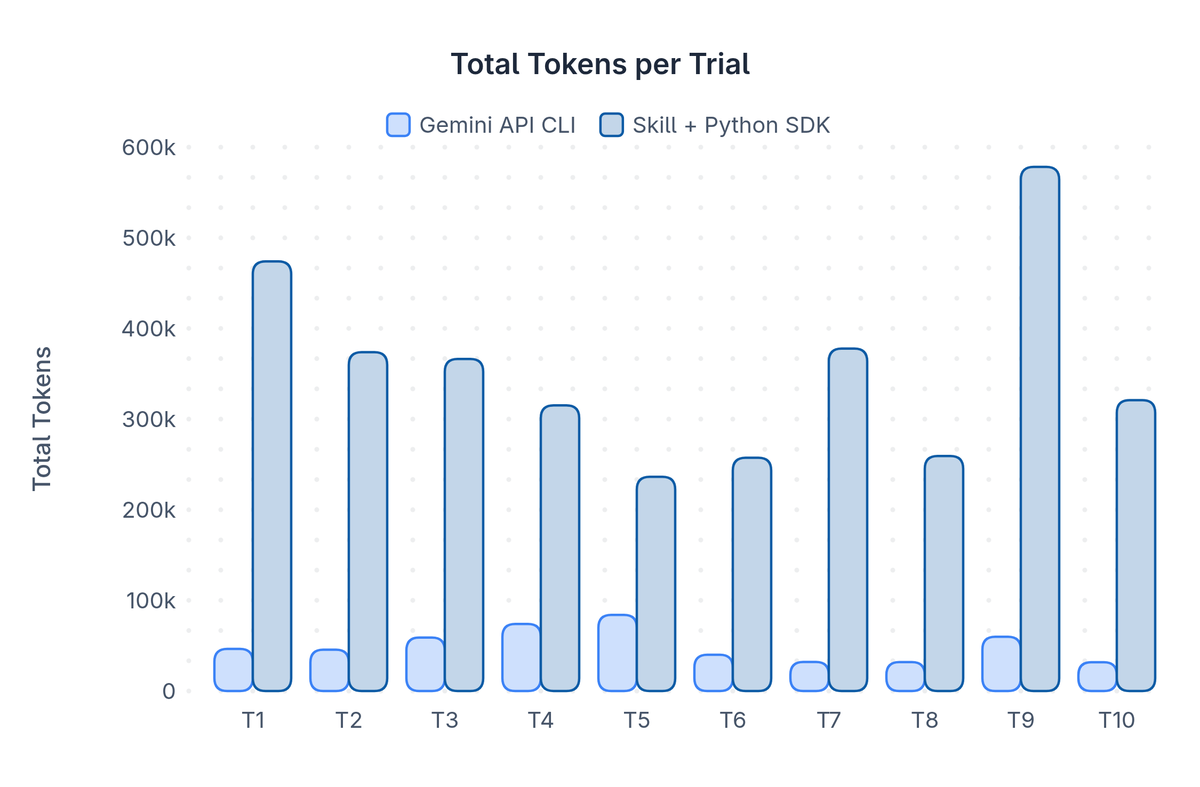
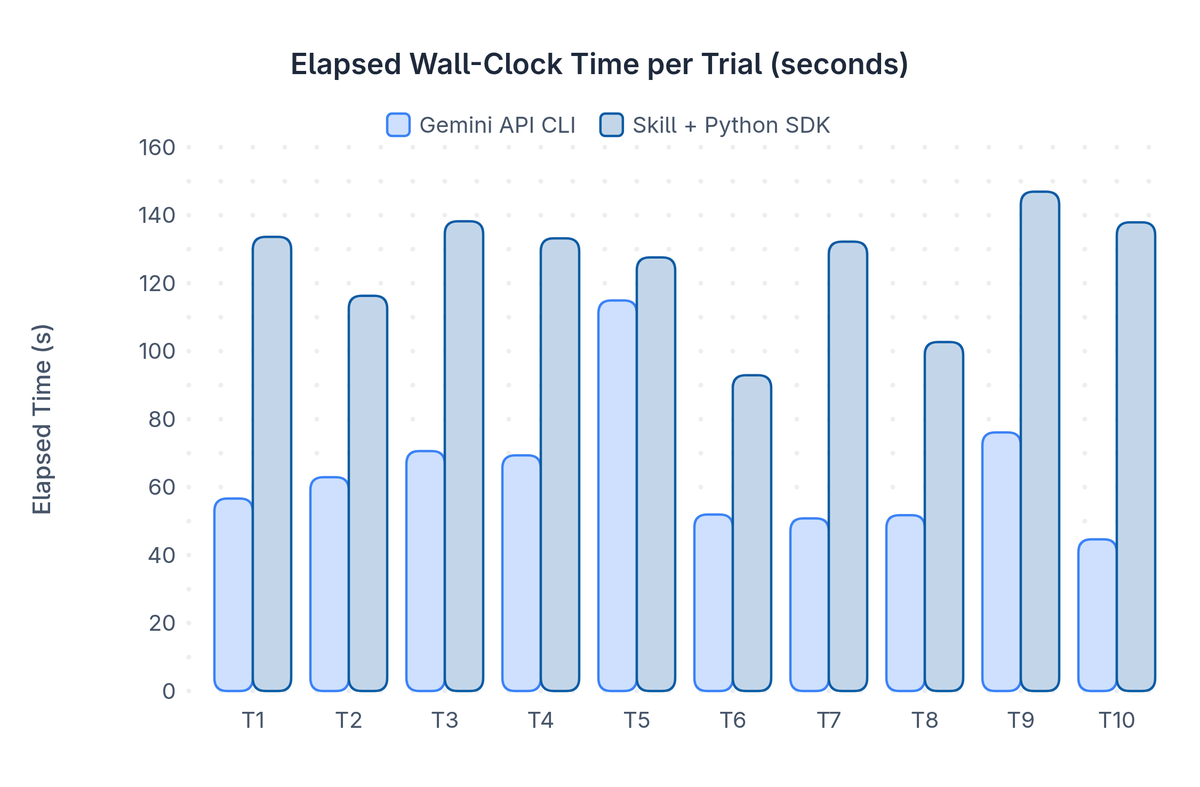
Instead of reading skill files, fetching docs over the network, installing dependencies like pillow, and writing a one-off Python script on every run, the agent with the CLI just checked gemini-api --help locally and then generated dog.jpg in one command.
Note: If you ran this same test with a different agent harness the gap between the two may vary slightly. As the sandbox didn’t have dependencies like pillow installed so the agent had to go install it, whereas your local agent’s environment might have it.
Here are all 20 dogs generated across the trials so that you can see the outputs are of the same quality (seems Nano Banana really loves golden retrievers):

Here is the full script to run the benchmark if you want to give it a try yourself.
When to use the SDK versus the CLI?
When you should use the Google GenAI SDKs versus the Gemini API CLI comes down to the task at hand. If you are building software on top of the Gemini API and building Gemini into your product or app, use the SDK. If you are just wanting your agent to generate a quick sound track to a video or create a hero image for a blogpost, use the CLI.
Use cases for the Gemini API CLI:
🎮 - "Add a soundtrack for the boss fight in my game"
📊 - "Create a cover image for this week's newsletter"
📹 - "Make a 10s hero video for the landing page"
Hopefully this helps clarify the value the Gemini API CLI brings. It is meant to augment your agentic workflows by making it more efficient to leverage all the models and multi-modal strengths Gemini provides.
We appreciate any and all feedback on the Gemini API CLI as we are in the preview phase. Give the Gemini API CLI a try and let us know what you think. We look forward to continuing to improve it and make it even more useful for users.