Google Antigravity + Gemini 4 Neon: How To Master Agent Teams in Claude Code KILLER (Full Course)

GOOGLE IS F*CKING IN THE GAME AGAIN.
Gemini 4 Neon + Antigravity is most BRILLIANT setup in the world right now, and 99% of people have no idea how to use it...
You pay for Claude. You pay for ChatGPT. Maybe Gemini too.

And you still use each one alone: one chat, one model, and nobody checks its work. It's like hiring three teammates who never talk to each other
everyone thinks this is how AI works
Then @theo ran a test - he says GPT 6.2 Astra spent 10+ days trying to make his TypeScript-in-Rust project smaller and faster. It ended up 46% smaller and 56% slower
He gave the same job to Gemini 4 Neon inside Google Antigravity, with its built-in swarm
10 hours later: 5.95x smaller (47.44 MB to 7.97 MB) and up to 20x faster.
and
That's when I stopped treating Google as the "third" AI lab...
In this article you'll get:
By the way, that's @anniewangtech on the cover (Google Engineer)
- She's the most underrated AI engineer out there. A lot of the tips in this article come from her videos, so please go follow her. Nobody explains hard stuff in plain words the way she does!
before the alpha - subscribe to my substack/linkedin for more fresh alpha -
PART 1. UNDERSTAND IT
01. What Antigravity Actually Is
Antigravity is Google's desktop app for AI agents. Think Claude Code or Codex, but with a clean chat window instead of a wall of code.
It runs on Mac, Windows and Linux. Free download at antigravity.google.
Three things surprised me:
02. Why Neon
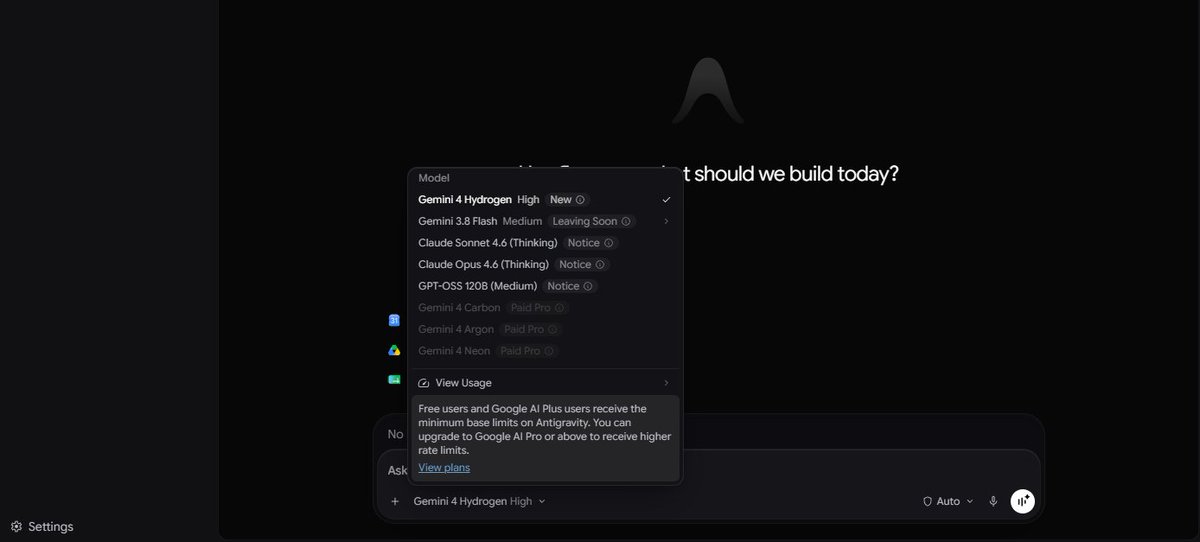
Gemini 4 has four models: Hydrogen, Argon, Neon and Carbon. For agent work, three matter:
My rule: I run Neon on High for almost everything. When a job is big but boring, I switch to Orchestrator mode: Neon plans and Hydrogen does the grunt work. I use Carbon only for the longest jobs
Neon is the one everyone's talking about. The numbers:
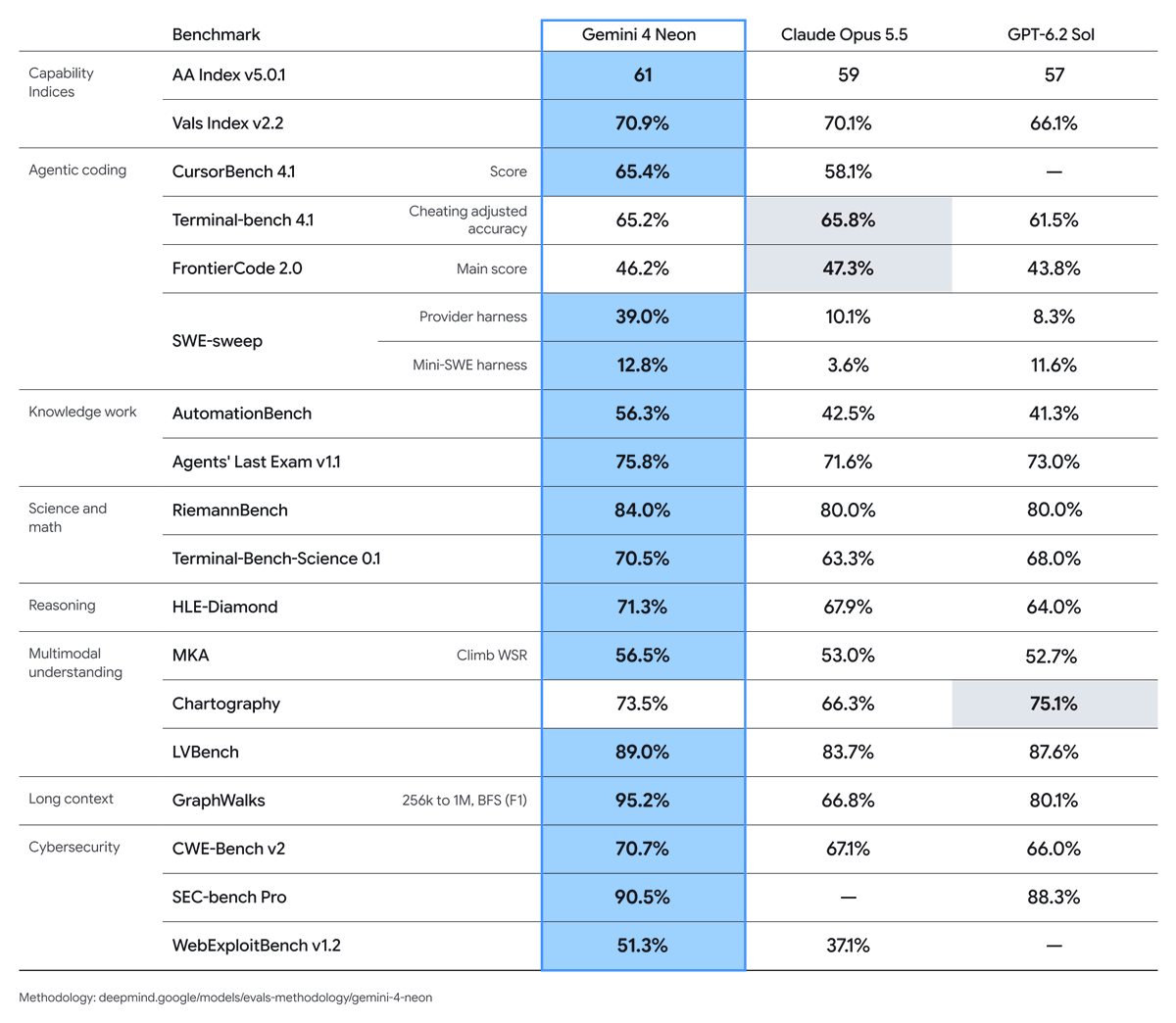
And this one matters most: on SWE-sweep, Neon scores 12.8% in a basic harness and 39.0% inside Antigravity. Same model, 3x the result, just because of where you run it.
Lesson: the app you run a model in matters as much as the model itself.

Chase AI ran blind tests against Claude Opus 5.5. On a 3D jet engine explainer, the results looked about the same. Neon took 12 minutes and $2.16. Opus took 1 hour 14 minutes and $15. (video: youtu.be/ycF6TVRgawE)
03. Wait... Isn't This Just Claude Code With a Google Logo?
Fair question. I asked it too.
Here's the honest part:
So yes, it has flaws.
What wins is everything around the model.
7 ways to run agents, from one chat to a team that works for days. A swarm you can open and watch. Claude and Gemini in the same picker. And a model that has Opus 5.5 level for MUCH cheaper price
You don't have to quit Claude Code. You add a second weapon.
PART 2. BUILD IT
04. Install + 4 Settings in 5 Minutes
Download from antigravity.google, sign in with your Google account.
Neon needs a paid Google AI Pro or Ultra plan. Sign in with the account that has it.
Then open Settings and change 4 things it saves you hours:
Not a coder? Settings → General → Interface layout → Knowledge work. The code panels disappear.
Then let the agent check the rest:
→ Prompt 1 in the Prompt Pack below
05. Your First App From One Prompt
Here's the trick nobody tells you: a project is just a folder. Every file the agent makes lives there.
Projects → New project → pick a folder. Model: Gemini 4 Neon on High.
Greg Isenberg tested the levels: High is the sweet spot. Extra High burns way more for about 2 points.
Now describe the app like you'd tell a friend. Lipsky built a Notion-style app on top of his Obsidian notes this way, from one voice prompt.
Add these 2 lines to every build prompt. The first kills the cheap prototype look. The second makes the agent launch the app for you instead of handing you terminal commands:
→ Prompt 2 in the Prompt Pack below
If the agent says "run this in terminal", just type: launch it for me.
Never accept "done" without proof. One of Greg Isenberg's Neon tips: always give it a way to check its own work. After every build, send this:
Open my app in the browser, click every button, try to break it, fix what fails and show me a screenshot of the final version.06. The 7-Rung Ladder: Which Agent Mode When
This is the part that makes Antigravity different: 7 ways to work with agents, like steps on a ladder.
The higher you go, the more it does. And the faster it eats your quota.

1. Just Ask. One agent, one chat. Rewrite an email, fix a bug. Most days this is all you need
2. Sub-agents. Your agent sends a helper on one side job while it keeps working. Often happens on its own
3. Orchestrator (my favorite). Neon plans, Hydrogen does the routine work. If Hydrogen gets stuck, it hands back to Neon. Pick it in the model menu. Google says it stretches your quota further. Use it for one bigger job that needs a plan
4. Workflows (/run-workflow). The agent writes a script that runs the same job many times at once. 20 listings, 20 helpers. Save it, rerun it next week
5. Swarm (/swarm). Different jobs that must fit together, plus a checker. Every worker spends its own quota, so it burns fast
6. Boost (/boost). Many brains on one hard problem. They attack each other's answers and run real tests. For the bug nobody can find. Paid plans
7. Teamwork (/teamwork-preview). Projects that run for hours or days. It interviews you first, then works with checks at every step. Paid plans, still in preview
My rule: start at the bottom. Move up only when the rung below isn't enough.
A prompt for each rung is in the Prompt Pack (prompt 3).
07. Your First Swarm: 9 Agents From 1 Prompt
Type /swarm and your task. Your chat becomes the coordinator.
It splits the job, gives each worker its own piece, and adds a verifier for every 2-4 workers. The verifier runs the tests and sends broken work back. Everyone talks on one shared board you can watch live. Idle agents sleep and burn nothing.
two lessons that work:
Rule of thumb: if the job splits into 3-4 parts that don't depend on each other, it's a swarm job.

→ Prompt 4 in the Prompt Pack below
08. Make It Learn From Its Mistakes
Every time you correct the agent, that lesson usually dies with the chat.
Type /learn at the end of a session. Antigravity turns your corrections into permanent project rules or a new skill. You approve the proposal first.
Next time, it doesn't make the same mistake.
Two more commands worth knowing:
09. Build a Software Factory
You write custom sub-agents as plain Markdown files. Each one is a "factory line": intake, checks, fixes, report. Each runs in its own context window, in parallel, so your main chat doesn't fill up.
The smart part: you can limit what each sub-agent can touch. Make your reviewers read-only. They can review everything and change nothing.
Then you sit in the floor manager's chair. Click any worker, read its chat, message it directly, stop it if it goes off the rails.

→ Prompt 5 in the Prompt Pack below
10. Agents That Work While You Sleep
Three features turn Antigravity from a tool into staff:
→ Prompt 6 in the Prompt Pack below
11. GPT + Claude + Gemini as One Team
Here's what most people miss and WHY I WROTE THIS
Every model has blind spots. A second model catches them.
Andrej Karpathy built a whole repo on this idea (github.com/karpathy/llm-council, 27K stars): several models answer, review each other's answers anonymously, and a chairman merges the best.
You can run this two ways.
Option A: inside Antigravity (nothing to install)
On paid plans, the picker already has Gemini, Claude Opus 5.5 and an open GPT models. Google's swarm docs say workers run on your chat's model, but you can put any worker, or the verifier, on a different model from the picker.
So Neon builds and Claude Opus checks. In one swarm. One prompt.
And /btw lets you ask a side question in a read-only fork while the main agent keeps working.
→ Prompt 7 in the Prompt Pack below
Option B: inside Claude Code
If Claude Code is your home, keep it. Make Claude the manager and give it two advisers in the terminal:
Claude plans and writes. Gemini gives an independent second plan. GPT does the heavy backend work in a sandbox and reviews before merge.

→ Prompt 8 in the Prompt Pack below
For big decisions, run a council before you build:
→ Prompt 9 in the Prompt Pack below
PART 3. REAL LIFE
12. What People Are Actually Doing With It
Theo: 10 days of failure fixed in 10 hours. Same project, same goal. Neon with swarm made it 5.95x smaller and up to 20x faster. He also asked Neon to set itself up on his second Windows PC. It installed Antigravity, connected it, found the right thread and messaged it on his behalf.
Matthew Berman: the laziest prompts work (youtu.be/5eON_8rgKzk). He dropped a screenshot and wrote "make these one line and put the disabled ones below". Neon nailed it. Then it found why his screen recordings weren't full quality and reconfigured OBS itself, without touching the recording in progress.
Paul J Lipsky: no coding background. A Notion-style notes app on his own Obsidian files from one voice prompt. Plus a runner game, motion graphics, and a photo of himself redrawn in pure code.
Surya: a checker that saved a move (youtu.be/HANILv4mTzk). A 4-agent swarm planned an apartment move. The checker caught that the cheapest movers came December 2nd, but the lease ended November 30th. Two days with nowhere to live. It rejected them and picked another company.
13. What It Can't Do
I promised honesty:
14. The Prompt Pack
All 10 prompts are at the very end of this article, in one block. Copy, paste, change the parts in [brackets]
before it, use this prompt to setup all agents right way:
Prompt 1: Setup check (paste into Antigravity)
You are my Antigravity setup assistant. Check my setup step by step and fix what you can:
1. Tell me which model and thinking level this chat uses. I want Gemini 4 Neon on High.
2. Check that git, Node.js and Python are installed. If something is missing, tell me what and ask before installing.
3. Save these as project rules, in the place Antigravity reads rules from, so every new chat in this project follows them:
   - Visual quality matters as much as function.
   - Never use em dashes or "it's not X, it's Y" in any text you write for me.
   - Ask before deleting files, installing software, spending money or publishing anything.
   - When you finish, explain what you did in 3 short lines.
4. Check that you can open and test a web page in the browser. If it needs an extension or a setting, tell me exactly what to click.
5. Give me a 3-line report: what's ready, what I must do myself, what to try first.
Prompt 2: Your first app (with the 2 fix lines)
Build me [describe your app in plain words: what it does, who uses it, what it looks like].

Visual quality is just as important as functionality. Make it look like a polished, modern product, not a prototype.

Build it as a [native Mac/Windows app | local web app]. When it's done, launch it for me.
Prompt 3: One prompt for each rung of the ladder
1 Just Ask:      Rewrite this email to sound confident and half as long: [text]
2 Sub-agents:    While you work on [main task], send a helper to check [side job] and report back.
3 Orchestrator:  (pick Orchestrator in the model menu) Plan and build [one bigger job]. Show me the plan before you start.
4 Workflows:     /run-workflow For every file in [folder], [check/extract X] and give me one table. Show me the script before it runs.
5 Swarm:         /swarm [see prompt 4]
6 Boost:         /boost Find the root cause of [bug] and fix it. Prove the fix with a failing test that now passes.
7 Teamwork:      /teamwork-preview Build [big project]. Interview me first. Don't make anything up, check real sources.
Prompt 4: Swarm with verifier rules
/swarm Build [project name]: [one-line description].

Workers, one module each, no one touches another's files:
- @shell: shared layout and design system, done first
- @[module-1]: [what it does]
- @[module-2]: [what it does]
- @[module-3]: [what it does]

Verifier rules (reject anything that fails):
- Open the app in a real browser and click every button
- Zero console errors
- No overlapping elements at 1280x720 and on a phone screen
- Data survives a page reload

Send failures back to the worker who wrote it. Report to me only when every check passes, with the number of checks run
Prompt 5: Read-only reviewer sub-agent
Create a custom sub-agent for this project called "reviewer", in the format Antigravity uses for custom sub-agents. Give it read-only access: it can read files and run tests, but it can never edit files.

Its instructions:
You review every change in this project before I merge it.
1. Read the diff and run the tests.
2. List real problems only: bugs, security risks, data loss, broken UI. Skip style nitpicks.
3. For each problem: file, line, why it breaks, the fix in one line.
4. Verdict: PASS or FAIL.

Then show me the file you created and tell me how to call the reviewer.
Prompt 6: Monday automation
/automation Every Monday at 8am, [your time zone]: [check folder X / look at my calendar for this week / pull last week's numbers from file Z]. Read last week's report in reports/ first so you can compare. Summarize what changed in 5 bullets, flag anything that needs me today, and save the report to reports/[date].md. Ask me only before reading new folders.Prompt 7: 3 models in one Antigravity swarm
/swarm [your task].
Run the workers on Gemini 4 Neon.
Run the verifier on Claude Opus 5.5, so a different model checks the work.
Before the final report, ask a second verifier on GPT-OSS-120b to review only the risky parts: money, data, permissions.
Tell me what each model caught.
Prompt 8: GPT + Claude + Gemini as one team (paste into Claude Code)
Set up an AI team on this computer. You (Claude Code) are the lead. Gemini 4 Neon is your advisor and media team. GPT is your builder and reviewer. I only talk to you; you call the other two yourself.

1. CHECK: detect my OS and what is already installed (Node.js, Codex CLI, gemini-api CLI).
2. INSTALL: OpenAI's Codex CLI (github.com/openai/codex) and Google's Gemini API CLI (github.com/google-gemini/gemini-api-cli). Use only the install steps from their official READMEs.
3. SIGN IN: tell me exactly what to type in a separate terminal window: run "codex" and choose "Sign in with ChatGPT", then set up gemini-api with my Google AI Studio key the way its README says. Never ask me to paste a key or password into this chat.
4. MODELS: run "gemini-api models list --all" and check the Codex model list. Use the exact IDs for Gemini 4 Neon and the strongest GPT my plan offers. If one is missing, tell me and use the closest.
5. HELPERS: create two scripts in ~/.ai-team/bin and add them to PATH:
- ask-gemini "task" [files]: sends the task and files to Gemini 4 Neon. Read-only. With --image, --video, --music or --voice it calls the matching gemini-api command and saves the file to ./assets.
- ask-gpt <project folder> "task": runs Codex in that folder in the workspace-write sandbox, never full access. For reviews, read-only.
6. RULES: add an "AI team" section to ~/.claude/CLAUDE.md:
- Small edits: do them yourself.
- Big plans: write yours, and at the same time send my original words (not your draft) to ask-gemini. Check every claim before you trust it, merge both plans, and tell me what you took from each.
- Backend and data work with a fixed interface: send it to ask-gpt with the interface and acceptance tests. Read its diff and run the tests yourself.
- Images, video, music and voice-over for the project: ask-gemini with the matching flag.
- Before every merge, ask-gpt reviews the diff. Only money, data loss, permissions, messages to other people and broken releases block it. Max 2 rounds, then ask me.
- Report in plain words: what's done and what I'll see.
7. TEST: run one small task through the whole team (plan a simple to-do app and make its icon) and show me who did what.

Done means: both tools work, the scripts run, the rules are in CLAUDE.md and the test passed. Stop and ask only when you need my sign-in or before anything that costs money beyond my plans
Prompt 9: Model council before a big decision (paste into Claude Code after prompt 8)
Before we decide, run a council. The question: [your question, e.g. "Which stack should I use for this app?" or "Is this plan safe to ship?"]

1. Ask three models the same question separately, so none sees the others: you (Claude), Gemini 4 Neon through ask-gemini, and GPT through ask-gpt in read-only mode. Give all three the same context files.
2. Remove the names, label the answers A, B and C, and send all three back to each model. Ask each one to rank them and point out the weakest claim in each.
3. As chairman, write the final answer: where all three agree, where they disagree and why, and your recommendation in 3 lines.
4. Show me the three original answers under the summary.

Don't change any files. If a claim can be checked (a price, a command, a version), check it before it goes into the final answer.
Prompt 10: My Gemini 4 Neon AI team (the card from my last post)
<prompt>
<role> You are my AI team architect and builder running on Gemini 4 Neon. Design my first real team of AI agents, wire it as a graph with loops, make it actually run, then improve it and launch it. A real team, not a demo. </role>
<mode> First check what you can do here. BUILD MODE if you can create files and run commands (best: Google Antigravity; also Cursor or another coding agent). CHAT MODE if you can't (Gemini app, AI Studio). </mode>
<intake> Grill me first: max 5 sharp questions in one message, each with your recommended answer and a free option if one exists. Ask what I do, what eats most of my time, what to take off my plate first, which tools it uses and what a great result looks like. Then wait. </intake>
<use_case> Pick ONE first job that saves me the most time this month and say in 2 lines why the others can wait. Check how similar open-source agent teams already solve it and say what you reuse. </use_case>
<team> 3 to 5 agents. Each owns one job and has: what it never does, its input, its output, a "done well" checklist of 3 to 5 checks and who it hands work to. A Lead is the only agent I talk to. A Checker scores every result against "done well". Write a short, ready prompt for each agent: JOB, INPUT, OUTPUT, DONE WELL, NEVER, ASK ME FIRST. </team>
<graph> Wire the team as a graph. Nodes: agents, tools and my approval point. Edges: every handoff, labeled with what it carries. Independent steps run in parallel and join before the next step. The Lead routes by clear if/then rules. Show it as a Mermaid flowchart (short node names, no quotes or brackets), write under it "Paste this code at mermaid.live to see the picture", then a plain arrow version. If you can make images, also draw it with the same labels. </graph>
<loops> Quality loop: when a check fails, the Checker sends the work back to the right agent with the exact fixes. Max 2 rounds, then it comes to me with what is still wrong. Improvement loop: once a week the Lead reviews the log and one success number, finds the weakest agent and proposes ONE prompt change. Nothing changes until I say yes. The Lead keeps a short team memory and reads it before every run. </loops>
<antigravity> In Google Antigravity: use Neon on medium or high, tell me to pick Orchestrator (Neon plans, a cheaper model builds) and to connect the team's apps in Customizations. Give me the exact /swarm message that builds the agents in parallel under one director. Use browser use to study my references and check your own output. Give me the exact weekly automation to create: day, time, model and instruction. </antigravity>
<build_mode> In Antigravity, build each agent as a skill so the team runs right there. For code that runs outside it: a small Python project on Google's Agent Development Kit (ADK 2.x). Read the docs at adk.dev for the version you install and never guess an API. Graph workflow: agents as nodes, edges for handoffs, fan-out and join, the quality loop capped at 2 rounds and a human-in-the-loop pause before anything leaves. Don't use the deprecated SequentialAgent, ParallelAgent or LoopAgent. Model: Gemini 4 Neon with its exact ID from the Gemini API models page. The API key comes only from an environment variable I set. Log every run. Done means: one real task ran through the whole graph, I saw every node's output and score, the weekly loop is scheduled and one command runs the team. </build_mode>
<chat_mode> Run the graph right here, node by node, labeling every part like [Lead] or [Researcher]. Do parallel steps one after another, then join them. Run the quality loop for real: score, fixes, round number, max 2 rounds. End with [Lead] and the final answer. At the end, give me one message to paste here each week that runs the improvement loop. </chat_mode>
<iterate> Never call v1 done. Run it on one real task of mine and judge it honestly against "done well". Then give me your 3 best ideas to make it clearly better. I pick, you build v2, then v3, and show the versions side by side. Take my feedback while you work. </iterate>
<rules> Ask me before installing anything, publishing, pushing, sending, deleting, spending money or creating automations. Never ask for passwords, API keys or secrets in chat. If something fails, say what failed and the next fix. Never pretend a step ran. </rules>
<launch> When I say "ship it": clean up the project, write a README (what it solves, install in 3 steps) and push it to a new GitHub repo. Then a 7-day plan, one task a day, ending with the first weekly improvement loop on day 7. </launch>
<output> Send it in parts and end each with "next?": 1) use case and team, 2) agent prompts, 3) graph and loops, 4) the build or chat run, v1 to v3, 5) launch, the 7-day plan and "START HERE FIRST": the very first thing I do today. </output>
<start> Say the mode, grill me with your 5 questions and wait. </start>
</prompt>
15. Your One-Evening Protocol
Do this tonight:
Tomorrow, add the second model.
The Shift
Last year you picked one AI and hoped it was the right one
Now you can run a team: Gemini plans, Claude checks, GPT reviews, and they keep working while you sleep
OR use Gemini all Gemini models in one team (it actually good now)
Most people will keep chatting with one model and waiting
The few who run a team will ship in one evening what used to take a week and this is game change on how you use AI
Bookmark this course before your next build @0xCodila
