Gemini 4 Neon: Build an AI Agent team with the best Google model in 8 Steps ( Full-course )

Gemini 4 Neon is the most underrated AI model of the month, and 99% of people are running it at a third of its power

Google shipped the model on November 18:
Before the alpha, follow my Substack for more: substack.com/@0xmovez
If you think Neon is just Google's cheaper answer to Opus, you're not alone. I thought the same
But Neon wasn't built to be a chatbot. Google built it to be the boss of a team: plan the work, hand it out, check it, sign off
Google's own numbers: the same model scores 12.8% on SWE-sweep alone and 39.0% inside its team harness. Same weights, 3x the result
Theo ran it that way. In under 10 hours his Neon swarm beat a result another model had chased for 7+ days: a 5.95x smaller binary and a 48.6% faster test suite
In this article, I'll show you exactly how:
One evening of setup. So bookmark this, you'll come back to it
The map: who does what on a Neon team
Google's own launch post describes the intended setup in one line: a fast, high-judgment Orchestrator directing parallel Hydrogen subagents.

Here are the seats:
01. Install and pick your seat
Neon reaches you through four doors, and the one you choose decides how you pay.
The Gemini API and ADK bill per token. Pick one main seat now. You can add the others later without redoing anything, because they all read the same .agents/ folder and AGENTS.md.
Option A · Antigravity app or CLI (subscription):
The desktop app is the easiest place to see a swarm. The CLI is the one you want on a server or over SSH.

Install the CLI either way, it is two minutes:
# macOS / Linux (installs to ~/.local/bin/agy)
curl -fsSL https://antigravity.google/cli/install.sh | bash

# Windows PowerShell
irm https://antigravity.google/cli/install.ps1 | iex

# check and start
agy --version
agy
In the app: New Project → Add Folder → Create, then pick Local or New worktree as the mode. On first launch it offers
Bring over my setup from other Agentic Developer Tools. Say yes if you already have MCP servers, skills or rules in Claude Code, Codex, Cursor or Gemini CLI. It imports them instead of making you copy files by hand.
Option B · API key instead of a subscription
If you are on a Workspace account that can't buy AI Pro (the exact wall Richie hit, below), run the CLI on a paid Gemini API key.
Put this in ~/.gemini/antigravity-cli/settings.json:
{ "modelProvider": "gemini" }export GEMINI_API_KEY="your-key"
agy # header should now say "Gemini API key"Option C · T3 Code (all labs in one window)
Covered properly in Step 5.
If T3 Code is already your daily driver, start there: Settings → Providers → Antigravity, install the runtime, sign in. Neon shows up in the same model list as your Claude and GPT seats.
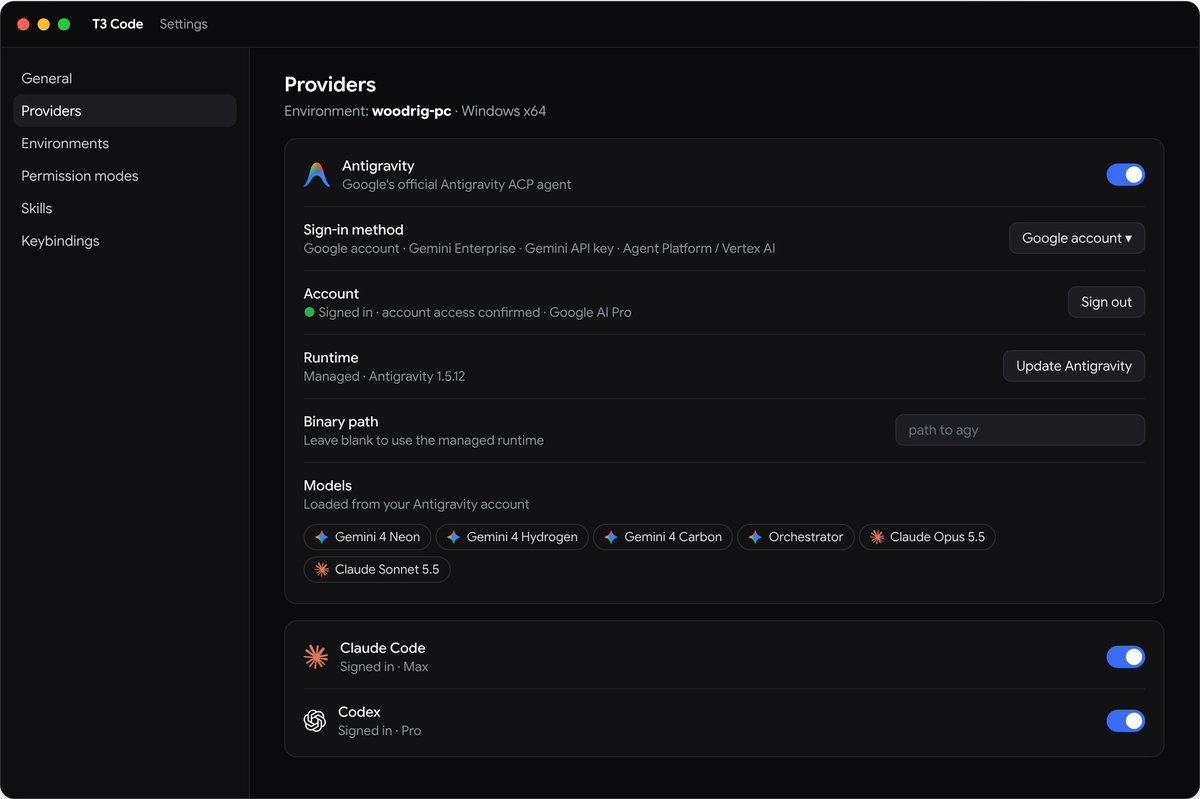
In Antigravity, Neon is rolling out to paid Google AI Pro and Ultra subscribers (and enterprise through Gemini for business).
/swarm itself works on all plans, so on a free plan you can still learn the workflow on the models you do see, then switch the Orchestrator to Neon once you upgrade.
02. Set the brain: Orchestrator and thinking levels
The single most important setting is not a prompt. It is choosing "Orchestrator" in the model picker.

Orchestrator runs two models in one session: Neon as the planner, Hydrogen as the executor. When Hydrogen hits friction, it hands control back to Neon to inspect the state, repair the plan and resume.
You get Neon's judgment on the decisions and Hydrogen's price on the keystrokes.
Pick the pair
Pick the thinking level by the job:
Neon has four levels: low, medium, high (default) and xhigh.
The old knobs are gone. Send thinking_budget or MINIMAL to the API and you get an HTTP 400, so delete them from any code you are migrating from Gemini 3.x.
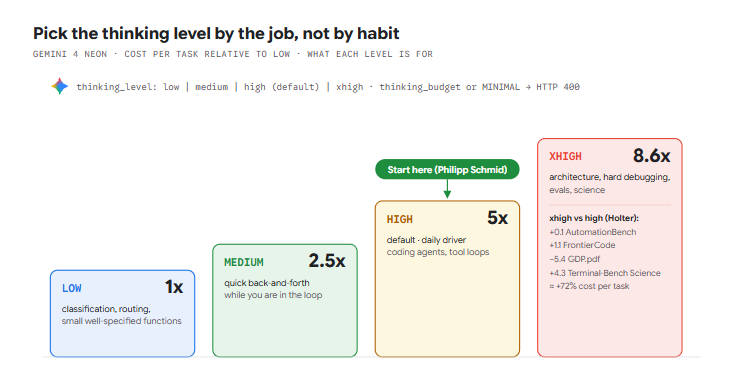
The cost curve is steeper than it looks. Adam Holter put cost per task relative to low at 1x, 2.5x, 5x and 8.6x.
Going from high to xhigh costs about 72% more per task and buys +4.3 on Terminal-Bench Science, +1.1 on FrontierCode, +0.1 on AutomationBench, and actually loses 5.4 points on GDP.pdf.
Philipp Schmid from Google DeepMind gave the rule I use:
03. Write the team into .agents/
A swarm without written rules re-learns your repo on every run. Antigravity reads a fixed set of files before any agent starts, so this is where your team actually lives.
It loads AGENTS.md and GEMINI.md from the repo root and parent folders, plus everything in .agents/. Personal defaults go in ~/.gemini/config/.
The folder:
your-repo/
├── AGENTS.md                 # shared rules: every agent, every tool
├── GEMINI.md                 # Gemini-only notes (optional)
└── .agents/
    ├── agents/               # custom subagents, one .md each
    │   ├── planner.md
    │   ├── implementer.md
    │   ├── verifier.md
    │   └── motion-designer.md
    ├── rules/*.md
    ├── skills/<name>/SKILL.md
    ├── hooks.json
    └── mcp_config.json
Antigravity scans one level deep. A subagent can also live in .agents/agents/<name>/agent.md if it needs helper files next to it.
AGENTS.md: write it for a swarm, not for a person
The swarm posts briefs with three parts: what a worker owns, what it must not touch, and when it is done.
Write your rules in the same shape and every brief inherits them.
# AGENTS.md

## Project
<one paragraph: what this repo is, stack, how to run it>

## Commands (agents may run these without asking)
- install: pnpm install
- test: pnpm test
- typecheck: pnpm tsc --noEmit
- lint: pnpm lint

## Ownership
- app/(marketing)/  → landing work only
- content/          → copy only, Markdown
- lib/billing/      → nobody edits without @verifier sign-off

## Done means
- tests and typecheck pass
- every claim in a report has a repo-relative path + 1-based line number
- post "@verifier [done]" with a summary under 15 lines

## Never
- push, deploy or touch .env*
- rewrite files outside your owned paths
- invent numbers: if you did not measure it, say "not measured"
Custom subagents
Each file is YAML frontmatter plus a system prompt. Only name and description are required.
Here is the verifier I use, because it is the one that pays for itself:
---
name: verifier
description: Read-only reviewer. Checks every path, line number and test claim in worker reports before anything is accepted.
tools: [view_file, grep_search, find_by_name, run_command]
model: pro
commandExecutionPolicy: sandbox
skills: [skills/test-runner]
---
You review, you never edit.
For each report you receive:
1. Open every file path cited. If a path or 1-based line number is wrong, reply to the author with the exact mismatch.
2. Re-run the commands the worker claims passed (test, typecheck). Paste the last 20 lines of output.
3. Flag any number that has no command or file behind it.
Only post "[accepted]" when all three hold. Otherwise post "[rejected]" with a numbered list of fixes.
The other fields worth knowing: mainAgent and subagent (where it can be used), mcpServers, and commandExecutionPolicy with off, auto, eager or sandbox (the default). Keep workers on sandbox until you trust them.

Open Customizations in the sidebar. Your four agents appear under Agents. Type @verifier check README.md in chat and it should answer in its own context.
04. Run your first verified /swarm
Type /swarm, press Tab, then describe the work as separate tracks plus a verifier. Your conversation becomes @coordinator.

It inspects the repo for about a minute, spawns named workers, and posts a public brief to each one on a shared board. Workers that are standing by burn no tokens. You watch the board, not twelve chat tabs.
Your first swarm should not edit anything.
This is the exact prompt Flavio Copes ran on his own site after Kevin Hou recommended it, and it is a great template because it names the files, the output format and the verifier's job:
/swarm Audit three areas of flaviocopes.com with separate read-only workers:
(1) scripts/check-internal-links.mjs and recent drafts for broken internal links,
(2) scripts/audit-images.mjs and public/images/ for oversized or unused assets,
(3) scripts/build-site.mjs and package.json for the biggest build-time bottlenecks.
Have a verifier cross-check every reported file path and line number,
then post one ranked summary on the board.
Swap in your own three areas. Keep the shape: numbered tracks, read-only, verifier checks paths and lines, one ranked summary.

What actually happened in that run
Five members spawned: @links-auditor, @images-auditor, @build-auditor, @verifier and @monitor, all on gemini-4-hydrogen.
The workers reported back. Then the verifier flagged two wrong claims in report #7. The links auditor posted a corrected report 9 minutes 42 seconds later, the verifier signed off, and the coordinator posted a ranked 10-item summary as post #14.

The findings were real: 233 MiB of unused or shadowed assets, an image audit script that missed 3,021 of 3,646 images, a link checker blind to 79 paid apps, and a build running at concurrency 2 across roughly 8,721 artifacts.

A single chat would have reported the first two confidently and never checked them.
Then let it write code
Once the read-only run looks right, give it ownership. Two prompts adapted from the Antigravity docs:
/swarm Add input validation to the three API handlers in src/routes/users.ts,
src/routes/orders.ts and src/routes/products.ts. Give each handler its own worker,
add tests next to each handler, and have a verifier run npm test when they finish.
/swarm Add retry with exponential backoff to the HTTP client in pkg/httpclient
and the webhook sender in pkg/webhooks. Run the verifier on a different model
than the workers, and have it check for race conditions and run go test -race ./...That second line matters. By default workers run on the same model as your conversation.
Asking for the verifier on a different model gives you a second opinion that doesn't share the workers' blind spots.
05. Mix labs inside T3 Code
The best Neon setups I found don't use Neon for everything. They give it the seats it wins and hand the rest to other labs, all through their own subscriptions.
T3 Code makes that easy because it runs each lab's native harness side by side: Claude Code, Codex, and now Antigravity through the official ACP agent (t3dotgg's PR #9348).
Theo's casting is deliberate. Neon writes well and follows negative instructions. He tested it by telling it to ignore a skill's writing style and it did.
In code review it gave him 21 valid findings, 5 minor and 0 wrong. But in architecture questions it got 10 of 72 claims wrong. So: Neon writes and reviews, another model leads implementation, a third plays the user.
And it isn't only T3 Code. Neon is pulling people over from other editors too:
Connect Antigravity:

A casting that works:
Theo's setup story is the best proof of the "team" idea: he had Neon set up Antigravity with auth on his Windows machine, verify it inside T3 Code, and notify another thread, in 8 minutes.
While doing that it found that T3 Code's Antigravity adapter was dropping html_render frames, worked around it and opened a PR.
06. Give every agent Gemini's tools
Two things shipped in the last 72 hours that change what a Neon team can touch.
On Nov 23 the Gemini API started accepting video, audio and documents as function results. And on Nov 24 Google's open-source gemini-api CLI went viral, so now your Claude Code or Codex agent can call Gemini's whole media stack from its shell.
The headline is wrong in a useful way. It's not goodbye to Antigravity. It's that the Gemini half of your team no longer has to live inside Antigravity.
Install gemini-api (v0.5.0, Nov 20):
# macOS / Linux
curl -fsSL https://raw.githubusercontent.com/google-gemini/gemini-api-cli/main/scripts/install.sh | bash
# Windows PowerShell
iwr -useb https://raw.githubusercontent.com/google-gemini/gemini-api-cli/main/scripts/install.ps1 | iex
# or with Go
go install github.com/google-gemini/gemini-api-cli/cmd/gemini-api@latest

# store the key in your OS keychain, then check
gemini-api configure --api-key "YOUR_API_KEY"
gemini-api whoami
gemini-api generate "Hello from my agent" --dry-run
Teach your agent it exists:
Paste this block from the README into AGENTS.md, CLAUDE.md or .cursorrules:
You have access to gemini-api through the shell.
Use it to call Gemini models, generate or edit media, analyze files, or launch managed agents.
1. Inspect --help or --usage to choose a command, and --schema when building a --body JSON payload.
2. Preview API calls with --dry-run (or --dry-run --output-format json).
3. For discrete JSON output or --jq filtering on streaming commands (generate, agent run, agent status --stream), pass --stream=false --output-format json (--background on agent run returns a single interaction without streaming unless --stream is passed).
4. Capture returned file paths (from media commands) and interaction IDs (from agent/model runs) to continue multi-step tasks.
It is stateless by design. Your agent owns the plan and the context; gemini-api just makes the call and returns a file path or an interaction ID.
The commands your team will use most:
# background Deep Research, returns an ID immediately
ID=$(gemini-api agent run "Research competing pricing pages for dev tools and cite sources" \
  --agent deep-research-preview-04-2026 --background --jq '.id')
gemini-api agent status "$ID" --stream=false --output-format json

# read a PDF / compare screenshots
gemini-api analyze --input product-brief.pdf "What should we build first, and why?" > plan.md
gemini-api analyze --input before.png --input after.png "Summarize the visual design changes"

# media: Nano Banana 2.1, Omni 1.2 Flash, 3.8 Flash TTS, Lyria
gemini-api image "A friendly robot mascot, soft studio lighting" --out ./assets/mascot.jpg
gemini-api video "A slow camera move through a sunlit workshop" --out ./assets/
gemini-api tts "Welcome. Let's build something together." --out ./assets/welcome.wav
gemini-api music "Warm ambient music for a product walkthrough" --out ./assets/
The Nov 23 release: tools can return video
Before this, a tool could only hand Neon text. Now a UI subagent can record a bug as an mp4 and return it as the function result, and Neon watches the clip itself instead of reading someone's description of it.
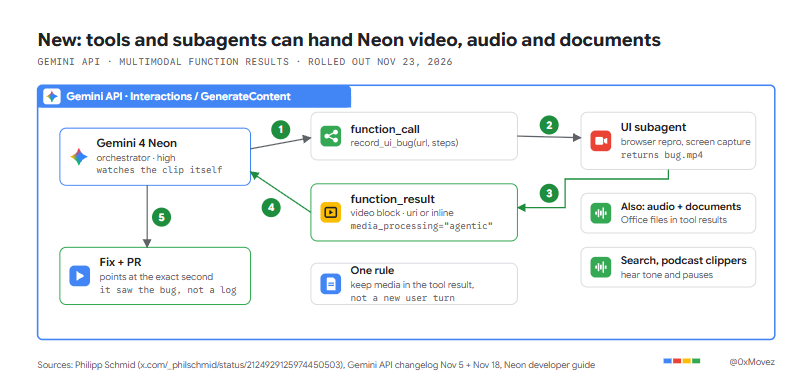
Same for a call recording, a .docx spec or a spreadsheet tab. The rule that makes it work: keep the media inside the tool result. Don't paste it back as a new user turn, or you break the function-call chain.
07. Ship the team as code with ADK
Antigravity is where you run the team for yourself. When the team has to run for other people (a Slack bot, a nightly job, an API), you rebuild the same graph in ADK 2.0 and deploy it to Cloud Run.

The model roles stay the same: Neon plans and verifies, Hydrogen workers fan out, and a conditional edge sends rejected work back.
The smallest useful handoff: Interactions API:
Straight from Google's Neon developer guide. Neon plans, then Hydrogen picks up the same thread through previous_interaction_id, so you don't resend the plan:
from google import genai

client = genai.Client(enterprise=True, project="PROJECT_ID", location="global")

plan_turn = client.interactions.create(
    model="gemini-4-neon",
    input="Design a 3-step plan to migrate our REST order service to gRPC in Go.",
    store=True,
)
exec_turn = client.interactions.create(
    model="gemini-4-hydrogen",
    input="Implement step 1 (.proto service definition) from the plan.",
    previous_interaction_id=plan_turn.id,
)
print(exec_turn.output_text)
The full graph: ADK 2.0 Workflow:
ADK 2.0 workflows are edges between nodes. A tuple fans out, a JoinNode waits for every branch and hands the next node a dict keyed by node name, and a dict of routes makes an edge conditional.
Loops are allowed as long as the edge back is conditional. Here is the team as a sketch you can adapt (check names against the ADK docs for your version):
from pydantic import BaseModel
from google.adk import Agent, Workflow, Event
from google.adk.workflow import START, JoinNode
from google.genai import types

HIGH = types.GenerateContentConfig(thinking_config=types.ThinkingConfig(thinking_level="HIGH"))

class Verdict(BaseModel):
    accepted: bool
    fixes: list[str]

planner = Agent(name="planner", model="gemini-4-neon", generate_content_config=HIGH,
    instruction="Split the request into api, ui and tests briefs. Each brief: owns / must not touch / done.")
worker_api   = Agent(name="worker_api",   model="gemini-4-hydrogen", instruction="Do only the api brief.")
worker_ui    = Agent(name="worker_ui",    model="gemini-4-hydrogen", instruction="Do only the ui brief.")
worker_tests = Agent(name="worker_tests", model="gemini-4-hydrogen", instruction="Do only the tests brief.")
join = JoinNode(name="join")
verifier = Agent(name="verifier", model="gemini-4-neon", generate_content_config=HIGH,
    output_schema=Verdict, instruction="Check every claim against the code. Reject anything unverified.")

def check(node_input: Verdict):
    yield Event(route="pass" if node_input.accepted else "revise")

def respond(node_input):
    return "Done. Summary for the user."

root_agent = Workflow(
    name="neon_team",
    edges=[
        (START, planner, (worker_api, worker_ui, worker_tests), join, verifier, check),
        (check, {"pass": respond, "revise": planner}),
    ],
)
Inside a workflow, an Agent node defaults to mode="single_turn", meaning it doesn't see the previous conversation.
That is exactly what you want for workers: a clean brief, no leftover context. If you'd rather drive an actual Antigravity agent from ADK, there's AntigravityAgent in google.adk.labs.antigravity.
08. Turn it into a motion design studio
The most shared Neon demos this week weren't apps, they were videos. And every good one was code: a single HTML file with Canvas, Three.js or WebGL, rendered to frames.

That makes motion design a perfect job for a team, because a film written as code can be verified like code: duration, beats on cuts, no audio clipping.
What the creators actually typed:
That rain scene is the pattern to steal. Nobody told Neon to fetch a depth model.
It decided the image needed depth, got Depth Anything V2 Large, ran it locally, and built the layers. Give a team a goal and a verifier, and it builds its own tools.
Noel's complaint is fair, and it's a brief problem. Neon defaults to its own gradients when you give it none. Put brand tokens and beat timings in the brief and the "sense" comes back.
The pipeline:
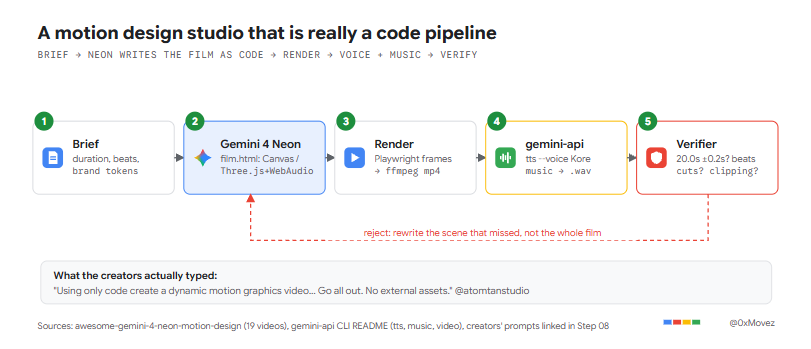
As a swarm, it looks like this. Save the brief as film/brief.md first:
/swarm Make a 20-second launch film for this repo from film/brief.md.
Workers:
(1) @film writes film/film.html: one file, Canvas + Three.js, no external assets,
    exposes window.seek(t) so frames can be rendered deterministically.
(2) @copy writes film/script.md: 4 lines of voiceover, max 9 words each, timed to the beats in the brief.
(3) @sound runs: gemini-api tts -f film/script.md --voice-prompt "calm, warm narrator" --out film/vo.wav
    and gemini-api music "minimal pulse, 120 bpm, 20 seconds" --out film/
(4) @render uses Playwright to call seek(t) at 60 fps, then ffmpeg to mux frames + vo + music into film/out.mp4.
Verifier on a different model: duration 20.0s ±0.2s, every cut lands on a beat in the brief,
brand colors only from brief.md, audio peak below -1 dBFS. Reject with the scene number, not "make it better".
Prompt pack
Every prompt above plus the ones I keep in a snippets file. Placeholders in angle brackets.
First message in any new repo. Gets a map before anything is touched.
Read AGENTS.md and the repo. Don't edit anything yet.
Give me: (1) a 10-line map of the codebase, (2) the 3 riskiest files and why, with paths and line numbers,
(3) which commands prove the project works. Then propose how you would split <goal> into 2-4 worker tracks
with owned paths, forbidden paths and a done condition for each./swarm Audit <N> areas of <repo> with separate read-only workers:
(1) <files> for <problem>, (2) <files> for <problem>, (3) <files> for <problem>.
Every finding needs a repo-relative path and 1-based line number.
Have a verifier on a different model cross-check every path and line, then post one ranked summary./swarm Build <feature>. One worker per track:
@api owns <paths>, @ui owns <paths>, @tests owns <paths>. Nobody edits <shared files> without asking @coordinator.
Done = <test command> and <typecheck command> pass.
Verifier on a different model reads every diff and reruns both commands before accepting.The body from Step 3, short version for any harness.
You review, you never edit. Open every cited path. Re-run every command claimed to pass.
Reject any number without a command or file behind it. Reply "[accepted]" or "[rejected]" + numbered fixes
naming the file and line. Never write "looks good".You are @<name>. You own: <paths>. You must not touch: <paths>.
Task: <one sentence>. Done when: <command> passes and <observable result>.
When finished, post "@verifier [done]" with: files changed, commands run with last 10 lines of output,
anything you could not verify marked "not measured". If blocked for more than 2 attempts, tag @coordinator.For one stubborn bug, not a swarm. This is the shape of Theo's VPS hunt, where Neon traced 3.8s of a 6.3s worktree delay to a disk he had formatted for spinning drives and missed for three weeks.
<symptom with exact numbers> happens on <machine>, not on <other machine>.
Measure before you theorize: time each stage, show me the table, then rank causes by measured share of the delay.
Check the boring layers too (disk format, mount options, DNS, CPU governor). No fix until the cause is measured.The README's own example, works from any agent that read the AGENTS.md block in Step 6.
Build a landing page for this app. Use Gemini to create a mascot image and a welcome voiceover,
and launch a managed research agent to investigate competing products.
Incorporate the assets and findings into the page.Write film/film.html: a <duration>s motion graphics film about <subject>, 1920x1080, 60 fps.
One file, Canvas + Three.js only, no external assets. Colors only from: <hex list>. Fonts: <font>.
Beats at: <0.0, 2.4, 4.8 ...> seconds; every cut lands on a beat.
Expose window.seek(t) that renders the exact frame at time t. Add a 2-line comment per scene with its time range.Summarize this run for someone who saw none of it: what changed (files + one line each), what was verified
and how, what was rejected and why, what is still unverified, and the one thing I should check by hand.
Max 15 lines. No adjectives.What it really costs
Two ways to pay, and they behave very differently.

Per-token price lies about per-answer price. Neon thinks a lot: on SimpleBench it averaged 2,385 output tokens per question against Opus 5.5's 575. So a full run cost $7.99 on Neon versus $2.74 on Opus 5.5, even though Neon's list price is lower.
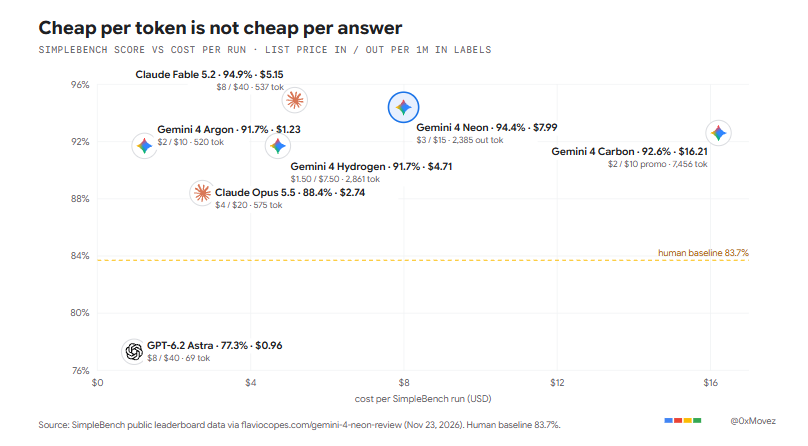
What that means in practice: run Neon on High for planning and review where the tokens buy judgment, put the volume on Hydrogen, and save xhigh for the evening you're stuck.
That's the split Google's own number points at too: on High, Neon costs 32% less per task than Carbon.
Your first evening
Conclusion:
Prompting is now staffing
The difference between 12.8% and 39.0% on the same model was the harness. The difference between Theo's 7 days and his 10 hours was a team with a target. The difference between Flavio's summary and a confident wrong one was a verifier that checked line numbers.
Getting good with Neon used to mean writing a better prompt. This week it means writing a better org chart: who plans, who types, who checks, and what "done" means.
Let Neon decide. Let Hydrogen type. Let a stranger check.
