Jev Engineering: Full 10-Step Roadmap to Set Up and Use a New Brain for AI (from scratch)

The Jevons Paradox (he's on picture) is a rule stating that an increase in the efficiency of a resource's use does not reduce, but rather increases, its overall consumption
- That's the global problem for AI: LLMs and Agents
And Jev by @typesafeai is built to save 101% of your money, time and will improve your efficiency of using AI
So trust me - this is the 2030 setup that you need to install right now
before the alpha - subscribe to my substack for more fresh alpha - https://substack.com/@0xcodila
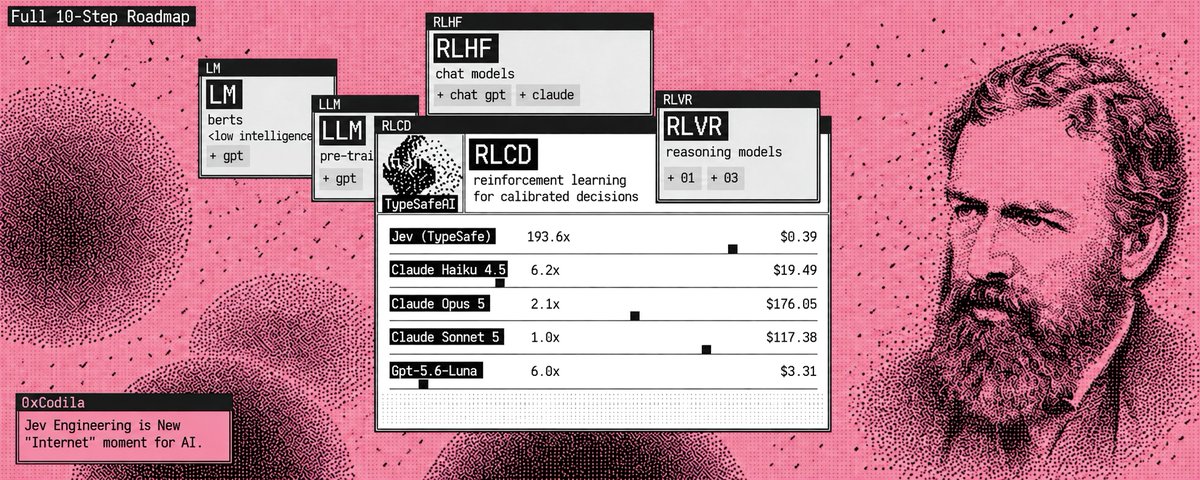
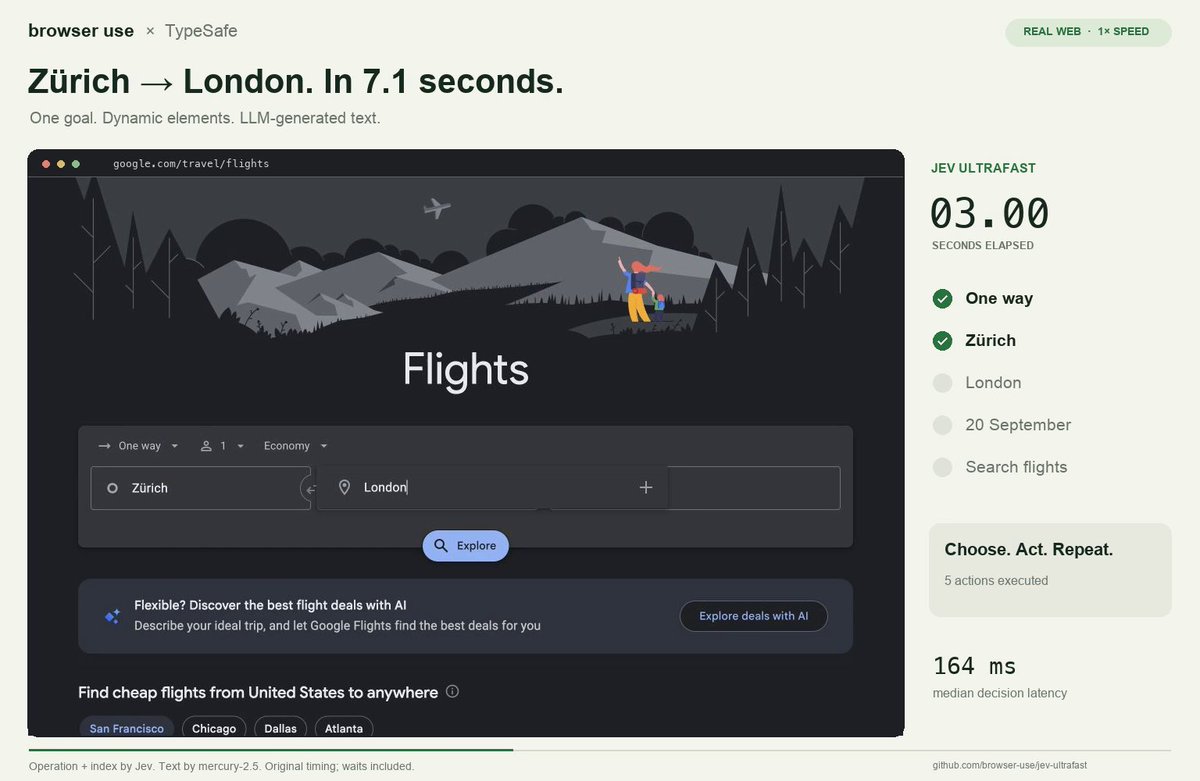
"Browser Use put Jev inside an agent that found flights in 7 seconds for $0.0039"
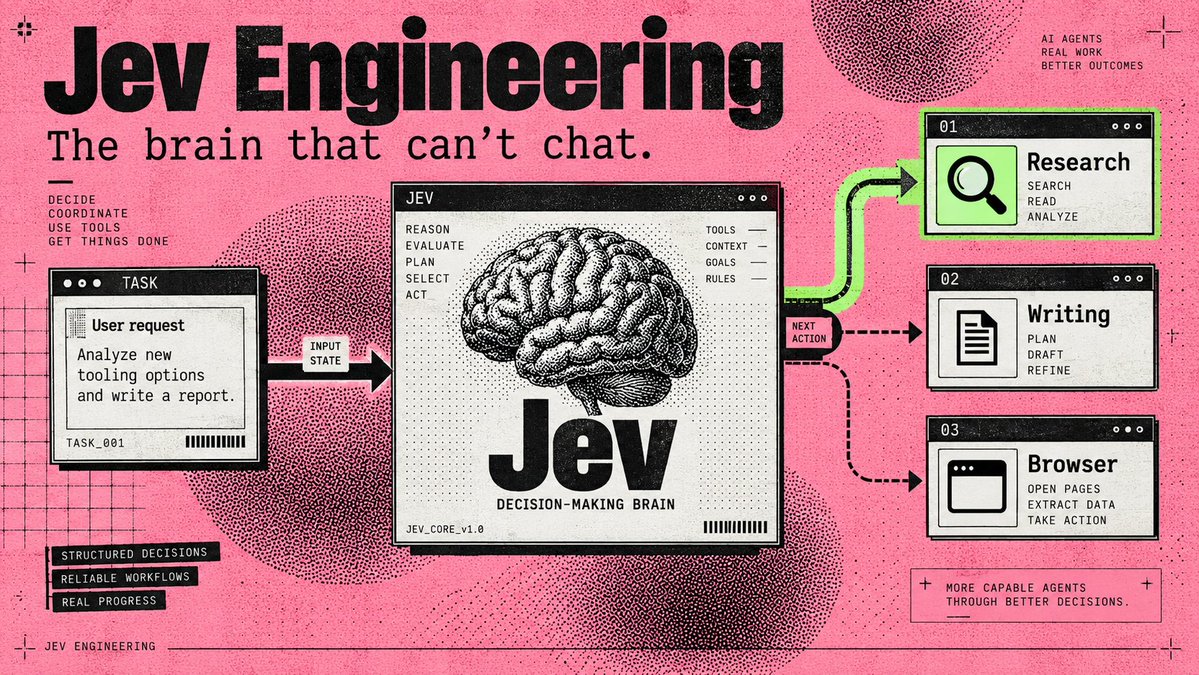
That gets interesting when you look at what your Chief of Staff does all day: choose a worker, check a result, decide whether to continue. Each fork can become another model call before any useful work happens
Jev gives those decisions their own model
Your writing agent keeps writing. Your research agent keeps researching. The small judgments between them become a separate component you can inspect, price, and change.
Start with a standalone task router: enter a job, let Jev choose its destination, and save the handoff on your computer.
Then run Browser Use's complete browser agent. (The first needs one API key; the browser project needs two)
01. Find the part of your agent Jev can take over
Jev is TypeSafe AI's System One model: you provide information and predefined questions, it returns typed answers with probabilities. It cannot write your briefing, generate code, or explain its reasoning in prose. TypeSafe's launch essay
Start with a job like this:
Research three new AI-agent tools and draft tomorrow's briefing. Save the draft for my review.
That job contains several decisions: Do we have enough sources? Which worker goes next? Is the draft ready for review?
Those are candidates for Jev. Fetching sources, writing paragraphs, and saving files still belong to your tools and generative models. An exact rule, such as stopping after ten actions, belongs in code.
For a GrokBot-style Chief of Staff, the saved handoff can feed an existing worker. Connecting that worker comes after the standalone setup below; you can complete the first run without an agent team.

02. Give it one decision in the Playground
Use this as your state:
Goal: Compare three AI-agent tools in a morning briefing.
Completed work: No sources collected yet.
Available workers: Researcher, Writer.
Constraint: Save drafts for review. Do not publish.
Add a Choice question: "Which worker should act next?"
Define three options: research for missing evidence, write for drafting from sufficient evidence, and review for unclear requests or completed work.
Run it. Then replace the completed-work field with actual research notes and compare the decision. This is the basic interaction described in the official Quickstart.
03. Connect the API once
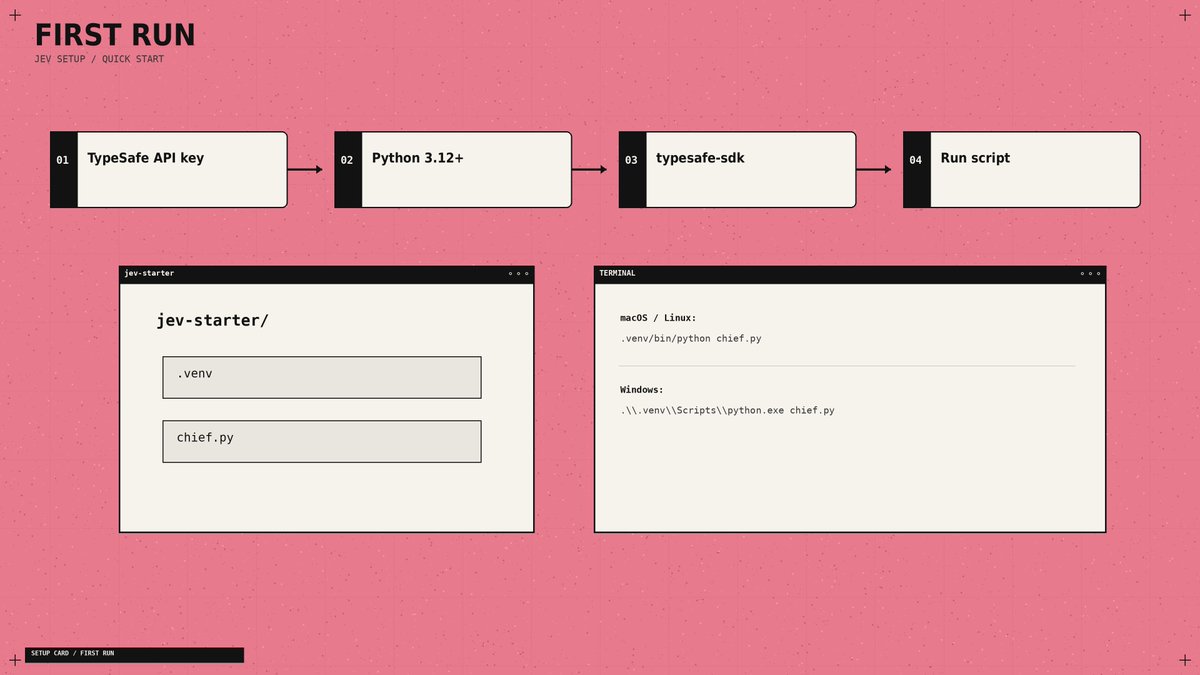
You need a TypeSafe account with API access enabled and a key from key settings. API calls are billed to that account.
Install Python 3.12 or newer, then open Terminal on macOS/Linux or PowerShell on Windows.
macOS / Linux:
mkdir jev-starter
cd jev-starter
python3 -m venv .venv
.venv/bin/python -m pip install --upgrade typesafe-sdk
Windows PowerShell:
mkdir jev-starter
cd jev-starter
py -3 -m venv .venv
.\.venv\Scripts\python.exe -m pip install --upgrade typesafe-sdk
These commands create an isolated environment and install the official Python SDK. Keep your key outside source files; the script below asks for it privately.
Using a coding agent? With Node.js/npm installed, add TypeSafe's official skill:
npx skills add typesafe-ai/skills --skill typesafe-aiSelect your supported agent when prompted. The skill gives it integration instructions; Jev itself runs through the API. Official repository

04. Turn a request into a saved handoff
Create chief.py inside jev-starter, outside .venv. Use a plain-text editor and save the exact filename, not chief.py.txt.
import json
import os
from getpass import getpass
from pathlib import Path
from uuid import uuid4
from typesafe_sdk import Choice, TypeSafeAPIError, TypeSafeClient

if not os.environ.get("TYPESAFE_API_KEY"):
    os.environ["TYPESAFE_API_KEY"] = getpass("TypeSafe API key: ").strip()

goal = input("Goal: ").strip()
if not goal:
    raise SystemExit("Enter a goal.")
notes = input("Completed work: ").strip() or "Nothing yet."
state = {"goal": goal, "completed_work": notes}

try:
    with TypeSafeClient(model="jev-1.13.0") as client:
        result = client.system_one(
            state=state,
            questions={
                "next_worker": Choice(
                    instructions="Choose the next step for a research briefing.",
                    criteria={
                        "research": "Collect evidence still needed for the goal.",
                        "write": "Draft the briefing from sufficient evidence.",
                        "review": "Goal unclear, outside scope, or work complete.",
                    },
                )
            },
        )
except TypeSafeAPIError as error:
    raise SystemExit(f"API error {error.status}; see Step 8.")

answer = result.choices["next_worker"]
destination = "review"
if answer.choice in {"research", "write"} and answer.confidence >= 0.85:
    destination = answer.choice

folder = Path(__file__).resolve().parent / "queue" / destination
folder.mkdir(parents=True, exist_ok=True)
job = folder / f"{uuid4().hex}.json"
payload = dict(state, choice=answer.choice, confidence=answer.confidence,
               destination=destination, status="queued")
job.write_text(json.dumps(payload, indent=2, ensure_ascii=False), encoding="utf-8")
print("Saved handoff:", job)
Run on macOS/Linux:
.venv/bin/python chief.pyRun on Windows:
.\.venv\Scripts\python.exe chief.pyPaste your API key when asked - the terminal hides it.
For Goal, enter Compare three AI-agent tools for tomorrow's briefing. For Completed work, enter No sources collected yet.
Your result: a Saved handoff: message with a full file path. Open that JSON file: it contains your request, progress, Jev's choice, confidence, and destination.
Each run creates a new file under queue/research, queue/write, or queue/review. These are local task queues; a saved job waits for a worker to consume it
The API call and error handling follow the SDK usage guide. I set the initial review threshold to 0.85 - adjust it using labeled examples from your workflow. Confidence is not an accuracy percentage. Confidence guidance
05. Ask questions that lead somewhere
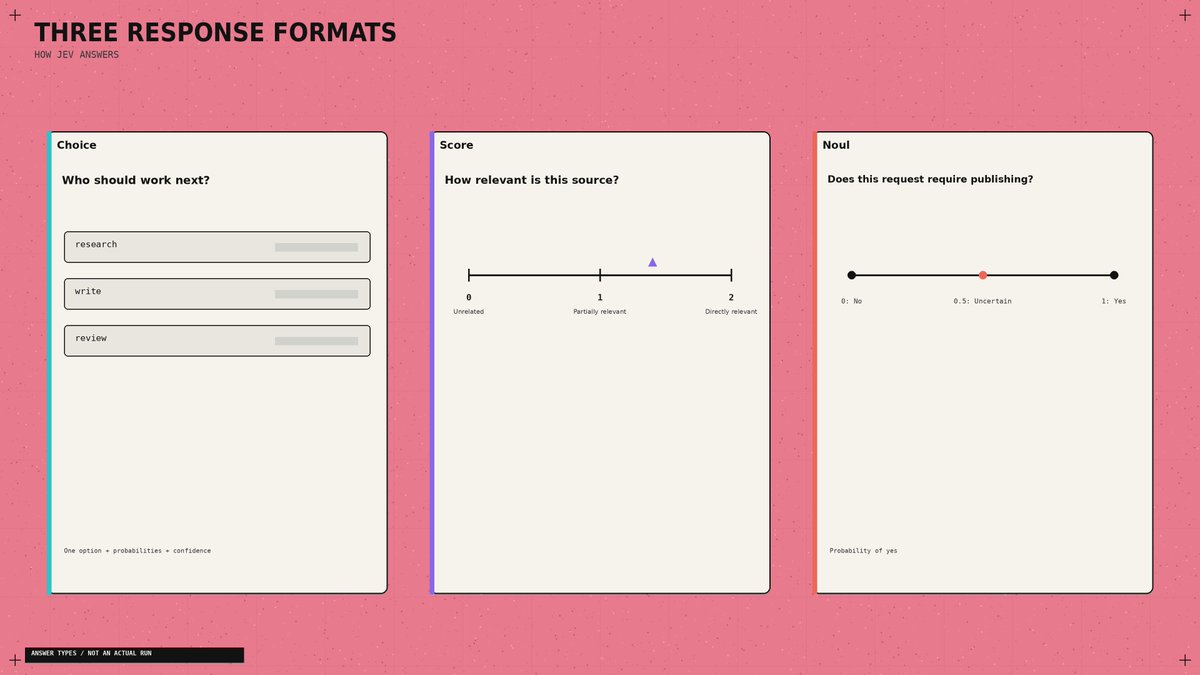
Three answer types cover different jobs:
Jev gives you three question types, each built for a different kind of decision:
Define a relevance Score with three descriptions: unrelated, partially relevant, directly addresses the question. Its numeric result runs from 0 to 2, including fractions. A Noul near 0.5 means uncertainty about yes/no. Score · Noul
A useful detail: Jev does not see your question ID. Naming a field safe_to_publish contributes no instructions. Put the actual requirement in the question and describe each option clearly. Choice documentation
Also supply evidence. "The researcher finished" tells Jev less than the sources, findings, and remaining gaps. Keep those fields separate from the original request. State documentation

06. Steal Browser Use's best idea: rebuild the menu
A browser's available actions change after every click. Browser Use builds a fresh list of observed controls and lets Jev choose from that list. A small LLM generates text when an input field needs filling. Decision implementation
Apply that design to your Chief of Staff. Build the choices from workers that exist and are available now. Include the current source IDs when selecting research material. Refresh the options after a tool changes the state.
For large candidate lists, filter obvious mismatches in code, score the remaining items, then choose among the shortlist. Choice supports up to 255 options; TypeSafe describes this scoring-then-selection approach in its launch examples

07. Stop paying for questions to wait on each other
Your dispatcher may need a worker, an urgency score, and an approval check.
If all three can inspect the same state, send them together.
TypeSafe supports parallel questions and speculative branches: ask about possible next actions, then use only the answer relevant to the selected branch.
Questions cannot read one another's answers. If a decision needs a fresh search result, perform the search first. Parallel evaluation pattern
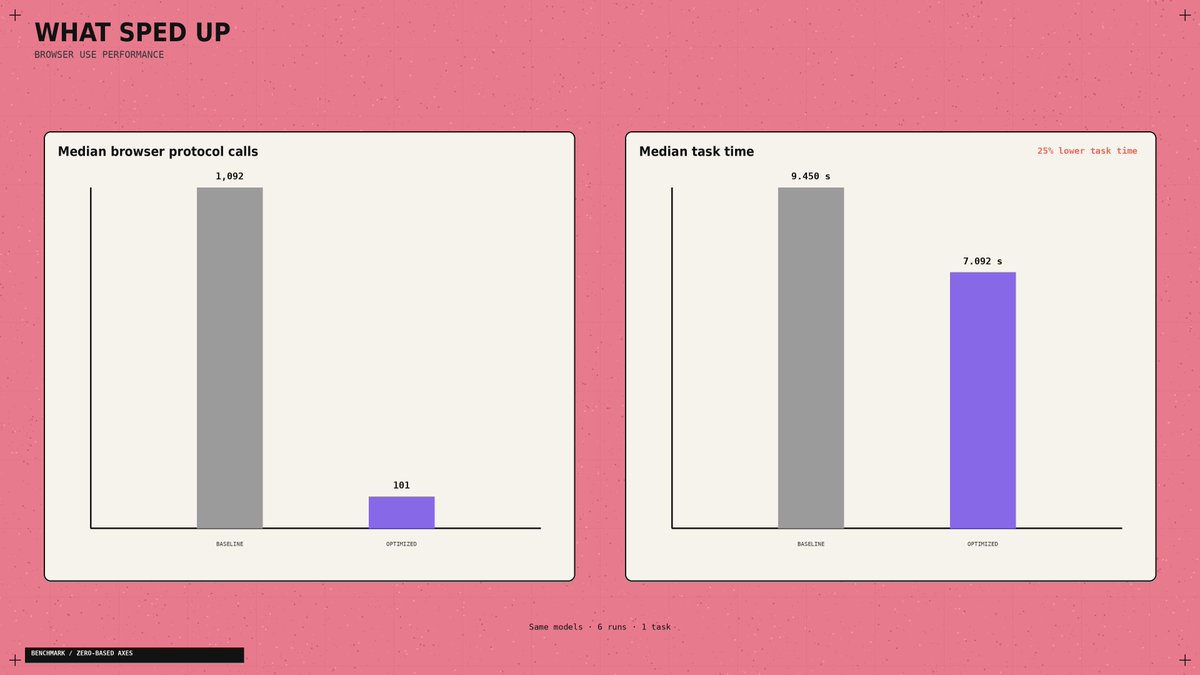
The browser example exposes another bottleneck. Its optimized runtime reduced median browser protocol calls from 1,092 to 101, while median task time fell 25% across three matched pairs. Both versions used the same models.
The changes included collecting the page state in one read and avoiding fresh predictions for irrelevant animations. Inspect repeated tool calls before paying for a faster model. Performance report
08. Give overnight work somewhere to stop
For a morning briefing, I'd allow source collection and draft creation, then stop at review. Publishing should require a separate permission check.
The application also needs an action limit, a spending limit, and saved progress.
After an interruption, it should inspect the last completed action before repeating anything. A confident answer cannot prove that a file was saved or a message was sent.
Browser Use independently checks the outcome after Jev selects DONE. Borrow that separation for your own completion checks. Agent loop

Once the local router works, use this brief to connect your existing agents:
Read the TypeSafe skill and inspect my worker interfaces. Connect chief.py's JSON queues to existing research and writing handlers. Prevent duplicate processing. Save progress after each action. Add call and spending limits, review on uncertainty, and a draft-exists completion check. Keep publishing behind approval. Identify missing connectors explicitly.
If the starter fails, use the error to choose the fix:
The SDK supplies retries; the script stops if an API error remains. API reference
09. Know what the headline price actually buys
Jev 1.13 costs $0.042 per million input tokens, with no output-token charge. At 1,000 billed input tokens per decision, 10,000 decisions cost $0.42 for Jev inference. Pricing

The flight demo's reported $0.0039 fits its recorded 90,558 Jev input tokens plus the text helper's reported charge.
Browser costs sit outside that calculation. Its roughly seven-second clock starts after the initial page observation and excludes fresh post-run verification
- So it finds flight results; it does not book tickets. Run measurements
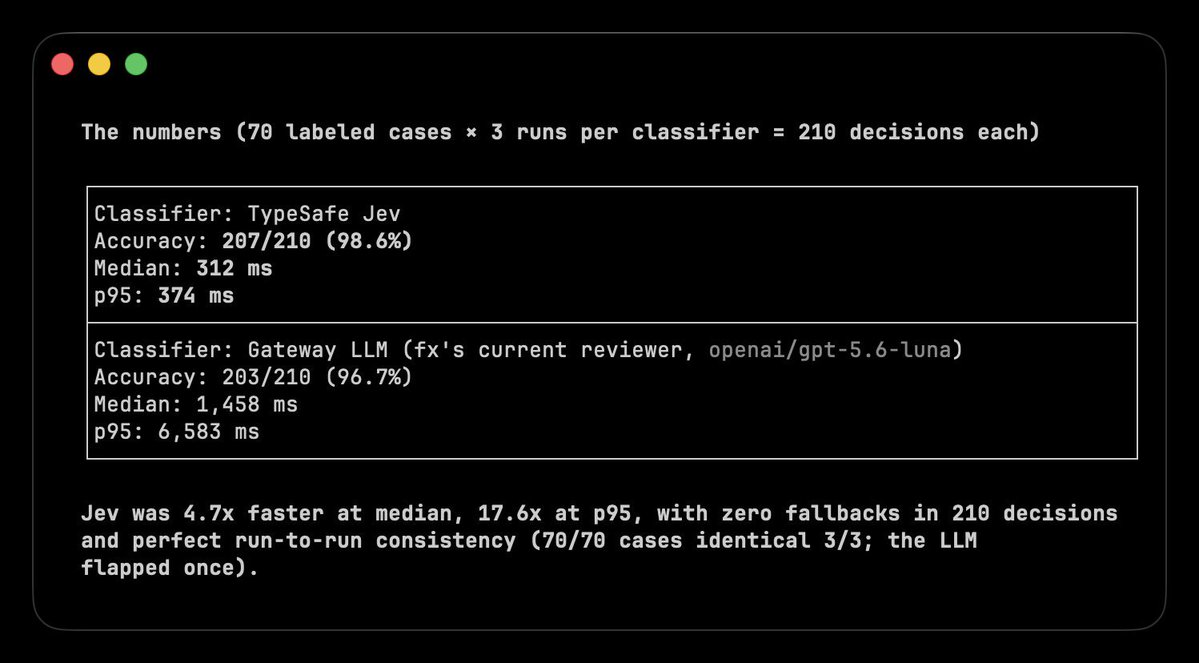
For a different workload, Vercel's fx team reported roughly 5-18x faster safety classification than GPT-5.6-luna, alongside improved accuracy.
That comparison concerns the classifier, not the duration of an entire agent run. Original benchmark
Track the bill per completed task. A cheap decision that sends a worker down the wrong branch can cost more than the decision itself.
10. Examples of Use
After the basic setup, Jev can already read the state of a task and choose between predefined options. Now you only need to decide which repeated decision to automate.
1. Control a Browser
Browser Use used Jev to select the next action and the correct page element. The agent found flights in 7 seconds for $0.0039.
How to repeat it: run the official project, add your TypeSafe and OpenRouter keys, then give the agent a website and a goal. Jev selects the action and target, while the browser executes the decision.
2. Classify Research
Hassan used Jev to classify 1,018 AI research papers. The entire classification cost $0.08, with 256ms median end-to-end latency per paper
How to repeat it: send the title and summary of each paper to Jev, then define your topics as Choice options. Save the selected category and send the strongest papers to your writing agent.
3. Triage Your Inbox
Riley Brown demonstrated how Jev can classify incoming emails and decide what should happen next.
How to repeat it: pass each email as the state, then add reply, research, wait, and review as Choice options. Connect each answer to the corresponding folder or email agent.
4. Route Tasks Between Models
LangChain uses Jev to choose between cheaper and more capable models based on the task

How to repeat it: connect several models, describe what each one is best at, and send the incoming request to Jev. Route simple tasks to a cheaper model and complex tasks to a reasoning model.
And other cases:
The shift
An LLM creates the work → Jev decides what happens next.
Jev is not another chatbot
It is a fast decision layer that reads the current state of your system and chooses between the options you define
And the real alpha is not the 7-second flight demo or the $0.08 paper classification
The real alpha is realizing how many expensive LLM calls inside your agents never needed generation:
That split changes the entire agent stack
You now have the setup, the working decision router, and four real ways to deploy it. Start with one repeated decision. Measure it. Then replace the next one.
Most builders will keep spending frontier-model tokens on every yes, no, route, and score
The few who separate thinking from deciding will build faster agents at a fraction of the cost.
Bookmark this playbook before your next agent → @0xCodila
