T3 Code: build ai agent teams with all frontier models (Full-Course)

Most people running AI agents have the same desktop. Claude Code in one terminal. Codex in another. A Gemini tab behind them. Grok on the phone. And one human in the middle, copy-pasting context between windows.
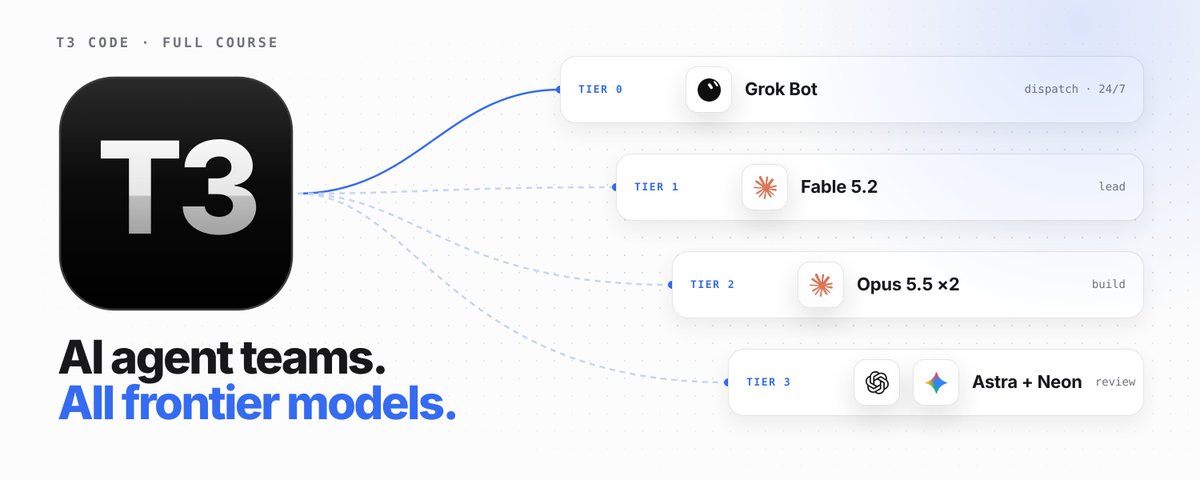
That is not a team. That is four tabs and a very tired router.
Between November 9 and 18, three frontier models shipped. @theo , who builds T3 Code, didn't pick a winner. He hired all of them:
This guide is that post, turned into a full build.
Plus one addition Theo's post doesn't have: Grok Bot as the dispatcher that never sleeps, feeding work into the team while you are offline.
More AI alpha on my Substack: https://substack.com/@0xmovez
Bookmark this. Steps 03 and 04 you will reopen every new project.

T3 Code is not a model. It is the control plane.
A small server on your machine runs each vendor's own agent (Claude Code, Codex, Antigravity, Grok Build and more) and gives all of them shared threads, Git worktrees, permissions, a phone app, an MCP server, and a way to hand work to each other.
The 6 steps:
The team, before any command
Decide the jobs first. Roles below come from Theo's post, from developers who publish their setups, and from what each vendor says its model is for.

01. Install - T3 Code plus five agents in one sitting
T3 Code runs where your code and your agent logins live.
Your phone and browser are just windows into that machine. Plan 20 minutes for this whole step.
brew install --cask t3-code
# Windows
winget install T3Tools.T3Code
# macOS / Linux, command line (installs `t3`, then run `t3`)
curl -fsSL https://t3.codes/install.sh | sh
# Windows PowerShell, command line
irm https://t3.codes/install.ps1 | iex
# Try it once without installing
npx t3@latest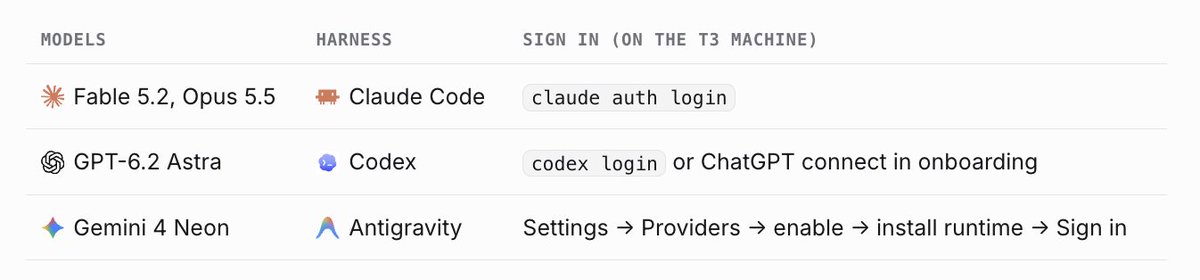
Three details that save an hour later:


A developer who documented a two-agent T3 setup on dev.to had one rule: verify each checkpoint on its own, and run a reply test before any file edits.
Open one thread per model and send:
Reply with exactly: "ok from <your model name>".
Do not read, run or edit anything.
Four threads in the sidebar, four provider icons, four "ok" replies.
The model picker in the composer shows the model by name, like the "Opus 5.5 Medium" chip below.

02. Configure - defaults, fallbacks, worktrees, permissions
This is the step that turns a chat app into a team.
Harry Smaje runs a dozen-plus threads a day from one MacBook and published every setting he uses. Here is that playbook adapted to our five.

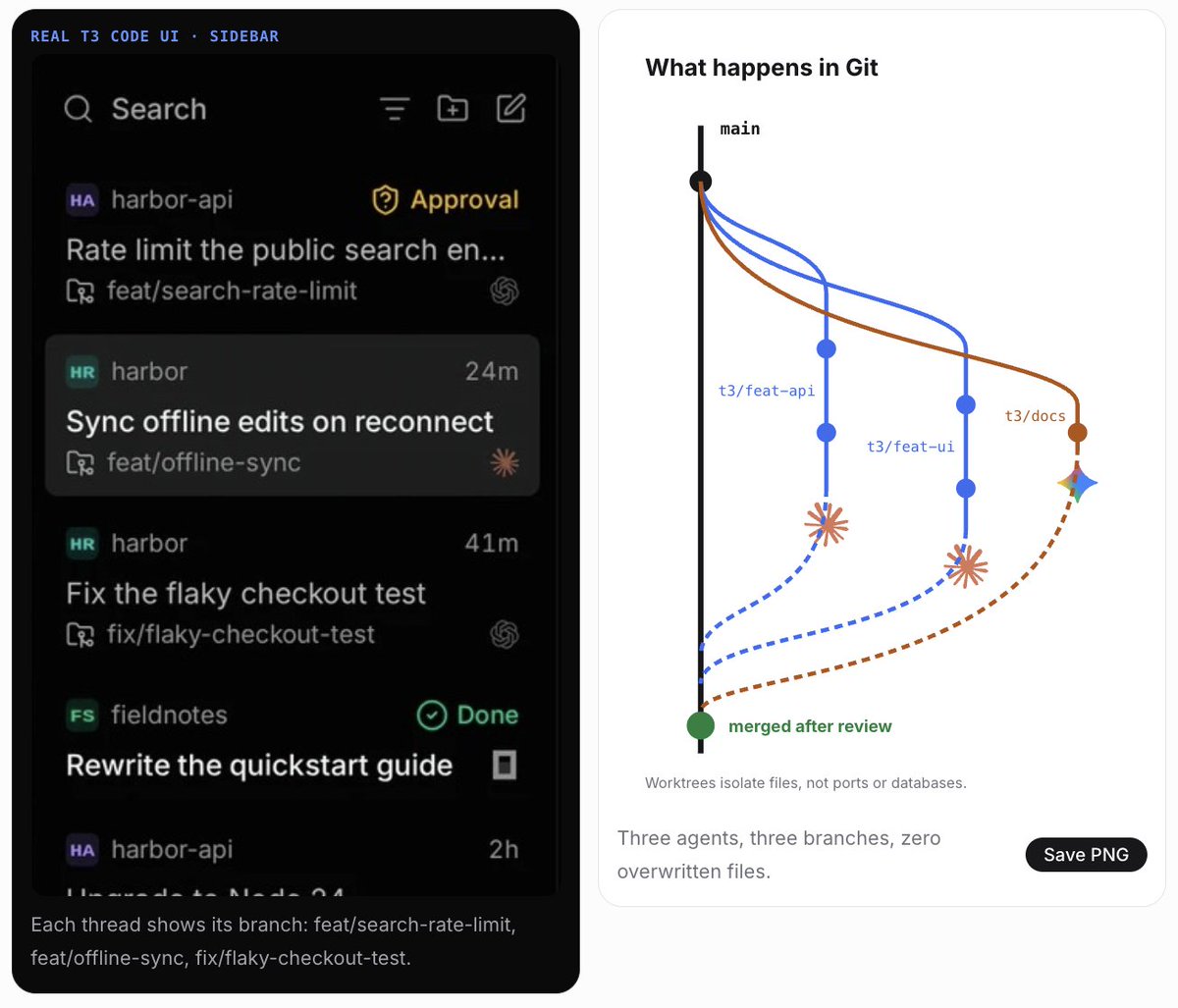
Flavio Copes' rule from his T3 deep dive: one writer on the main checkout, worktrees for truly independent parallel tasks.
Here is what that looks like in practice: each thread is pinned to its own branch in the sidebar.
T3 Code has four modes. Pick one per role, not per mood:

Tailkits' guide notes new threads default to Full access. Lower it before you point agents at anything valuable.
On Antigravity, Auto appears only if your sign-in provides it; otherwise the thread runs Supervised. Grok Build offers no Auto-accept edits.
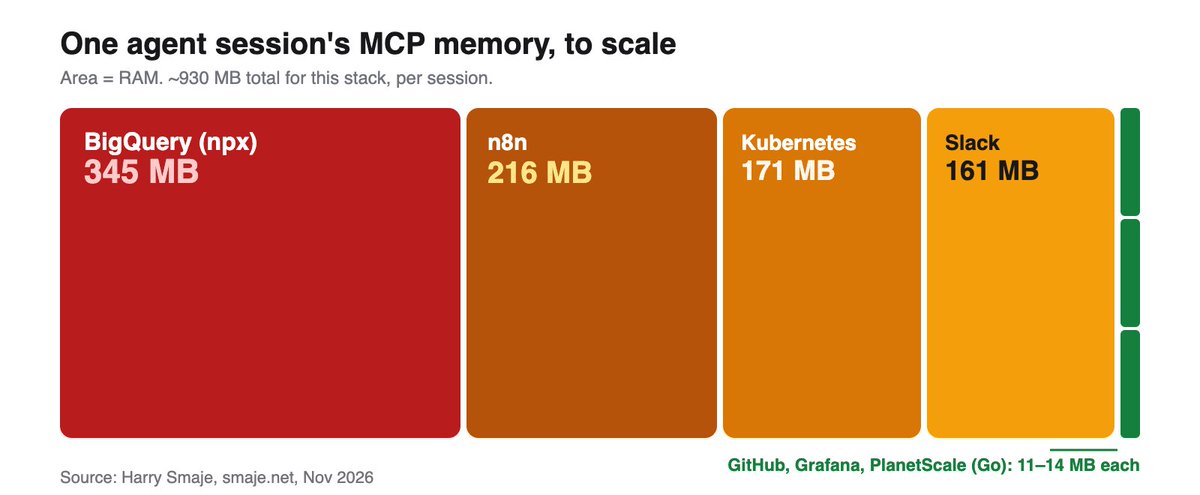
Every parallel agent loads its own copy of every MCP server.
Smaje ran 19 Claude sessions on an M4 Pro with 24 GB and hit 371 MCP processes and 11 GB of swap. This is what one session's MCP stack weighed:
03. Hire - the team charter and role prompts
A child agent starts with your prompt and nothing else. It does not see the parent's history.
GILD found this out running research agents in T3 Code and wrote the rule down: write the child's prompt as a complete brief.
So the team gets two things: a charter file every agent reads, and a brief format every handoff uses.
Claude Code, Codex, Antigravity and Grok Build all read project instruction files (Grok Build lists AGENTS.md support on x.ai/cli).
Put the team rules in one file and reference it from each:
# TEAM.md · read this before any task

## Roles
- Lead (Fable 5.2): writes SPEC.md, splits work, takes the hardest slice.
- Builders (Opus 5.5): one slice each, one worktree each.
- Playtester (GPT-6.2 Astra): read-only. Reports bugs, never fixes them.
- Copywriter (Gemini 4 Neon): docs/, README.md, CHANGELOG.md, src/i18n/ only.
- Dispatcher (Grok Bot): files tasks. Never merges, never deploys.

## Rules
- Every handoff uses the BRIEF format below.
- A task is done only when its DONE WHEN check passes.
- Max 3 review rounds. Max 4 agent-to-agent handoffs without a human.
- Never touch .env*, migrations, or CI config without asking the human.

## BRIEF format
BRIEF FOR / ROLE / GOAL / CONTEXT / DONE WHEN / DO NOT / RETURNBRIEF FOR: @<model>
ROLE: <lead | builder | playtester | copywriter>
GOAL: <the outcome in one sentence>
CONTEXT: <files, decisions made, link to SPEC.md>
DONE WHEN: <a test passes, a command returns 0, a checklist is true>
DO NOT: <files to leave alone, commands never to run>
RETURN: <exactly what to report back>You are the tech lead. Read TEAM.md first. Do not write feature code yet.
Task: <feature>
Acceptance test: <how I will know it works>
1. Read the codebase. Write SPEC.md: goal, files touched, risks, test plan.
2. Stop and wait for my approval of SPEC.md.
3. Split the work into slices that touch different files.
4. For each slice, use delegate_task to start a builder on @opus in its own
worktree, with a full BRIEF.
5. Take the hardest slice yourself.
6. When builders finish, delegate a read-only review to @astra with the diff.
7. Fix what it finds. Stop after 3 review rounds and report.
8. Delegate README, CHANGELOG and UI copy to @neon last.
Report: slices, owners, test results, open risks.Why High and not max? Theo, on getting a lot done with Fable without hitting limits:
BRIEF FOR: @opus
ROLE:      builder
GOAL:      Add rate limiting to POST /api/upload: 60 requests/min per API key.
CONTEXT:   SPEC.md section 2. Use the Redis client in lib/redis.ts.
DONE WHEN: `npm test -- upload` passes and a new test covers the 429 path.
DO NOT:    touch /ui, change package.json, run migrations.
RETURN: files changed, test output, anything you were unsure about.BRIEF FOR: @astra
ROLE: playtester (read-only)
GOAL: Break this change. Find bugs a real user would hit.
CONTEXT: Task: <task>. Combined diff from the builders. SPEC.md.
DONE WHEN: you tried: empty input, huge input, two tabs at once, slow network,
unicode (e.g. "Piña"), expired auth, missing permissions.
DO NOT: edit or fix anything. Report only.
RETURN: numbered list. Each: repro steps, expected, actual, severity 1-3.BRIEF FOR: @neon
ROLE: copywriter
GOAL: Update README.md, CHANGELOG.md and UI strings for this feature.
CONTEXT: SPEC.md, the final diff. Tone: short sentences, no jargon, no hype.
DONE WHEN: every new user-facing string has copy, and the changelog entry
says what changed and why a user should care, in 3 lines or less.
DO NOT: touch anything outside docs/, README.md, CHANGELOG.md, src/i18n/.
RETURN: edited files and the changelog entry.04. Delegate - let the lead run a real feature
In T3 Code, one agent can start other agents on any provider or model. That tool is delegate_task, shipped with T3 Code's own MCP server:

Cmd/Ctrl+K → new thread → Claude → Fable 5.2, effort High, mode Supervised.
Paste Prompt 01 with your task. Theo's own quick-start for a new project is exactly this flow:
Type @ plus part of a model name in the composer, like @opus, @astra, @neon. It tells the agent which model to use when delegating, without changing the thread's own model. Join words for a specific provider: @opus:opencode.
On Claude, Codex and OpenCode 2.2.5+, /goal keeps the agent working across turns until it judges the goal met. The thread shows Goal and its progress.
Open Agents. Every child shows up as its own thread you can open beside the lead. Stop the lead and its children stop too.
A child's approvals come to you through the lead. When a turn finishes, it lands like this:

Start a message with /btw or /side. It opens a side chat that starts with everything the thread knows, while the thread keeps working.
/btw why did you split the upload work into two slices instead of one?
/btw which file is the riskiest change so far, and why?
05. Playtest & ship - cross-family review, PR from your phone
A reviewer from the same model family shares the builder's blind spots.
That is the whole reason Astra is on this team. The best public numbers come from GILD, who run Opus and Astra on each other's work inside T3 Code:

Two rules from the people running this:
Every thread has its branch, a diff against main, and one button for commit, push and PR:
npx t3 connect # pair the phone app with your machineTheo's bar for when to let agents merge, after the Fable 5.1 and Astra generation:
06. Go 24/7 - Grok Bot, schedules and webhooks
Everything so far starts when you sit down. Step 06 makes the team start without you.
Grok Bot is xAI's standing agent. It runs on its own cloud computer, signs into your existing tools and websites, works continuously, and messages back when it needs approval.
It shipped as a beta on August 11 and as Grok Bot 1.0 on November 11, with shared Team Bots in Slack and Teams.
Inside this team it is not a coder. It is the dispatcher: it watches the places work comes from, and files clean tasks into T3 Code.
T3 Code runs an MCP server for "outside agents". Per the docs, any agent that supports remote MCP servers over HTTP with OAuth can connect, and hosted agents must use the T3 Connect address.