How to Reverse Engineer Anything with Opus 5.5 ( Full-Course)

Most people who try to reverse-engineer a binary open it in a hex editor, scroll for twenty minutes, and quit.
They don't know which tool loads the file. They don't know which prompt pulls the logic out. They don't know how to turn a wall of assembly into something they can actually rebuild.
This 11-step course will turn Claude Opus 5.5 into an open-source anything machine.
Follow my Substack to get fresh AI alpha: movez.substack.com
Reverse engineering is not about cracking. It is about understanding a thing well enough to build your own.
On October 7, 2026 Amjad Masad, the CEO of Replit, posted a single line:
under it, a developer called @morluto replied with the receipt: a set of tools that let agents drive Hopper and Ghidra and go very far.
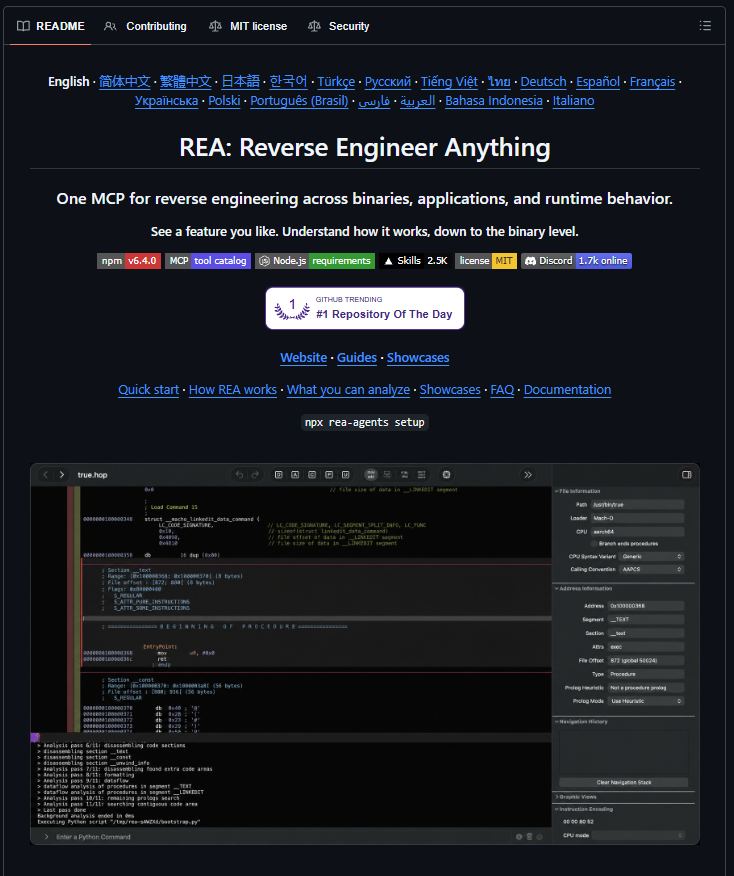
That project is REA, and it crossed 110,000 GitHub stars in days.
The claim is not hype. The same week, an open-source project called WordCraft shipped a clean-room rebuild of Microsoft & Adobe in pure Rust:

It was built by observing Word & Adobe behavior and reading public file-format specs, never its code.
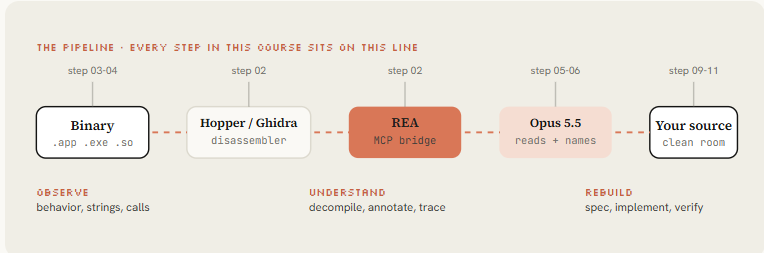
This course shows you the whole path from a sealed binary to a rebuild like that, with Opus 5.5 doing the reading.
01. The engine - how an agent reads a binary
Opus 5.5 cannot run a disassembler on its own. It reads text and writes text.
Reverse engineering with an agent works because a tool sits between the model and the binary: it loads the file into a real disassembly engine, exposes the results as callable functions, and lets the model ask questions.
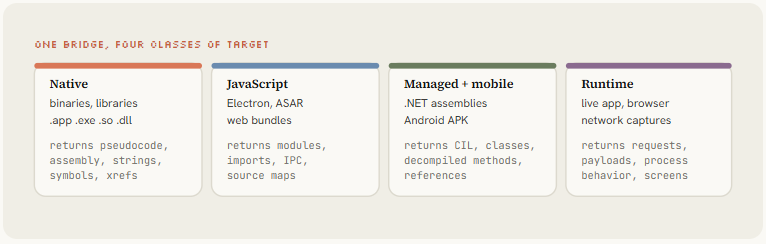
That tool is REA, and the engine underneath is Hopper, Ghidra or IDA.
The loop is simple and it repeats: the model asks REA to inspect the target, REA returns findings with the exact evidence behind them (addresses, bytes, pseudocode, call sites), and the model uses those findings to ask the next question or to write and test a reimplementation.
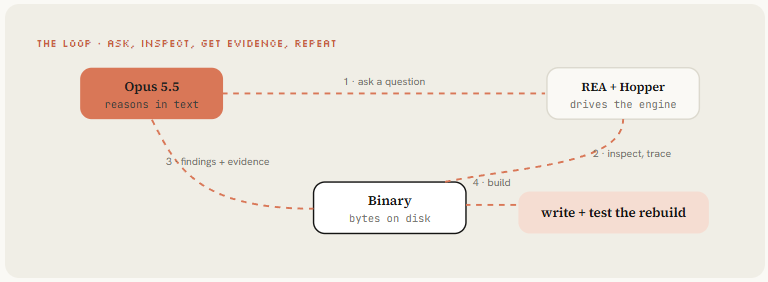
Everything runs locally on your machine. Nothing is uploaded except the findings the model needs to reason, and every conclusion is tagged as an observation, an inference, or an unknown.
#
02. The install - rea-agents plus one disassembler
Setup registers REA's MCP server with your agent and installs the matching workflow instructions.
One command does it, it shows you every change before writing anything, and it backs up what it touches.
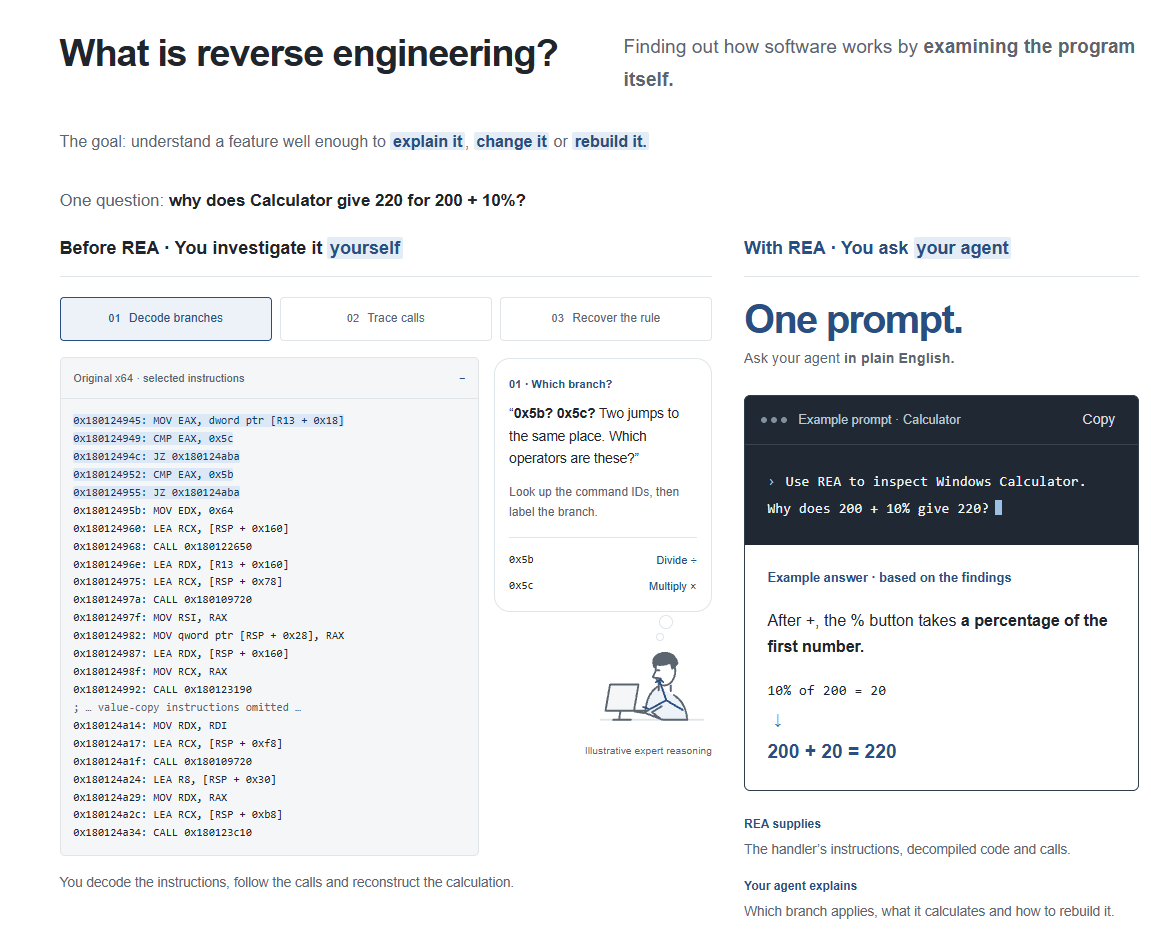
You bring your own disassembler: Hopper on macOS is the easiest path, Ghidra is free and cross-platform, IDA if you already own it.
# 1. Register REA with your agent (Claude Code, Codex, Cursor, Gemini CLI...)
npx rea-agents setup            # shows planned changes, asks before writing

# 2. A deep-analysis provider. Hopper is the smoothest on macOS;
#    setup can install it after approval. Ghidra and IDA are bring-your-own.
# 3. Install the rea CLI for terminal use and scripting
npm install --global rea-agents
rea --help

# 4. Restart your agent, then confirm the tools are live
claude
> /mcp
  rea: connected
    open_binary, binary_overview, analyze_function, decompile,
    list_procedures, search, xrefs, trace, inspect_artifact,
    analyze_javascript_application, inspect_managed_artifact ...
Requirements are modest: Node.js 22 or newer and npm. Native analysis needs one of the three engines; static JavaScript and .NET inspection need no engine at all. Keep REA current, because releases ship frequent fixes.
# Reverse-engineering house rules ( CLAUDE.MD )

## Authority
- Only analyze targets I own or am authorized to examine. State the basis once.
- Every claim is tagged: observation (saw it), inference (deduced it), or unknown.
- Cite the evidence: address, bytes, pseudocode or call site. No unsourced claims.

## Workflow
- Start with the smallest overview, not a full dump. Expand only on a concrete gap.
- Reuse the open session; never re-run an identical analysis.
- Separate static facts from runtime facts. Never imply execution from static reads.

## Reconstruction
- Build from BEHAVIOR and public specs, never from copied code or assets.
- Keep an obligation ledger: every recovered behavior needs a passing test before "done".
Opus 5.5 ships five effort levels: low, medium, high, xhigh and max. Use:
Effort is the single biggest quality knob in this whole course.
03. The router - 20 target types, one tool each
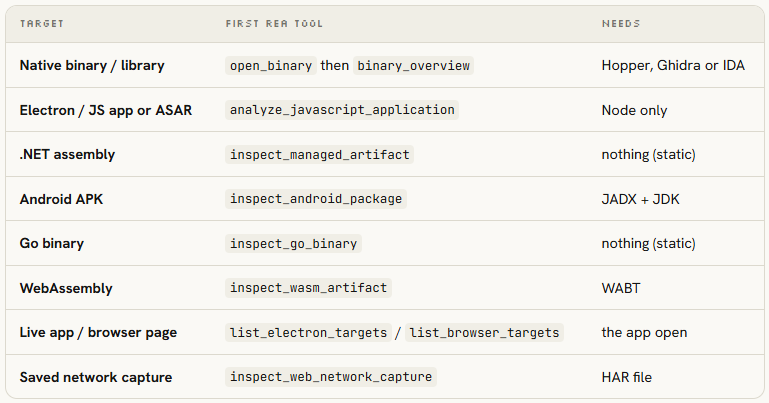
The first mistake beginners make is reaching for a disassembler when the target is an Electron app whose JavaScript is sitting right there.
REA routes the target to the right tool, and so should your first prompt. Name the file, name the feature, and let the agent pick the entry tool.
I want to understand how [FEATURE] works in [APP], which lives at [ABSOLUTE PATH].

First, tell me what kind of target this is (native, Electron/JS, .NET, Go, APK, WASM)
and pick the right REA tool to open it. Do not start deep analysis yet.

Then give me a one-paragraph map: what the app is built with, how big it is, and
where you would look first for [FEATURE]. Keep observations, inferences and unknowns
separate, and cite evidence for anything you claim.
Pointing REA at an Electron app returns modules, imports and IPC boundaries in seconds with no disassembler at all.
Pointing it at a native Mach-O or ELF opens a Hopper database and gives you the harder but deeper native path. Knowing which one you are in saves hours.
04. Recon - overview, strings and the call graph
Do not open any code yet. First ask REA for a map of the whole file. One command tells you what kind of machine it runs on, how many functions are inside, and all the readable text buried in it.
That text is the fastest clue you have: web addresses, error messages and feature names tell you what the app does before you read a single line of code.
rea.open_binary        { path: "/Applications/Target.app/Contents/MacOS/Target" }
rea.binary_overview    {}
  arch:        arm64
  functions:   1,284 identified
  segments:    __TEXT __DATA __LINKEDIT
  entry:       _main @ 0x1000051c0

rea.search             { query: "http" }  # strings + code refs
  0x10004a2c0  "https://api.target.app/v3/sync"
  0x10004a300  "Authorization: Bearer "
  0x10004a330  "offline cache miss, falling back"

rea.xrefs              { address: "0x100012ab0" }  # who calls this?
  147 references  ->  core config loader, called everywhere
REA also counts how many times each function gets called (that count is called its cross-references, or xrefs).

A function called 147 times is the heart of the app and deserves your best effort. One called twice is a small helper you can ignore until it matters. Start at the top of that list and work down.
05. Decompile - one function into pseudocode
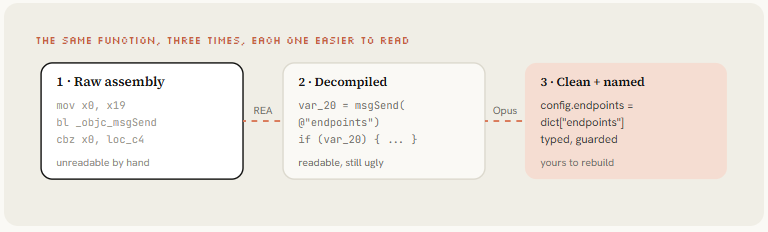
Now pick one of those busy functions and turn it into something you can read. A decompiler takes the raw machine instructions and rewrites them as code close to C.
It looks rough: names like var_28, tangled logic, casts everywhere. But you can read it, and readable is all Opus 5.5 needs.
Run it from the command line to save the result, or from inside a chat.
# Decompile one function by address, as JSON you can pipe or save
rea decompile /Applications/Target.app/.../Target 0x100012ab0 \
  --provider hopper --json > fn_config_loader.json

# Or search for a function by name and follow references
rea function /path/to/Target parseConfig --provider hopper --json
rea xrefs    /path/to/Target 0x100012ab0 --provider hopper --json
rea trace    /path/to/Target "sync" --provider hopper --json
// 0x100012ab0 xrefs: 147
void sub_100012ab0(void* arg0) {
void* var_20 = objc_msgSend(cls_NSJSONSerialization,
sel_JSONObjectWithData_options_error, arg0, 0x0, 0x0);
if (var_20 != 0x0) {
void* var_28 = objc_msgSend(var_20, sel_objectForKey, @"endpoints");
void* var_30 = objc_msgSend(var_20, sel_objectForKey, @"auth_mode");
void* var_38 = objc_msgSend(var_20, sel_objectForKey, @"retry_count");
objc_msgSend(g_sharedConfig, sel_setEndpoints, var_28);
objc_msgSend(g_sharedConfig, sel_setAuthMode, var_30);
objc_msgSend(g_sharedConfig, sel_setRetryCount,
objc_msgSend(var_38, sel_intValue));
}
}REA's own showcase follows a sound call in the old game DX-Ball down to the helper that decides left-right audio balance, then turns the half-finished pseudocode into C.
The result passes all 3,205 original test cases and reproduces every one of the 63 compiled bytes.
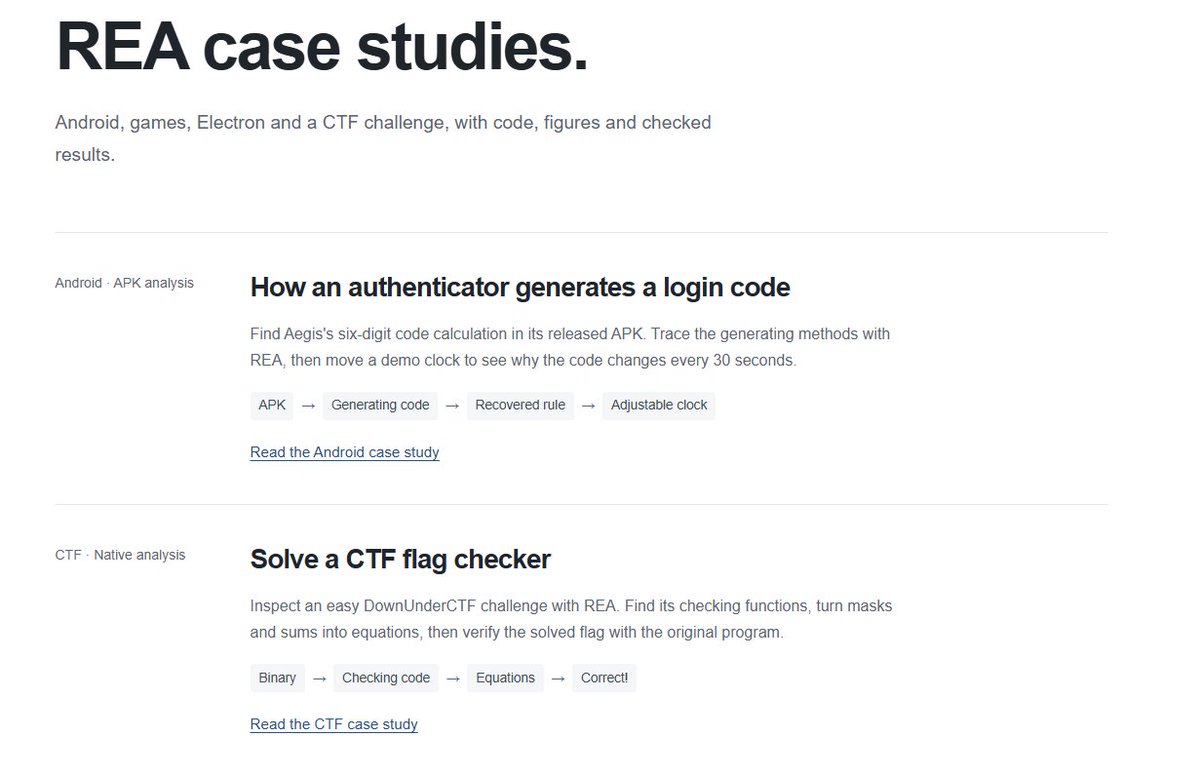
Full walk-through on rea.tools/showcase.
06. Annotate - make Opus name every variable
That rough code is only half the job. Now hand it to Opus 5.5 and ask it to explain and clean it up.
It renames the cryptic variables to real ones, says in a sentence what the function is for, spots the pattern it follows, and even flags bugs the original app left in.
Paste this prompt with the Claude:
Here is decompiled pseudocode from a function with 147 cross-references.

For this function:
1. Rename every variable to a meaningful name based on how it is used.
2. State its purpose in one sentence.
3. List the data structures it reads and writes.
4. Name the pattern (singleton, factory, state machine, observer...).
5. Rewrite it as clean, idiomatic Swift (or the language the calling
   conventions imply), with doc comments.
6. Flag any missing error handling, input validation or security check.

Think it through at xhigh effort before answering: reason about what each
value is before you commit to names. Mark anything you are unsure of.

[paste pseudocode]
Decompilation gives you what the code does. Opus 5.5 gives you why, and the names to rebuild it.
Not every target needs a disassembler. REA's Notion showcase finds the clipboard feature in the app's JavaScript, follows it through the Electron layers into the main process, and shows exactly how it builds the rich clipboard, a full trace with no assembly at all. See
07. Obfuscation - the Tigress benchmark
Some apps are built to resist exactly what you are doing. Their code is scrambled on purpose: the logic is shuffled, the text is encrypted, and fake branches are added to waste your time.
This is called obfuscation, and it is the one place even the best model struggles. Elastic Security Labs measured it, pointing Claude Opus at the Tigress scrambler across 20 tasks. Keep these numbers in mind.
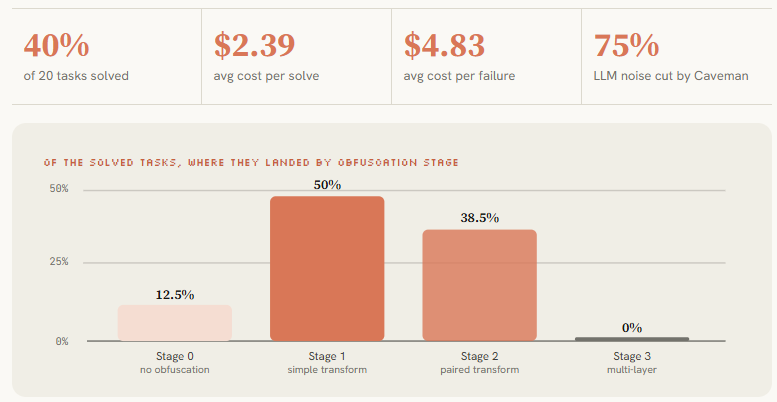
Two practical lessons sit in those numbers.
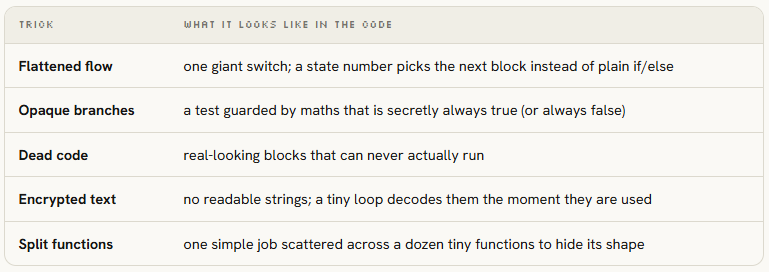
The five tricks you will actually meet, and what each looks like when you open the code:
This function looks obfuscated. Work at max effort.

1. Identify the techniques present (control-flow flattening, opaque predicates,
   dead code, string encryption, function splitting) and point to where each shows
   up in this specific code.
2. Resolve them: remove dead branches, evaluate opaque predicates, unflatten the
   dispatch, decrypt inline strings if the key is recoverable.
3. Show the clean function that remains.
4. Rate your confidence 1-10. Below 6, tell me exactly which parts are uncertain
   and what neighboring context would resolve them. Do not guess silently.

[paste obfuscated pseudocode]
08. The swarm - a controller running workers
A single chat cannot read 500 functions well. It forgets what it saw, calls the same thing by three different names, and starts contradicting itself.
The fix is a small team: one controller chat that hands out the work, and several worker chats that each take one function.
The controller holds the big picture and stitches the pieces back together.
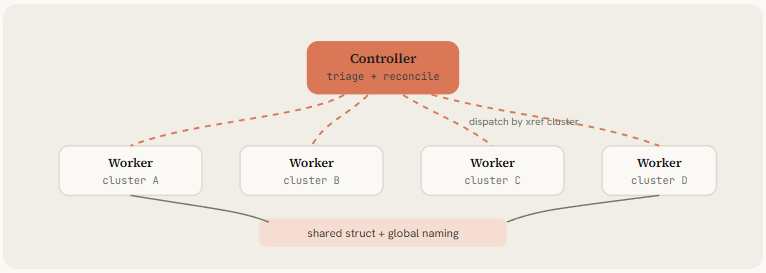
You do not build anything special for this, the two prompts below are the whole setup.
You are a reverse-engineering controller. The function map is in functions.json
(address, name, size, xref_count).

1. Cluster functions by call-graph proximity; order clusters by xref count.
2. Dispatch each cluster to a worker. Never analyze a function yourself.
3. Inject already-resolved structs into each worker's brief so names stay consistent.
4. When a worker returns confidence below 6, queue a second pass with context
   from its resolved neighbors.
5. Track cumulative token spend and report it after each cluster.
You are a worker. You get one decompiled function and the structs resolved so far.
Return exactly: address, purpose, confidence (1-10), structs_used, structs_new,
clean_source, flags. Reuse existing struct names; never invent a second name for
a struct the controller already gave you. One function only. Stop when done.09. Clean room - four rules that keep it legal
A clean-room rebuild means you copy what the app does, never the code inside it. Get this right and what you ship is fully yours. Get it wrong and you are carrying someone else's copyright.
Four rules keep you on the safe side, and the WordCraft team checks all four automatically on every build.
From the completed analysis, write a clean-room specification for a reimplementation.

Describe BEHAVIOR only. Include: every public interface, the data model, each
user-visible feature as a testable requirement, the file formats read and written
(by observed behavior and public spec), and the error-handling behavior.

Do NOT include: addresses or offsets, variable names from the decompile, assembly,
or anything copied from the original. A developer who never saw the binary must be
able to implement a compatible version from this document alone.

Output markdown with sections: Architecture, Data Model, Public API, File Formats,
Test Cases.
Working from a description is not just legal cover. It lets you make the right choices for your own language and needs, instead of inheriting decisions the original author made decades ago.

WordCraft is faster than Word in places precisely because it did not copy Word's insides.
10. Crafting Apps - twelve pro tools, one method
WordCraft is not a one-off. It is one app in a shelf of twelve from the ArtCraft team, each a clean-room rebuild of a tool you already pay for, all written from scratch in Rust and shipped free and open on GitHub.
Their own line is "Twelve apps. One craft", and the one craft is the method from step 9: watch the original, read the public specs, build a fresh version from behavior alone.

The payoff of that shared method is the same everywhere. No Electron: each app is native on macOS, Windows and Linux, and all but FilmCraft also run in a browser tab through WebAssembly.
And because every action inside them is a named command, all twelve are drivable by an AI agent straight away.
Every Craft app is built the same way, and the shape is worth copying. Each is stacked in layers, each layer using only the one beneath it, from basic measurements at the bottom to the on-screen window at the top.
Here are WordCraft's layers:
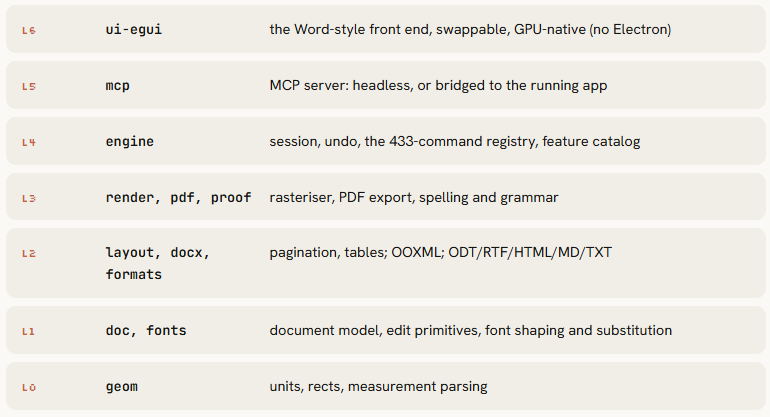
And every action is just a named command, so a person clicking, a keyboard shortcut, and an AI agent all trigger the exact same thing. That is what makes any of them drivable by an agent.
drive WordCraft over MCP

# Headless document automation
claude mcp add wordcraft -- wordcraft-cli mcp

# Or drive the running desktop app
wordcraft --control 7981 &
claude mcp add wordcraft-app -- wordcraft-cli mcp --connect 127.0.0.1:7981

# Tools: list_commands, execute, batch, type_text, select_text,
#        inspect_document, render_page, save_document (+ screenshot/click/key live)
> Open report.docx, make every heading 14pt bold, export to PDF
  ✓ select.all-headings -> 12 selected
  ✓ format.font-size 14 · format.bold
✓ export report.pdf (selectable text, bookmarks kept)11. Verify and ship - prove parity, expose MCP
You never had the original's source code, so you cannot compare it line by line.
You compare behavior instead: give both the original and your rebuild the same inputs and check they produce the same output.
Build a behavioral test harness comparing the original binary and my rebuild.

Generate 50 inputs: 30 normal, 10 edge (empty, max size, unicode, special chars),
10 error (malformed, missing fields, corrupt). Run each through both. Compare output
byte-for-byte where possible, semantically otherwise. Report match rate, a divergence
list, and a severity for each (cosmetic / behavioral / critical). Save to report.md.
This is also the most convincing proof you can show anyone (the RE slot at the very top of the article).
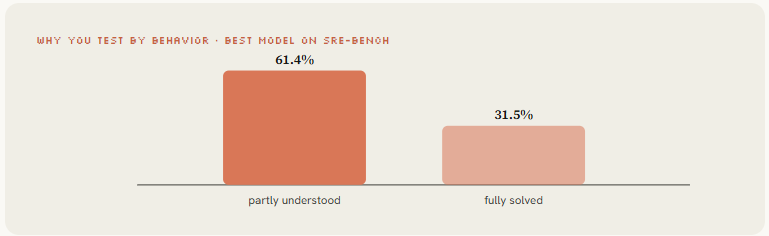
Then release your rebuild the same way REA and WordCraft did: as an MCP server, so the next person's agent can drive it just like you drove REA.
Give each function a clear name and description, wrap it in a simple command-line tool, and make it install in one line.
And test as you go, not at the end, because a mistake found after you have built three layers on top of it is far more expensive to fix.
Six mistakes that waste a weekend
Conclusion:
Install REA. Read the binary. Rebuild it as your own.
Route the target, map its surface, decompile the hot functions, let Opus 5.5 name everything, break the obfuscation worth breaking, scale it with a swarm, then spec it clean and ship the rebuild over MCP.
Eleven steps. One model. Zero copied code.
