How to build a $1M AI animation studio with Fable 5.2 + Picsart

Most people who try to make an AI series end up with one great clip and a stranger with the same name in the next one.

They render before they direct. They pay for 1080p before they've seen a draft. They describe the character from memory every single time.
This is the 13-step course that turns that mess into a studio that ships an episode a day
A video model has no memory. So the studio is the memory.
a single season of animated shorts used to need a writer, a character designer, storyboard artists, animators, a sound team and an editor...
that's how you end up with a $1M budget for something people watch on their phone
now it's one folder, Fable 5.2 as the director inside Claude Code, and Picsart as the studio floor, connected through its official MCP server
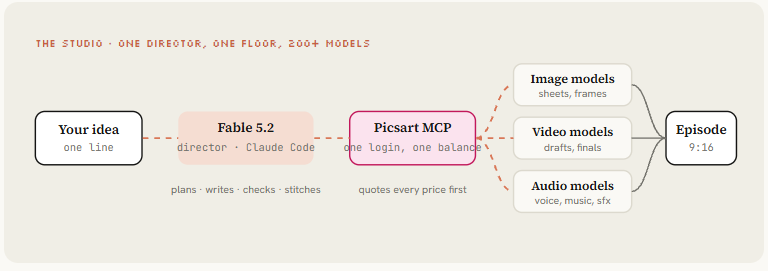
Fable plans, writes, checks and assembles. Picsart generates the frames, the motion, the voice, the music. you approve
01. The mistake - rendering before directing
A video model has no idea what happened in the last shot
it doesn't remember your character's face, the color of his jacket, or which side of the room the door was on... every generation starts from zero
so when people go straight from idea to video prompt, they get one great clip and then a stranger with the same name in the next one.
on one clip nobody notices. across an episode the audience feels it instantly. across a season it kills the series
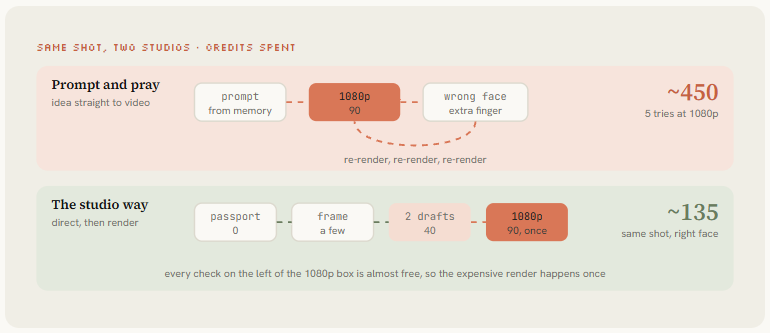
the fix is to invert the order: direct everything on paper and in still images first, lock it, and only then let a video model touch it
02. The fast track - let Picsart's Saga run the season
if you don't want to build anything, Picsart already ships the studio as agents.

The AI Agents Marketplace has agents that act like crew members: you hire one, give it a brief in plain english, and it comes back with the plan, the scenes and the finished cut
>Try Saga on Picsart: picsart.go.link/c6IrT
I want a 40-episode animated series, 60 seconds each, vertical 9:16.

Character: [one line, e.g. a tiny retired robot who runs a night bakery]
World: [one line, e.g. one cozy bakery at 3am, warm lamps, flour in the air]
Engine: [what goes wrong every episode, e.g. a customer orders something impossible]
Tone: [e.g. 3D animated, soft light, no dialogue, gentle humor]

Show me storyboard frames for episode 1 before generating any video.
03. The install - Picsart MCP in Claude Code, two minutes
Create PicsArt account first: picsart.go.link/c6IrT
Fable 5.2 runs the studio inside Claude Code.
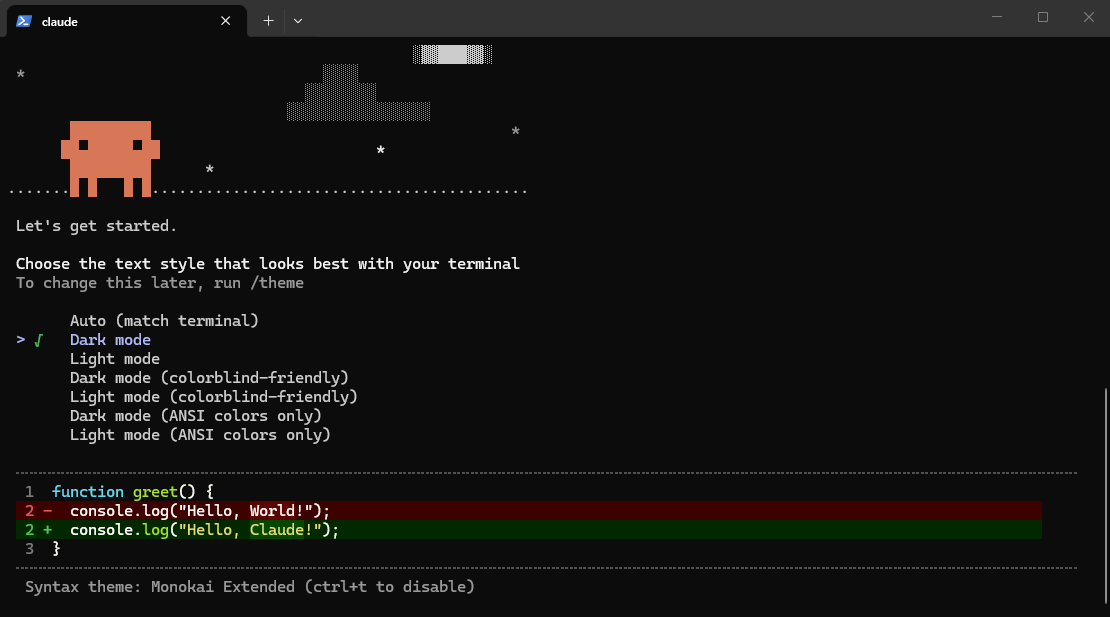
it fits this job because animation is mostly long planning, keeping hundreds of details consistent, and checking every frame against a spec
Picsart is the floor because one connection gives the director every model it needs: 84 video models, 66 image, 24 audio, one balance, and you swap a model by changing its id
claude mcp add --transport http picsart-gen-ai https://api.picsart.com/gen-ai/mcpthen open Claude Code, type /mcp, pick Picsart, hit Authenticate and sign in in the browser.

no API key, nothing to paste. switch the model to Fable 5.2 and run the first test:
show me my Picsart credits, then quote the price of one 1024x1024 image
on the cheapest image model. do not generate anything.
every paid generation gets quoted before a credit is spent. that one rule is what lets an agent run your studio without burning your balance
04. The crew - 7 subagents, one director
One giant chat that does everything forgets the passport by shot six. so the studio runs like a real one.
Fable 5.2 is the director in your main Claude Code session, and every job goes to a small subagent with one task, its own instructions
Subagents in Claude Code are plain markdown files in .claude/agents/.
The director hands work out, each agent returns a file, and you only step in at two gates: before money is spent and before anything is published
create 7 subagents in .claude/agents/ for an animation studio:
showrunner, designer, storyboarder, reviewer, renderer, editor, publisher.

for each file: a name, a one-line description of when to use it,
only the tools it needs, and a short system prompt with its one job,
the files it reads, the file it writes, and what it must never do.

hard rules:
- only designer, renderer and editor may use the Picsart MCP tools
- reviewer is read-only, it never edits or generates
- renderer quotes every price, never renders 1080p without my approval,
  stops at a daily budget of [N] credits
- publisher never posts without my approval
- every agent logs what it did in log.md---
name: renderer
description: Use to turn approved frames into video drafts and finals on Picsart.
---
You render video for the studio. You never write or change prompts.
Read: episodes/ep[N]/shots.md, frames/, cast/
Write: renders/ep[N]/, one line per attempt in log.md
1. Quote the total price for the batch first. Wait for approval.
2. Render 480p drafts only. Never a 1080p final until the director
says the draft is approved.
3. One retry per shot with ONE changed line. After 3 failed attempts,
stop and report back: the shot needs to be simplified.
4. Stop when today's spend reaches the budget in bible.md.
5. Never touch selects/. The editor owns it.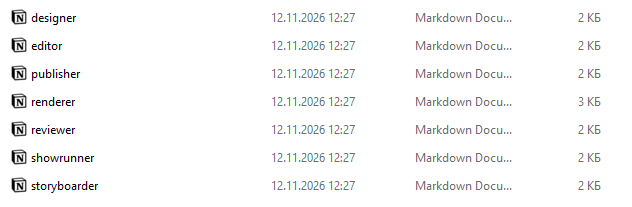
05. The studio - one folder, two laws
There's no production office. there's a directory, and it is the memory the models don't have
The scanner beam locks on its straight antenna, the loupe compares it with passport.md, and the take gets kicked off the belt. Only the takes that pass drop into selects/
studio/
  bible.md     the series: world, engine, tone, rules
  cast/        one passport per character (text + reference images)
  episodes/    one folder per episode: script, shot cards, prompts
  frames/      approved still frames only
  renders/     raw video attempts, nobody else looks here
  selects/     accepted takes only, the edit sees nothing else
  log.md       every generation: model, prompt version, cost, verdict
A reference image is never renamed or regenerated. every attempt gets logged. an unlogged good shot is a shot you can't make again
create the studio folder structure above in this directory.
seed bible.md, log.md and one empty character passport template.
write the two folder laws at the top of bible.md so every future
session reads them first.
06. The bible - a world with an engine
People don't share animation, they share a feeling.
A feeling needs a world that comes back every episode, and the line that matters most in the bible is the engine.
The thing that goes wrong every single episode and can never be solved
you are the showrunner of a new animated short series. interview me
one question at a time until you can fill every field below. then
write bible.md.

- logline (one sentence)
- world: one location, its light, its colors
- engine: what goes wrong every episode, and why it can never be solved
- tone: style, pacing, dialogue or no dialogue
- palette: dominant, secondary, accent, as a 60:30:10 split
- never: what can't appear (real faces, text on screen, gore)
- 5 episode ideas in one line each

if i can't give you 5 episode ideas, tell me the engine is too weak
and help me fix it before we continue.
this is what the interview gives you for the robot series. one page, and every agent reads it before it does anything:

07. The passport - one face in every shot
A description in words is not memory. describe the same character in two prompts and you get two different characters
one exhaustive text descriptor plus a reference sheet, copied word for word into every prompt he ever appears in
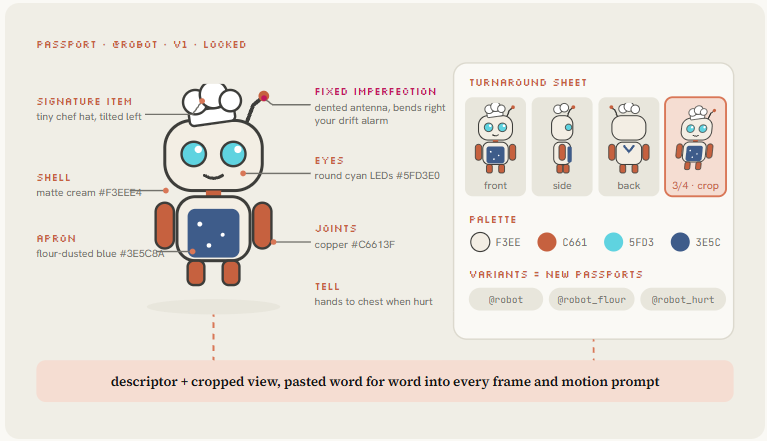
a robot covered in flour is a new asset with its own tag, because a variant described inline is a variant the model forgets
build the passport for [character name] using bible.md.

1. write an exhaustive descriptor: silhouette, proportions, materials,
   colors with hex codes, one signature item he's never without, one
   "tell" (a gesture he always does), and one small fixed imperfection
   that makes drift easy to spot.
2. write the image prompt for the first hero image, neutral grey
   background, full body, calm pose.
3. quote the cost on Picsart and wait for my yes.
Using the attached character as the identity reference, create a
horizontal character turnaround sheet: front view, left profile, back
view, right profile and one relaxed three-quarter pose. Same face,
proportions, materials and colors. Five full-body views on a light
grey background. No labels.here is the passport file the designer agent writes. this exact text goes into every prompt the robot appears in:
# @robot · passport v1 · LOCKED

descriptor (paste verbatim, never shorten):
3D animated small round robot baker, matte cream-white shell #F3EEE4,
copper joints #C6613F, two round cyan LED eyes #5FD3E0, tiny white
chef hat tilted left, flour-dusted blue apron #3E5C8A, short antenna
with a dent bent to the right.

signature item: the chef hat. never without it.
tell: presses both hands to his chest when something goes wrong.
fixed imperfection: the dented antenna. straight antenna = failed shot.

references:
  cast/robot/hero.png         (never regenerate)
  cast/robot/turnaround.png   (5 views)
  cast/robot/crop-34.png      (use this one in video calls)

variants (separate passports):
  @robot_flour  covered in flour after an explosion
  @robot_hurt   apron torn, one eye dimmed
Lock the sheet and never regenerate it. If motion looks wrong later, fix the motion prompt.
08. The shot cards - one action per shot
write episode [N] from bible.md as a script, then break it into shot cards.

for every shot:
- shot id, duration in whole seconds (4-10)
- characters in frame, by passport tag
- what the camera sees, in camera language: shot size, angle, lens, movement
- the ONE action that happens
- sound: ambience, effects, music on or off
- the emotional beat: setup, accident, reaction or twist

rules:
- hook in the first 3 seconds, readable with the sound off
- no text inside any frame, no crowds, no mirrors, no hands picking up small objects
- the last shot holds its final pose to the last frame
save to episodes/ep[N]/shots.md
the storyboarder writes this for episode 0. four lines of real direction per shot, nothing else:

and before a single frame is generated, ask Fable to turn shots.md into an animatic. it's plain HTML, it costs zero credits, and you see the pacing of the whole episode in one loop, like the one above:
read episodes/ep[N]/shots.md and bible.md.
build an animatic as one HTML file with an inline SVG, 1280x720:
- one storyboard panel per shot, drawn simply in the bible palette,
  each with its ONE action animated in CSS (loop it)
- the active panel highlighted, the others dimmed, in shot order
- a timeline under the panels with a playhead, shot lengths to scale
- under each panel: shot id, duration, action, camera
then record it to episodes/ep[N]/animatic.mp4 with playwright and
ffmpeg at 30 fps. no Picsart calls in this step.09. Frames first - then a fresh reviewer
every shot gets a still starting frame before it gets any motion. images are cheap to test, video is not.
the frame prompt only describes the starting picture: who, where, light, and a calm pose so the emotion can build during the motion
for every shot in episodes/ep[N]/shots.md, write the starting frame prompt:
- paste the full passport descriptor of every character in frame, verbatim
- the location from bible.md with its light and palette
- the calm starting pose
- end with: "no text, no extra characters, 9:16"

attach the cropped turnaround view as reference.
quote the total cost for all frames on Picsart, then wait for my yes.
then a second, fresh session checks every frame. a new chat has no memory of your work, which is the point:
it judges the frame, not your intentions
you are a reviewer. read only, change nothing. this frame is about
to cost real credits.

1. does the frame match the shot card? position, left and right,
   colors, counts, clothes.
2. does the character match the passport, including the fixed imperfection?
3. is the planned action physically possible from this pose?
4. where will the video model most likely break?
5. anything you can't judge from a still image, mark as UNCHECKED.

end with PASS or FAIL. if FAIL, list exactly what to change.
10. Motion - 480p draft, 1080p final
the scene lives in the frame. the motion prompt is only motion: image-to-video, one action, one camera move, timed in beats
Image-to-video, 8 seconds, from the attached still.
0-2s: he looks up from the oven, the camera stays still.
2-5s: slow push-in on his face, his eyes widen.
5-8s: he presses both hands to his chest and holds, the lamp flickers once.
Natural room sound, no music, the character does not speak.Image-to-video, 8 seconds, from the attached still.
0-2s: he looks up from the oven, the camera stays still.
2-5s: slow push-in on his face, his eyes widen.
5-8s: he presses both hands to his chest and holds, the lamp flickers once.
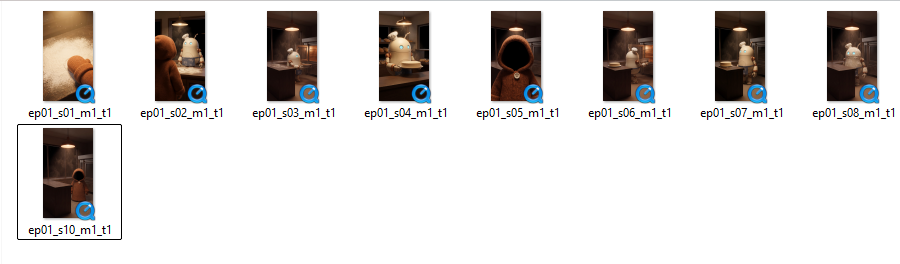
Natural room sound, no music, the character does not speak.on Seedance 2.5, Draft Mode previews at 480p and renders the approved version at 1080p with the same composition and motion VERIFY.
so you draft everything, approve one, and pay for full resolution once
#
11. Sound and stitch - plus the 16-frame check
Sound is half of animation, and almost everyone adds it last.
Picsart's audio models cover voice, music and effects from the same balance, so the director scores the episode without a second tool
for episode [N]:
1. generate one music bed matching the tone in bible.md, mixed well
   under the effects. no music under the first 3 seconds.
2. generate sound effects only where the picture implies one.
3. stitch the selects in shot order with ffmpeg, trim the first and
   last 0.3 seconds of every clip (generations drift at their edges),
   normalize loudness, export 9:16.
save to selects/ep[N]_final.mp4
pull 16 evenly spaced frames from selects/ep[N]_final.mp4.
check each one against the passports in cast/: finger counts,
melting or duplicated props, a character changing color or shape,
background jumps inside one shot. ignore changes at my own cuts.
report: frame number, what broke, which shot to regenerate.12. The money map - which stream pays first
The $1M in the title is the budget this pipeline replaces, not a promise of what lands in your bank.
what you actually get is a studio that costs credits, not salaries, and four ways to get paid that open in a specific order
Join Picsart Earn, the stream with no follower gate: picsart.go.link/c6IrT
The finals are most of the bill, which is exactly why nothing reaches a final without a passport, a reviewed frame and an approved draft.
13. The 30-day launch - 3 episodes a week, one number
the series that makes money is not the prettiest one. it's the one with a premise people want to see again, posted often enough that the platform learns who it's for
so before episode 1, let the showrunner pick the premise with you, from what is already working:
you are my showrunner. find me a premise for an animated short series
that can make money in its first 30 days.

1. search for animated or AI character shorts posted in the last 30 days
   that got 10x the views of their account's usual posts. list 10 with
   links, the views, and the format in one sentence (format, not topic).
2. propose 3 premises that use a proven format with my own character.
   for each: logline, engine, 5 episode ideas, and which kind of
   business could pay for a version of it (bakery, gym, app, clinic...).
3. recommend one and tell me why in two lines.
never copy a character, a look or a story. only the format.
one number decides everything: completion rate, the share of viewers who watch to the end.
compare each episode to your own average, never to someone else's best video
you are my publisher. here are this week's numbers per episode:
[paste: views, completion rate, saves, shares, comments]

1. rank the episodes by completion rate against our 4-week average.
2. what did the top 2 share in the first 3 seconds? be specific.
3. write 3 hook variations of that shape for next week's episodes.
4. flag any episode that looks too similar to the last 10 we posted.
5. tell me: keep, change or kill the premise. based on how many
   episodes? say it out loud if it's fewer than 8.
log the review in log.md.
the format that gets shared: the breakdown reel
every reel in this course uses one format, borrowed from the motion designers and VFX studios that blow up on Instagram:
the finished shot plays, then it comes apart into the layers that made it, each one labelled, and snaps back together. people rewatch it to see how the trick was done, and they send it to the one friend who makes things
for an AI studio it's the perfect format, because your layers are the product. the passport, the frames, the cheap drafts, the one final. the episode sells the character, the breakdown reel sells you as a studio
three rules make it feel like motion design and not a slideshow:
post one the day after each episode. this is the prompt that built every reel in this article:
you are my motion designer. read bible.md, cast/robot/passport.md
and episodes/ep[N]/shots.md.
build a 10 sec breakdown reel for episode [N] as one HTML page,
1920x1080, animated by ONE paused GSAP timeline (no css keyframes,
no timers), so every frame is a pure function of time.
structure it on a 120 BPM grid (one beat = 0.5 s):
  0.0-1.5   hook: max 6 words slam in on the beats, one highlighted
  1.5-3.0   reveal: the final shot of the episode, big and alive
  3.0-8.0   breakdown: the shot explodes into labelled 3D layers
            (passport.md, frame_01.png, draft_480p, final),
            something new every beat or two
  8.0-10.0  payoff: layers snap back, a sticker with the real cost
            from log.md. the last frame equals the first frame.
draw the character from the passport in SVG with separate parts
(head, eyes, arms, antenna) so he can blink, jump with squash and
stretch, and react. palette and type from the bible only.
no linear easing: anticipation before a move, overshoot after,
a 3-frame camera shake on every impact.
keep text 96 px from the sides and 80 px from top and bottom.
for a Reels/TikTok cut, ask for the same reel recomposed at 1080x1920.
show me a contact sheet of 18 frames first. after I say yes,
render with playwright (seek the timeline at 30 fps) and ffmpeg
to episodes/ep[N]/reel.mp4. no Picsart calls in this step.
Conclusion:
Direct on paper. Render once. Own the character.
Bible with an engine, one passport per face, one action per shot, frames before motion, drafts before finals.
Fourteen steps. One director, seven agents, one studio floor, two ways to get paid in the first month.


