Create animated cartoons with Claude Opus 5.5

*the skill file, the prompt, the lip sync code, the render command and the $26 bill*

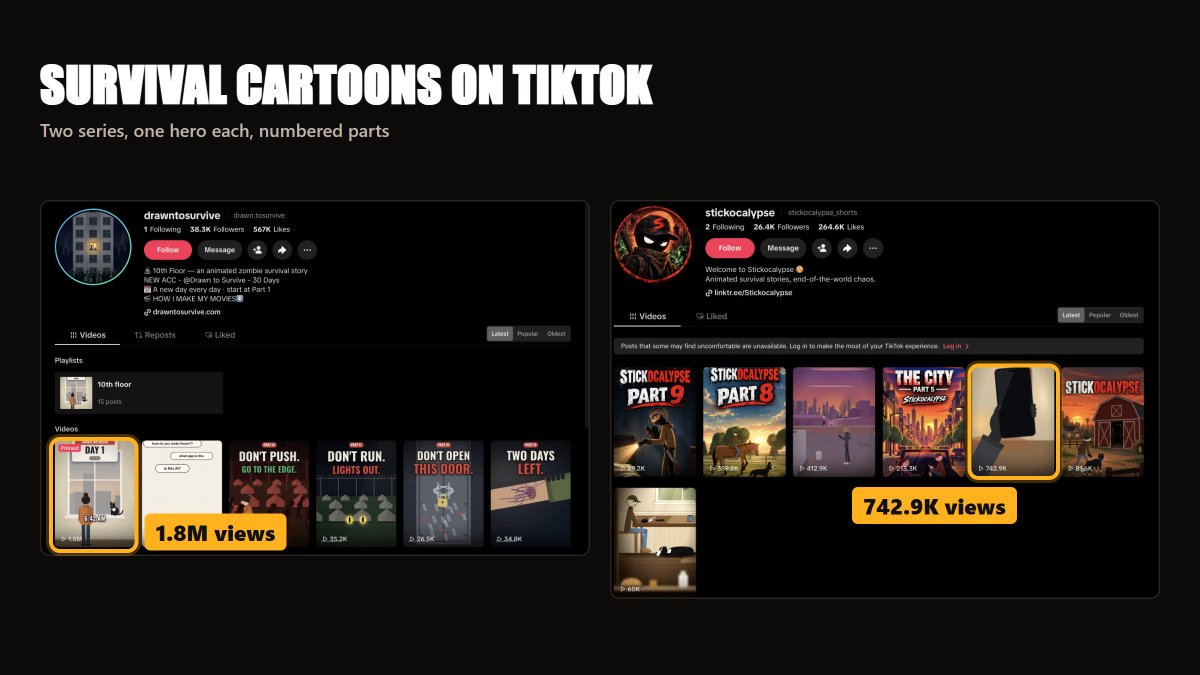
I kept seeing the same video on TikTok. A cartoon guy at a window, a black cat on the sill, "6:42 AM" in big letters. That one episode sits at 1.8M views.
I can't draw. I have never animated anything. Paying an animator for a 40-second short was off the table - and a series needs a new episode every day or two.
So I opened Claude Code, picked Claude Opus 5.5 and typed one line: "a meteor hits in 5 hours, Max needs a bunker."
Three episodes later, those cartoons have 31,914 views on X. Every frame is code: one HTML file with a canvas, drawn and moved by Opus 5.5. Below is the full setup, so you can start your own series from zero.
> POST: embed https://x.com/TemsYanik/status/2117647950423773298 (Part 1)
1/ COPY THE FORMAT BEFORE YOU WRITE A LINE
Study two accounts first I saved screenshots of two TikTok series built on the same idea. Their numbers:
| Account | Followers | Likes | Top video | What it is |
|---|---|---|---|---|
| @ drawn.tosurvive | 38.3K | 567K | 1.8M views | "10th Floor", a zombie survival story |
| @ stickocalypse_shorts | 26.4K | 264.6K | 742.9K views | animated survival stories |
They share a pattern. One hero you recognise in half a second. A survival story. Numbered parts ("Part 8", "Day 1"), so someone who lands on part 5 scrolls back to part 1. And each cover carries a short threat in huge letters, like "DON'T OPEN THIS DOOR."
Pick one hero and one clock Mine is Max. His clock is a meteor 5 hours away. A countdown on screen gives the viewer a reason to stay until the last second - and a reason to come back for the next part.
2/ SET UP CLAUDE CODE
Install it once Claude Code runs in your terminal and writes files straight into a folder on your computer. That matters: an episode is an HTML file plus a folder of voice files, and Claude has to see both.
curl -fsSL https://claude.ai/install.sh | bash
irm https://claude.ai/install.ps1 | iex
```
**Make a project folder** and start Claude inside it:
mkdir max-bunker && cd max-bunker
mkdir voices characters
claude
Log in with your Claude account. I used the Pro plan at $20 a month. Type `/model`, pick Opus 5.5, and you are ready.
3/ WRITE THE SKILL ONCE
A skill is a rules file Claude reads before each job. Without it, every episode drifts: Max gets a new nose, the captions jump around, the canvas changes size. With it, episode 3 looks like episode 1.
Create `.claude/skills/cartoon-episode/SKILL.md` inside the project:
```markdown
---
name: cartoon-episode
description: Turns a one-line story idea into a 9:16 cartoon episode as one HTML/canvas file with a shot timeline, voices, lip sync and captions. Use it when I ask for a new episode.
---
Cartoon episode rules
seconds, what is on screen, who speaks, the exact line, the emotion.
Keep the rules dull and exact."1080x1920, 30 fps" works. "Make it look nice" does nothing. When an episode comes out wrong, add one line to this file, and that mistake stays fixed for every episode after it.

4/ ONE SENTENCE IN, A TIMELINE OUT
Ask for the timeline before the drawing This step turns 30 seconds of motion into a story. I ask Claude to document everything that happens across the timeline before it touches the canvas.
[ WHAT YOU SEND ]
```
/cartoon-episode a meteor hits in 5 hours, Max needs a bunker.
35 seconds. Document everything that happens in the timeline first.
```
[ WHAT COMES BACK ]
```
timeline.md (10 shots)
Shot 01 | countdown 05:00:00 on screen | Max | calm -> scared
Shot 02 | ...
...
Shot 10 | Max climbs down a ladder into a WWII bunker | countdown 00:39
```
Read it like a director Cut shots that repeat. Move the scariest line closer to the start. Editing a text file takes a minute; editing a finished animation takes an evening. When the timeline reads well, type "build it."
What ended up in my three episodes:
| Episode | Length | Views on X | What is on screen |
|---|---|---|---|
| Part 1 | 31.1 s | 13,284 | 10 shots, countdown 05:00:00 -> 00:39, word-by-word captions, ladder into a WWII bunker |
| Part 2 | 29 s | 11,599 | meteor impact in layers, a rigged stray dog, a checklist that turns red |
| Part 3 | 41.6 s | 7,031 | red censor bar that reveals "SOLAR PANELS", chalkboard route plan, a photo drawn in code, five knocks on the hatch |

5/ CHARACTERS ARE CODE
Lock the hero in one file `characters/max.js` holds one function that draws Max: head, body, cap, face lines. Every episode imports it, and rule 3 in the skill stops Claude from inventing a new Max.
Turn emotions into numbers A cartoon face reads through three things: brows, eyes, mouth. So each emotion is a small object, and Claude blends between two of them over a few frames:
// characters/emotions.js
export const EMOTIONS = {
calm:   { brow: 0,  eyeOpen: 1.0, mouthCurve: 0.2 },
scared: { brow: -6, eyeOpen: 1.4, mouthCurve: -0.4 },
angry:  { brow: 8,  eyeOpen: 0.7, mouthCurve: -0.6 },
sad:    { brow: -3, eyeOpen: 0.8, mouthCurve: -0.3 },
};
export function blend(a, b, t) {          // t goes 0 -> 1
const out = {};
for (const k in a) out[k] = a[k] + (b[k] - a[k]) * t;
return out;
}
When Max hears the meteor news, the timeline says `calm -> scared`, and his face slides from one set of numbers to the other. Zero drawing on your side.
Props follow the same logic. The stray dog in Part 2 has jointed legs, so it walks. The censor bar in Part 3 is a red rectangle that slides away on cue. Each one started as a single sentence in the timeline.

6/ VOICES WITH ELEVENLABS
Give each character a real voice My episodes ran on voices Claude wired into the code. They did the job. For a new series, use ElevenLabs: the voices sound like actors, and that shows when two people argue in a bunker.
One file per line, in timeline order Generate each line on the ElevenLabs site and download it, or let Claude call the API for you:
curl -X POST "https://api.elevenlabs.io/v1/text-to-speech/VOICE_ID" \
-H "xi-api-key: $ELEVENLABS_API_KEY" \
-H "Content-Type: application/json" \
-d '{"text": "Five hours. We have five hours.", "model_id": "eleven_multilingual_v2"}' \
--output voices/01_max.mp3
Pick the plan with commercial rights The free tier has none, and you plan to post these for views. Starter is the cheapest plan that includes them (prices in THE BILL below).
7/ LIP SYNC FROM LOUDNESS
Mouths follow volume Film lip sync matches every sound to a mouth shape. A cartoon needs less: loud means open, soft means half open, silence means shut. The eye reads it as talking.
const audioCtx = new AudioContext();
function makeMouth(audioEl) {
const src = audioCtx.createMediaElementSource(audioEl);
const analyser = audioCtx.createAnalyser();
analyser.fftSize = 512;
src.connect(analyser);
analyser.connect(audioCtx.destination);
const data = new Uint8Array(analyser.fftSize);
let open = 0;
return function mouthOpen() {          // 0 = shut, 1 = wide
analyser.getByteTimeDomainData(data);
let sum = 0;
for (const v of data) { const x = (v - 128) / 128; sum += x * x; }
const rms = Math.sqrt(sum / data.length);
open = open * 0.6 + Math.min(1, rms * 6) * 0.4;   // smooth the flicker
return open;
};
}
One analyser per character Max gets his own, the second voice gets its own, so only the person talking moves their mouth. Each frame, `mouthOpen()` sets the mouth height inside `drawMax()`.
8/ CAPTIONS WORD BY WORD
One big word at a time The word in the middle of the screen holds the eye while the voice runs, and it still works for anyone scrolling with the sound off.
// words: [{ text: "FIVE", start: 0.42, end: 0.71 }, ...]
function drawCaption(ctx, t) {
const w = words.find(w => t >= w.start && t < w.end);
if (!w) return;
ctx.font = "bold 110px Impact, sans-serif";
ctx.textAlign = "center";
ctx.lineWidth = 14;
ctx.strokeStyle = "#000";
ctx.strokeText(w.text, 540, 1450);
ctx.fillStyle = "#fff";
ctx.fillText(w.text, 540, 1450);
}
Where the timings come from:ElevenLabs has a `with-timestamps` endpoint that returns the time of every character in the line. Ask Claude to group them into words and save `words.json`. No API? Claude can spread the words across the clip length by word size. It drifts a little, and on a 30-second clip nobody notices.

9/ RENDER TO MP4
Record the canvas in the browser Rule 9 in the skill adds a Record button. Behind it sits this:
const stream = canvas.captureStream(30);
const dest = audioCtx.createMediaStreamDestination();
// every voice analyser also connects to dest
stream.addTrack(dest.stream.getAudioTracks()[0]);
const rec = new MediaRecorder(stream, {
mimeType: "video/webm;codecs=vp9,opus",
videoBitsPerSecond: 12_000_000,
});
Press Record, let the episode play to the end, and the browser saves `episode.webm`.
Convert it to MP4 with ffmpeg TikTok, Reels and Shorts all take MP4 with H.264 video and AAC audio:
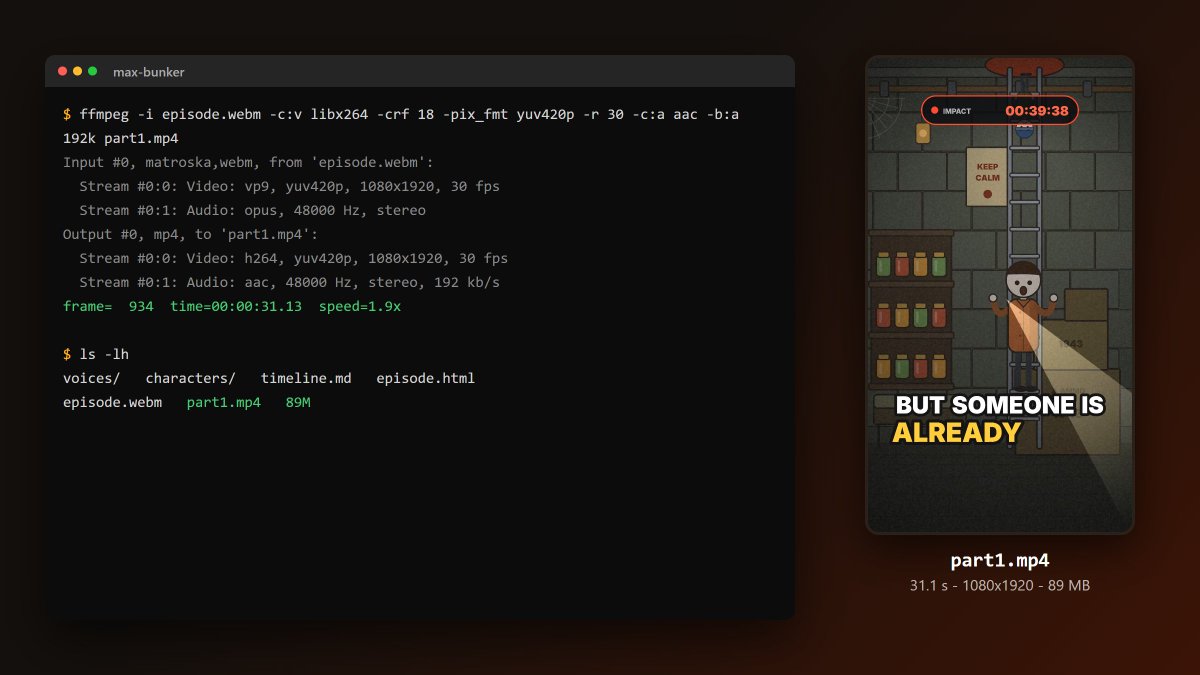
ffmpeg -i episode.webm -c:v libx264 -crf 18 -pix_fmt yuv420p -r 30 -c:a aac -b:a 192k part1.mp4One odd detail from my folder: the 31-second Part 1 came out at 89 MB. Canvas drawings with hard edges eat bitrate. The apps compress it again on upload, so the size never caused a problem.
10/ POST IT AS A SERIES
End every part on a hook Part 1 ends with Max climbing down into the bunker. Part 2 ends with the meteor. Part 3 ends with five knocks on the hatch, from the outside. Each ending asks a question that only the next part answers.
Number everything "Part 1", "Part 2" on the cover and in the caption. Make the cover a still from the scariest shot plus a three- or four-word threat. Ask Claude for that too: "draw a 1080x1920 cover from shot 7 with the text WHO IS KNOCKING".
Stretch past 60 seconds for TikTok My parts ran 29 to 42 seconds. TikTok's Creator Rewards Program pays only on videos longer than one minute, so for TikTok send the same idea with "65 seconds" in the prompt. The skill keeps everything else the same. You can go to 2-3 minutes if the story holds.
THE BILL
Prices checked November 7, 2026:
| Tool | Plan | Monthly price | What it does here |
|---|---|---|---|
| Claude (Opus 5.5 in Claude Code) | Pro | $20 | writes the timeline, the drawing code, the render setup |
| ElevenLabs | Starter (30,000 characters, commercial rights) | $6 ($5 on annual billing) | the voices |
| ffmpeg | free | $0 | WebM -> MP4 |
| A browser | free | $0 | plays and records the canvas |

Monthly math: $20 + $6 = $26.
At one episode a day, 30 episodes: $26 / 30 = about $0.87 per episode.
Voice budget (estimate): a 40-second episode at a normal speaking pace is around 100 words, about 600 characters. 30 episodes x 600 = 18,000 characters, inside Starter's 30,000.
If you prefer the API to a subscription, Opus 5.5 costs $4 per million input tokens and $20 per million output tokens. An episode file of around 20,000 output tokens works out to about $0.40 in output (calculation, your file size will vary).
WHERE THE MONEY IS
All three are calculations from public numbers. None of this is my income.
| Path | The arithmetic | What it needs |
|---|---|---|
| TikTok Creator Rewards | 1,000,000 qualified views x $0.40-$1.00 per 1,000 = $400-$1,000 | 10K followers, 100K views in 30 days, videos over 1 minute, a supported country |
| Episodes for other accounts | 4 clients x 8 episodes = 32 episodes a month at $0.87 cost each | a sample series and your own price |
| Sell your skill and prompts | 100 buyers x $19.99 = $1,999 before platform fees | a series people already watch |
Creator Rewards: "qualified" matters. One tracker reports that a video with 500,000 total views often shows only 250,000 to 350,000 qualified views. TikTok does not publish a fixed rate; the $0.40-$1.00 band comes from creator reports.
Client work: small brands, history pages and story channels all need short animated clips. Your cost stays near $0.87 an episode, so almost all of your price is margin.
A guide: the creator behind @drawn.tosurvive sells a 21-page guide on their method at $19.99. That price is the reference point for the math above.
THE SHORT VERSION
Install Claude Code, make a folder, write the 9-line skill.
Send one sentence with a hero and a clock, and read the timeline before you say "build it."
Add ElevenLabs voices, loudness lip sync and word-by-word captions, then record and convert with ffmpeg.
Start with one 30-second Part 1 that ends on a question.
the stack:
Claude Code
Claude plans
Claude Code skills docs
ElevenLabs
ffmpeg
TikTok Creator Rewards Program

