Use Claude Code Better Than 99% of People (Full System)

Most people use Claude Code wrong.

They treat it like a chat box.
The setup below treats it like an employee. Workspace, memory, brief, ticket, eyes, review, schedule, permissions. Nine pieces.
Give a person joining your company those same things and they perform. Claude works the same way.
Here is the build, exactly as it ran in the episode, on a real demo idea: a missed-lead responder for med spas. A lead fills out a form, DMs the business, or calls after hours. The business replies too late. The money walks.
1. The workspace
Claude needs a place to work. That place is a repo.
The folders:
Three root files carry the operating manual:
The setup prompt:
Help me set up this repo as an AI employee workspace. Create or update CLAUDE.md, roadmap.md, review.md, /context, /customers, /specs, /demos, /routines. Use this business context. Product: missed-lead responder for med spas. Buyer: med spa owner and operator. Pain: inbound leads go cold when the team replies too late. Promise: respond to every missed lead before they book somewhere else. Goal: build a simple landing page and demo flow. Before writing, ask me for any missing context that would materially change the setup and keep the first version simple.
That last line does heavy lifting. Claude comes back with high leverage questions first, fills the rest with sensible defaults, and keeps v1 small.
Claude gets way more useful when the project explains itself.
2. The memory files

Scaffolding alone is thin. Optimize the three MD files.
CLAUDE.md gets a working style. Small, reviewable changes. Explain the plan before editing when the task affects product behavior. Use the existing code style. Run the relevant checks. Summarize what changed, what got tested, and what needs human review.
CLAUDE.md also gets the business context and the quality bar. The landing page reads clear in five seconds. The demo flow works on desktop and mobile. Copy uses specific customer language.
roadmap.md gets this week only. Landing page, waitlist form, demo flow, looms to 10 med spa owners.
Then the part people skip: out of scope. Payments. CRM integration. Admin dashboards. Multi-user permissions.
Scope limits make it cook on the MVP.
review.md gets your standards as questions. Does the change match the roadmap? Is it small enough to review? Does the main user flow still work? Are there mobile layout issues? Are form errors handled? Are there auth, payment, or production data risks? Did we add complexity we can cut? Can a first-time visitor understand the offer in five seconds? Is the CTA visible? Does the page use the words customers actually use?
3. The brief

Plan mode is the moment Claude looks around, reads the context, and shows you the approach before it touches files.
The prompt:
Use plan mode. I want to add a waitlist form to the landing page. First inspect the current app, CLAUDE.md, roadmap.md, and review.md. Then give me the files that need to change, the smallest clean implementation, the user experience, the risks, how we will verify it, and what you are intentionally leaving out for the first version. Wait for my approval before editing.
The instruction to inspect the context files first is the whole trick. Context in, quality out.
Now you have something to react to. Keep the front end only. Connect it to Supabase for real submissions. Trim the fields to name, email, company. Leave auth and payments alone for now.
Measure twice. Cut once.
4. The ticket
Claude Code is very good at doing the work. It needs to know what done looks like.
A ticket is a small, clear assignment with a visible finish line.
Good tickets:
Tickets that go sideways: make the app better, make this more viral, add AI, build the whole thing.
Vague prompts make Claude guess. Once it guesses, you stop managing the work and start cleaning it up.
One task. One finish line. One reviewable change.
5. The eyes
This is where Claude Code starts to feel like an operator.
A good employee does the task, then checks the task. They open the product, click the flow, run the tests, check the console, and ask whether a customer would survive it.
Product work is visual. A landing page can load and still confuse. A form can submit and still feel awkward. A headline can explain the product and still miss the buyer's pain.
The prompt:
Start the app and inspect the waitlist flow. Open the landing page in desktop preview. Check the experience from the perspective of a med spa owner seeing this for the first time. Then verify the implementation. Tell me what the buyer understands in the first five seconds, what feels confusing or low trust, whether the waitlist form works, and what happens after submission. Then make one focused pass to improve the highest impact issue.
In the episode Claude read the page, used a computer, submitted an empty form, confirmed the empty state, rendered the success state, verified the record in the back end, and checked the console and network for errors.
Its verdict: the page asked a cold med spa owner for an email before it earned any trust. Its fix: expectation-setting microcopy at the CTA.
That is a good employee. Few people use this.
6. The review

Once Claude builds fast, the bottleneck moves to judgment.
Review in three layers.
Layer 1 is your own read. Open the diff view in Claude Desktop and look at what Claude touched. Does this match the ticket? Does this match the plan? Is anything here surprising?
Surprising changes are where the risk lives. A waitlist ticket that suddenly edits auth, routing, and the database is a signal you want immediately.
Layer 2 is Claude against your standard:
Use review.md as the standard. Review the current changes for production issues, broken edge cases, and confusing user flows. Separate issues into must fix, should fix, and okay to ship. Focus on bugs, user confusion, security risks, unnecessary complexity, files changed outside the scope of the ticket, and anything that violates the roadmap.
Must fix. Should fix. Okay to ship. That format alone is worth the setup.
Layer 3 is /review for normal work, and ultra review before anything heavy ships. Authentication. Payments. Big features.
The upfront work in review.md pays dividends here.
7. The schedule

Everything above happens while you sit there. An employee earns their keep through repeating responsibilities.
Routines are how Claude gets them.
Start with a controlled operator task, not production code while you sleep. The morning brief:
Every weekday morning at 7am, read /customers and /context, open GitHub issues if connected, and create or update /context/morning-brief.md with the top customer pain point from the latest notes, one product risk, one recommended build task for today, and one question I should ask customers today. Keep production code untouched. Keep pull requests closed. Keep it under 500 words.
Then the weekly ops review:
Every Friday at 3pm, review open issues and recent customer notes. Group related issues and identify duplicates. Suggest the single highest leverage fix for the week and post the summary to /context/weekly-ops.md. Leave the code alone.
Then close the loop on pull requests:
When a pull request opens, review it using review.md. Leave comments only on issues that could create bugs, broken user flows, security problems, or confusing behavior. Post a short summary with what looks good, what needs attention, and whether this is ready for human review.
Setup time: seconds. This is what people mean by the night shift. Work gets organized, feedback gets summarized, risks surface, and the next task gets clearer.
8. Parallel agents

One employee is a start. The dream is 5, 10, 20.
In Claude Desktop the code tab runs separate sessions. Each session carries its own context and its own set of changes. Worktree isolation keeps those changes apart.
Each session should feel like one clear assignment handed to one person.
Three work streams from one morning:
Debugging, copy, and sales enablement. In the old workflow those run one after another. Here they run at once, with the same product context and a specific handoff each.
The bug session returns the root cause, the files it changed, the checks it ran, and what to look for in the diff. The hero session returns a before and after, the customer language it used, and why the new version is clearer. The demo session returns the script, the objection it handles, and what to review before recording.
You want small packets of work you can inspect, accept, revise, or reject.
9. Permissions
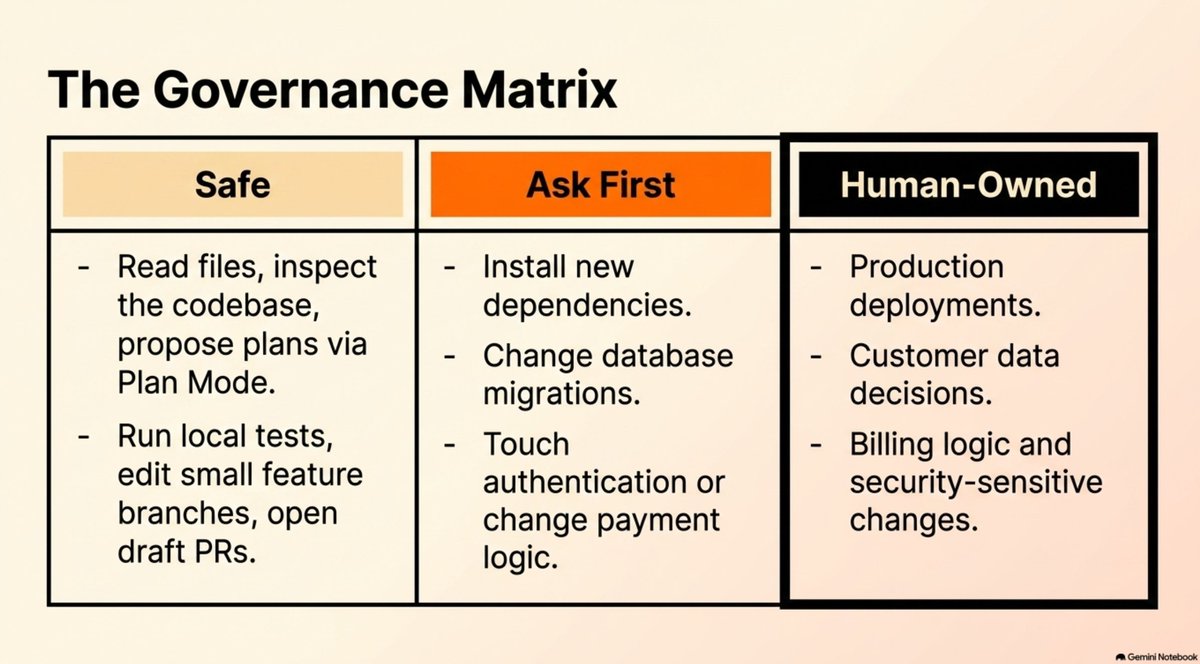
Treat permissions the way you treat delegation. Three buckets.
Safe: read files, inspect the codebase, propose plans, run local tests, edit a small feature branch, update docs, open a draft pull request.
Ask first: install dependencies, change database migrations, touch authentication, change payment logic, delete files.
Human owned: production deploys, customer data decisions, billing decisions, security sensitive changes.
Claude Desktop has permission modes for exactly this. Start conservative. Use plan mode for bigger changes. Use manual review while you learn the system. Give Claude more room as the repo brain, the review checklist, and your task scopes get stronger.
Room to work, plus boundaries. YOLO mode carries real risk.
10. Skills, connectors, hooks
This is where Claude Code starts to belong to your company.
A skill is a repeatable way of doing work. Type the same prompt twice and it should be a skill.
Three worth building:
The customer notes skill matters most. Now Claude builds from customer language instead of your opinion. The same skill feeds your ad copy.
A connector gives Claude better context. GitHub, Linear, Google Drive, Slack.
A hook is a guardrail around the work. Run formatting after Claude edits code. Run tests before a PR summary. Run the checks that matter before a change ships.
Skills make the work repeatable. Connectors make the context richer. Hooks make the workflow safer. Combined with your roadmap, your standards, and your customer notes, that becomes a moat.
The 7-day plan

You can run this in seven hours, 70 minutes, or 31 days. A week is a clean frame.
The loop
Customer feedback → /customers Product direction → roadmap.md Working style → CLAUDE.md Quality standards → review.md Small tasks → plan mode Changes → preview and review Recurring work → scheduled routines
That is the 24/7 setup.
The product, the customer feedback, the docs, the demos, the reviews, and the recurring work stop living in a chat window. They live in an operating loop you sharpen over time.
It will be imperfect. It will still beat the old way.
Get your hands dirty.
