Stop telling ChatGPT “Make a graphic.” Stop telling ChatGPT “Design...

Subhan Qureshi@LearnWithSubhan
110 views
Oct 18, 2026
~5 min read
Advertisement
1
Stop telling ChatGPT “Make a graphic.”
Stop telling ChatGPT “Design a flyer.”
Stop telling ChatGPT “Create a poster.”
Weak prompts = Poor designs and AI slop.
Try these 7 powerful commands to get much better results from ChatGPT: 👇
Stop telling ChatGPT “Design a flyer.”
Stop telling ChatGPT “Create a poster.”
Weak prompts = Poor designs and AI slop.
Try these 7 powerful commands to get much better results from ChatGPT: 👇
2
1. SOCIAL MEDIA GRAPHIC
Create a high-quality 1080 × 1350 social media design for BRAND.
Headline: “HEADLINE”
Supporting copy: “TEXT”
Call to action: “CTA”
Apply a refined editorial layout, strong visual hierarchy, ample negative space, precise alignment, and uniform margins. The headline should attract attention first, followed by the main visual and then the supporting text.
Use a maximum of two font families. Ensure the typography is clear, legible, and professionally spaced. Incorporate PRIMARY COLOUR, SECONDARY COLOUR, and ACCENT.
Main subject: SUBJECT.
Photography direction: EDITORIAL / STUDIO / CINEMATIC.
Lighting style: SOFT / HARD / NATURAL.
Background details: DESCRIPTION.
Avoid standard Canva templates, scattered shapes, excessive gradients, glassmorphism, glowing effects, generic stock photography, tiny text, fake logos, and unnecessary decorative elements.
The final design should resemble a premium brand campaign crafted by a professional art director.
Create a high-quality 1080 × 1350 social media design for BRAND.
Headline: “HEADLINE”
Supporting copy: “TEXT”
Call to action: “CTA”
Apply a refined editorial layout, strong visual hierarchy, ample negative space, precise alignment, and uniform margins. The headline should attract attention first, followed by the main visual and then the supporting text.
Use a maximum of two font families. Ensure the typography is clear, legible, and professionally spaced. Incorporate PRIMARY COLOUR, SECONDARY COLOUR, and ACCENT.
Main subject: SUBJECT.
Photography direction: EDITORIAL / STUDIO / CINEMATIC.
Lighting style: SOFT / HARD / NATURAL.
Background details: DESCRIPTION.
Avoid standard Canva templates, scattered shapes, excessive gradients, glassmorphism, glowing effects, generic stock photography, tiny text, fake logos, and unnecessary decorative elements.
The final design should resemble a premium brand campaign crafted by a professional art director.
3
2. EVENT FLYER
Create a polished 4:5 event flyer for [EVENT NAME].
Include the following information:
Date: [DATE]
Time: [TIME]
Location: [VENUE]
Speaker/performer: [NAME]
Call to action: [REGISTER / BUY TICKETS]
Establish three distinct levels of visual hierarchy: highlight the event name first, showcase the main attraction second, and present the essential event details third.
Follow a well-organized grid with bold typography, balanced spacing, and a prominent focal point.
Visual style: [LUXURY / CORPORATE / MUSIC / TECH / CULTURAL].
Apply [PRIMARY COLOUR], [SECONDARY COLOUR], and [ACCENT].
If a portrait is included, ensure the person looks realistic, with natural skin texture, accurate anatomy, and professional-quality lighting.
Avoid unnecessary icons, fabricated QR codes, harsh shadows, overcrowded layouts, glowing buttons, generic stock photos, and excessive text containers.
The final flyer should have the quality and visual appeal of a professionally designed event marketing campaign.
Create a polished 4:5 event flyer for [EVENT NAME].
Include the following information:
Date: [DATE]
Time: [TIME]
Location: [VENUE]
Speaker/performer: [NAME]
Call to action: [REGISTER / BUY TICKETS]
Establish three distinct levels of visual hierarchy: highlight the event name first, showcase the main attraction second, and present the essential event details third.
Follow a well-organized grid with bold typography, balanced spacing, and a prominent focal point.
Visual style: [LUXURY / CORPORATE / MUSIC / TECH / CULTURAL].
Apply [PRIMARY COLOUR], [SECONDARY COLOUR], and [ACCENT].
If a portrait is included, ensure the person looks realistic, with natural skin texture, accurate anatomy, and professional-quality lighting.
Avoid unnecessary icons, fabricated QR codes, harsh shadows, overcrowded layouts, glowing buttons, generic stock photos, and excessive text containers.
The final flyer should have the quality and visual appeal of a professionally designed event marketing campaign.
4
3. PRODUCT AD
Design a premium 1080 × 1350 advertisement for [PRODUCT].
Headline: “[HEADLINE]”
Key benefit: [MAIN BENEFIT]
Price: [PRICE]
Special offer: [OFFER]
Call to action: [SHOP NOW]
Keep the product as the central visual element and the primary focus of the advertisement.
Use high-end commercial photography with accurate proportions, authentic packaging, consistent branding, realistic shadows, balanced highlights, and natural-looking materials.
Camera perspective: [ANGLE].
Lens style: [35MM / 50MM / 85MM].
Surface material: [STONE / WOOD / METAL / GLASS].
Background design: [DESCRIPTION].
Apply refined commercial typography and maintain sufficient negative space for the text.
Avoid fabricated labels, warped packaging, neon borders, scattered ingredients, low-quality sale badges, unnecessary props, fake awards, and excessive visual effects.
The finished advertisement should resemble a genuine commercial campaign created for a well-established brand.
Design a premium 1080 × 1350 advertisement for [PRODUCT].
Headline: “[HEADLINE]”
Key benefit: [MAIN BENEFIT]
Price: [PRICE]
Special offer: [OFFER]
Call to action: [SHOP NOW]
Keep the product as the central visual element and the primary focus of the advertisement.
Use high-end commercial photography with accurate proportions, authentic packaging, consistent branding, realistic shadows, balanced highlights, and natural-looking materials.
Camera perspective: [ANGLE].
Lens style: [35MM / 50MM / 85MM].
Surface material: [STONE / WOOD / METAL / GLASS].
Background design: [DESCRIPTION].
Apply refined commercial typography and maintain sufficient negative space for the text.
Avoid fabricated labels, warped packaging, neon borders, scattered ingredients, low-quality sale badges, unnecessary props, fake awards, and excessive visual effects.
The finished advertisement should resemble a genuine commercial campaign created for a well-established brand.
5
4. TYPOGRAPHY POSTER
Design a typography-focused 4:5 poster centered on [TOPIC].
Main statement:
“[STATEMENT]”
Supporting information:
“[DETAILS]”
Make typography the dominant visual feature of the composition.
Limit the design to one or two typefaces. Create visual impact through font size, spacing, alignment, repetition, weight, and the strategic use of negative space.
Follow a structured modular grid or Swiss design approach. Maintain uniform margins and align secondary information with precision.
Colour palette:
Background: [COLOUR]
Primary text: [COLOUR]
Accent: [COLOUR]
Optional elements may include subtle numbering, fine lines, dates, small labels, light grain textures, and minimal geometric separators.
Avoid emojis, sparkles, unnecessary icons, glowing typography, artificial 3D text, excessive outlines, and decorative elements that add no value.
The final poster should reflect the sophistication of modern editorial, cultural, architectural, or fashion design.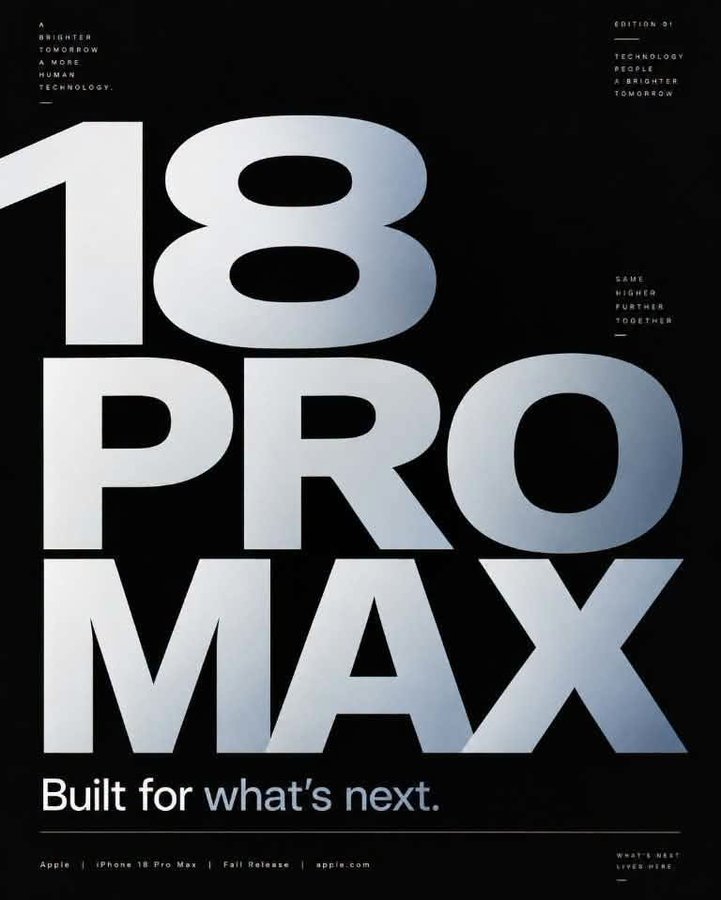
Design a typography-focused 4:5 poster centered on [TOPIC].
Main statement:
“[STATEMENT]”
Supporting information:
“[DETAILS]”
Make typography the dominant visual feature of the composition.
Limit the design to one or two typefaces. Create visual impact through font size, spacing, alignment, repetition, weight, and the strategic use of negative space.
Follow a structured modular grid or Swiss design approach. Maintain uniform margins and align secondary information with precision.
Colour palette:
Background: [COLOUR]
Primary text: [COLOUR]
Accent: [COLOUR]
Optional elements may include subtle numbering, fine lines, dates, small labels, light grain textures, and minimal geometric separators.
Avoid emojis, sparkles, unnecessary icons, glowing typography, artificial 3D text, excessive outlines, and decorative elements that add no value.
The final poster should reflect the sophistication of modern editorial, cultural, architectural, or fashion design.
6
5. INFOGRAPHIC
Design a high-quality 1080 × 1350 infographic that breaks down [TOPIC] in a clear and engaging way.
Target audience: [AUDIENCE]
Main heading:
“[TITLE]”
Include the following points:
1. [POINT]
2. [POINT]
3. [POINT]
4. [POINT]
5. [POINT]
Ensure readers can grasp the core message at a glance.
Follow a structured grid with well-defined sections, balanced spacing, legible typography, and a clear visual hierarchy.
Position the title first, highlight the key insight second, present the main content third, and arrange supporting details last.
Incorporate charts, timelines, comparisons, or icons only when they meaningfully improve clarity and help communicate the information.
Use [BRAND COLOUR] as the primary accent, complemented by neutral supporting colours.
Never fabricate statistics or include unverified data.
Avoid excessive content cards, overly varied colours, unnecessary arrows, inconsistent icon styles, illegible text, misleading figures, and decorative clutter.
Keep the final design professional, logically organized, and easy to scan.
6:33 AM · Oct 11, 2026
·
5,711
Views
Design a high-quality 1080 × 1350 infographic that breaks down [TOPIC] in a clear and engaging way.
Target audience: [AUDIENCE]
Main heading:
“[TITLE]”
Include the following points:
1. [POINT]
2. [POINT]
3. [POINT]
4. [POINT]
5. [POINT]
Ensure readers can grasp the core message at a glance.
Follow a structured grid with well-defined sections, balanced spacing, legible typography, and a clear visual hierarchy.
Position the title first, highlight the key insight second, present the main content third, and arrange supporting details last.
Incorporate charts, timelines, comparisons, or icons only when they meaningfully improve clarity and help communicate the information.
Use [BRAND COLOUR] as the primary accent, complemented by neutral supporting colours.
Never fabricate statistics or include unverified data.
Avoid excessive content cards, overly varied colours, unnecessary arrows, inconsistent icon styles, illegible text, misleading figures, and decorative clutter.
Keep the final design professional, logically organized, and easy to scan.
6:33 AM · Oct 11, 2026
·
5,711
Views
7
6. LUXURY BRAND GRAPHIC
Design an elegant 4:5 luxury campaign visual for [BRAND / PRODUCT].
Headline:
“[HEADLINE]”
Supporting text:
“[TEXT]”
Call to action:
“[CTA]”
Feature one striking focal image, concise messaging, generous negative space, understated typography, and a carefully balanced composition.
Photography direction:
Subject: [SUBJECT]
Environment: [LOCATION]
Lighting: Soft studio or architectural illumination
Materials: [MATERIALS]
Camera angle: [ANGLE]
Choose an elegant serif, a clean sans-serif, or a sophisticated combination of both.
Colour palette:
Primary: [COLOUR]
Neutral: [COLOUR]
Accent: [COLOUR]
Create a sense of luxury through exceptional photography, balanced proportions, refined typography, premium materials, and visual simplicity.
Avoid metallic gold gradients, overused marble textures, crowns, diamonds, sparkles, decorative borders, excessive script fonts, and artificial luxury effects.
The final design should be suitable for premium advertising across fashion, beauty, automotive, hospitality, architecture, and lifestyle brands.
Design an elegant 4:5 luxury campaign visual for [BRAND / PRODUCT].
Headline:
“[HEADLINE]”
Supporting text:
“[TEXT]”
Call to action:
“[CTA]”
Feature one striking focal image, concise messaging, generous negative space, understated typography, and a carefully balanced composition.
Photography direction:
Subject: [SUBJECT]
Environment: [LOCATION]
Lighting: Soft studio or architectural illumination
Materials: [MATERIALS]
Camera angle: [ANGLE]
Choose an elegant serif, a clean sans-serif, or a sophisticated combination of both.
Colour palette:
Primary: [COLOUR]
Neutral: [COLOUR]
Accent: [COLOUR]
Create a sense of luxury through exceptional photography, balanced proportions, refined typography, premium materials, and visual simplicity.
Avoid metallic gold gradients, overused marble textures, crowns, diamonds, sparkles, decorative borders, excessive script fonts, and artificial luxury effects.
The final design should be suitable for premium advertising across fashion, beauty, automotive, hospitality, architecture, and lifestyle brands.
8
7. YOUTUBE THUMBNAIL
Design a compelling 16:9 YouTube thumbnail for:
“[VIDEO TITLE]”
Thumbnail headline:
“[2–5 WORDS]”
Main subject:
[PERSON / PRODUCT / SCREENSHOT]
Feature one prominent subject, a concise headline, and only one additional visual element if needed.
Ensure the subject and text are visually distinct and easy to identify.
If a person is featured, maintain realistic facial features and use a natural yet expressive pose.
Background: [DESCRIPTION]
Use large, bold, easy-to-read typography with a maximum of two font styles.
Create strong visual contrast while keeping colours balanced and avoiding excessive saturation.
Prioritize composition, scale, lighting, and cropping before considering arrows or circles.
Avoid exaggerated shocked expressions, excessive arrows, unnecessary red circles, emojis, explosion effects, excessive glow, visual clutter, and tiny text.
Ensure the thumbnail remains clear, recognizable, and visually effective even at a very small size.
Design a compelling 16:9 YouTube thumbnail for:
“[VIDEO TITLE]”
Thumbnail headline:
“[2–5 WORDS]”
Main subject:
[PERSON / PRODUCT / SCREENSHOT]
Feature one prominent subject, a concise headline, and only one additional visual element if needed.
Ensure the subject and text are visually distinct and easy to identify.
If a person is featured, maintain realistic facial features and use a natural yet expressive pose.
Background: [DESCRIPTION]
Use large, bold, easy-to-read typography with a maximum of two font styles.
Create strong visual contrast while keeping colours balanced and avoiding excessive saturation.
Prioritize composition, scale, lighting, and cropping before considering arrows or circles.
Avoid exaggerated shocked expressions, excessive arrows, unnecessary red circles, emojis, explosion effects, excessive glow, visual clutter, and tiny text.
Ensure the thumbnail remains clear, recognizable, and visually effective even at a very small size.
9
I hope you've found this thread helpful.
Follow me @LearnWithSubhan for more.
Like and Retweet the tweet below with your friends.
Follow me @LearnWithSubhan for more.
Like and Retweet the tweet below with your friends.
Subhan Qureshi@LearnWithSubhan
Stop telling ChatGPT “Make a graphic.”
Stop telling ChatGPT “Design a flyer.”
Stop telling ChatGPT “Create a poster.”
Weak prompts = Poor designs and AI slop.
Try these 7 powerful commands to get much better results from ChatGPT: 👇
Stop telling ChatGPT “Design a flyer.”
Stop telling ChatGPT “Create a poster.”
Weak prompts = Poor designs and AI slop.
Try these 7 powerful commands to get much better results from ChatGPT: 👇
