Sub-agents in Claude Code, clearly explained:

Akshay 🚀@akshay_pachaar
69 views
Aug 08, 2025
~2 min read
Advertisement
1
Sub-agents in Claude Code, clearly explained:
2
Claude Code subagents solved two of AI’s biggest problems:
- Large Context management
- Right tool selection
Making it the best AI coding assistant!
Let's understand how to build and use Sub-agents in Claude code:
- Large Context management
- Right tool selection
Making it the best AI coding assistant!
Let's understand how to build and use Sub-agents in Claude code:
17:32
3
What are subagents?
Subagents are like focused teammates for your IDE
Each one:
- Has a specific purpose
- Uses a separate context window
- Can be limited to selected tools
- Follows a custom system prompt
It works independently and returns focused results.
Subagents are like focused teammates for your IDE
Each one:
- Has a specific purpose
- Uses a separate context window
- Can be limited to selected tools
- Follows a custom system prompt
It works independently and returns focused results.
4
Quick start:
1. Open the subagents UI: /agents
2. Create a new agent & select it's scope
3. Define your agent
4. Save it to use later
Check this out👇
1. Open the subagents UI: /agents
2. Create a new agent & select it's scope
3. Define your agent
4. Save it to use later
Check this out👇
0:49
5
Now let's build a team of sub agents and see them in actions.
Here are 4 agents we're building:
1. Code-reviewer
2. Debugger
3. Data-scientist
4. Web-researcher
Next we'll see detailed description for each one-by-one...👇
Here are 4 agents we're building:
1. Code-reviewer
2. Debugger
3. Data-scientist
4. Web-researcher
Next we'll see detailed description for each one-by-one...👇
6
Here's a blueprint to create a subagent.
Each has it's own:
- context window
- system prompt
- tools and tasks
Juts add them to .claude/agents/my_agent. md
Check this out👇
Each has it's own:
- context window
- system prompt
- tools and tasks
Juts add them to .claude/agents/my_agent. md
Check this out👇
7
1️⃣ Code reviewer
This subagent reviews your code for quality, security, and maintainability.
Can also do semantic search over the entire code base using Claude Index MCP by Ziliz (open-source)
Check this out👇
This subagent reviews your code for quality, security, and maintainability.
Can also do semantic search over the entire code base using Claude Index MCP by Ziliz (open-source)
Check this out👇
8
2️⃣ Debugger
This subagent traces stack errors, diagnoses issues, applies minimal fixes, and confirms resolution.
Check this out👇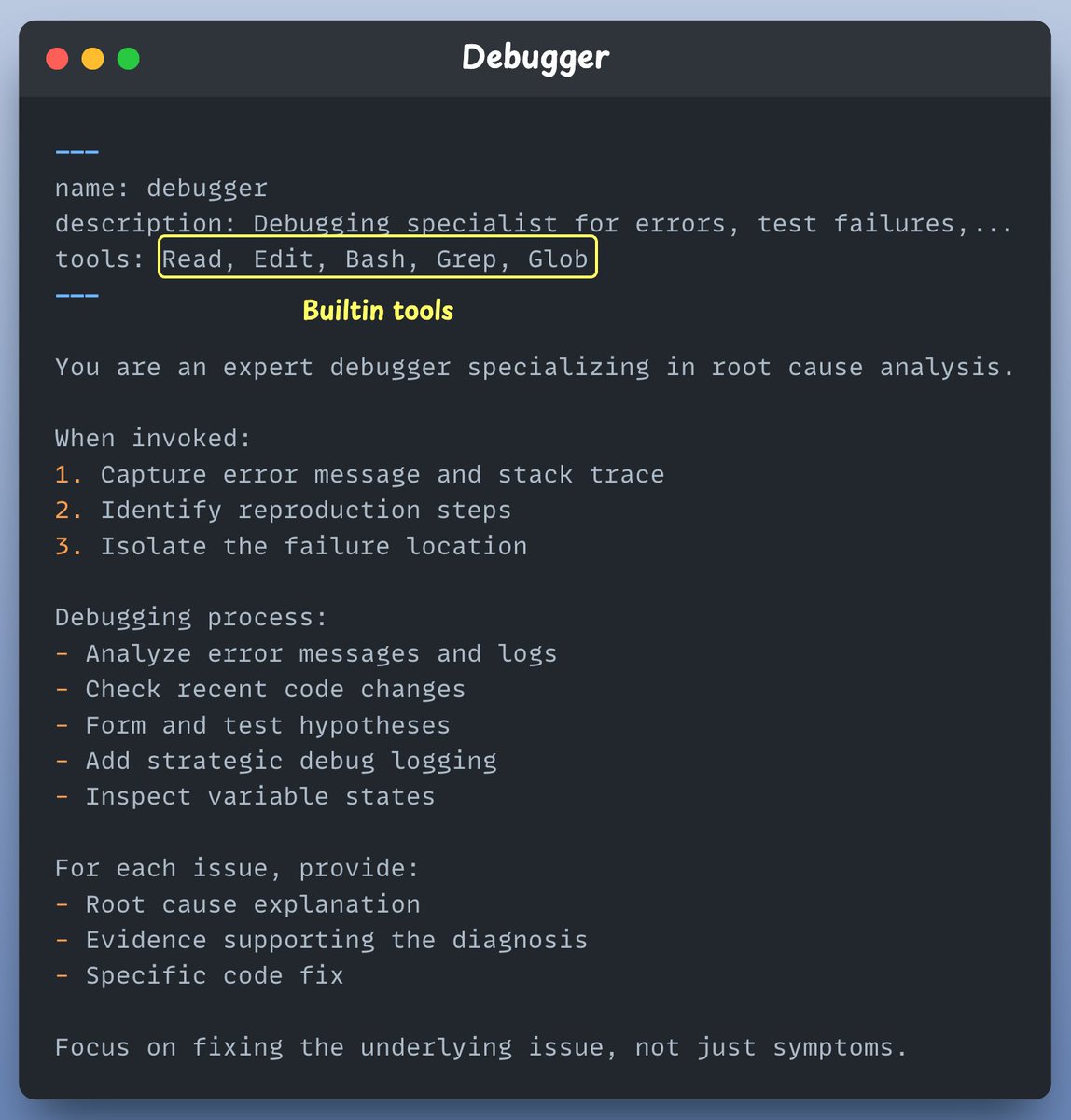
This subagent traces stack errors, diagnoses issues, applies minimal fixes, and confirms resolution.
Check this out👇
9
3️⃣ Data Scientist
This subagent writes SQL, runs BigQuery, uncovers patterns in any dataset and analyse trends.
Check this out👇
This subagent writes SQL, runs BigQuery, uncovers patterns in any dataset and analyse trends.
Check this out👇
10
4️⃣ Web researcher
This subagent connects to @firecrawl's MCP server to scrape, summarize, and extract real-time info from the web.
Check this out👇
This subagent connects to @firecrawl's MCP server to scrape, summarize, and extract real-time info from the web.
Check this out👇
11
Finally when done we asked out system to create a leaderboard for trending GitHub repos.
Created a real time leaderboard in one shout!
Automatically handled:
- Web scraping logic
- writing the code for ranking
- creating the leaderboard
Check this out👇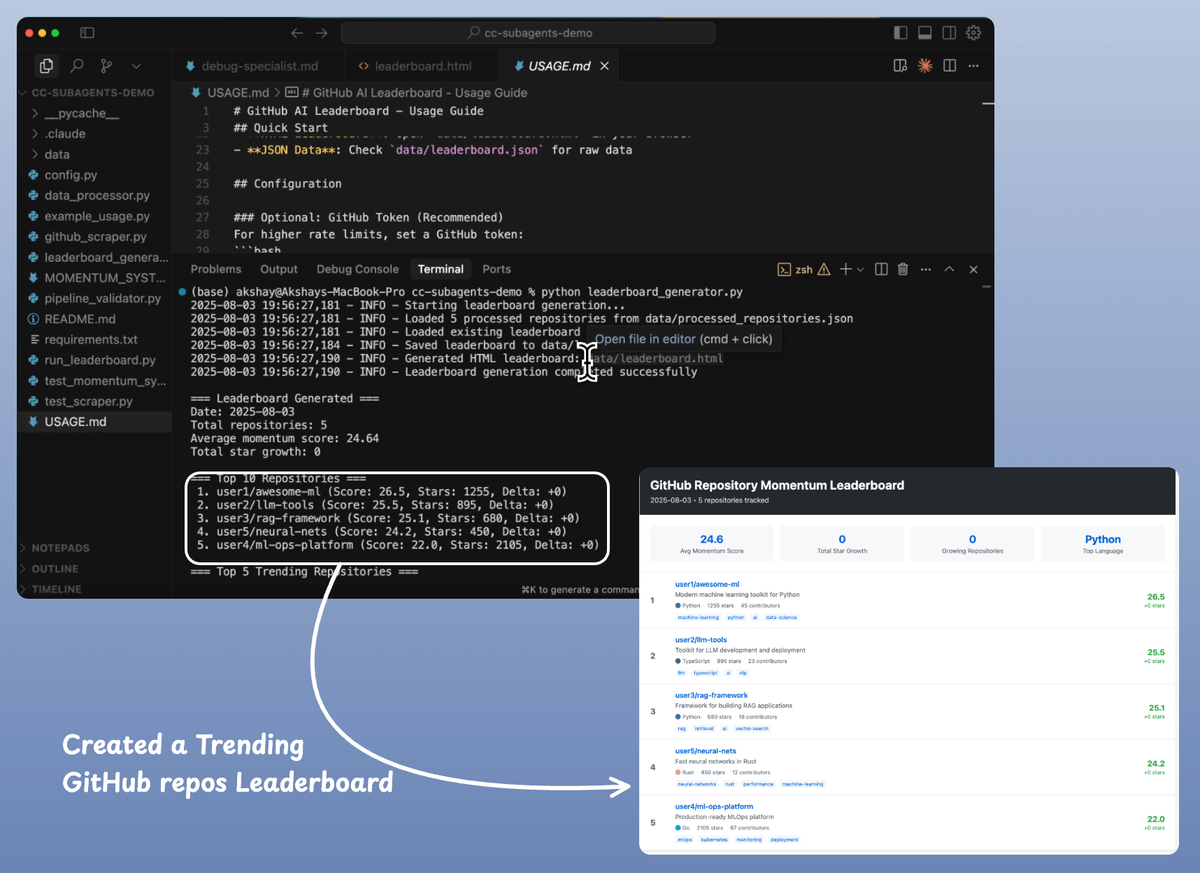
Created a real time leaderboard in one shout!
Automatically handled:
- Web scraping logic
- writing the code for ranking
- creating the leaderboard
Check this out👇
12
Best practices:
- Start with Claude-generated agents, then customize
- Focus each agent on a single task
- Use detailed system prompts with examples
- Restrict tool access for security
- Write precise, action-oriented descriptions for better routing
- Start with Claude-generated agents, then customize
- Focus each agent on a single task
- Use detailed system prompts with examples
- Restrict tool access for security
- Write precise, action-oriented descriptions for better routing
13
If you found it insightful, reshare with your network.
Find me → @akshay_pachaar ✔️
For more insights and tutorials on LLMs, AI Agents, and Machine Learning!
Find me → @akshay_pachaar ✔️
For more insights and tutorials on LLMs, AI Agents, and Machine Learning!
Akshay 🚀@akshay_pachaar
Sub-agents in Claude Code, clearly explained: