Let's build Claude Code's harness (step-by-step)

We will cover everything that goes into building a coding harness, the agent loop, planning, subagents, sandboxing, memory, and checkpointing, built step by step.

If you've ever tried building your own coding agent, you know how this goes. You wire a model up to file tools and a shell, point it at a real codebase, and it breaks down within a dozen tool calls.
It reads the wrong files, loses the goal halfway through, and fills its context with output it no longer needs.
Then the same task goes through Claude Code and finishes cleanly. The easy conclusion is that Anthropic simply has a better model, and that conclusion misses where the work actually happens.
The difference is the harness. A harness is the ordinary code wrapped around the model, and it handles planning, tool execution, memory, and safety while the model only decides the next step.
Here's what a fully harnessed agent looks like when you draw it out:
The picture looks busy, but it breaks into four groups:
Anthropic describes this split as the brain and the hands. The model is the brain that picks each action, and the harness is the hands that carry it out and keep the run on track.
So the gap between your agent and Claude Code isn't the model, it's the machinery around the model.
Claude Code is one of the most capable harnesses in production today, and it's built from a surprisingly small set of the layers in that illustration. To see how much of that machinery you'd have to build yourself, I rebuilt it in CrewAI, an open-source framework for orchestrating agents.
More of it maps onto built-in features than I expected, and the part that doesn't is where the real engineering lives.
Let's build it layer by layer, starting with the core loop and stacking planning, subagents, sandboxing, and memory on top. At each step we'll mark where the framework ends and where your job begins.
How Claude Code's harness works
At the center of Claude Code is a plain agent loop. You send it a message, the model decides what to do next, and it either responds directly or requests a tool. If it requests one, the tool runs, the result goes back into the conversation, and the model decides again.
This repeats until the model returns a final answer with no further tool calls.
Inside that loop, the model reads files, edits code, runs shell commands, and executes tests. These aren't separate modes. They're just different tool calls inside the same loop.
The loop alone isn't enough for a reliable coding agent, though. Claude Code adds planning, file tools, subagents, memory, and a permission and sandbox system around it. These layers don't replace the loop, they make it safe and reliable enough for real work.

That's the architecture we'll rebuild, the core loop first, then each layer on top, mapping every layer to the CrewAI feature that handles it.
The core agent loop
The loop runs the same sequence until the task is done:

while True:
    reply = model(messages, tools)
    calls = [b for b in reply if b.type == "tool_use"]
    if not calls:            # plain text, no tool call: the job is done
        return reply.text
    messages += [reply, run_all(calls)]
Each tool call completes one step, gives the model new information, and feeds into the next decision. A simple question might finish in one iteration, while fixing a complex bug or refactoring a large codebase can take dozens of iterations before the model has enough to produce a final answer.
CrewAI provides this execution loop automatically as soon as you create an agent. You don't implement the while loop yourself, you define the agent and assign it a task.
Building the first agent
Let's create a simple Bug Fixer agent.
from crewai import LLM, Agent, Crew, Task

bug_fixer = Agent(
    role="Bug Fixer",
    goal="Find and describe the fix for the reported bug in the codebase.",
    backstory="You read directories and files to build an accurate picture of the code.",
    llm="claude-sonnet-4-6",
)

task = Task(
    description="Find the fix for {objective}.",
    expected_output="A short description of the fix and which file it belongs in.",
)

result = Crew(agents=[bug_fixer], tasks=[task]).kickoff(
    inputs={"objective": "the overdraft bug in account.py"}
)
Three concepts to understand here:
Giving the agent tools
Tools are what let a model that only generates text actually work on a codebase. They read files, write them, run shell commands, and call external APIs.
CrewAI ships file system tools out of the box:
from crewai_tools import DirectoryReadTool, FileReadTool, FileWriterTool

read_file = FileReadTool()
write_file = FileWriterTool()
list_dir = DirectoryReadTool()

filesystem_tools = [read_file, write_file, list_dir]
These also double as external memory. Instead of holding a large search result in the model's context window, the agent can write it to a file, keep only the filename, and read it back when needed.
This keeps the context window smaller and the model more focused, which is what Anthropic calls context engineering.
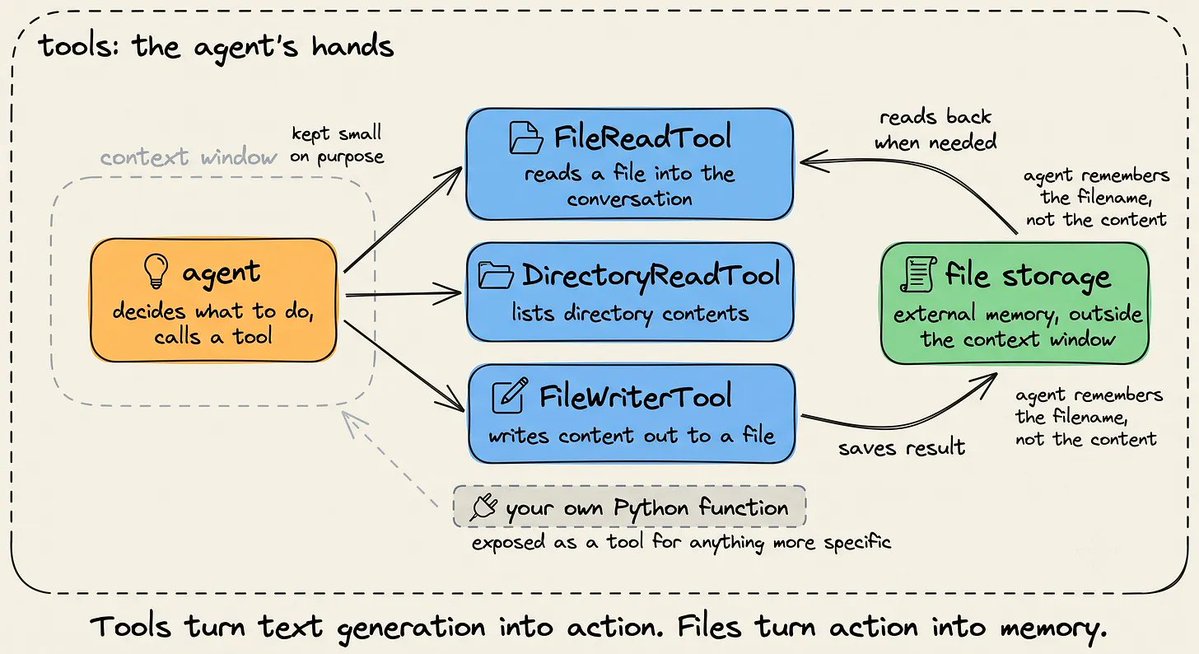
Built-in tools cover common workflows only. For anything more specific, you expose a Python function as a tool with the @tool decorator.
The docstring acts as the instruction manual, telling the model what the tool does, when to use it, and what it expects as input.
from crewai.tools import tool
import subprocess

@tool("run_tests")
def run_tests(path: str = "tests/") -> str:
    """Run the pytest suite at the given path and return the result."""
    result = subprocess.run(
        ["pytest", path, "-q"], capture_output=True, text=True, timeout=120
    )
    output = result.stdout + result.stderr
    return output[-4000:] if len(output) > 4000 else output
Planning long-running tasks
As tasks get more complex, a plain execution loop starts losing track of the original goal. After enough tool calls, file reads, and intermediate results, the context fills up and the objective gets crowded out by everything that came after it.
This slow degradation is what people call context rot.
Planning addresses it directly. The agent builds a step-by-step plan before doing any work and keeps that plan in context throughout execution.
The plan doesn't do the work. It's a roadmap that keeps the model connected to the original goal, which is the same job Claude Code's to-do list does.

CrewAI adds this at the crew level with planning=True. It generates a plan before execution and keeps it available as the task progresses.
from crewai import Crew, LLM

crew = Crew(
    agents=self.agents,
    tasks=self.tasks,
    planning=True,
    planning_llm=LLM(model="gpt-4o-mini"),
)
Note: By default, CrewAI uses gpt-4o-mini for planning, and you can swap in any LLM you prefer for that step.
Individual agents can also reason about their own work with reasoning=True:
from crewai import Agent

bug_fixer = Agent(
    role="Bug Fixer",
    goal="Find and describe the fix for the reported bug in the codebase.",
    backstory="You read directories and files to build an accurate picture of the code.",
    tools=[FileReadTool()],
    reasoning=True,
    max_reasoning_attempts=3  # Optional: Set a maximum number of reasoning attempts
)
Planning and reasoning solve different problems. Planning builds a high-level roadmap for the overall task, while reasoning gives one agent time to think through its own approach before acting.
When reasoning is enabled, the agent:

Together, they keep the agent anchored on long-running tasks and reduce drift from the original goal.
Delegating with subagents
Planning keeps the agent focused, but it doesn't reduce how much information the model has to hold. On a large codebase, even a well-planned task can exceed a single context window.
Finding one bug may require reading dozens of files, and the main agent doesn't need to keep all of them in memory.
Subagents solve this through delegation. The main agent hands a specific task to a helper agent, which works in its own context and returns a short summary. The main agent sees the conclusion, not the intermediate steps.

CrewAI supports this through hierarchical workflows, where a manager agent delegates to specialist agents and combines their results.
In our earlier setup, one Bug Fixer agent did all the heavy lifting. Let's split the work across a manager and three specialists:

from crewai import Crew, Agent, Task, Process

explorer = Agent(
    role="Codebase Explorer",
    goal="Map the repository and surface the files relevant to the task.",
    backstory="You read directories and files to build a picture of the code.",
    tools=[read_file, list_dir],
    llm=llm,
)  # Same for other two specialist agents

manager = Agent(
    role="Engineering Lead",
    goal="Break the request into steps and delegate each to the right specialist.",
    backstory="You decide who does what, review tests, finish once change is done.",
    llm=llm,
    allow_delegation=True,
)

crew = Crew(
    agents=[explorer, coder, tester],
    tasks=[task],
    manager_agent=manager,
    process=Process.hierarchical,
)
One thing to note is that allow_delegation is disabled by default, so it must be explicitly enabled on the manager.
Sandboxing: Securing agent execution
An agent with shell access can run a destructive command, and telling the model not to do something isn't a safeguard.
Real protection comes from two layers:
Anthropic uses the same approach. Moving code execution into a sandbox cuts down how often a user needs to approve actions while still protecting the host system.

Sandboxing in CrewAI
Executing code inside a sandbox rather than on the host machine applies that second layer. In this setup, code runs inside E2B, which spins up a fresh VM per session and destroys it afterward.
Shell commands and Python run entirely inside that isolated environment.
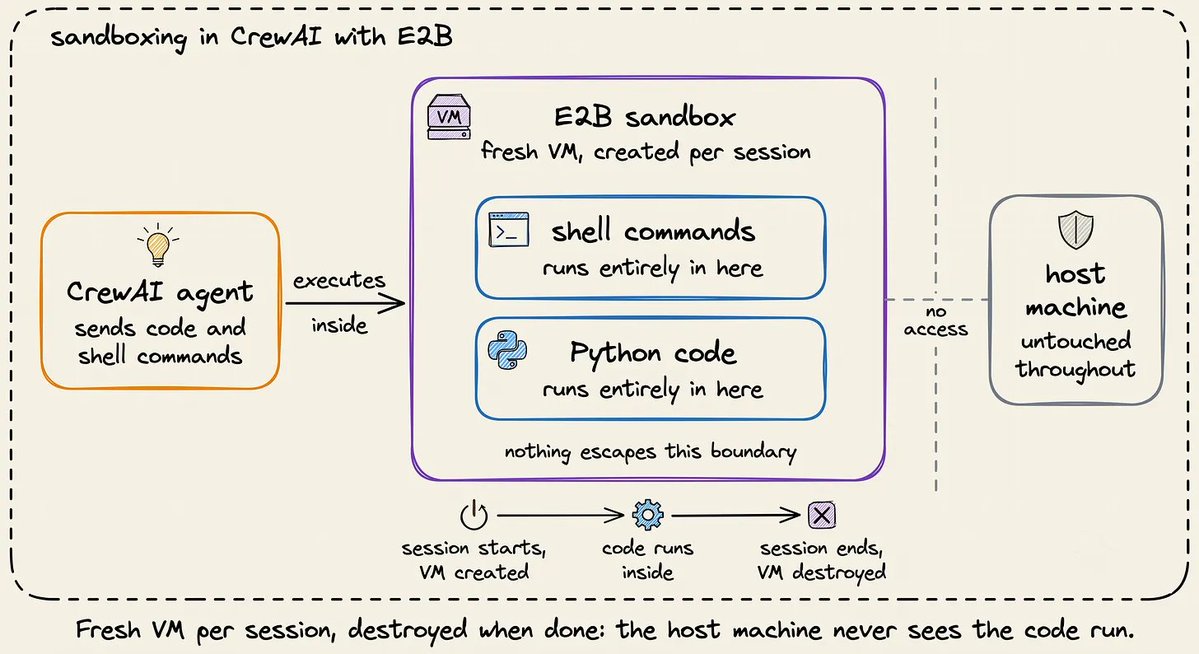
from crewai_tools import E2BExecTool, E2BPythonTool
sandbox_tools = [E2BExecTool(), E2BPythonTool()]  # run tests / run code
Human-in-the-loop approval
Setting human_input=True on a Task pauses the crew after it generates an answer. You review the output, then approve it or send it back for another iteration.
When execution reaches that task, CrewAI waits for your feedback through standard input.
from crewai import Task

task = Task(
    description=(
        "In the working directory ./workspace, {objective}. "
        "Explore the code first, make the change, then run the tests and report."
    ),
    expected_output="A summary of the files changed and the final test output.",
    human_input=True,
)
If your crew runs behind a web app or chat interface rather than a terminal, CrewAI's webhook-based human-in-the-loop system handles the same review step.
Memory and checkpointing
By default, an agent forgets everything once a run ends. Come back tomorrow to fix another bug in the same project, and it starts from zero.
Two mechanisms let an agent carry information across runs, and each serves a different purpose:

Memory in CrewAI
CrewAI provides a unified Memory interface rather than separate short-term, long-term, entity, and external memory types. When saving, it uses an LLM to identify important details, organize them, and make them retrievable later.
Setting memory=True on the crew gives it memory across runs. After each task, CrewAI extracts useful facts from the output and stores them, and in future runs it retrieves relevant memories and adds them to the task prompt.

from crewai import Crew

crew = Crew(
    agents=[explorer, coder, tester],
    tasks=[task],
    memory=True,
)
All agents in a crew share its memory unless an agent is given its own.
Checkpointing in CrewAI
A checkpoint is a snapshot of an agent's progress, including its configuration, task state, memory, intermediate results, inputs, and execution history.
By default, CrewAI creates a checkpoint whenever a task finishes, allowing the workflow to resume from that point if it's interrupted.
Checkpoints can live in one of two built-in stores:

from crewai import Crew

crew = Crew(
    agents=[explorer, coder, tester],
    tasks=[task],
    checkpoint=True,
)
Crew, Flow, and Agent all accept a checkpoint argument, and children inherit from their parent unless they set their own value.
Putting it all together
Here's the full harness on one task, with the execution loop, tools, planning, subagents, sandboxing, and memory working together:
from crewai import Agent, Crew, LLM, Process, Task
from crewai.tools import tool
from crewai_tools import (DirectoryReadTool, FileReadTool, FileWriterTool,
E2BExecTool, E2BPythonTool)

llm = LLM(model="anthropic/claude-sonnet-4.6")

list_dir = DirectoryReadTool(directory="./workspace")
filesystem_tools = [FileReadTool(), FileWriterTool(), list_dir]
sandbox_tools = [exec_tool, E2BPythonTool()]

@tool("run_tests")
def run_tests(path: str = "tests/") -> str:
    """Sync ./workspace into the sandbox, then run pytest there."""
    return E2BExecTool().run(command=sync_and_test_command(path))

explorer = Agent(role="Codebase Explorer", goal="Map repo, surface relevant files.",
    tools=[read_file, list_dir], llm=llm)
coder = Agent(role="Software Engineer", goal="Implement requested change.",
    tools=filesystem_tools, reasoning=True, llm=llm)
tester = Agent(role="Test Runner", goal="Run tests in sandbox, report pass/fail.",
    tools=sandbox_tools + [read_file] + [run_tests], llm=llm)
manager = Agent(role="Engineering Lead", goal="Delegate steps, finish once tests pass.",
    allow_delegation=True, llm=llm)

task = Task(
    description="In ./workspace, {objective}. Explore, edit, test, report.",
    expected_output="Summary of changes and test output.", human_input=True,
)
crew = Crew(
    agents=[explorer, coder, tester], tasks=[task],
    manager_agent=manager, process=Process.hierarchical,
    planning=True, memory=True, checkpoint=True,
)
result = crew.kickoff(inputs={"objective": "fix failing tests in account.py"})
Agent harnesses are easiest to evaluate when success can be checked automatically. A test suite gives the agent a concrete objective, so it can plan, edit, test, and repeat until everything passes.
So this was tested against a small codebase, a BankAccount class with two real bugs and five tests, three of which failed. The rule was to fix only the implementation, not the tests.
This mirrors how Anthropic evaluates coding agents internally. One published example has Claude rebuilding a clone of the claude.ai interface against a large suite of failing tests.
Here, the harness took the project from 3 failing and 2 passing to all 5 passing, with the implementation-only rule closing off the shortcut of editing or removing the failing tests.

What's still your job
Some parts of the system aren't things the framework builds for you:
There's also a cost to the harness itself. Planning, subagents, and looping all add API calls, so a complex agent setup can end up more expensive than a task a single model call would have solved directly.
And there's a longer-term limitation worth keeping in mind. As models improve, some of the scaffolding stops being necessary, because some of what gets built into a harness today is a workaround for today's model limits rather than a permanent requirement.
Anthropic originally used context resets to keep Claude Sonnet 4.5 from ending tasks too early, and they weren't needed anymore with the more capable Claude Opus 4.5.

Wrapping up
That's the whole finding. A coding agent's capability lives mostly in the harness, and an orchestration framework hands you more of that harness than you'd guess.
The loop, planning, delegation, sandboxing, and memory all arrive as configuration, while the prompts, the execution environment, and the tool choices remain yours.
If you want to run this against your own codebase, the CrewAI docs cover every feature used here, and the framework is fully open source.
Thanks for reading!
Cheers! :)
