Grok Bot: make your life easier (setup, life, business, money)

Part 1 was the manual. It explained every button in Grok Bot.
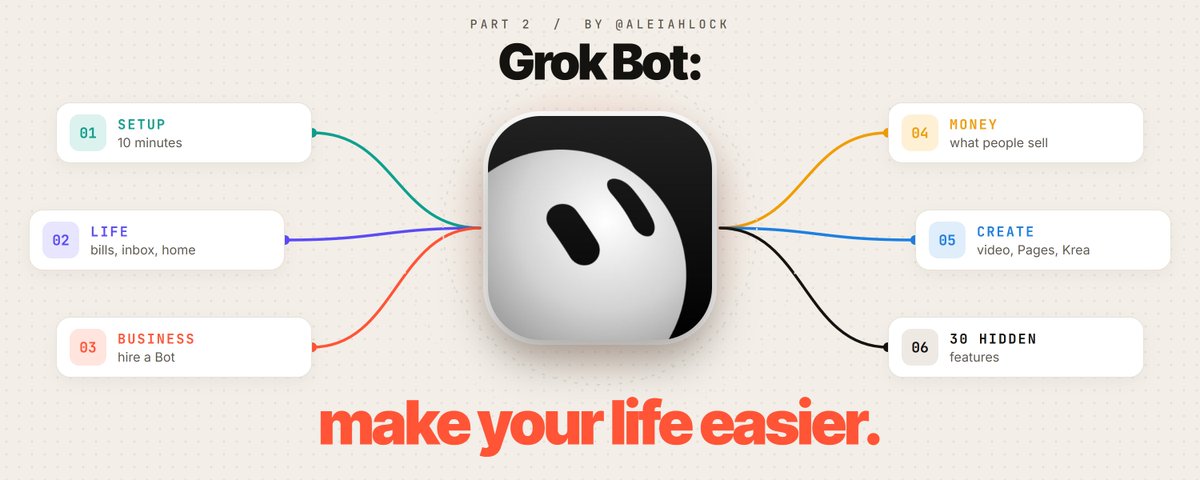
This part is about what to hand it. Bills, inbox, calendar, the store you run, the calls you keep putting off, the side project you never start. I went through the changelog, the docs, Elon's posts, user threads and every update since October 21, then sorted it by the job you want gone.
Setup comes first and takes ten minutes. Everything after it is one chapter per part of your life, with the exact lines to type.
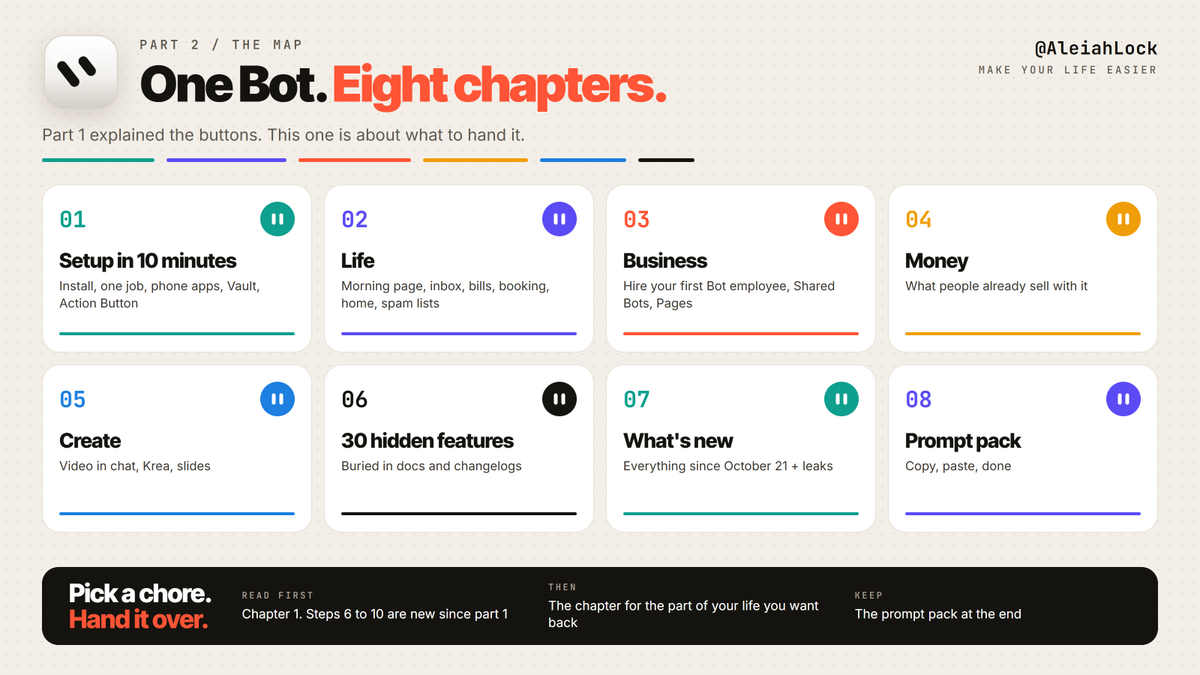
Contents
1. Setup in 10 minutes
If you set up Grok Bot with part 1, skip to step 6. Steps 6 to 10 are new since then.
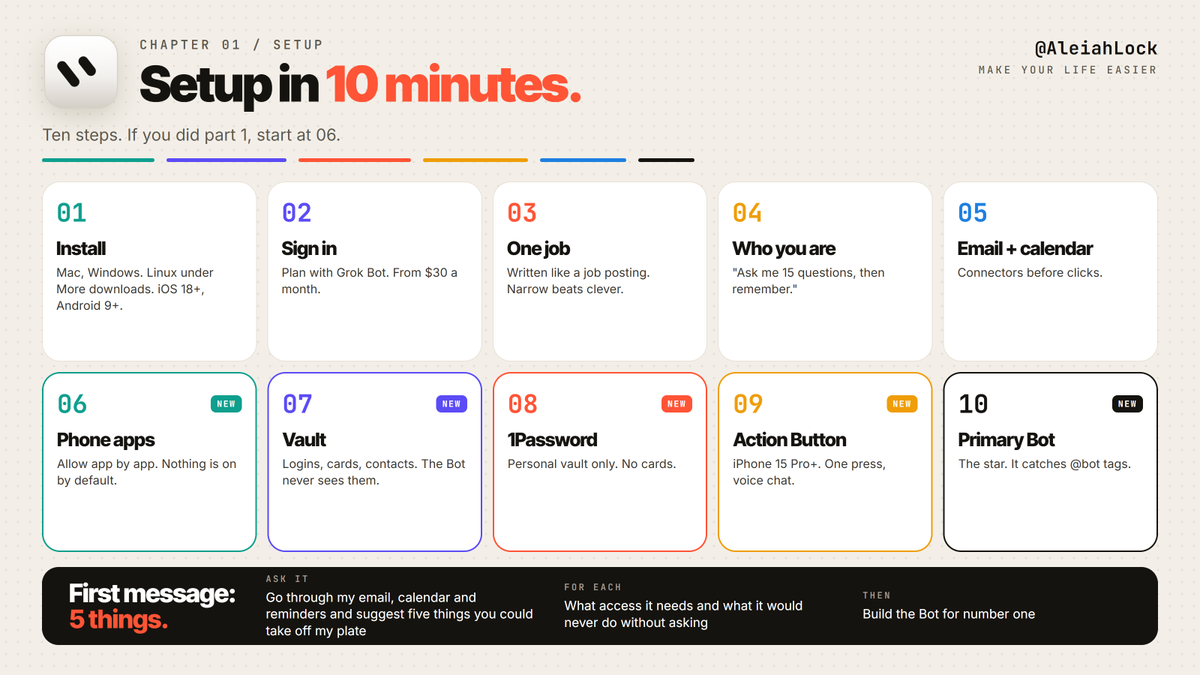
1. Install. x.ai/bot for Mac and Windows. Linux builds hide under "More downloads", not on the main button. Phone: iOS 18+ or Android 9+, and iPad works too.
2. Sign in. It needs a plan with Grok Bot in it. Since October 12 that starts at X Premium, $30 a month, inside The X Subscription.
3. Give it one job. Name your first Bot and write its job like a job posting. "Inbox Bot. Reads my email every morning, flags anything that needs me today, drafts replies, never sends." Narrow beats clever. A "General Assistant" Bot ends up doing everything badly.
4. Tell it who you are, once. "Ask me 15 questions about my work, my week and how I like things done, then remember the answers." The tenth task goes faster than the first because of this message.
5. Connect email and calendar. Connect apps is in the sidebar. Connectors are cheaper and more reliable than the Bot clicking a website, so connect what you can.
6. Turn on the phone apps. New on October 22. In the phone app, go to Settings, Connect apps and tap Allow app by app: Calendar, Reminders, Contacts, Location, Home, Messages. Nothing is on until you tap it. iMessage is not part of this update yet.
7. Fill the Vault. New on October 23. Settings, Vault. Add your logins, cards and contact details once. The Bot knows which login or card to use, but it never sees the password or the card number. You can import a CSV from your password manager. Delete that CSV afterwards, because it sits on your disk unencrypted.
8. Or connect 1Password instead. Connect apps, Password Managers. It only reaches your Personal or Private vault, and no payment cards.
9. Put it on the Action Button. iPhone 15 Pro or later, app 1.16+. Settings, Action Button, Shortcut, Grok Bot, Start Voice Chat. One press and you are talking to it.
10. Pick your Primary Bot. It wears a star. It is the one that picks up @bot tags from X and spots work it can take off your plate. Keep it small: it routes work to specialist Bots and asks before anything risky.
Then send the first message:
"Go through my email, calendar and reminders and suggest five things you could take off my plate this week. For each one, tell me what access you need and what you would never do without asking."
2. Life: take the small stuff off your plate
Most of life admin is the same twelve chores on repeat. Grok Bot is good at chores that need a login, a form and a confirmation email, because it has its own browser and keeps working when your phone is in your pocket.

The morning page
One routine, 7:30 every morning:
"Every weekday at 7:30, write me one page: today's calendar with travel time, emails that need a reply today, bills due this week, the weather, and anything you're waiting on me for. Ten lines max."
Since October 21 the Bot can build that as a Page, a live document it keeps updated instead of a chat message you scroll past. More on Pages in chapter 5.
Inbox zero without sending anything
"Sort my inbox from the last 7 days into: needs me, can wait, newsletters, receipts. Draft replies for 'needs me'. Don't send anything."
Drafts wait for your Send button. Routine emails always land as drafts first.
Calendar, reminders, contacts
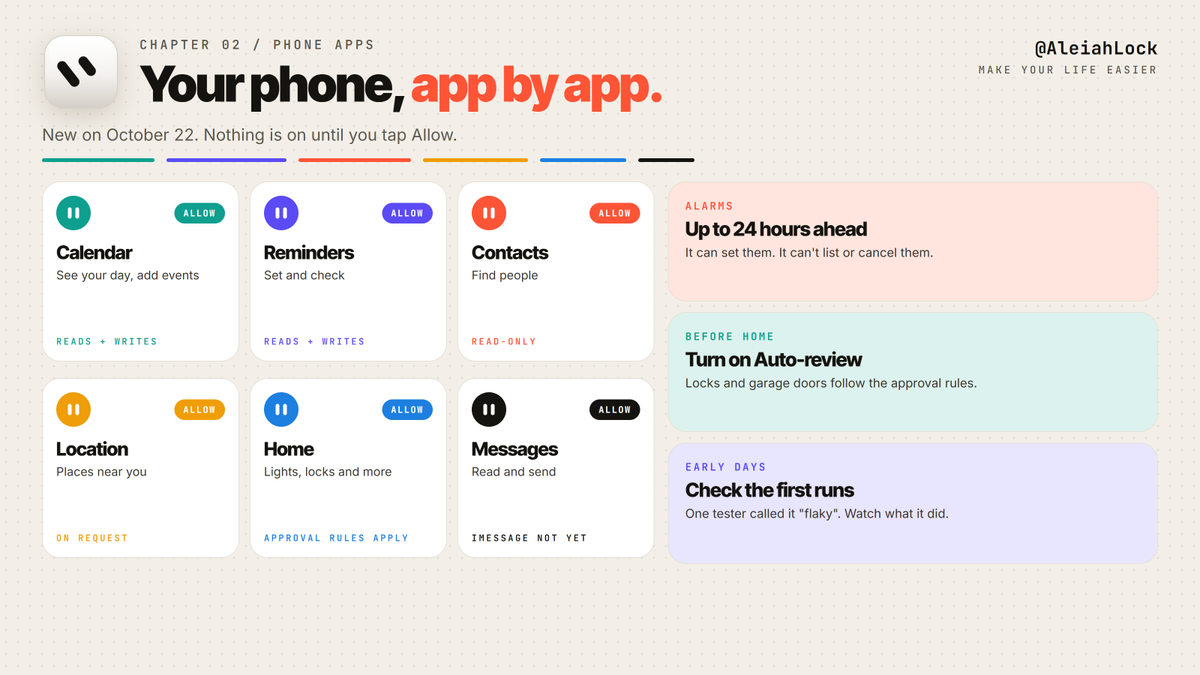
With the phone apps on, you can say things like:
"Move my dentist to next week, any morning, and add a reminder the day before."
"Find Anna's number in my contacts and add her birthday to my calendar."
Contacts are read-only. Alarms and timers can be set up to 24 hours ahead, but the Bot can't list or cancel them, so don't build your mornings on it yet. One early tester called the phone integration "flaky". Check what it did the first few times.
Bills and subscriptions
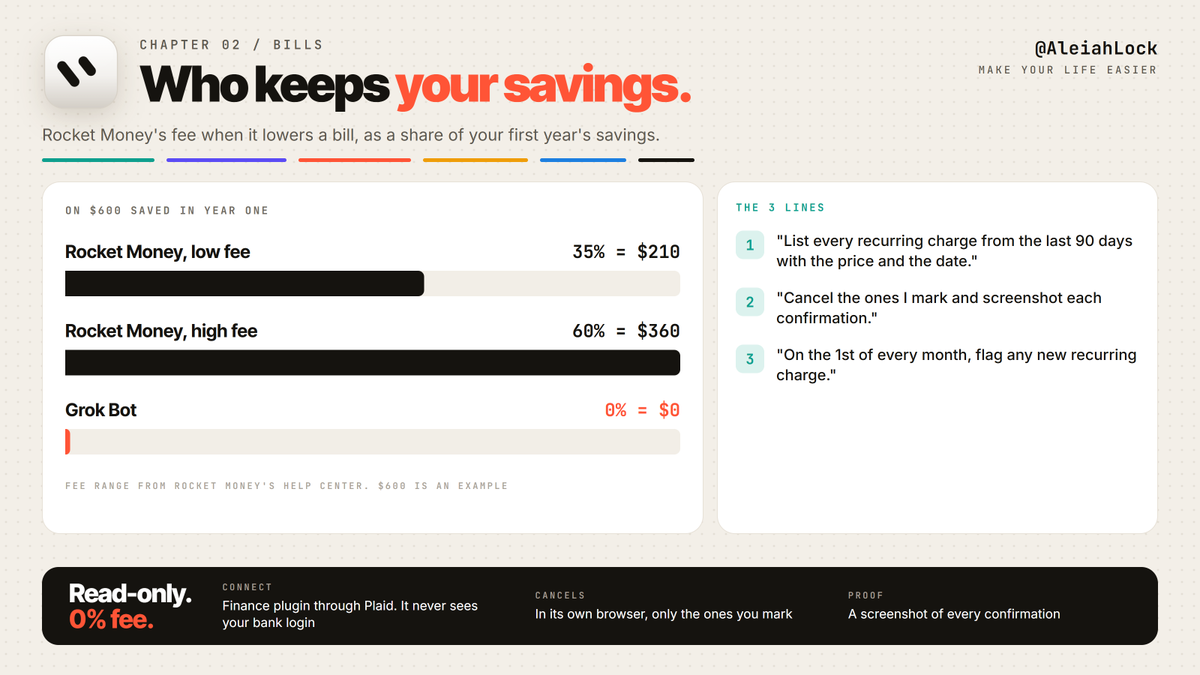
Connect the Finance plugin. It goes through Plaid and is read-only: the Bot sees transactions, never your bank login, and you can unlink any time.
Rocket Money charges 35% to 60% of your first year's savings when it lowers a bill. Grok Bot keeps none of it. Three lines:
Shopping and booking
Since October 23 the Bot can check out with a card from your Vault. Shopping through Link gives it a single-use card per purchase, and you approve every spend. If you want to approve every payment yourself, don't save a card in the Vault.
"Find me a 2-night hotel in Lisbon for the 14th under $180 a night, near the metro, free cancellation. Show me three. Book nothing."
Your home
Home is one of the phone apps. Lights, locks and more, by voice, from the Action Button. Keep Auto-review on before you grant it: locks and garage doors follow the same approval rules as payments.
Spam calls
Elon's own tip from October 16: ask your Bot to remove your phone number from spam call and text lists. It goes through the opt-out forms of the data brokers one by one. That is exactly the kind of boring, form-heavy job it was built for.
The phone calls you hate making
On October 25 Elon posted that Grok Bot "can now call someone or a business for you, make a request on your behalf, take notes on the response and send you a note summarizing the conversation". The official docs don't describe calling yet, and one reviewer's Bot told them calls only work in the US. Try it, and don't plan around it until @bot announces it.
3. Business: hire your first employee
The best way to think about a Bot at work: a new hire with a job description, access to the tools that job needs, and a manager (you) who signs off on anything that leaves the building.
Write the job, not the prompt
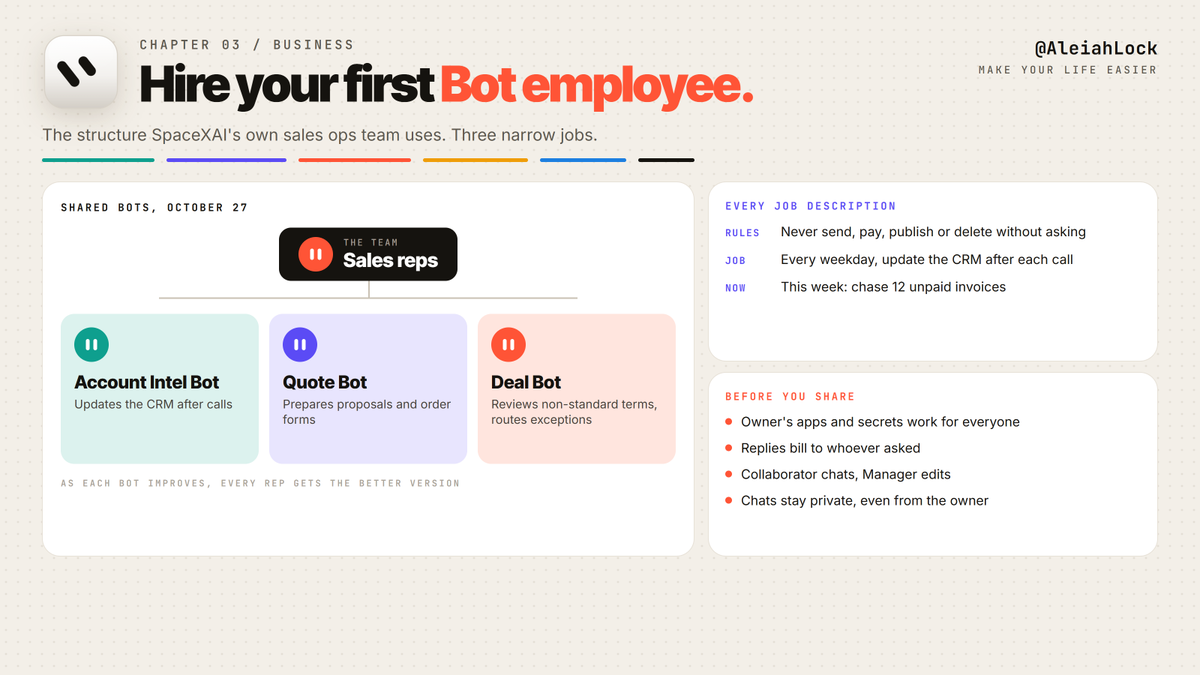
Every Bot description gets three parts:
Non-negotiable rules. "Never send, publish, pay or delete without asking."
The recurring job. "Every weekday, update the CRM after each call."
The current assignment. "This week: chase the 12 unpaid invoices."
Add what to do when information is missing. Otherwise it guesses.
Copy the sales team SpaceXAI built for itself
On October 27, SpaceXAI showed the Shared Bots its own sales ops team uses:
Account Intel Bot updates the CRM after calls
Quote Bot prepares proposals and order forms
Deal Bot reviews non-standard terms and routes exceptions for approval
That is three narrow jobs. Copy the structure for your own business before you copy anything else.
Shared Bots: one Bot, the whole team
If you are on a Cursor team, you can share a Bot instead of everyone building their own. Collaborators can chat with it. Managers can also change its instructions, skills, memory and apps. Chats stay private, so the owner can't read a teammate's conversation.
Two things to know before you share:
The Bot uses its owner's apps and secrets, for everyone. Review them first.
Replies bill to the usage of the person asking, not the owner.
In Slack, the Bot acts for whoever mentioned it, and in a thread it keeps following the conversation without another @mention. Auto-add puts it in everyone's sidebar, and members can't hide it.
What a Bot employee has done so far

Real numbers from SpaceXAI and users:
Haggle Bot, the in-house procurement Bot: over $100K saved in its first week
Support: 175% more tickets handled with no new hires
One incident: 204 tickets cleared in about 10 minutes, one engineer approving the batch
A deal team at a major label: 40+ deals worked through in two weeks with one main Bot watching the submissions inbox, analyzing models, building decks and drafting approval emails (their own post)
Reports, memos and dashboards
"Build me a Page with last month's sales by product, a chart of weekly revenue and a table of overdue invoices. Update it every Monday at 8."
Pages hold tables, charts and filters. Filters change the view, not the data underneath. Pages are private until you share them, and a public link skips sign-in, so keep anything sensitive behind a team share.
A phone line for the business
Grok Bot connects to Allo, a business phone system. Through the plugin it can text customers back from your Allo line after you read the draft, read call transcripts, tell you who to call back first and write the instructions for Allo's AI receptionist. It doesn't place calls through Allo itself. It queues numbers in the dialer and you start the session. Built-in skills: /allo-briefing, /allo-followups, /allo-report.
Your store
Shopify is connected since October 8. "Every morning check yesterday's orders, flag anything unshipped after 48 hours and any product under 10 units."
4. Money: things people already sell with it
The Bot doesn't make money on its own. People make money by doing a boring service faster than anyone else. Here is what they're selling, and the numbers come from the people posting them, so treat them as their claims, not mine.

The side hustle template. Alex Finn released a free template called Side Hustle CEO. It interviews you about your skills and interests, pitches three microbusinesses and helps build and run one. He says his own version made $1,800 in a week. A Japanese write-up that tested it noticed the traffic came from his own followers, so you still need an audience or a channel.
Websites for local businesses. A YouTube walkthrough runs a nightly routine over local businesses with outdated websites and wakes up to 5 to 10 drafted pitch emails. You send them. You build the site.
UGC and ad creatives. Hook a video plugin into your Bot and it can drive the whole pipeline from a folder of product photos. HeyGen's own tip: put Grok Bot on the Action Button, connect the HeyGen plugin, and one press turns a sentence into a finished avatar video. Krea's plugin does campaigns "right from your DMs".
Price-checking and haggling. SpaceXAI's Haggle Bot is in the marketplace. Small businesses overpay for software seats nobody opens. Running the same audit for a client is a service.
Bookkeeping cleanup. Finance is read-only, which is what a client wants to hear. Monthly reconciliation, duplicate charge flags, a Page with the month on one screen.
The rule from every one of these: the Bot does the work in the middle. Finding customers is still on you.
5. Create: images, video and pages from one chat
Video in chat
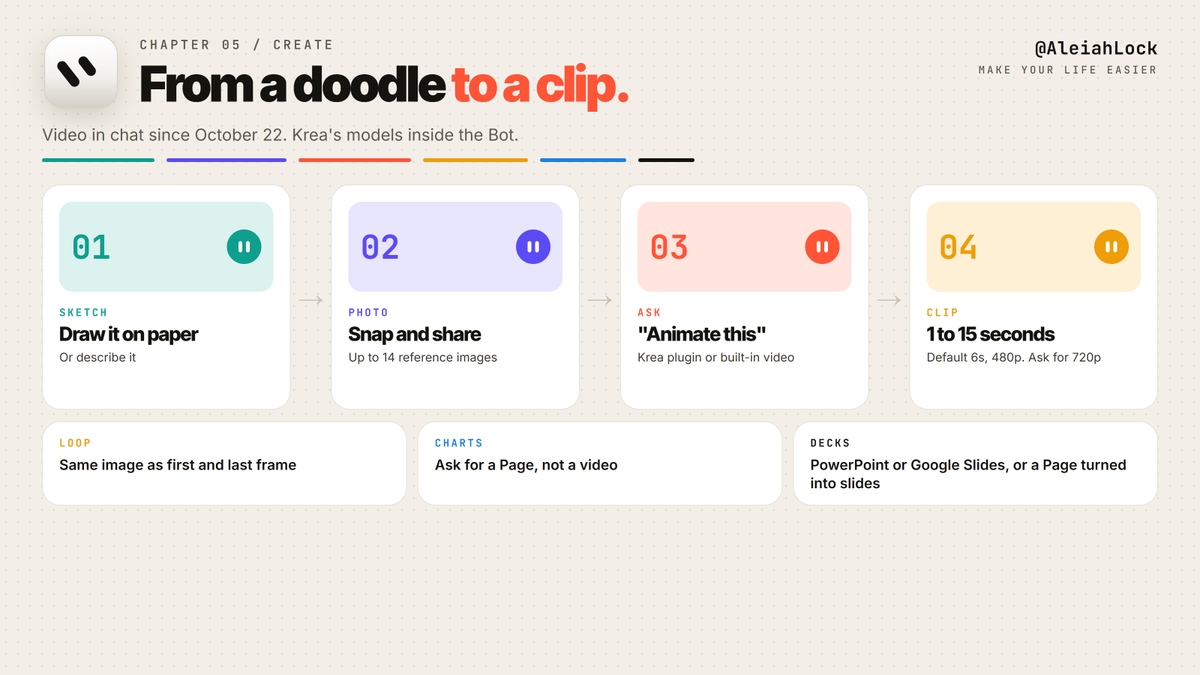
Since October 22 a Bot can make a video from a description or from an image you share. The numbers that matter:
Clips run 1 to 15 seconds. Default is 6
Default is 480p. Ask for 720p if you need it
Use the same image as the start and the end frame and you get a loop
You can add up to 14 reference images
For charts and product demos, ask for a Page instead. A video of a chart is worse than the chart.
Krea inside Grok Bot
Krea shipped a plugin, so the Bot can generate images and video with Krea's models without you leaving the chat. Draw something on paper, take a photo, say "animate this".
Slides
Ask for a deck and it comes back as PowerPoint or Google Slides. A Bot can also turn a Page into slides, so build the Page first, check the numbers, then ask for the deck.
Your own avatar videos
HeyGen plugin plus the Action Button, covered in chapter 4. The same trick works for any video tool with a plugin.
6. 30 hidden features
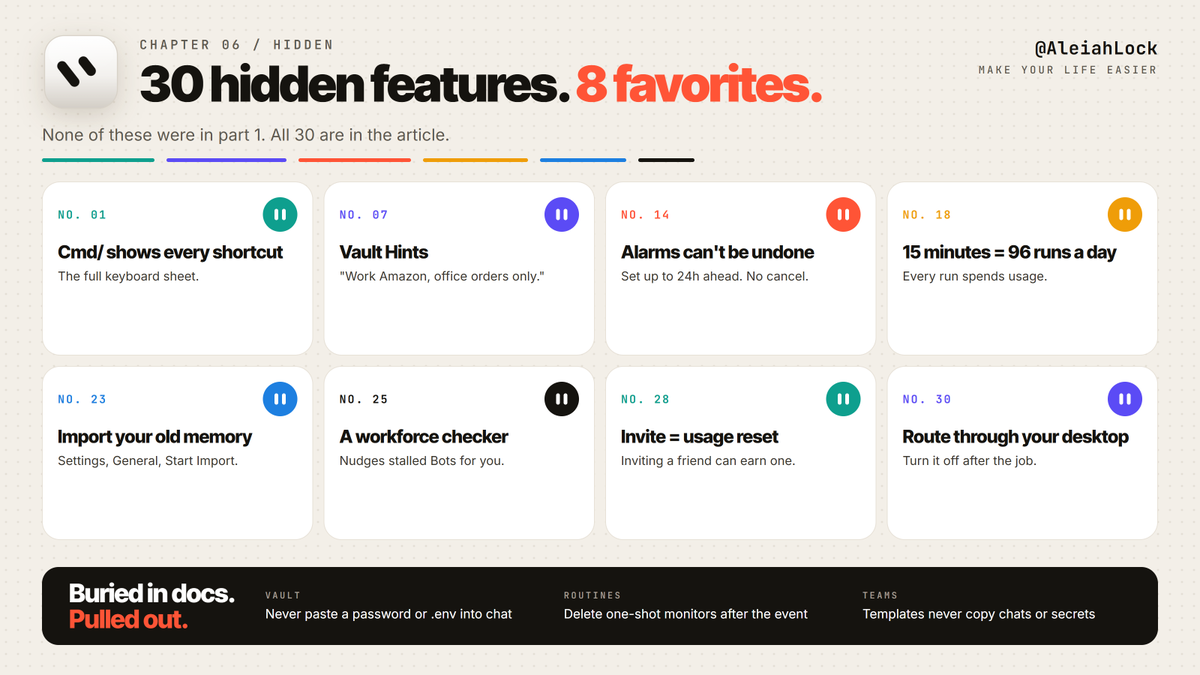
None of these were in part 1. Most of them are buried in docs, changelogs and threads from people who use it every day.
Speed
Vault and logins
Phone
Routines
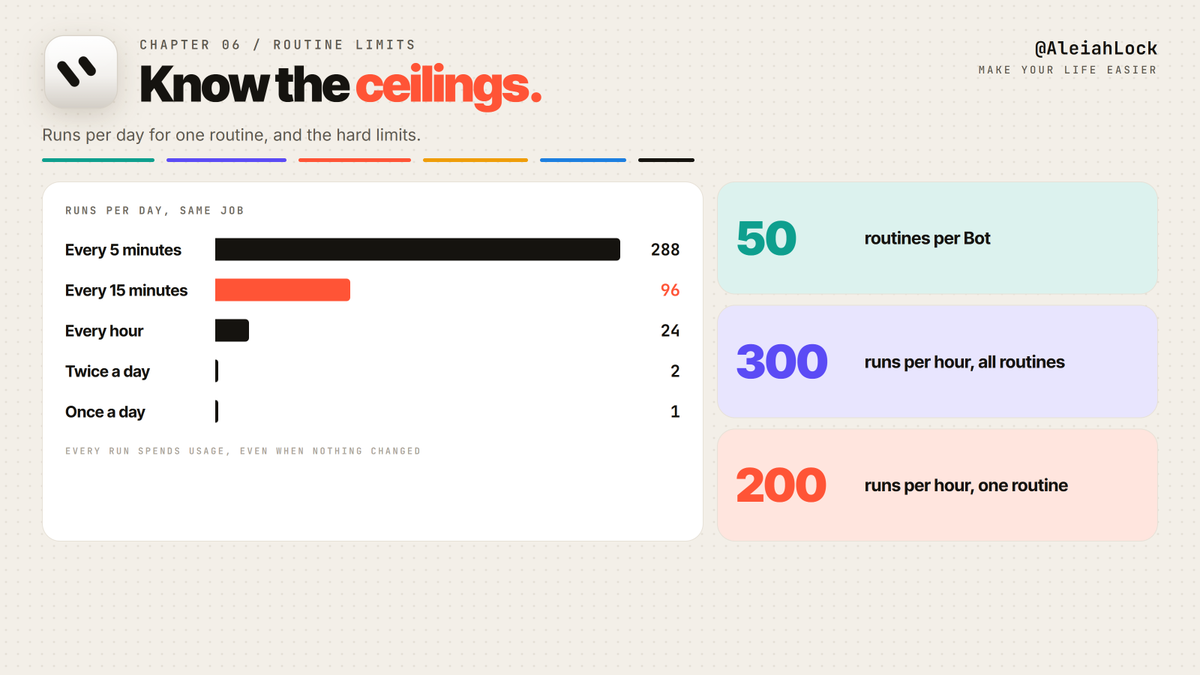
Teams and Bots
Usage and network
7. What's new since October 21, and what's coming
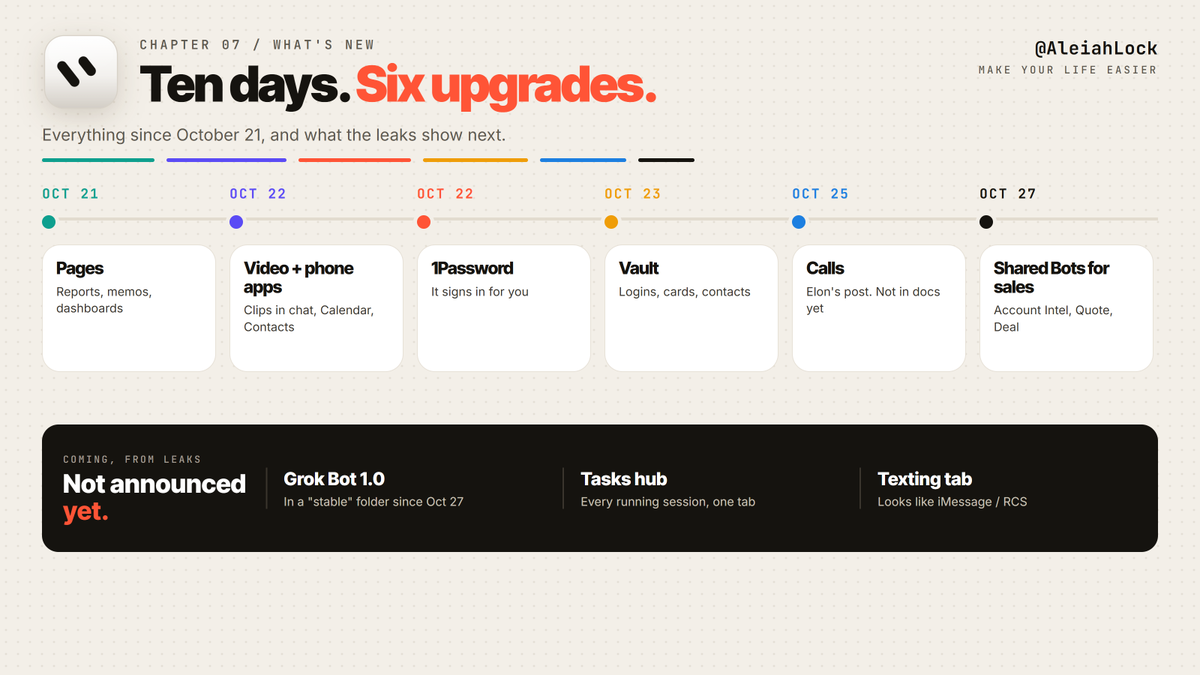
October 21. Pages. Reports, memos and dashboards you edit together or let the Bot keep up to date.
October 22. Video in chat. From a description or an image.
October 22. Phone apps. Calendar, Reminders, Contacts and more on iOS and Android.
October 22. 1Password. Approve the logins you want to share, and the Bot signs in for you.
October 23. Saved logins, cards and contact info. Add once, the Bot remembers.
October 25. Calls. Elon: Grok Bot can call someone or a business for you and send you a summary. Not in the docs yet.
October 27. Shared Bots for sales. SpaceXAI's Account Intel, Quote and Deal Bots. Elon the same day: "New features in Grok @Bot."
October 28. Team Bots are now called Shared Bots in the docs.
Late October. Krea plugin, images and video from Krea's models inside the chat.
October 30. A user-built iPhone Shortcut that lets Grok Bot see what's on your screen. Not an official feature. Elon replied "Cool".
Coming, from leaks and builds, not announced:
Grok Bot 1.0. The first stable build has been sitting on Cursor's download server in a folder called "stable" since October 27
A Tasks hub: one tab with every session your Bots are running at once
A Texting tab in settings, which looks like iMessage or RCS support
8. The prompt pack
Setup
"Ask me 15 questions about my work, my week and how I like things done, then remember the answers."
Morning
"Every weekday at 7:30, write me one page: calendar with travel time, emails that need me today, bills due this week, and anything you're waiting on me for."
Inbox
"Sort the last 7 days into needs me, can wait, newsletters, receipts. Draft replies for needs me. Send nothing."
Bills
"List every recurring charge from the last 90 days with the price and the date."
Booking
"Find three options, show me the total with fees, book nothing."
Business
"Build me a Page with last month's sales by product and a table of overdue invoices. Update it every Monday at 8."
Hire
"Write the job description for a Bot that would take [task] off my plate. Rules, recurring job, current assignment, and what to do when information is missing."
Night
"I'm going to sleep. What can you work on for the next 8 hours that moves us toward this week's goal? Draft everything, send nothing."
Create
"Make a 6-second loop from this image, same first and last frame, 720p."
The setup takes ten minutes. Pick the chore you hated most this week, give it to a Bot tonight, and read the morning page tomorrow.
Every feature, every setting and the first 30 hacks are in part 1, Grok Bot A-Z.
Okey @grok before people decide to open or not the article - rank it