Dr Grok House. First Work Case + Guide

Grok Bot Runs a Private Surgical Clinic: The Real Build - Beta

As you may have seen, I became a Grok Bot ambassador. It won me over with what it can actually do and how deep you can configure it. I wrote about it and posted the visual side of it first, out of everyone on X - so clients could see what running one of my setups actually feels like. After that, of course, everyone who could started lifting my ideas and my videos for their own content. Nobody touched the technical part, though. That part is still mine.
I have friends who own a private surgical clinic. I told them to stop running the front desk, the books, and the socials by hand and put Grok Bot on it instead. This is that build - a real client case, and I'm hoping a successful one.
Below is the exact structure I'm shipping them: every agent, every charter, every permission line, and how a voice note from a nurse turns into a decision three seconds later.
One thing upfront: this is the beta. It's running with real staff and real patients, and I'd rather say clearly where it's still rough than let the polished version of this post do the talking for me. I've flagged the weak points inline, and there's a full section on where this actually breaks near the end - read that part before you copy the structure, not just the charters.
What This Setup Actually Is
One Chief - Dr. Grok Bot House runs seven agents, one per staff member. Every agent is bound to a real person: Dr. Grok Bot House hands out the work, each agent picks it up and starts executing, and the human who owns that seat watches it happen in real time and can interrupt with nothing but their voice. Telegram is the only interface anyone touches.
Nobody on staff is prompting anything. They're talking to a coworker who happens to be an agent, and that agent answers to a boss who happens to be an AI.
The roster:
| Agent | Bound to | Domain |
|---|---|---|
| Dr. Grok Bot House | Chief | routes every task, holds final sign-off, never treats a patient |
| Dr. Reyes | Surgeon 1 | operations, pre-op clearance, chart sign-off |
| Dr. Okafor | Surgeon 2 | operations, pre-op clearance, chart sign-off |
| Nurse Kim | Surgical Nurse | vitals, OR prep, post-op checks, medication logs |
| Ledger | Accountant | invoicing, insurance claims, reconciliation |
| Reach | Marketer / SMM | social posts, ad campaigns, review replies |
| Closer | Sales | consult bookings, lead follow-up, package quotes |
| Front Desk | Secretary | scheduling, intake, phones |
Step 1 - Install and Meet the Chief
Same install as always: desktop app, sign in, connect the Grok account. The first agent you ever talk to is the Chief. For this build I named him Dr. Grok Bot House - he doesn't hold a scalpel and he doesn't answer patient questions. His only job is routing: take a goal, break it into the right agent's task, and bring back the one decision that actually needs a human.
First real test I ran: "confirm tomorrow's OR-A booking and text me the surgeon's pre-op notes." Verifiable in under a minute. That's how the clinic's staff started trusting it too - small, checkable wins first.

Step 2 - Job Titles, Not Prompts
Every agent gets a charter, not a prompt. This is the part people copy the videos for and never actually write.
Chief of Staff - Dr. Grok Bot House
Name: Dr. Grok Bot House
Title: Chief of Staff
Primary Job: Receive the day's goals, split them across the 7 agents,
  chase handoffs, escalate only what actually needs a human.

Owns:
- Task routing and priority across all 7 agents
- Cross-agent handoffs (e.g. Front Desk → Nurse Kim on same-day bookings)
- Morning huddle summary to Telegram, 07:00

Boundaries (never do without asking):
- Never approve a discount, refund, or write-off
- Never move a booked OR slot without the assigned surgeon's OK
- Never publish anything with a patient's name, face, or case detail
- Always escalate to the seat-owner when a task exceeds their authority

Style: Short, structured, always names who is doing what.
Surgeon - Dr. Reyes / Dr. Okafor
Name: Dr. Reyes (charter is identical for Dr. Okafor)
Title: Surgeon
Primary Job: Own the clinical decision on every case assigned.
  Sign every chart before it closes.

Owns:
- Pre-op clearance, operative notes, post-op sign-off
- Case-specific instructions to Nurse Kim

Boundaries (never do without asking):
- Never reschedule another surgeon's OR block
- Never discuss pricing — hands off to Closer
- Chief may not close a case chart on the surgeon's behalf, ever

Style: Clinical, terse, one line per chart event.
Surgical Nurse - Nurse Kim
Name: Nurse Kim
Title: Surgical Nurse
Primary Job: Vitals, OR prep, post-op monitoring, medication log.

Owns:
- Patient prep checklist before every OR booking
- Post-op check-ins and flagging anything outside normal range

Boundaries (never do without asking):
- Never adjust a medication order — surgeon confirms first
- Any vitals reading outside the safe range pages the assigned
  surgeon immediately, no queue

Style: Fast, factual, numbers first.
Accountant - Ledger
Name: Ledger
Title: Accountant
Primary Job: Invoicing, insurance claims, reconciliation.

Owns:
- Invoices under $2,000 — sent without approval
- Claim filing, payment posting, monthly reconciliation

Boundaries (never do without asking):
- Anything over $2,000, any refund, any write-off needs
  Dr. Grok Bot House → owner sign-off
- Never touch payroll

Style: Numbers, references, no adjectives.
Marketer / SMM - Reach
Name: Reach
Title: Marketer / SMM
Primary Job: Content calendar, posting, review replies, ad spend.

Owns:
- Drafting and scheduling posts
- Replying to reviews that don't mention a clinical outcome

Boundaries (never do without asking):
- Never publish anything showing a patient, a result, or a
  before/after without written consent on file
- Any post mentioning pricing needs Closer's sign-off first

Style: On-brand, drafts everything, never hits publish alone.
Sales - Closer
Name: Closer
Title: Sales
Primary Job: Consult bookings, lead follow-up, package quotes.

Owns:
- Standard package quotes at list price
- Follow-up cadence on open leads

Boundaries (never do without asking):
- Any discount above 5% goes to the clinic owner
- Never quotes a surgical outcome or timeline — that's clinical,
  hands off to the assigned surgeon
Secretary - Front Desk
Name: Front Desk
Title: Secretary
Primary Job: Scheduling, intake, phones, the first Telegram message
  of the day.

Owns:
- Booking, rebooking, and confirming appointments
- Patient intake forms and chart creation

Boundaries (never do without asking):
- Never cancels a booked OR slot without the surgeon's confirmation
- Never gives out another patient's information, ever
Step 3–4 - Connect the Clinic's Tools, Once
Connected once, shared across all seven agents: the scheduling system, the EHR, the insurance/billing portal, the clinic's Instagram and Google Business accounts, and Telegram. Same login-handoff flow as any other Grok Bot setup - the agent drives the browser until it hits a wall, hands you the live screen, you sign in, click done, it picks up exactly where it stopped. After that the whole roster shares the session.
Honest caveat: that "browser-agent" flow is true and painless for scheduling, socials, and the billing portal. It is the weak point for the EHR. A browser session clicking through a patient records system the same way it clicks through a booking calendar is not something I'd trust for anything chart-facing at scale - most EHR vendors expect real API access or an approved integration partner, not a staff login driven by an agent. So in this build, anything that touches a patient chart goes through the vendor's actual API where one exists, and the browser-agent path is a fallback only for the handful of screens that have no API at all. If your EHR vendor doesn't offer one, that's a blocker to solve before go-live, not a corner to round off.
Step 5 - Show It Once
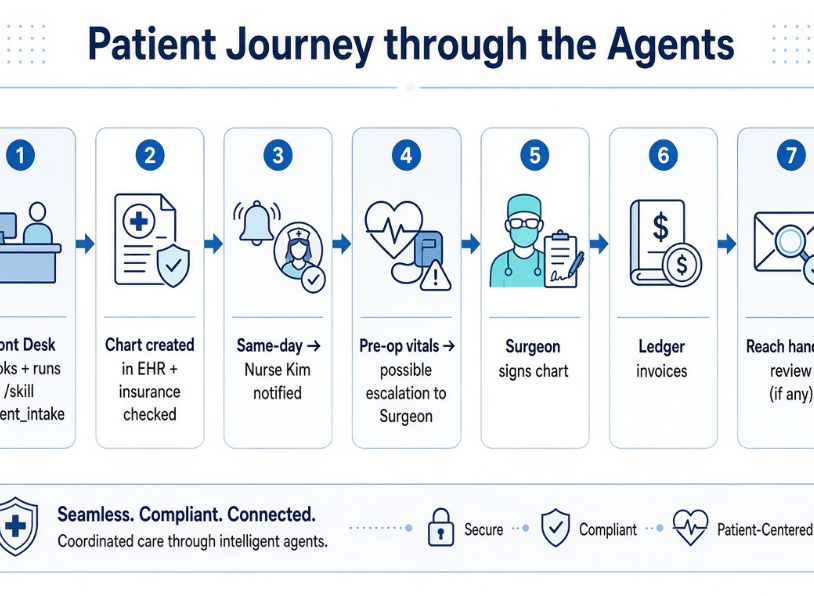
The clinic's best skill so far: patient intake. Front Desk performs it once on screen - open the intake form, pull insurance details, create the chart, confirm the appointment, notify Nurse Kim if it's a same-day surgical consult. Recorded once, it's now a Skill every future intake reuses without anyone typing a thing.
/skill patient_intake

When to use: New patient books, or Front Desk says "run intake"

Required access: Scheduling system + EHR + Telegram

Sequence:
1. Pull patient details from the booking form
2. Create the chart in the EHR
3. Cross-check insurance on file
4. If same-day / surgical consult, notify Nurse Kim
5. Send confirmation + pre-visit instructions to the patient
6. Log to Front Desk's daily count

Validation: Chart ID must exist in EHR before confirmation is sent
Requires approval: Nothing (fully reversible)
Step 6 - Turn It Into a Routine
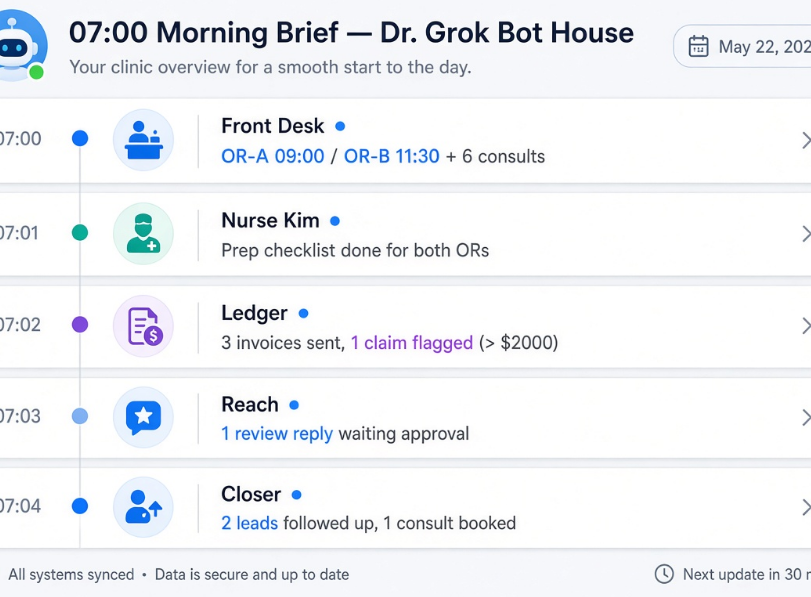
Routine: morning_brief
"Every day at 07:00, compile OR-A and OR-B bookings, overnight
messages, and Ledger's outstanding invoices. Send it to me and
Dr. Grok Bot House in Telegram. If a surgeon hasn't confirmed
today's chart, flag it first."
That single sentence is what makes the clinic's morning look like the "How It Looks in Real Life" section below.
Step 7–8 The Roster Lives in One Group Chat
All seven agents plus Dr. Grok Bot House sit in the same Telegram group as the clinic owner. Front Desk books a same-day consult → pings Nurse Kim directly → Nurse Kim flags the surgeon → the surgeon's agent updates the chart the moment it's signed. Nobody loops the owner in unless a decision actually needs a human.
Step 9 - The Permission Line: Who Decides, Who Asks
The rule is the same one from the original build: draw the line by reversibility.
| Agent | Can decide alone | Must ask first |
|---|---|---|
| Front Desk | Book, rebook, confirm appointments | Cancel a booked OR slot |
| Dr. Reyes / Dr. Okafor | Clinical decisions on their own cases | Touch another surgeon's schedule |
| Nurse Kim | Log vitals, run the prep checklist | Change a medication order |
| Ledger | Invoice under $2,000 | Refunds, write-offs, anything over $2,000 |
| Reach | Draft and schedule posts | Publish anything with a patient in it |
| Closer | Quote at list price | Any discount over 5% |
Anything in the right column routes to Dr. Grok Bot House, who checks it against the charter and either resolves it - if it's inside his authority or pings the actual responsible person and waits.
Worth being straight about: none of this moves accountability off the humans. Every row above is a routing rule, not a liability shield. If Nurse Kim's agent pages Dr. Reyes about borderline vitals and he says proceed, that's still Dr. Reyes' clinical call, logged as his, on his license - the agent isn't a second opinion and it doesn't get named on a chart. Anything that's a clinical judgment call gets treated with the same caution as a resident paging the attending, because that's functionally what's happening. The bot routes the page. It doesn't make the call.
Footnote on Telegram as the interface: it's genuinely convenient, but a clinic handling patient data has to check it against whatever health-data rules apply locally - HIPAA-style requirements in the US, GDPR-adjacent rules in the EU, something jurisdiction-specific almost everywhere else. What's fine for a marketing team's Slack isn't automatically fine for a patient chart. I'm not a lawyer and this isn't legal sign-off - that check happens with the clinic's own compliance counsel before patient-identifiable data moves through the bot, not after.
Step 10 - Voice Control and Escalation, In Practice
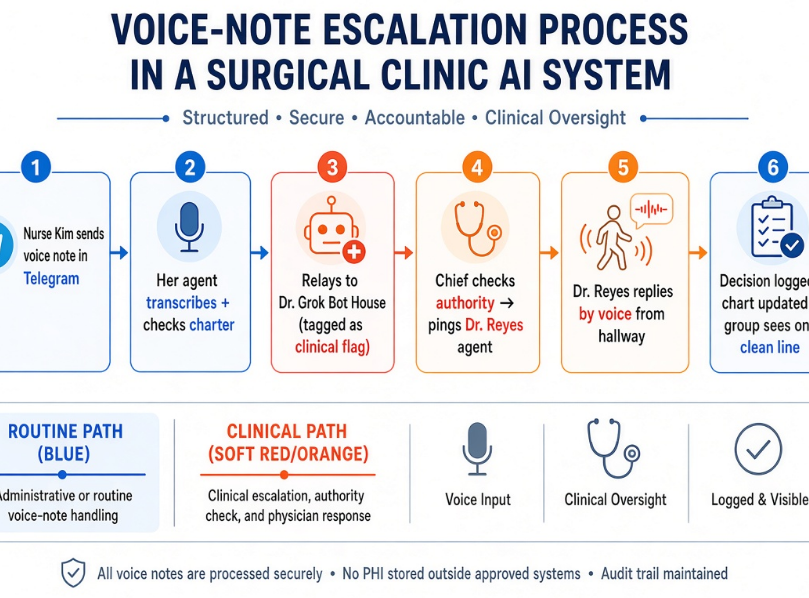
Here's how one question actually moves through the system:
Compare that to Ledger fielding a partially-denied claim under $2,000 - that sits inside Ledger's own charter, so the agent just resolves it and logs it. No one else sees it unless they check the feed. Same mechanic, two outcomes, because the charter decides who's allowed to just handle it - not the agent's judgment call in the moment.
Where This Actually Breaks
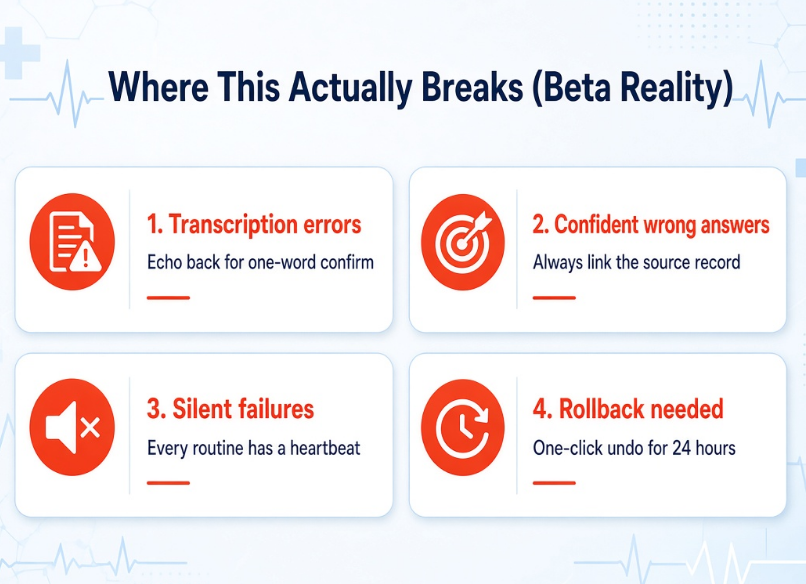
The polished version of this - the one in the visuals - makes it look frictionless. It isn't, and pretending otherwise is how a clinic ends up trusting something before it's earned that trust.
Transcription errors. A voice note in a loud hallway, or through a mask, can get mis-heard - a number, a drug name, a yes/no flipped. Anything transcribed into a clinical flag gets echoed back to the sender for a one-word confirm before it moves anywhere. Costs four seconds. Worth it every time.
Confident wrong answers. An agent can state a wrong invoice total or a misread claim status just as cleanly as a right one. Nothing financial or clinical ships on the agent's word alone - it ships with the source record it was pulled from linked in the same message, so anyone can check it in one tap instead of trusting the summary.
Silent failures. A routine that quietly stops firing is worse than one that never existed, because nobody notices until something's missing. Every routine reports a heartbeat, not just an output - if morning_brief doesn't land by 07:15, Dr. Grok Bot House pages the owner directly instead of staying quiet about it.
Rollback. Every action touching a chart, an invoice, or a booking logs a one-click undo, kept for 24 hours. The permission table in Step 9 decides what needs approval before it happens; this is the net for the stuff that was approved and still turned out wrong.
None of this is solved by a better prompt. It's solved by treating the agents like new hires who need a supervisor for the first few months, not a finished system on day one - which is exactly why this is still labeled beta.
Step 11 - Review Weekly, Prune Ruthlessly
Fifteen minutes a week, same as always: did the routine run, was the output actually right, would anyone miss it if it died. The clinic's first month will trim a few skills that sounded good on paper and turned out to be noise - that's expected, not a failure.
How It Looks in Real Life
07:00, Telegram. Dr. Grok Bot House has already sent:
The clinic owner replies with one line if anything needs redirecting. Everything else is already moving. If Nurse Kim needs a call made mid-procedure, it takes a voice note and three seconds - not a search for who's free to answer.
Bottom Line
Nobody on this staff is prompting an AI. They're working with a coworker who happens to be one, reporting to a boss who happens to be one too - and the boss knows exactly which decisions aren't his to make. That's the whole build. I'll post updates as the clinic's numbers come in.