how to run an ai video agency (FULL GUIDE)

claude opus 5.5 and gpt-6 astra can now build studio-level videos in code, editing and all. businesses already pay every month for videos like that, and this guide shows you how to run a video agency that makes them, with hermes running it.

by the end of this guide you'll have:
why this works now
like a year ago, making a good motion video meant hiring an editor, buying templates, or learning after effects yourself.
that's changed now. claude opus 5.5 and gpt-6 astra can now write the whole video as code. every title, camera move, 3d object and every transition is written out and rendered into a real video file.
the videos that software companies post when they launch something are the best example of this style. lots happening on screen, smooth movement, 3d that explains how something works. those used to cost thousands from a studio, and now an agent can get close to that level.
but the bigger opportunity isn't launch videos. a startup might need just a few launch videos a year. a normal business needs videos every single month, to explain their service, to follow up on quotes, and to keep their ads fresh. that's the market this guide goes after.
what businesses actually pay for
businesses don't buy a video because of how it was made. they buy what the video does for them. for ex, a roofer wants a homeowner to understand the job and accept the quote.
so when you pitch, you're selling that outcome, and the fact that it's made with ai is just how you make it fast.
it helps to know what the market already pays, because it tells you where to position yourself. here's what i found when i looked at real public prices.
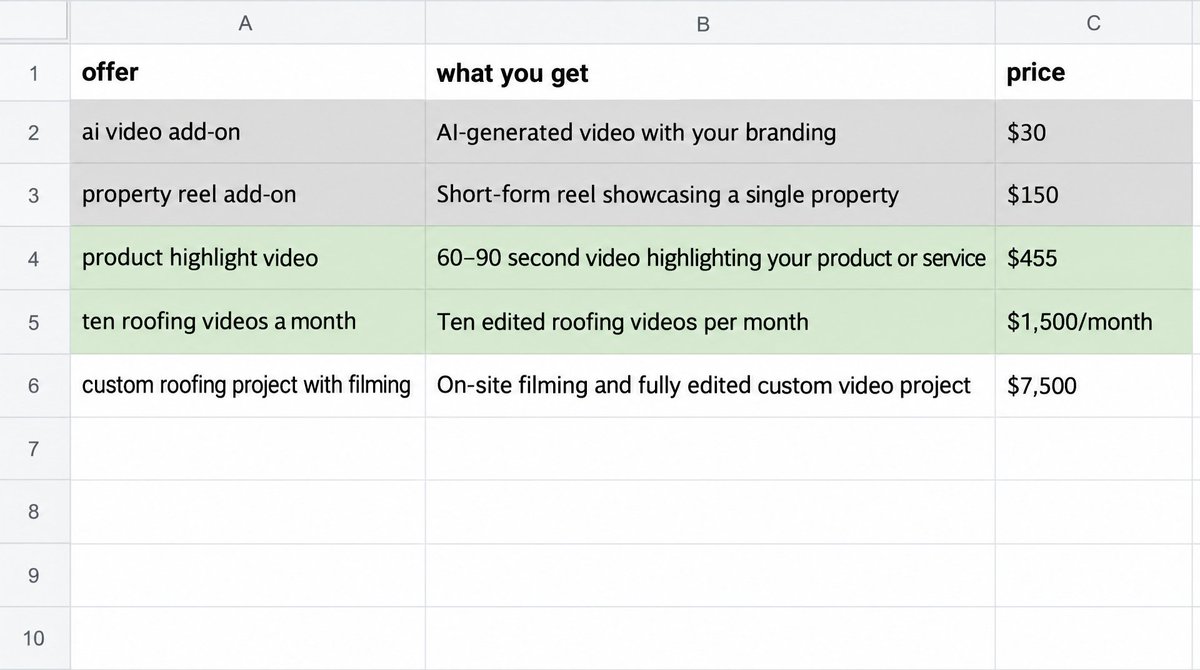
at the cheap end, there are ai tools that make ad videos as a $30 add-on, and real estate videographers who add a property reel for $150 extra. at that level it's a race to the bottom, and you don't want to be there.
in the middle, a product video studio charges $455 for a 15 to 30 second product highlight video. and there's a company called roof lens that makes 10 short videos a month for roofing contractors out of their own footage, for $1,500 a month on a quarterly commitment.
at the top end, one video studio did a full roofing project with filming, drone footage and graphics for $7,500.
so the market goes from $30 all the way up to $7,500. the part worth going after is the middle, which is recurring videos made specifically for one business, month after month. that's a retainer, and it's where the steady money is.
who to sell to first
i looked at a handful of business types and what they already spend on video.
roofing contractors were the best fit to start. there's already a company selling almost exactly this service to them, so you know the demand is real, the buyer is clear, and the video has an obvious job, which is helping a homeowner understand the work before they say yes to a quote.
property companies that run a lot of apartments are the next one. they need videos for every floor plan, every offer, and every amenity, and those change all the time. sell to the companies that manage lots of buildings, or the agencies that work for them, because single real estate agents are already getting cheap reels for $150.
online stores need product demos and a steady flow of new ad variations. the catch is that there are already cheap ai tools here, so what you're really selling is accuracy to the real product and good judgment on what to test.
software companies need explainers, onboarding videos and feature updates. this is where fully code built videos shine, but you need real access to their product to make them accurate.
solar is worth doing later. the videos work well there, but anything about savings needs current, local numbers the client has approved, which makes it slower to get right.
so the rule is to pick businesses that already spend money on marketing and already have their own footage.
the offer
start with something small and clearly defined, so it's easy for a business to say yes.
one 25 second video, with two different openings and in two sizes, one 9:16 for phones and one 16:9.
the two openings let the business see which one gets more people to keep watching, and the two sizes mean the same video works on phones and on their website or youtube. it's a small amount of extra work for you, and it makes the video a lot more useful to them.
the business gives you their approved footage, the area they work in, the facts about how they work, and what they want people to do at the end. filming, ad spend and running their campaigns are separate, so you're not on the hook for any of that.
the first thing to find out is simple, does a business pay for it and actually use it. whether it brings them more jobs comes later, once they've run it for a while.
the tools
you don't need to be able to edit video for any of this. these are the tools the agent uses.
claude opus 5.5 is the model that's best at this right now, and gpt-6 astra is good at it too. you use them through claude code or codex, which are the agents that write and build everything. you talk to them in plain words and they write the code.
hermes is what runs the agency once you have clients. it's an agent you deploy once and then talk to on telegram, and it takes each client's footage through the whole process on its own.
hyperframes turns html and animations into an actual video file. html is the language websites are built in, and gsap is a tool for animating things on a web page. hyperframes takes those animations and renders them frame by frame into an mp4. a full 1080p video took about a minute to render for me.
three.js is how the 3d stuff gets made. it builds 3d objects in code, like a model of a house that you can take apart layer by layer.
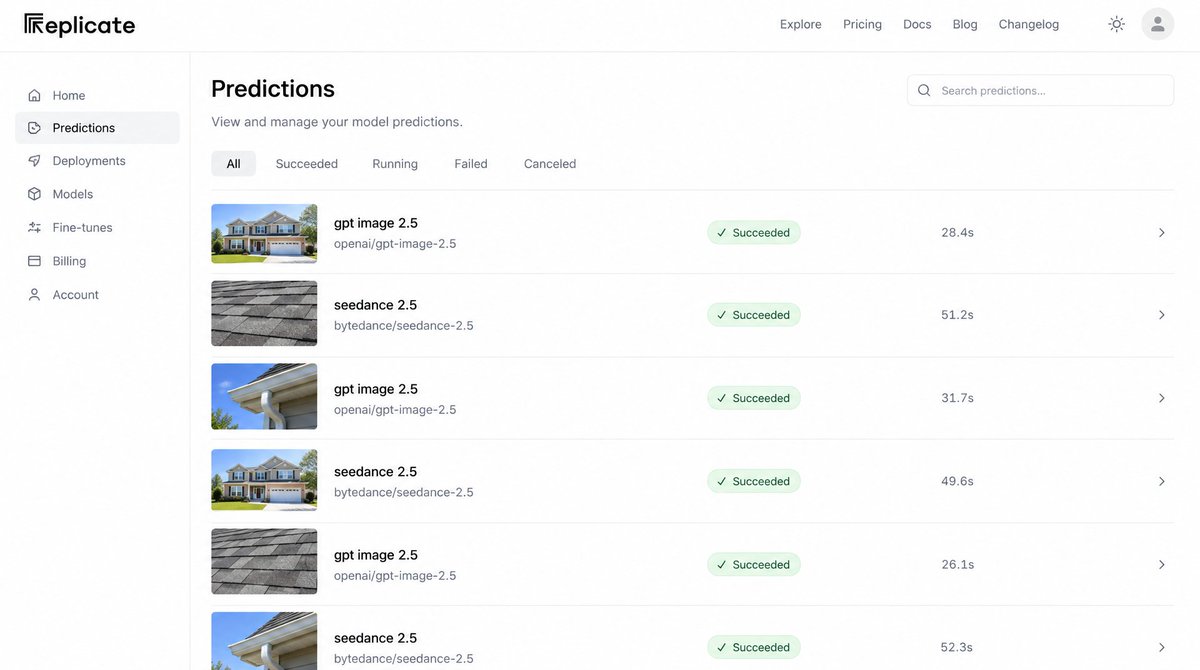
the part that makes the biggest difference is giving the agent its own access to image and video models. i gave it a replicate api key, and through that it could call gpt image 2.5 to make still images and seedance 2.5 to turn those images into video clips, all by itself. replicate is just a site that lets your agent use a lot of different models with one key.
without that, the agent can only animate text, shapes and 3d. with it, it can make its own footage for the shots that need it, which is what gives the videos real substance.
give yourself access to image and video models through replicate.

- my replicate key is in REPLICATE_API_TOKEN
- use gpt image 2.5 for still images and seedance 2.5 for turning an image into a short video clip
- generate one test image and one test clip so i can see it's working
- save every generation with the prompt you used, so any of them can be redone later
- if one of those models isn't available on replicate, tell me instead of switching to a different one
elevenlabs makes the music, and hyperframes comes with a library of clean sound effects.
what makes it look expensive
before building anything, i studied the launch videos a studio makes for software companies, 28 of them and about 48 minutes in total, and had the agent go through every frame looking at how things move. a few patterns came out of it that work for any business video.
the thing in the front of the shot becomes the transition, so a title or a logo flies towards the camera and carries you straight into the next scene.
one object carries the story across the shots, like a photo or a card, so it feels like one continuous piece instead of a slideshow.
there's always one main movement with smaller ones layered around it, and they overlap, which is what makes it feel full without feeling messy.
the speed changes the whole time, holding just long enough to read, then leaving fast, then slowing down as the next piece arrives.
cuts are fine too, as long as the size, direction and subject match from one shot to the next, so it doesn't all have to be fades.
and every shot shows what the business actually does. for roofing, that's an inspection turning into a finding, and the finding turning into a booked visit.
you can hand the agent those same patterns along with your own reference videos, and it'll build to them.
i've put all of it into one skill file on github, with the reference breakdowns, the motion patterns and every prompt from this guide, so you can hand the whole thing to your agent at once: [github link]
planning it first
the first version i made was a simple ten second ad. an image, a short video clip, and some text. it got rejected straight away for being too basic, basically just an image and a video stuck together.
so every video starts with a storyboard before anything gets built. a storyboard is just a list of every shot in order, what's on screen, what moves, and how it gets to the next shot. it's much faster to fix a bad idea on paper than after it's rendered.
plan a 25 second video for [business].

- what they do: [service], who their customer is: [customer], what we want people to do at the end: [call to action]
- here's their footage and facts: [attach]
- write a storyboard, shot by shot, with what's on screen, what moves, how long it holds, and how it gets to the next shot
- every shot should show something useful to the customer as well as looking good
- mark which shots use their real footage, which use 3d built in code, and which use ai generated images or clips
- no empty frames and nothing that just sits there. every shot should be moving into the next one
- don't invent testimonials, ratings, prices, savings, warranties or results. if a shot needs one of those, leave a placeholder for the client to fill
building the parts that explain
the 3d is what makes these look expensive.
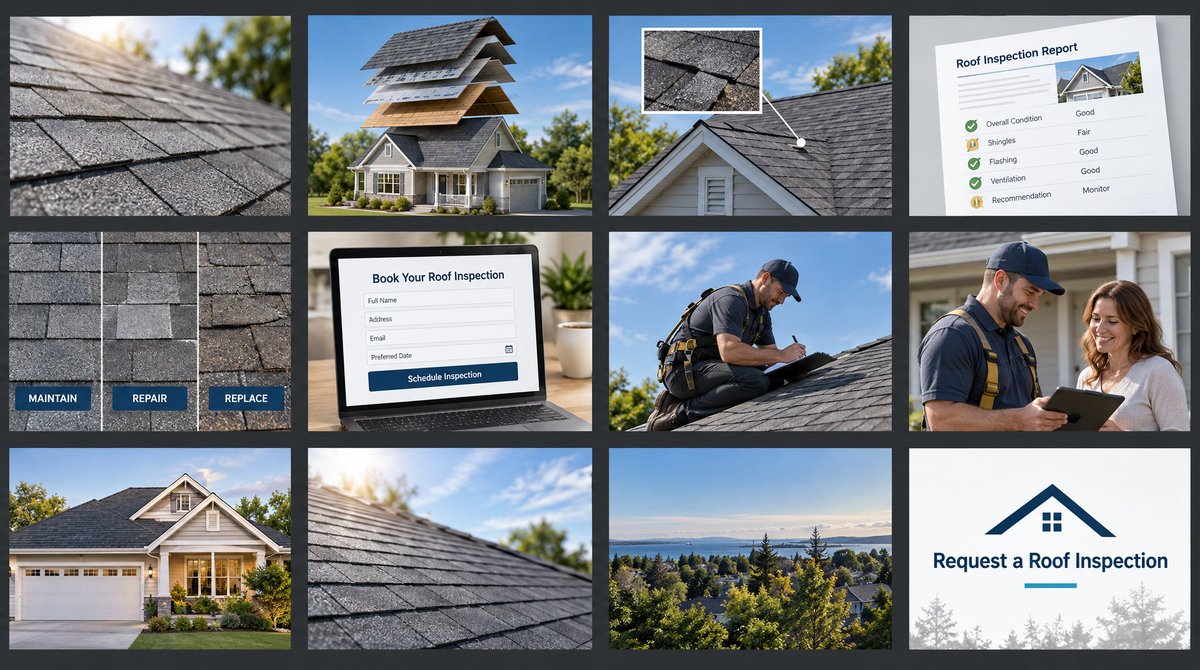
for the roofing sample, the main piece was a model house where the roof comes apart into its layers, shingles, then the layer under them, then the deck, then the rafters, with a label on each one. a homeowner watching that actually understands what a roofer is talking about.
another piece took each inspection photo and pinned it to the exact spot on the roof where it was taken. another showed three patches on the roof for the three options, maintain, repair or replace.
each of those got built on its own, rendered on its own, and checked on its own before it went anywhere near the full video. that way you're not trying to fix five things at once.
build one 3d component for the video in three.js.

- what it needs to explain: [the idea, like how a roof is built in layers]
- it should work inside hyperframes and render smoothly at 60 frames a second
- the camera should move with purpose, speeding up and slowing down, not drifting at one speed
- label anything the viewer needs to understand, and make sure no text overlaps or flies through other text
- render it on its own as a short clip first so i can check it before it goes into the full video
- if something can't be shown clearly in 3d, tell me and suggest a simpler way instead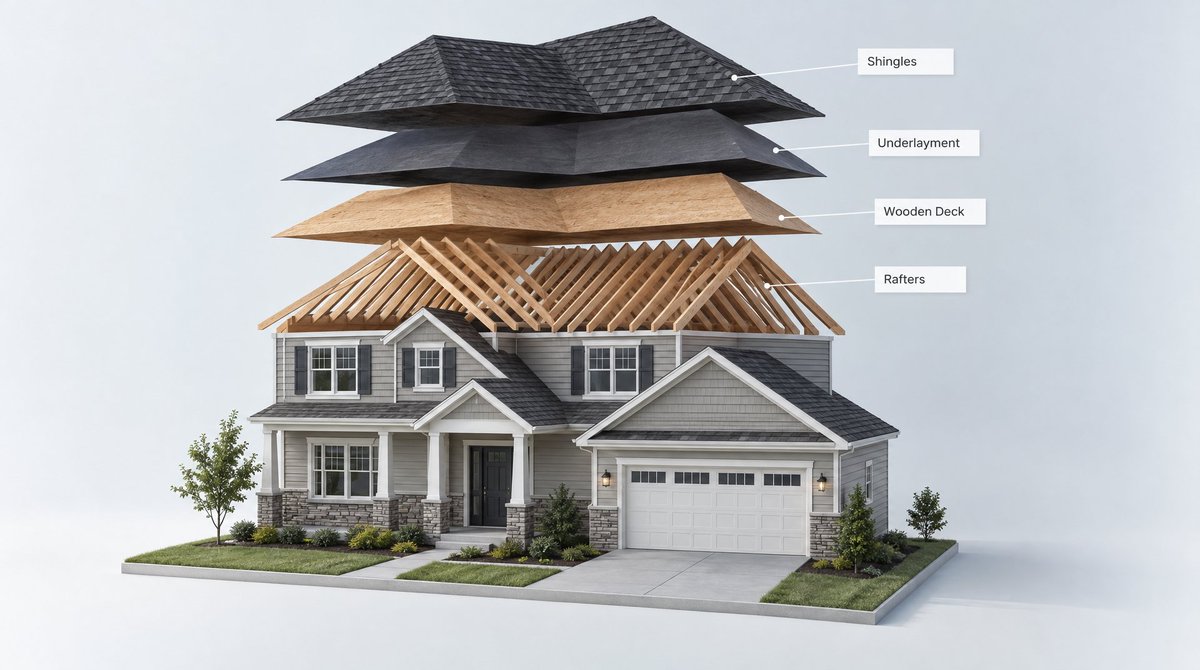
the ai footage
ai images and clips are great for the supporting shots, like the mood of a house at the start or a close up of a detail. but the business's own footage is always the proof.
if something in the video is generated, it's basically a concept, and it should be labelled that way.
a couple of things to know. the video clips came out at 720p and 24 frames a second, so they needed to be upscaled to 1080p and smoothed to 60 frames to match the rest.
generate the supporting footage for the storyboard.

- make the still images with gpt image 2.5 on replicate, then turn the ones that need movement into clips with seedance 2.5
- only for the shots the storyboard marks as ai generated. anything showing their real work uses their real footage
- keep everything bright and clear, matching a real home and a real business, not a dark or moody look
- upscale the clips to 1080p and smooth them to 60 frames so they match the rest of the video
- check every clip for anything that looks physically wrong, like parts of a building that don't line up, and regenerate those
- never generate a fake finished job, a fake customer or a fake result
checking the quality
this step took the video from okay to actually good.
the method is called a gauntlet loop, which matt shumer wrote up at somethingbig.ai/gauntlet-loop. you give the agent a real bar it has to beat, which here was the studio launch videos, and it splits the work into small pieces and keeps looping on each one until it gets there.
the idea is to split the builder from the judge. the agent that builds the video never checks its own work. a fresh agent, one that hasn't seen any of the building, gets the finished video, the brief and the reference videos, and says what's wrong with it. then you fix the biggest problem and run it again.
you keep going until it hits the level you want, or until each round only makes small changes.
i ran the whole video past a fresh critic five times, plus a final check. they caught things i would have missed, like a single frame where the 3d jumped, text splicing together during a transition, the 3d house turning into a flat slab for a second etc.,
you can also measure some of it. one thing i tracked was how much of the video was basically frozen, where almost nothing moved on screen.
you're reviewing a video you did not build. be honest.

- here's the rendered video: [attach], the brief: [attach], and the reference videos we're aiming for: [attach]
- watch the whole thing and list every problem, biggest first
- look hard for empty frames, shots that hold too long, uneven spacing, text that collides or flies through other text, and anything that looks physically wrong
- say whether the music and sound fit the business's customer
- give each problem a time in the video so it can be found
- don't suggest fixes that change what the video is about. only point out what's making it look worse than the references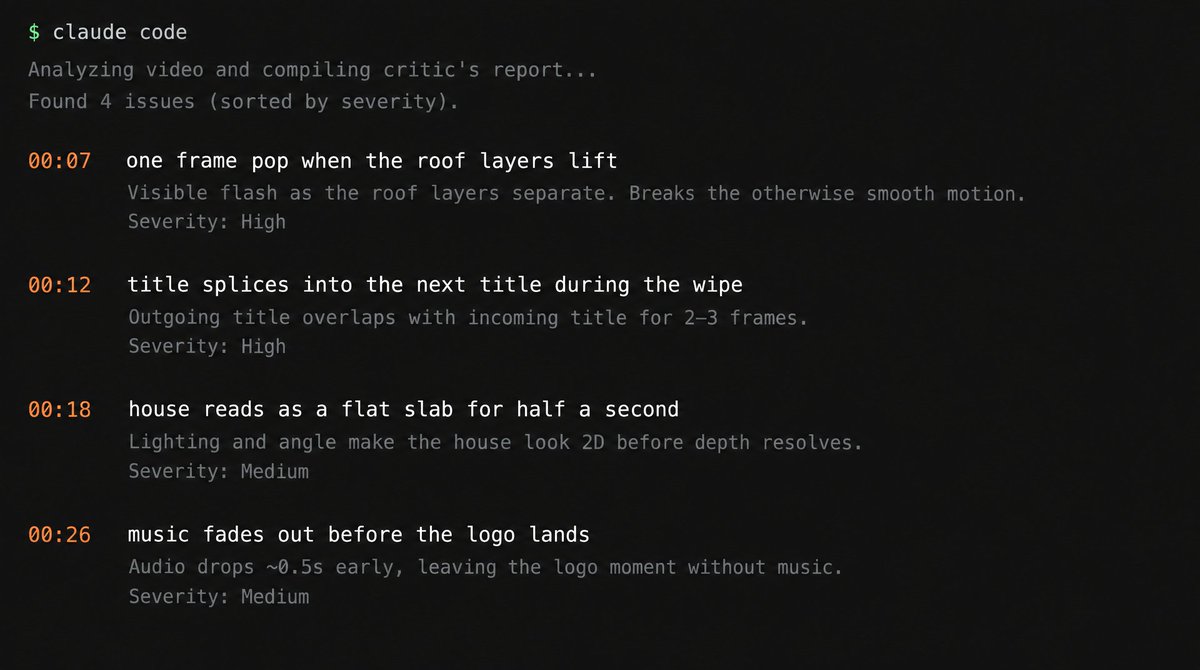
the audio
good visuals can be ruined by bad sound, and that's exactly what happened.
the first music i used was energetic, like a tech launch. it didn't fit at all, because the person watching a roofing video is a homeowner, not someone excited about software. the fix was something warm and calm, like soft piano, clean guitar and a gentle steady beat.
so match the music to the business's customer, not to what sounds exciting.
the ai generated sound effects sounded unprofessional and jarring. what fixed it was using a small set of clean, standard sound effects, turned down, only on the moments that actually matter, and always sitting under the music.
keep the overall volume calm too. the final video was mixed at a normal web level with the effects never louder than the music.
make the music and sound for the video.

- the business's customer is [customer]. the music should feel right to them, warm and calm for a home service, not a hype track
- use elevenlabs for the music and time it to the sections of the storyboard, so it builds and lands with the logo at the end
- use a small set of clean, standard sound effects, only on the moments that matter, and keep them under the music
- mix it at a calm web volume, and never let an effect be louder than the music
- give me the video with two different music options so i can pick
what the sample took
i built a sample for a made up roofing brand called alder, so i'd have something real to show businesses. it's a 28.6 second video that goes from a close up of a roof, to how a roof is built, to the inspection, to every photo placed on the house, to a clear report, to the options, to booking a visit.
it went through more than seven full versions, from ten seconds up to forty and back down to 28.6, over a couple hours with the agents doing the work. i used 10 ai images and 10 ai clips across the whole project, and the final video uses 5 of those clips.
finding the buyers
the businesses to go after are the ones already spending on marketing, because they already believe in paying for it. for roofing, that's contractors running ads, posting project videos, or working with a marketing agency.
roofing marketing agencies are worth going after too. one agency can have lots of roofing clients, so one yes can turn into several videos a month.
the same approach works for the other business types. for property companies, look for the ones managing lots of buildings and already running leasing ads. for online stores, look for brands already running video ads, since they're the ones who need fresh versions all the time.
find roofing contractors and roofing marketing agencies in [area] that are already spending on marketing.

- look for contractors running facebook or google ads, posting project videos, or showing drone and job site footage on their site or socials
- look for marketing agencies that list roofing companies as clients
- for each one, give me the name, the website, where their videos or ads are, and the owner or marketing contact if it's public
- note which ones already have lots of their own footage, because those are the easiest to make great videos for
- if you can't confirm they're actively marketing, leave them out
pitching it
the pitch is simple. you turn the footage they already have into clear sales videos and fresh ad versions every month.
send them the sample, and then offer to make their first one from their own footage. seeing their own jobs in that style is what makes it click for them.
you can send it by email or dm, but a postcard works really well here. these owners get a lot of emails. the front of the postcard has a still from the video with their business name on it, and the back has one line and a qr code that goes straight to the video.
the best version is a short demo made from footage they've already posted publicly, like the project videos on their site or their socials, clearly marked as a sample. then the qr code takes them to their own jobs in that style.
once they've used the first one, the next step is the monthly version, a set number of videos every month from new footage, new offers and new ad angles. that's the retainer, and it's where this becomes steady income.
write a short message to [business] offering the video service.

- say what we do in one line: we turn the roofing footage they already have into clear sales videos and fresh ad versions
- link the sample video: [link]
- offer to make their first 25 second video from their own footage
- keep it under 80 words, friendly, and specific to their business
- don't promise more jobs, more leads or any result
- also write a postcard version: a headline for the front, one line for the back, and a qr code pointing to the sample video
running the agency on hermes
once the process works for one video, you hand it to hermes so it runs for every client without you starting each one.
you set it up by opening claude, giving it the hermes docs and a telegram bot token, and telling it to deploy on railway. then you give it the whole process as one set of instructions, with opus 5.5 as the model it builds with.
from then on, a client drops new footage or a new offer into their folder, and hermes storyboards it, builds it, renders it, runs it past a fresh critic, fixes what the critic finds, and sends you the finished draft on telegram. you watch it, approve it, and it goes to the client.
the monthly retainer runs the same way. at the start of each month it makes that client's set of new videos and ad versions from whatever's new, and you only step in to approve them.
you're running my video agency. here's the process.

- use claude opus 5.5 for all the building, planning and writing
- keep one folder per client with their footage, brand, facts, call to action and past videos
- when new footage or a new offer lands in a client's folder, write the storyboard, then build the 3d parts, generate any supporting footage, and render the full video
- give the render to a fresh critic that hasn't seen the build, fix the biggest problems it finds, and repeat until the fixes are small
- make the music and sound to match the client's customer
- export every version and size the client's plan includes
- send me the finished draft on telegram with the critic's last notes. never send anything to a client until i approve it
- on the first of each month, make each retainer client's new set of videos from whatever's new in their folder
- never invent testimonials, results, prices or savings. if a video needs one, leave a placeholder and tell me
where to start
pick one type of business, roofing is the easiest imo. make your own sample first so you have something to show, time how long it takes, set your price from that, and send it to ten businesses that are already spending on marketing.
hope you have fun setting this up.
join here for more value: https://t.me/+pbCBBtUEtu1lZDA1