GPT-6 Astra should be Illegal for SEO

If you want more customers from Google and AI search, but:

↳ ChatGPT keeps giving you keyword lists while your existing pages still need work.
↳ You open Search Console, stare at the numbers, and close it without changing anything.
Then connect your website and give it the 10 jobs below.
The plugin connects your project's SEO data to the conversation, so the agent can work from your existing pages and search performance.
GPT-6 Astra scored more than twice as high as GPT-5.6 Sol on OpenAI's AutomationBench: 41.4% versus 18.1%. On OSWorld 2.0, which evaluates computer use, it scored 72.6% versus 65.7%. OpenAI's evaluations.

For SEO, that makes a complete page refresh a more interesting job to hand over. Give it a URL, have it read the searches bringing that page impressions, check the product information against current sources, and return the copy to change.
I did that check on my own backlink-tools article. It gets search impressions, and one vendor description needed a correction. Step 3 shows the exact replacement. That's a useful result to get from the same conversation as the audit.
The benchmarks measure model capabilities under OpenAI's evaluation settings, which can differ from ChatGPT. They don't measure SEO results.
TL;DR
↳ Connect your project and start with pages already getting relevant searches.
↳ Ask for the exact edit, comparison table or outreach draft you need.
↳ Check the output, publish the approved work, and record what changed.
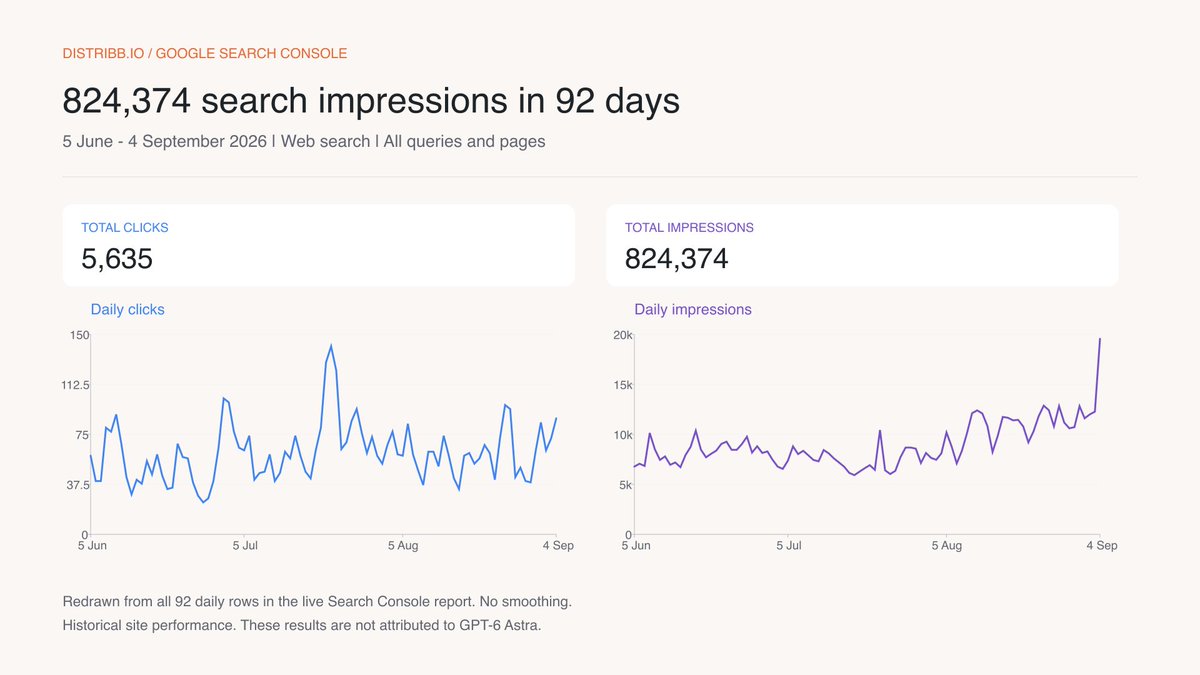
The screenshots show working files with real Distribb data. Proposed edits and messages are drafts.
Set up the 10-step playbook
Choose Astra in ChatGPT and open SEO with Distribb. Connect your Distribb account, then connect Search Console and your publishing integration inside the project.
Paste this once:
Use SEO with Distribb to find my website project. Ask which one if there
are several. Read its details, published articles and connected
integrations, then open the homepage, pricing and main product pages.

Create a business brief: buyer, problem, verified features, pricing,
target country and language, existing content, and the action we want
visitors to take.

Use that brief for every task below. Cite sources for factual claims,
use only available tools, and flag missing data instead of guessing.
Separate observations from recommendations. Keep edits, content and
outreach as drafts until I approve them.
Check the buyer description. For Distribb, someone choosing software to manage SEO is relevant. Someone looking for a job as an SEO writer needs a different page.
Step 1: Find five existing pages to improve
Start with a short list of pages and a specific reason to work on each.
↳ Use complete reporting dates.
↳ Read the queries for each individual page.
↳ Return one edit per opportunity.
Read the latest 90 complete days available in Search Console. State the
dates and filters.

Find up to five pages getting impressions for searches connected to what
we sell. Separate searches using our company name. Inspect each page and
its page-filtered queries; don't join unrelated query and page
summaries.

Return a table: page URL, buyer query, clicks, impressions, average
position, missing or inaccurate information, and proposed edit.

Rank the pages by buyer relevance and the strength of the evidence for
that edit. Explain your first choice in two sentences.
My backlink-tools article received 25,945 impressions and 88 clicks from June 5 to September 4. Its page-filtered report includes "backlink automation" and "ai backlink builder". That makes it worth inspecting; the numbers alone don't tell me what to rewrite.
| Query | Clicks | Impressions |
|---|---|---|
| backlink automation | 2 | 1,161 |
| ai backlink builder | 4 | 115 |
| automated backlink builder | 2 | 61 |
| backlink building software | 2 | 43 |

Step 2: Match buying searches to the right page
An agent should check whether an existing page already answers the question before adding another article to your calendar.
↳ Group searches by what the buyer needs.
↳ Inspect the current search results.
↳ Assign one destination to each intent.
Research up to 20 buying searches using our business brief and keyword
data for our target market. Include relevant use cases, alternatives and
comparisons.

Check the current organic results for the strongest candidates. Group
searches with the same intent and compare them with our existing pages.

Return the five strongest groups: buyer question, keywords, available
volume and difficulty, expected page type, existing destination or
proposed new page, and the reason for that choice. Keep Search Console
impressions separate from keyword search volume.
For Distribb, "ai backlink builder" suggests a tool comparison. "Backlink automation" also needs checking against our existing explanation of the process. The output below is a proposed page assignment using real queries and URLs.

Step 3: Write the correction you can publish
The backlink-tools article describes Hunter as finding addresses and nothing else. Hunter's current site also describes Sequences for sending emails and scheduling follow-ups.
↳ Compare the page with current vendor information.
↳ Show the existing line beside its replacement.
↳ Explain what the correction changes for the buyer.
Audit the first selected page against its queries, current search
results and first-party product sources.

Find the most useful factual correction or missing buyer explanation.
Write the replacement section. Suggest a new title or meta description
only if the existing one needs changing.

Return: current copy, proposed copy, source URL, reason for the edit,
and any real screenshot needed to support it.
My proposed replacement:
Hunter combines email discovery and verification with Sequences for sending personalized emails and scheduling follow-ups. Teams can use it to find contacts and run outreach from their connected email account.
A buyer can now evaluate the sending feature when deciding which tools they need.

Step 4: Draft three useful programmatic pages first
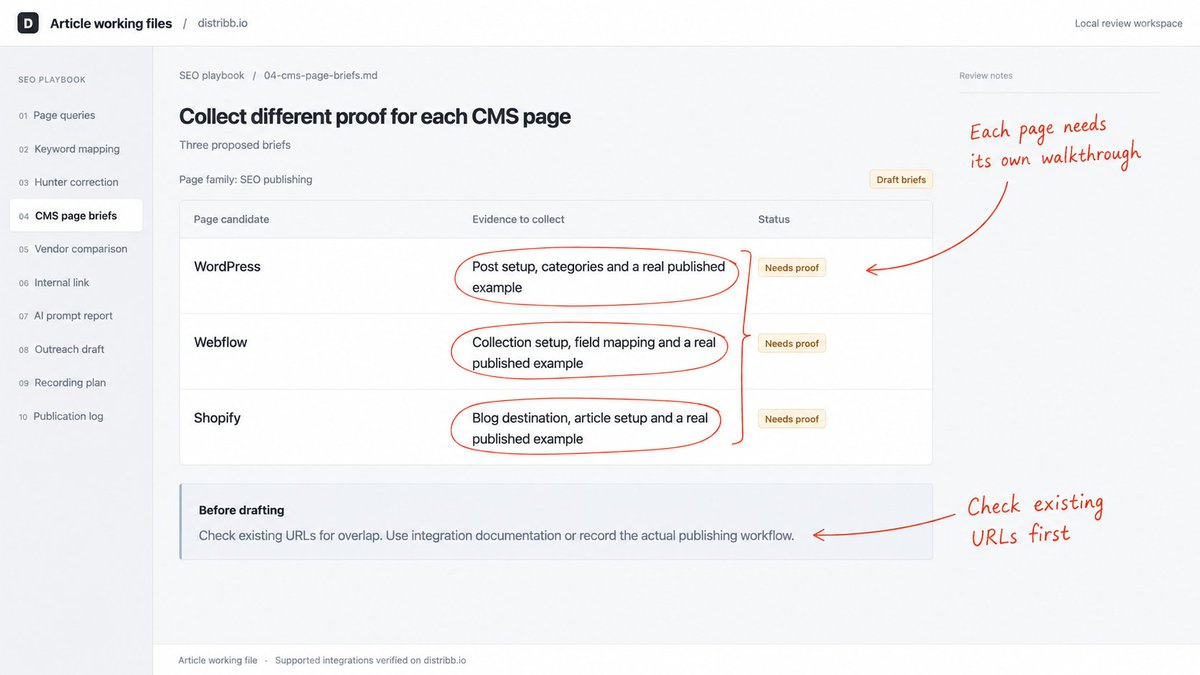
For Distribb, WordPress, Webflow and Shopify are supported publishing integrations. A page for each should show the actual setup and publishing workflow for that CMS.
↳ Check what already exists.
↳ Collect the details that differ.
↳ Review three drafts before expanding.
Find a useful page family among our researched industries, integrations
or workflows. Check existing URLs first.

Prepare three sample drafts using verified product capabilities. For
each, include the buyer's problem, the specific workflow, required
setup, a worked example, limitations and next step.

Return a page plan with proposed URL, existing overlap, unique evidence
needed and publish/revise/merge/skip recommendation. Reject pages whose
only meaningful difference is a swapped keyword. Then provide the three
drafts worth reviewing.
A Shopify draft needs the relevant blog destination and publishing example. A Webflow draft needs its own collection setup. Those details should come from the integration documentation or a real walkthrough. Google's content guidance supports writing pages that add useful information for their audience.
Step 5: Build a comparison from current sources
The Hunter correction gives us a useful research question: what does each backlink tool actually do for the buyer?
↳ Choose the products before collecting results.
↳ Record a source for every observation.
↳ Turn the checked table into the article.
Choose a buyer question we can answer by comparing current public
product information. Define the product list, selection rule and fields
before collecting results.

Visit first-party sources. Return a table with product, capability,
supporting detail, source URL and date checked. Mark unclear details
unknown.

Check the completed table against those sources, then draft the article
with the table, practical examples and sources. Describe documentation
checks accurately; claim hands-on testing only where it happened.
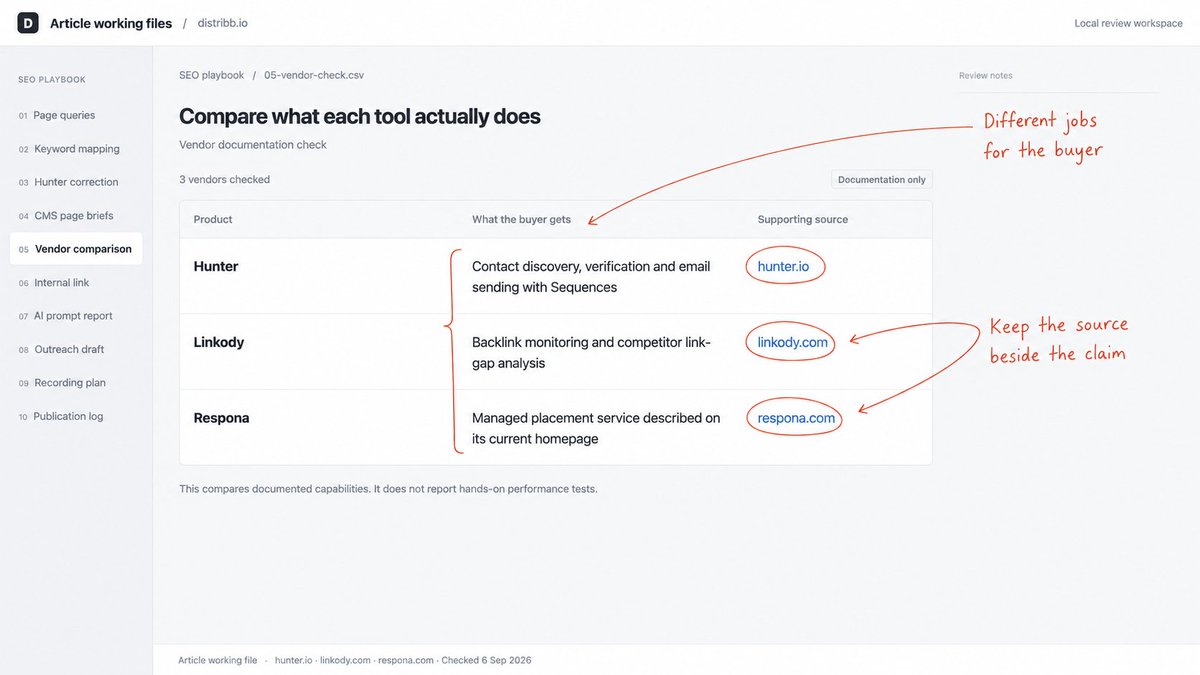
I checked Hunter, Linkody and Respona for this example. They currently describe different purchases: contact data and email sending, backlink monitoring, and a managed placement service. A comparison needs to make those differences visible before it ranks the products.
Step 6: Write the internal-link sentence
Give the agent enough context to choose where the link belongs. Google's link guidance recommends descriptive anchors and relevant surrounding text.
↳ Read the source paragraph.
↳ Check the destination.
↳ Return the sentence ready to insert.
Read our selected page and relevant published content. Find up to ten
internal links that help the reader continue the task.

Return: source URL, insertion point, current paragraph, proposed
sentence with linked anchor text, destination URL, and why the link
belongs there.

Check that destinations work. Avoid duplicate links and forced
exact-match anchors.
After the category table in our tools roundup, I'd add:
For the process behind these tools, read our guide to backlink automation.
The destination explains the process. The roundup helps someone choose software for it.

Step 7: Read the individual AI search prompts
A report showing citations across several engines still needs checking at the question level.
↳ Keep the wording fixed between checks.
↳ Separate a brand mention from a citation.
↳ Inspect the actual cited URLs.
Read this project's AI visibility summary, tracked prompts and cited
pages.

Return a table: exact prompt, scan date, engines checked, mentions,
citations and source URLs where available. Flag fields the report does
not expose.

Open relevant cited pages and identify one verifiable gap in our own
content. If important buying questions are missing, propose five fixed
prompts for future checks. Don't infer coverage of engines or questions
we haven't checked.
In Distribb's September 5 report, "What is Distribb and what does it do?" has recorded citations. "babylovegrowth alternatives" has none. I'd investigate that buying question separately instead of treating the brand-query result as evidence we've covered it.

Step 8: Draft an email about a specific addition
The research gives you something useful to offer a publisher. Find the paragraph where that information belongs.
↳ Read the actual article.
↳ Name the useful addition.
↳ Return the finished email.
Find up to five relevant editorial pages that could use our completed
research. Read each page and reject ones already covering the same
evidence.

Return: page URL, relevant section, specific addition, public contact
route and a short individual email. Link to the supporting evidence.
Skip opportunities that require payment for a ranking link.

The email should make sense to its recipient without the rest of this
conversation.
BuzzStream's guide has a Hunter section focused on finding contacts. A note about its current sending features gives the editor a concrete addition to consider. The draft below is for use after our own correction is published.

Step 9: Show the page refresh in a video
Use the same work to demonstrate how the reader can audit a page.
↳ Show the real Search Console query.
↳ Open the source that supports the correction.
↳ Explain the proposed edit on screen.
Turn this page refresh into a two-minute screen-recording plan.

Write the opening, voiceover and shot list. For every shot, name the
real page or product screen, the action to demonstrate and the question
it answers. List footage still needed.

Return a descriptive title, transcript and description linking to the
source article and relevant product page. Keep planned footage distinct
from completed recordings.
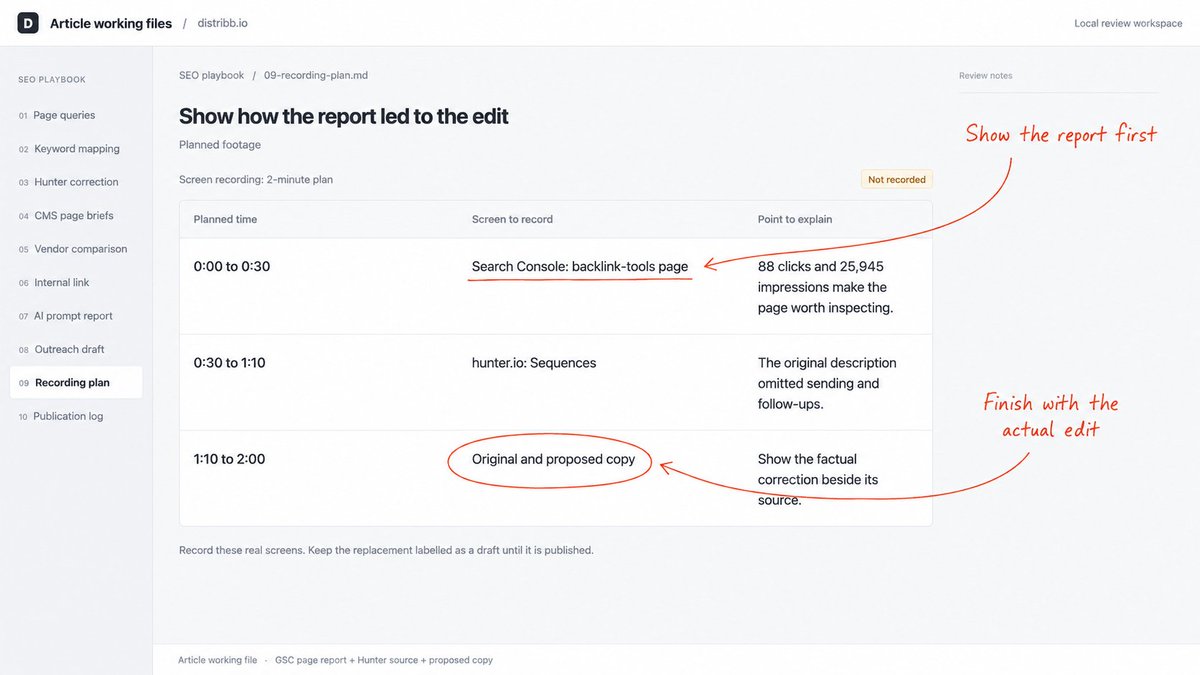
For this example, I'd show our 88-click backlink-tools page, open Hunter's Sequences section, and explain the correction beside the original copy. The viewer sees how the agent went from a report to a useful edit.
Step 10: Verify the published page and save the baseline
Finish by opening the public URL and checking the exact work you approved.
↳ Preserve the previous version.
↳ Check the live text, images and links.
↳ Compare equal, complete reporting periods.
Prepare a final review of the completed drafts and edits: URLs, changed
copy, sources, images, internal links and next-step links.

After approval, publish the specified changes through the supported
integration. Preserve the previous version and open every public URL to
verify the result.

Return a change log with publish date, live verification status and
Search Console baseline. Prepare a follow-up comparison using equal
complete periods with the same page, queries, country and device
filters. Report conversions separately if tracking is available.
Distinguish measured changes from possible explanations.
For our example, the saved baseline is 88 clicks and 25,945 impressions. The publication date stays empty until the edit is live. A factual correction helps the buyer immediately; a later search-performance comparison tells us whether traffic changed.

Run the 10 steps in order
↳ Pick an existing page from Search Console.
↳ Match buying searches to the right URLs.
↳ Write the correction.
↳ Test three useful page drafts.
↳ Collect evidence for the comparison.
↳ Add the internal-link sentence.
↳ Inspect individual AI search prompts.
↳ Draft a relevant outreach email.
↳ Show the work in a video.
↳ Publish approved edits and record the results.
Start with one URL. By the end of the first audit, you should have a specific change to review.
Thanks for reading.
Borja
Try GPT-6 Astra SEO plugin chatgpt.com/plugins/plugin…