i'm sick of seeing Google Ads bros telling people to just "do...

Jackson Blackledge@blvckledge
143 views
Jul 30, 2026
~3 min read
Advertisement
1
i'm sick of seeing Google Ads bros telling people to just "do keyword research" instead of actually showing them how.
so I'm gonna drop our entire keyword research process today for $0.
here’s how to find and scale profitable keywords fast: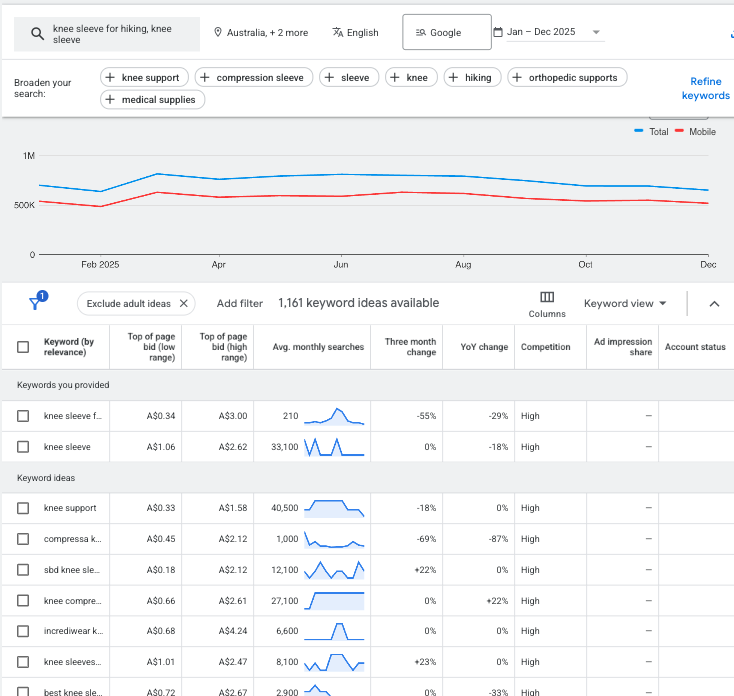
so I'm gonna drop our entire keyword research process today for $0.
here’s how to find and scale profitable keywords fast:
2
in this thread, i’ll show you:
- which keywords to target
- which tools to use
- when to use exact, phrase, broad match
- how to organize them inside campaigns
let’s dive in…
- which keywords to target
- which tools to use
- when to use exact, phrase, broad match
- how to organize them inside campaigns
let’s dive in…
3
1. the fundamentals
first, understand that not all searches are created equal:
there are 4 distinct types of keywords, each with different conversion potential:
- informational
- navigational
- commercial
- transactional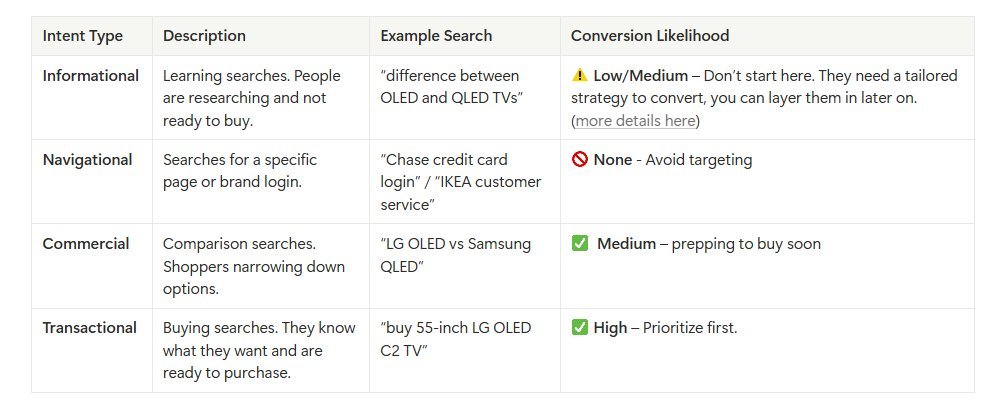
first, understand that not all searches are created equal:
there are 4 distinct types of keywords, each with different conversion potential:
- informational
- navigational
- commercial
- transactional
4
we usually start with commercial and transactional keywords.
they tend to be the most reliable, which gives you conversion data to optimize around.
once you’re profitable, layer in informational keywords.
they can help you reach cold traffic and get more buyers into your funnel.
they tend to be the most reliable, which gives you conversion data to optimize around.
once you’re profitable, layer in informational keywords.
they can help you reach cold traffic and get more buyers into your funnel.
5
2. match types
google has changed how match types behave over the last few years.
before, an exact match for "furniture store" would only show that search.
today, it can trigger close variants and related terms.
that’s why you need to be deliberate with which types you use.
google has changed how match types behave over the last few years.
before, an exact match for "furniture store" would only show that search.
today, it can trigger close variants and related terms.
that’s why you need to be deliberate with which types you use.
6
exact match is for precision and control.
we use it for long-tail, specific terms with 1,000-2,000+ monthly searches.
- "creatine for women"
- "magnesium glycinate 400mg"
- "best whey protein for weight loss"
we use it for long-tail, specific terms with 1,000-2,000+ monthly searches.
- "creatine for women"
- "magnesium glycinate 400mg"
- "best whey protein for weight loss"
7
phrase match is where you widen the net.
you still anchor around the core query while picking up variations you wouldn’t think of manually.
use broad match to discover related searches and conversational queries.
always use longer phrases. 3-5 words minimum.
you still anchor around the core query while picking up variations you wouldn’t think of manually.
use broad match to discover related searches and conversational queries.
always use longer phrases. 3-5 words minimum.
8
broad match can bring in low-quality, irrelevant terms with low roi
so you need two things in place before running it:
- enough conversion data for smart bidding to optimize properly
- a strong negative keyword list to filter out irrelevant traffic
so you need two things in place before running it:
- enough conversion data for smart bidding to optimize properly
- a strong negative keyword list to filter out irrelevant traffic
9
3. discover high-value keywords
now, let’s get into the actual process:
- go to tools → keyword planner → discover new keywords
- enter seed term. add website url for context
- filter by “average monthly searches > 30”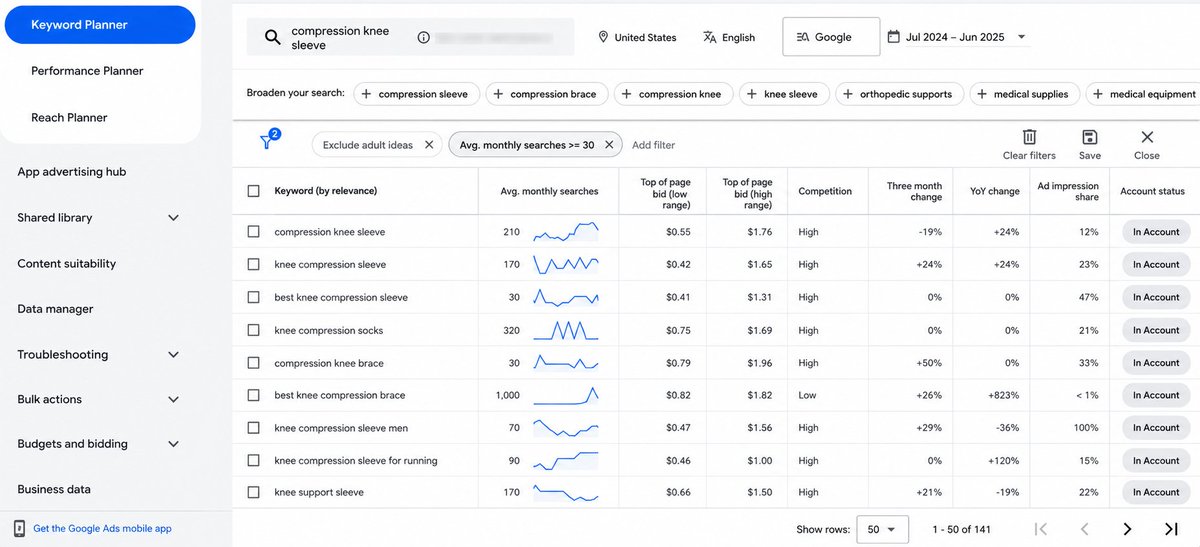
now, let’s get into the actual process:
- go to tools → keyword planner → discover new keywords
- enter seed term. add website url for context
- filter by “average monthly searches > 30”
10
focus heavily on the high-volume variations.
if you see “compression knee sleeves” (9,900 searches) vs “best compression knee sleeve for arthritis” (140), pick the bigger one.
match types will pull in the long-tail variants anyway.
if you see “compression knee sleeves” (9,900 searches) vs “best compression knee sleeve for arthritis” (140), pick the bigger one.
match types will pull in the long-tail variants anyway.
11
next, use the refine keywords feature to dig deeper.
google will show you sub-categories and themes inside your results:
if you spot themes emerge, create themed ad groups around these.
google will show you sub-categories and themes inside your results:
if you spot themes emerge, create themed ad groups around these.
12
a few other places we use to find keyword ideas:
- search term reports
- keyword research tools (semrush, spyfu, keywordtoolio, etc)
- ai (make sure you validate what it suggests)
- google trends
- search term reports
- keyword research tools (semrush, spyfu, keywordtoolio, etc)
- ai (make sure you validate what it suggests)
- google trends
13
4. validate keywords
pay close attention to the competition level for each keyword you're considering.
this shows you how many other advertisers are bidding on the same terms.
then examine the top of page bid estimates to see your expected cpcs for positions 1-4.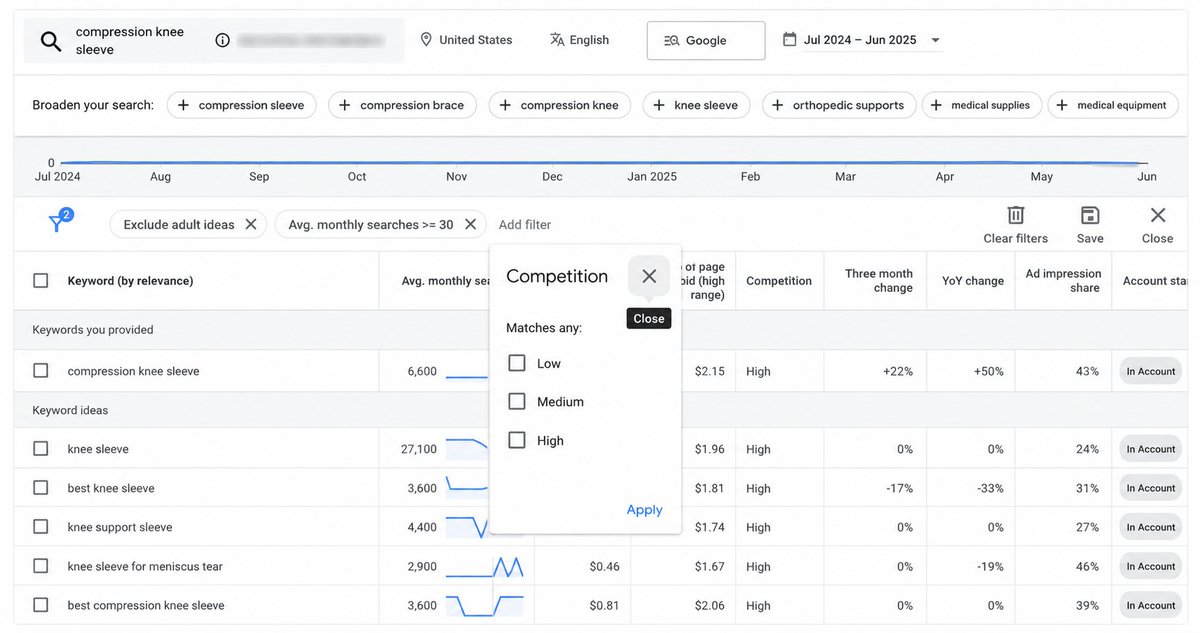
pay close attention to the competition level for each keyword you're considering.
this shows you how many other advertisers are bidding on the same terms.
then examine the top of page bid estimates to see your expected cpcs for positions 1-4.
14
finally, run your keywords through google's forecast tool.
while it won't predict your exact performance…
it reveals how much room exists for scaling your campaigns.
use these insights to set realistic budget expectations and identify which keywords to bid on.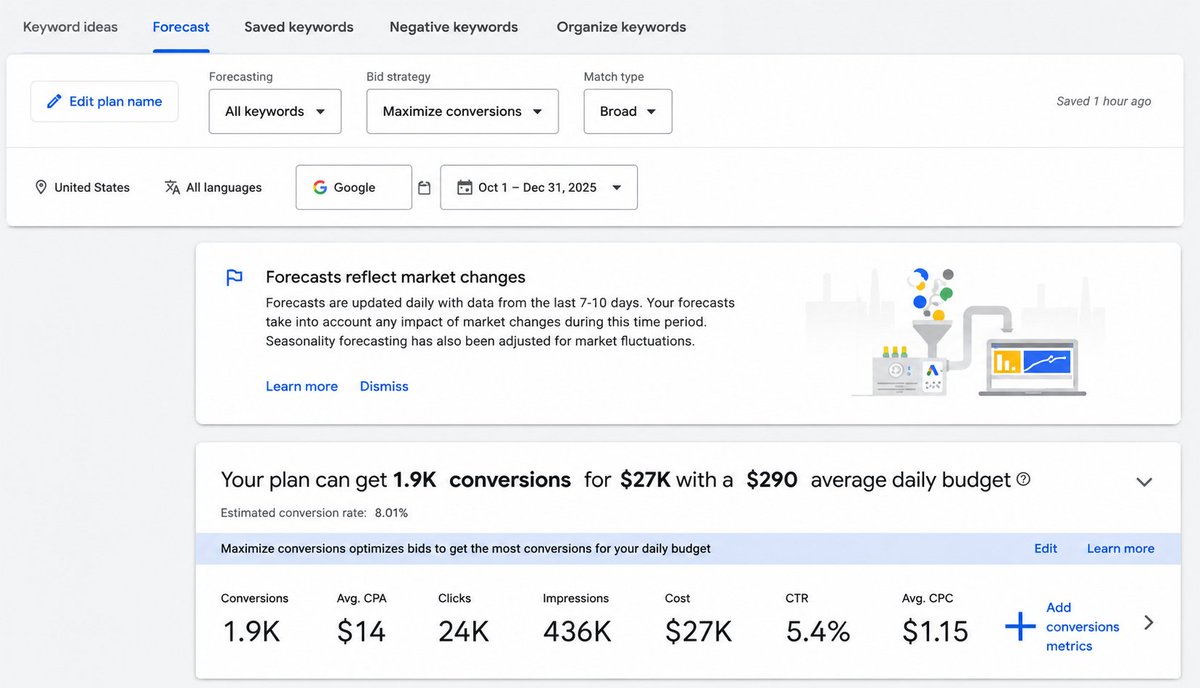
while it won't predict your exact performance…
it reveals how much room exists for scaling your campaigns.
use these insights to set realistic budget expectations and identify which keywords to bid on.
15
5. organize keywords
next, it’s time to structure these keywords in your campaigns.
a few rules here:
- one theme & intent per ad group
- make sure each group has meaningful conversion data
- keep exact match and phrase match in separate groups
next, it’s time to structure these keywords in your campaigns.
a few rules here:
- one theme & intent per ad group
- make sure each group has meaningful conversion data
- keep exact match and phrase match in separate groups
16
that's our full playbook for google ads keyword research in 2026.
walk through each step and see where you can apply it to your own setup.
and if you need our direct help to set it up, my dms are open.
walk through each step and see where you can apply it to your own setup.
and if you need our direct help to set it up, my dms are open.
17
we put together a swipe file of our best-performing LPs for Google Ads right now
grab it here:
resources.echelonn.io/lp-swipe?utm_s…
grab it here:
resources.echelonn.io/lp-swipe?utm_s…


