How to Make Money on YouTube with AI: The Complete 2026 Playbook

What AI actually changes — and what stays yours

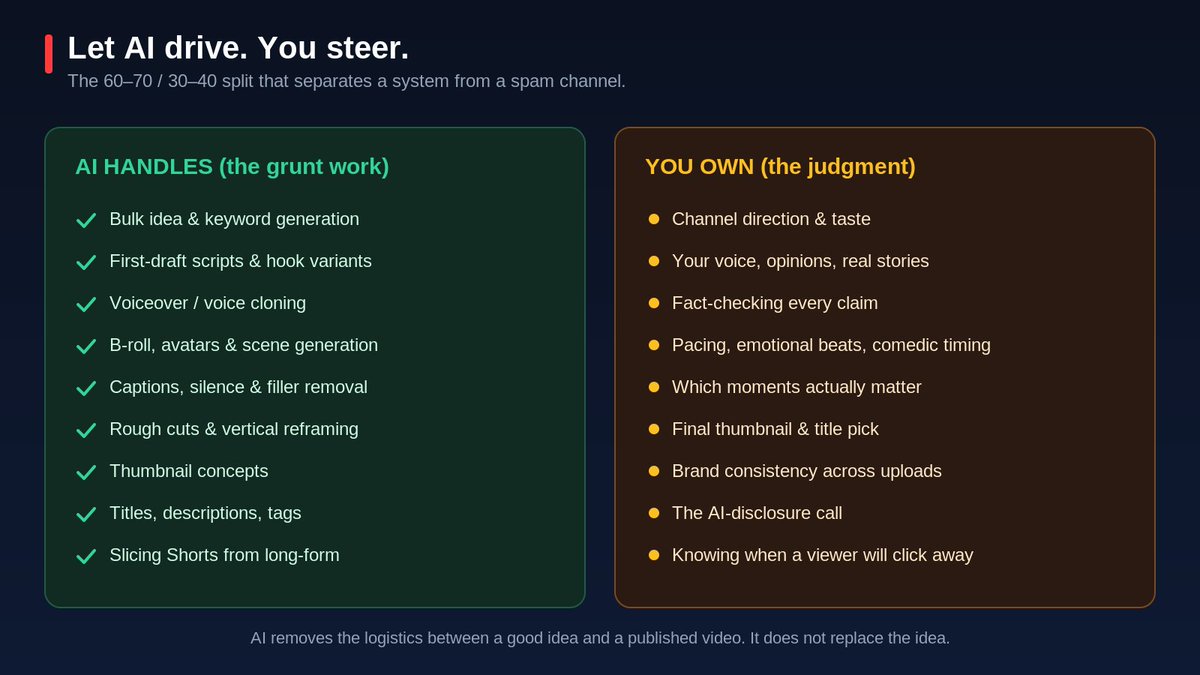
AI won't make YouTube one-click easy. What it does is remove the production work between an idea and a finished video: the hours of editing, the blank-page script, the B-roll, the rushed thumbnail. The creative part — taste, story, and the final call — is still yours. Now you just have more time for it.
And this isn't a niche edge — it's already the baseline. Over 80% of creators use AI somewhere, more than half of new channels launched with it, and 1M+ channels use YouTube's built-in AI tools every day. A fully manual workflow won't make you more authentic — just slower. Here's the full machine, stage by stage.

So the rule is simple:
Think of yourself as a director, not an operator. You don't hold the camera anymore — you decide what gets made, judge the output, and overrule it when it's wrong. In practice that's roughly a 60–70 / 30–40 split: AI does the mechanical work, you keep strategy, voice, pacing, and the final decision.
Stage 1 - Idea & Research.
Win or lose before you create
The most expensive mistake new creators make: producing something nobody searches for. Flawless production still flatlines at 200 views if the topic is dead on arrival.
So the highest-leverage work happens before you write a word. You want two kinds of tools, because they do opposite jobs:
🔍 Search-data tools — VidIQ, TubeBuddy Your reality check. Real YouTube search volume, competition, trending velocity, best time to publish. Stops you pouring a weekend into a topic the market already forgot.
💡 Language models — ChatGPT, Claude, Perplexity Your idea-volume engine (Perplexity when you need cited sources fast). Be ruthlessly specific:
Specificity is the whole game — the more precisely you name your audience's real pain, the more differentiated the output.
The workflow that works:
1. Validate demand with VidIQ / TubeBuddy.
2. Then explode the winner into 15 angles + hooks with an LLM.
3. Never brainstorm in a vacuum — sort competitors by "most popular," study what earns views, layer your expertise on top.
You're not inventing demand. You're intercepting it.
Stage 2 — Script
Engineer for retention, not for completeness.
Most people underrate this stage. It's where videos are quietly won or lost.
YouTube's algorithm is a watch-time optimizer. It rewards attention and punishes drop-off. The counterintuitive result:
A shorter script that keeps people beats a longer, "more complete" script that loses them at minute four.
Completeness is a trap. Retention is the target. So you write for it — with structure.

The first 30 seconds are everything. This is where viewers decide to stay or leave:
- Open with tension, a bold claim, or a sharp contrast.
- State the promise — the concrete outcome of staying.
- Cut the throat-clearing: no long intro, no logo animation, no "hey guys, welcome back."
- Benchmark: keep 50%+ of viewers past the 30-second mark.
Through the body:
-One idea per section — when the topic shifts, the visual shifts.
- Plant a pattern interrupt every ~90 seconds: new b-roll, a stat, a question, a joke, a mini-cliffhanger. These micro-resets fight attention decay.
The tools: Claude and ChatGPT are the strongest general writers. Subscribr and Jasper add YouTube-native features (channel-voice modeling, competitor-informed structure).
But the tool matters less than how you prompt it. Weak input → weak output, every time. Feed the model structure:
Then edit hard: read it aloud, cut every sentence that survives deletion without losing meaning, rewrite anything robotic.
The model provides the scaffolding. You provide the substance, the opinion, and the real stories. That last 20% of human editing is the difference between "another Top 10 list" and a video that clearly came from someone who did the thing.
Stage 3 — Voice
Human-grade narration, or your own voice at scale.
For narration, the gap between AI and human speech has basically closed.
🎙️ ElevenLabs is the benchmark — and its killer feature isn't the stock voices, it's cloning your own:
🧑💻 AI avatars — HeyGen, Synthesia — for an on-screen presenter without filming yourself. The trick to staying out of the uncanny valley:
But don't let AI voice become a personality substitute. This is where faceless channels live or die.
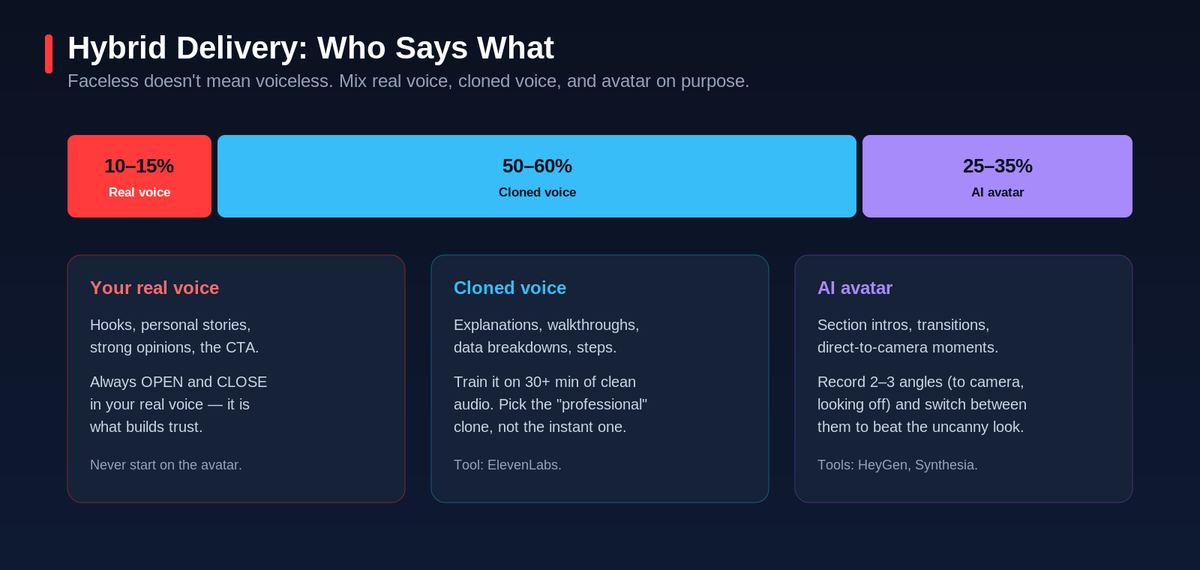
The strongest formula is hybrid delivery:

Always open and close in your real voice — that's what builds trust. And never start on the avatar.
Stage 4 — Visuals & Video
Generate scene by scene.
Fastest-moving tech, biggest quality gap. But the most important lesson is a discipline, not a tool:
Treat every AI clip as B-roll, not a finished video. Raw output is source material. The edit makes it watchable.
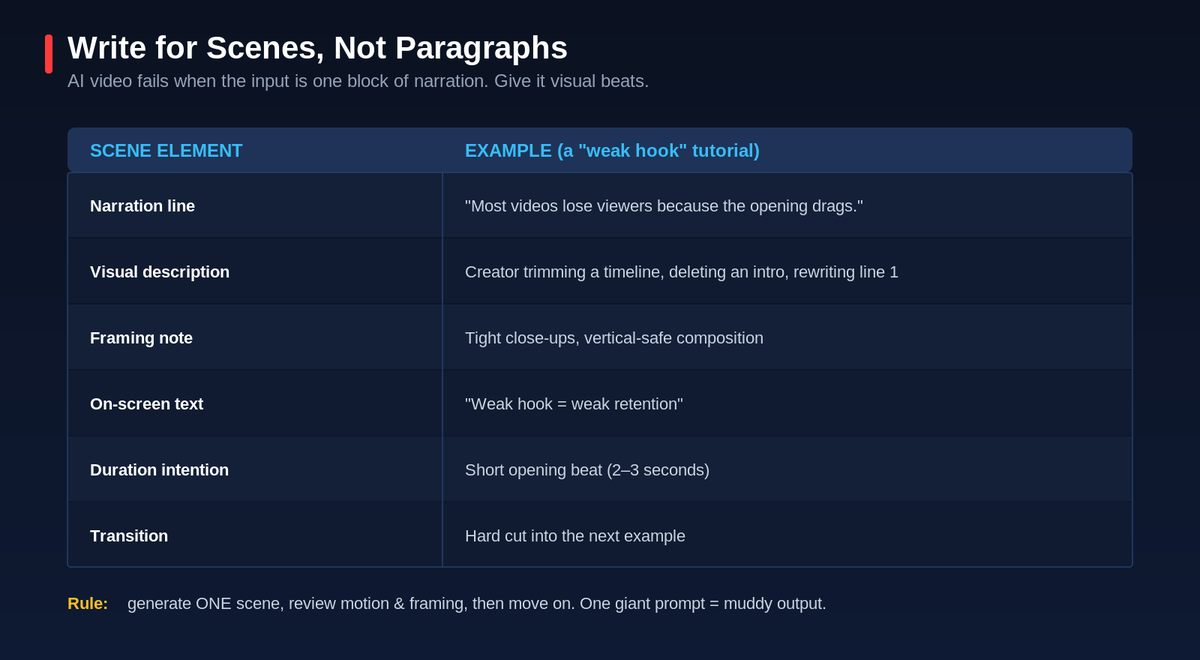
Most AI-video attempts fail before generation, because the input is one block of narration and the creator hopes the tool "figures it out." It won't. Write for scenes — and for each one, specify:
Then generate one scene at a time, review motion and framing, and move on. A single mega-prompt returns mud.
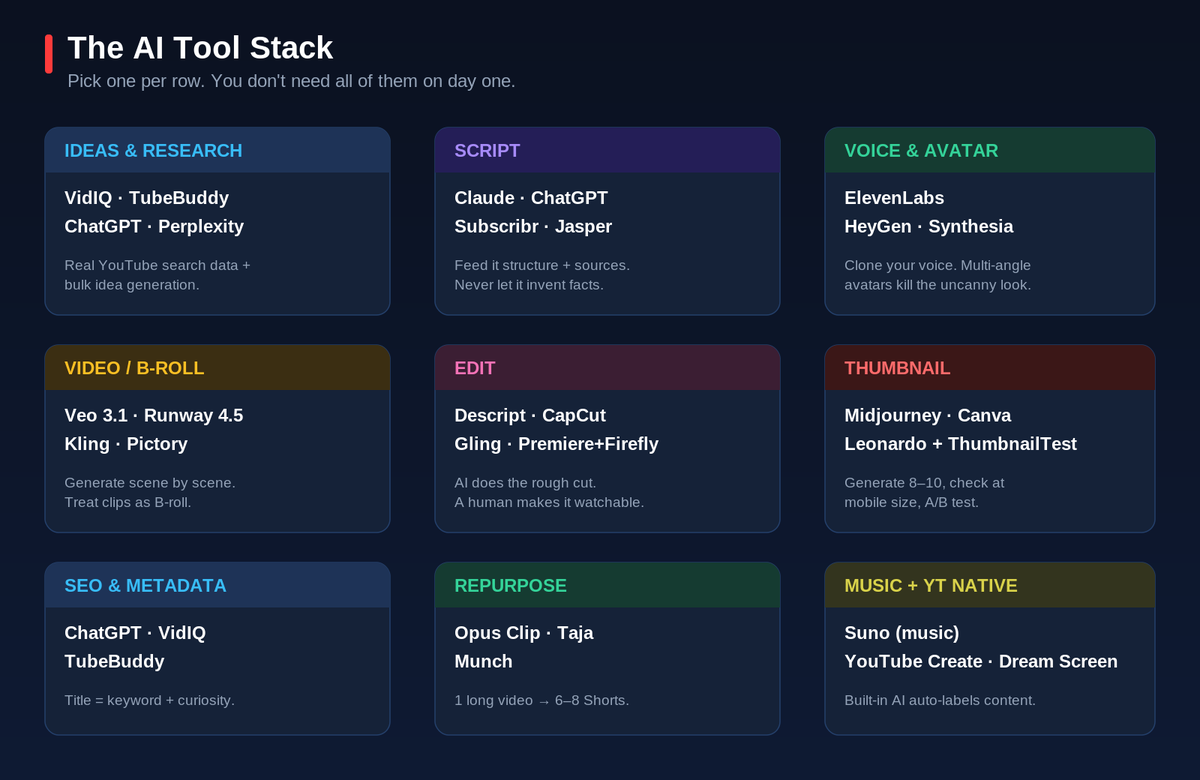
The 2026 tool landscape:
>
Don't build on Sora. OpenAI is winding it down — web/app shut April 2026, API follows September 2026. However good the clips look, it's no foundation for a long-running channel. Anchor on Veo, Runway, Kling.
Stage 5 — Edit
AI makes the rough cut. A human makes it watchable.
This is the clearest illustration of the whole philosophy, because the boundary is sharp.
AI crushes the mechanical layer — hand it over without a second thought:
What AI still can't do — and it's the part that decides performance:
Those need empathy, not pattern recognition. So the reliable pattern is:
Let AI generate the rough cut. Let a human make it watchable.
The most common editing mistake: keeping every generated clip because it took effort to make. That's backwards.
Viewers don't reward effort they can't feel. They react to pace. If a scene doesn't earn its place, cut it — no matter how nice it looks alone.
Stage 6 — Thumbnail
The click is won or lost here
You can make the best video on the platform and still lose, because the click happens before the video does. CTR directly shapes how hard YouTube distributes you — the thumbnail is distribution strategy, not decoration.
The tools:
The workflow that produces winners:
Never ship the first output just because it exists.
Stage 7 — SEO & Publish
Alignment beats keyword-stuffing
YouTube SEO in 2026 isn't cramming keywords into every field. It's alignment — title, thumbnail promise, opening hook, and actual content all describing the same idea.
Aligned → the algorithm understands it and viewers feel satisfied. Misaligned → a punchy title wins the click but the mismatch tanks satisfaction, which hurts more than an honest, softer title ever would.
Use AI where it's strongest:
Then publish on a consistent cadence. Predictability is something the algorithm and your audience reward.
Stage 8 — Analyze & Repurpose
One video becomes a content engine
Publishing is the middle of the process, not the end. A single long-form video is raw material for a week of content — and its analytics fuel your next idea.

Repurpose: Opus Clip, Taja, and Munch ingest a 20-minute video, find the best moments, and cut them into 6–8 vertical clips with captions and 9:16 reframing — instant reach across Shorts, Reels, and TikTok from work you already did. The transcript becomes a blog post or an X thread.
Then close the loop:
1% compounded across a year of uploads is how channels quietly become unrecognizably better. Compounding beats chasing virality.
The stakes: disclosure & monetization
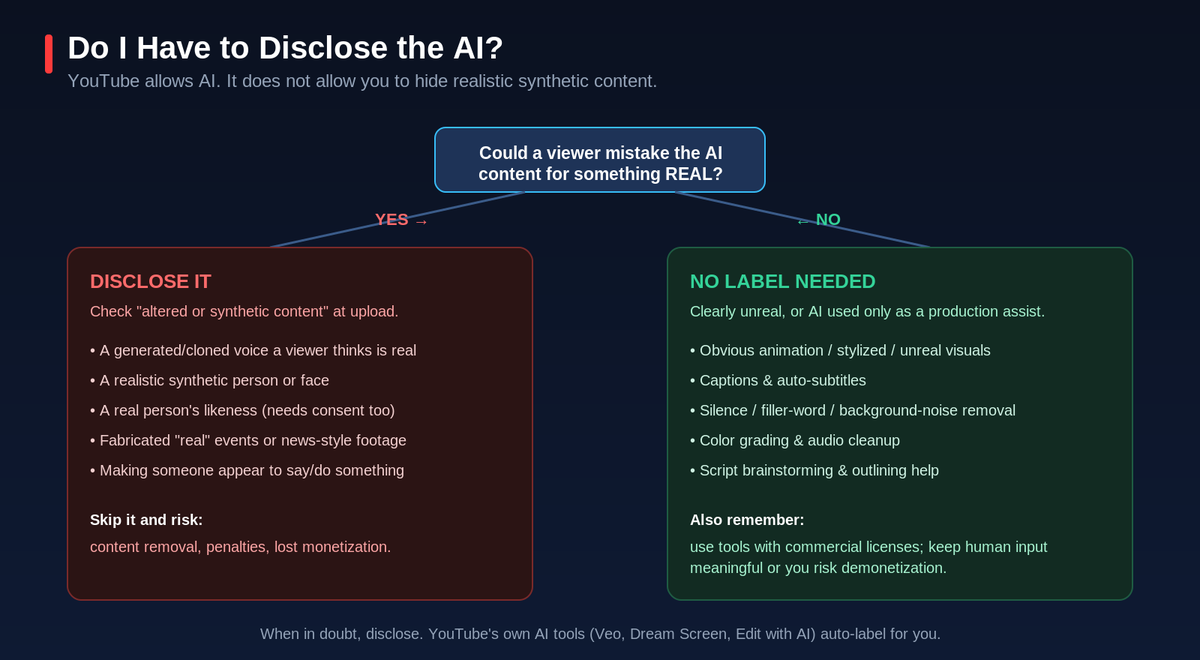
None of this matters if your channel gets flagged. Treat the rules as part of the craft.
YouTube allows AI content. It does not allow you to hide realistic synthetic content.
Where to actually start
If you take one instruction from this whole article, take this:
Don't try to adopt eight stages this week. That's how people burn out and quit.
Start with the two stages that pay off fastest and cost nothing: idea research + scripting (free ChatGPT/Claude + VidIQ/TubeBuddy).
If you're brand new (0–1,000 subs), your entire stack can be three free tools:
That covers ~90% of the workflow. Publish ten videos before you buy anything. Then layer in voice → visuals → repurposing, one system at a time.
The real shift
It isn't "using AI tools." It's building a system:
Instead of waking up and asking "what should I make today?", you operate an engine.
The creators winning right now don't have the biggest budgets or the fanciest gear. They built the smartest workflow. AI doesn't replace your creative judgment — it amplifies it, by clearing everything that used to stand between a good idea and the upload button.
Your taste was always the asset. Now you finally have the time to spend on it.
Now go point it somewhere.

