How To Build Your First AI Loop in 2026

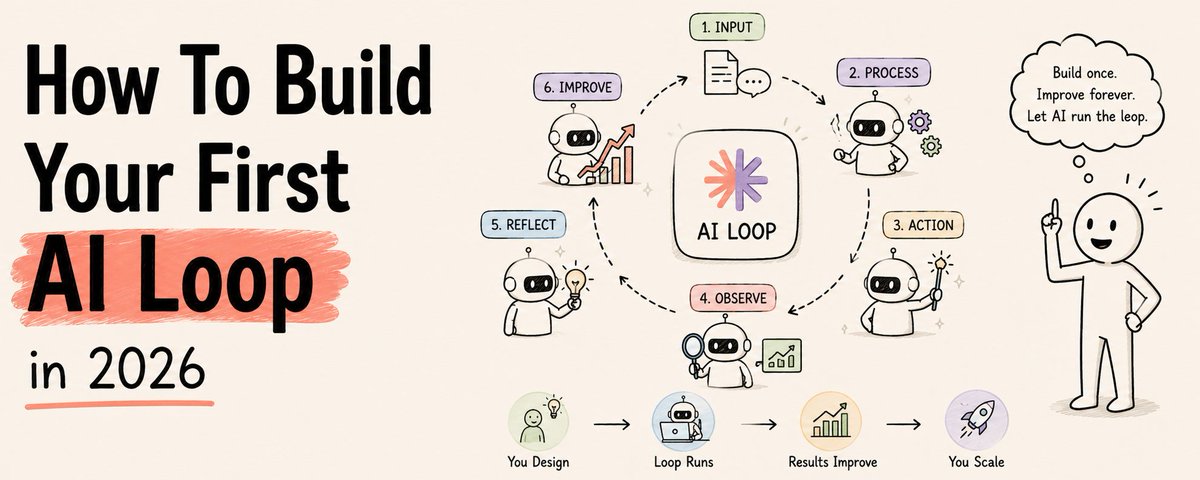

Two of the most senior AI engineers alive said the same thing last month.
Peter Steinberger, creator of OpenClaw, now at OpenAI:
"You shouldn't be prompting coding agents anymore. You should be designing loops that prompt your agents."
Boris Cherny, head of Claude Code at Anthropic:
"I don't prompt Claude anymore. I have loops running that prompt Claude and figure out what to do. My job is to write loops."
Most people read that and thought: what does that actually mean?
And more importantly: how do I build one?
This article tells you exactly how.
No theory without code. No code without context. Real steps. Real commands. Copy and run.

The way most people use AI is already outdated
Write prompt. Wait. Read output. Fix it manually. Write another prompt.
You are the loop.
Every step runs through you. The AI waits. You decide. The AI waits again.
The moment you stop, everything stops.
The builders moving fastest in 2026 are not writing better prompts.
They are building systems that do the prompting for them.
The leverage point has moved.
From typing prompts → to designing loops.

What changed with GPT-5.6?
GPT-5.6 doesn't change the need for loops.
It increases the value of them.
The better the model gets, the more expensive it becomes to leave it idle between prompts.
In terminal workflows, GPT-5.6 is noticeably better at:
→ understanding large codebases
→ maintaining implementation consistency
→ following multi-step plans
→ recovering from failed attempts
→ acting as a strict verifier
The result isn't "better prompting."
It's fewer human interventions per task.
What a loop actually is
Simple definition:
A prompt answers once and stops.
A loop keeps working until the job is actually done.
Not until it generates an answer.
Until it reaches a verified outcome.
Every serious AI agent runs the same underlying cycle:
→ Discover — what needs doing?
→ Execute — do the work
→ Verify — did it actually work?
→ Iterate — not done? fix and repeat
→ Stop — condition met, or hard limit hit
Claude Code. Cursor. Codex.
Underneath, they all run this loop.
The difference between a prompt and a loop is not the model.
It is whether something checks the work and keeps going until it passes.

The 4-condition test — run this before building anything
Most loops fail here.
A loop earns its setup cost only when all 4 conditions are true.
Miss one and the loop costs more than it returns.
1. The task repeats. At least weekly. A one-off task is still better served by one good prompt.
2. Verification is automated. Something must fail the work without you in the room. Tests. Linters. Builds. Type checks. No gate = the agent is grading its own homework.
3. Your token budget can absorb the waste. Loops re-read the full context on every iteration. They retry, explore, burn tokens whether or not the run ships anything. This is the cost nobody mentions.
4. "Done" is objective. A test that passes or fails. A build that compiles or doesn't. Not "when it looks good." If done requires a human opinion, keep it manual.
Pass all 4 → build the loop.
Fail any 1 → use a prompt instead.
The honest version: most developers don't need heavy loops yet. What everyone can use is a simple loop. We'll build one shortly.
Install Slate
Slate is an AI coding agent built for exactly this — running long, parallel, multi-step tasks in your terminal.
Built by RandomLabs. The first agent built specifically for swarm orchestration.
What makes it different from Claude Code or Cursor:
→ Automatically selects the right model for each step. Plan with Claude, search with another, execute with Codex — Slate decides.
→ Runs parallel subagents simultaneously across your codebase
→ Manages its own context across long multi-hour sessions
→ Works alongside you — not just for you
Install it in one line:
npm i -g @randomlabs/slateNavigate to your project and start it:
cd /path/to/your/project
slate
That opens the Slate TUI — a terminal interface where you give it tasks and watch it work.
Step 1 — Set up your workspace
Before Slate can run loops on your project, it needs to understand your codebase.
Create an AGENTS.md file in your project root. This is the context Slate reads at the start of every session.
# AGENTS.md

## What this codebase does
[One paragraph description of the project]

## Architecture
- src/api/ — Express API routes
- src/services/ — Business logic
- src/db/ — Database models (PostgreSQL via Prisma)
- tests/ — Jest test suite

## Key commands
- npm test — run the full test suite
- npm run build — TypeScript compile
- npm run lint — ESLint check
- npm run typecheck — tsc --noEmit

## Rules
- Never modify src/billing/ or src/auth/ without human approval
- Always run tests before marking any task complete
- Use the existing error handling pattern in src/utils/errors.ts

## Environment
- .env.slate contains all env vars Slate needs
Slate reads this file automatically at startup — no need to paste it every session.
Add your workspace directories inside Slate:
/workspace add ./src
/workspace add ./tests
/workspace list
Or reference specific files inline using @ mentions:
Please review @src/api/routes.ts and suggest improvements
Step 2 — Configure Slate
Create slate.json in your project root to control how Slate behaves.
{
  "$schema": "https://randomlabs.ai/config.json",
  "permission": {
    "*": "allow",
    "bash": "ask"
  },
  "models": {
    "main": { "default": "anthropic/claude-opus-4.6" },
    "subagent": { "default": "anthropic/claude-sonnet-4.6" },
    "search": { "default": "anthropic/claude-haiku-4.5" },
    "reasoning": { "default": "openai/gpt-5.6" }
  }
}
What this does:
→ "*": "allow" — Slate can read and write files without asking each time
→ "bash": "ask" — Slate asks before running shell commands (keep this on until you trust it)
→ Models config — cheap fast model for search, expensive model for main reasoning
For CI or automation runs where you want zero prompts:
slate run "Run the test suite and fix any failures" --dangerously-skip-permissions --output-format stream-jsonStep 3 — Your first task (not a loop yet)
Before building a loop, get a single manual run reliable.
This is the most skipped step. And the reason most loops fail in production.
Give Slate a real task:
Please review the architecture of my entire codebase.
Create an ARCH.md with:
- current structure
- dependencies between modules
- 3 things to improve
Look at @src/ first, then @tests/
Watch Slate work. It will:
This is already a mini-loop — it checks its own output before finishing.
For a longer task:
Hey Slate, research my codebase for the authentication flow,
then make a plan for adding OAuth2 support.
Make sure you look at @src/auth/ and @src/api/routes.ts
Slate returns a plan. You iterate on it:
No, don't add a new auth provider class.
Make it follow the same pattern as the existing ApiKeyAuth in src/auth/api-key.ts
Approve the plan. Slate executes autonomously.

Step 4 — Create a Skill (make the loop reusable)
A Skill is how you stop re-explaining your project every session.
Write it once. Slate reads it on every relevant run.
Create the folder structure:
mkdir -p .slate/skills/ci-triage
touch .slate/skills/ci-triage/SKILL.md
Write the skill:
---
name: "ci-triage"
description: "Classify CI failures by root cause and draft fixes for the easy ones."
---

# CI Triage Skill

## What I do
When a CI run fails, I:
1. Read the test output
2. Classify the failure: env issue / flaky test / real bug / dependency bump / infra
3. Draft fixes for bugs and dependency issues
4. Escalate env and infra issues to humans

## Classification rules
- env: missing secret, wrong env var → flag for human
- flake: passes on retry without code change → retry once, then file issue
- bug: deterministic failure tied to recent commit → draft fix
- dependency: failure tied to version bump → draft rollback PR
- infra: timeout, OOM, runner issue → escalate immediately

## Fix patterns
- Auth test failures → check src/auth/middleware.ts first
- Database test failures → verify migration ran in CI env
- E2E failures → check UI selectors against latest snapshot

## Never do
- Disable failing tests
- Modify CI config without asking
- Touch src/billing/ or src/payments/

## State
Update STATE.md after every run:
- Files checked
- Classifications made
- PRs opened
- Items escalated
List available skills inside Slate:
/skillsActivate one manually:
@ci-triage please triage today's failing testsOr Slate activates skills automatically when it decides they are relevant to the current task.
Step 5 — Add state (the loop's memory)
The agent forgets.
The file does not.
Create STATE.md in your project root:
# Loop State — CI Triage

## Last run
2026-06-28 03:30 UTC — 7 failures classified, 3 fixes drafted, 4 escalated

## In progress
- claude/fix-auth-token-refresh — tests passing locally, awaiting CI
- claude/fix-flaky-payment-webhook — retry pattern applied, monitoring

## Completed
- claude/bump-axios-1.7.4 → merged (CI green)
- claude/lint-fix-pass-june-28 → merged

## Escalated to humans
- src/billing/refund.ts — tests failing in 3 ways, root cause unclear
- ci/staging-runner — infra timeouts, not a code issue

## Lessons learned
- 2026-06-27: PowerShell hits TLS 1.2 issue on this Windows runner. Use bash.
- 2026-06-26: tests/e2e/checkout requires Stripe webhook secret in env. Skip if missing.
Tell Slate to use it at the start of every session by adding to AGENTS.md:
## Session start
Always read STATE.md first. Pick up where the last run stopped.
Update STATE.md at the end of every run with what was done and what is next.
Without state: every run starts from zero.
With state: every run resumes and compounds on the last.
Step 6 — Build the actual loop
Now you have:
→ Workspace set up (AGENTS.md)
→ Config set (slate.json)
→ One reliable manual run proven
→ A skill written (ci-triage)
→ State file created (STATE.md)
Time to wrap it into a real loop.
Option A: Queue file loop (simplest)
Create loop.md:
Read STATE.md to understand what was already tried.

Run the CI triage skill across all failing tests in the last build.

For each failure:
- Classify it using the ci-triage skill rules
- Draft a fix for bugs and dependency issues
- Escalate env and infra issues

Run the fixes. Check if tests pass.
If tests pass → open PR.
If tests still fail → record in STATE.md and stop.

Update STATE.md with everything done this run.

Hard stop: 8 attempts maximum. On limit, report current state.
Run it:
slate --queue loop.mdSlate reads the queue file and runs each block as a queued message.
Option B: Headless/CI loop (automated)
Run non-interactively in a GitHub Action or cron job:
slate run "$(cat loop.md)" --output-format stream-json --dangerously-skip-permissionsIn a GitHub Actions workflow:
name: CI Triage Loop
on:
  workflow_run:
    workflows: ["CI"]
    types: [completed]

jobs:
  triage:
    if: ${{ github.event.workflow_run.conclusion == 'failure' }}
    runs-on: ubuntu-latest
    steps:
      - uses: actions/checkout@v4

      - name: Install Slate
        run: npm i -g @randomlabs/slate

      - name: Run triage loop
        env:
          SLATE_API_KEY: ${{ secrets.SLATE_API_KEY }}
        run: |
          slate run "$(cat loop.md)" \
            --output-format stream-json \
            --dangerously-skip-permissions \
            --workspace ./src \
            --workspace ./tests
Now every CI failure automatically triggers the triage loop.
No human needed until escalation.

Step 7 — Add sub-agents (the maker-checker split)
The single most important structural improvement to any loop.
Never let the same agent grade its own homework.
The model that wrote the fix is too generous a grader.
In Slate, you can set different models for different roles:
{
  "models": {
    "main": { "default": "anthropic/claude-opus-4.6" },
    "subagent": { "default": "anthropic/claude-sonnet-4.6" },
    "search": { "default": "anthropic/claude-haiku-4.5" }
  }
}
Then write your task so Slate uses this split naturally:
Please fix the failing auth tests.

Step 1: Have a search agent explore src/auth/ to understand the current implementation.
Step 2: Have a separate agent implement the fix based on what was found.
Step 3: Have a third agent verify the fix against the original test requirements —
        this agent should NOT have seen the implementation.
Step 4: Only open the PR if the verifier approves.
Slate orchestrates the subagents automatically.
The search agent uses a fast cheap model. The implementation agent uses a stronger model. The verifier uses a strict model with no access to the maker's reasoning.
This split is why Slate can run 5 parallel subagents on a single task — each specialized, each isolated.
Step 8 — The state loop pattern (for long-running tasks)
For tasks that run over hours or days, use this pattern in your task prompt:
You are running a multi-session loop.

GOAL: Migrate all Express routes to the new ApiError pattern.
Track progress in STATE.md.

START OF EVERY SESSION:
1. Read STATE.md
2. Find the first incomplete item in "Remaining routes"
3. Do that item only

END OF EVERY SESSION:
1. Move completed items to "Done routes" in STATE.md
2. Record any blockers in "Blockers"
3. Update "Last run" timestamp
4. Stop cleanly

STATE.md format:
---
## Done routes
- [x] /api/users (2026-06-27)
- [x] /api/auth/login (2026-06-28)

## Remaining routes
- [ ] /api/payments/checkout
- [ ] /api/payments/refund
- [ ] /api/admin/users

## Blockers
- /api/payments/refund — requires human review (touches billing logic)

## Last run
2026-06-28 14:30 UTC
---

HARD RULES:
- Never touch src/billing/ without human approval
- Always run tests after each route migration
- Stop after completing ONE route per session
Run this every morning:
slate --continue "$(cat loop.md)"--continue picks up the most recent session instead of starting fresh.
Each day, one more route. STATE.md tracks everything.
The loop resumes exactly where it stopped.
Step 9 — Custom commands for your most-used loops
Add custom slash commands to slate.json so your loops are always one keystroke away:
{
  "command": {
    "triage": {
      "description": "Run CI triage loop",
      "template": "Read STATE.md. Run the ci-triage skill on all failing tests. Update STATE.md when done.",
      "agent": "build"
    },
    "review": {
      "description": "Review a file for correctness",
      "template": "Review @$ARGUMENTS for correctness, edge cases, and consistency with surrounding code."
    },
    "migrate": {
      "description": "Migrate one route to ApiError pattern",
      "template": "Read STATE.md. Migrate the next incomplete route to ApiError pattern. Run tests. Update STATE.md."
    }
  }
}
Now inside Slate:
/triage
/review src/api/payments.ts
/migrate
Each runs your pre-written loop prompt instantly.
3 complete loops you can run today
Loop 1: CI failure triage (the one we built)
When: every CI failure What: classify → fix easy ones → escalate hard ones → open PRs State: STATE.md Gate: tests pass Time to set up: 30 minutes
# trigger
slate run "$(cat loop.md)" --dangerously-skip-permissions --output-format stream-json

# or in GitHub Actions — see Step 6 above
Loop 2: Morning brief
When: 7am every weekday (cron job) What: scan last 24h of commits, PRs, and open issues → write a 5-bullet brief → post to Slack
# loop.md for morning brief
cat > morning-brief-loop.md << 'EOF'
Read the last 24 hours of:
- git log --since="24 hours ago" --oneline
- Open PRs in draft or review
- GitHub Issues opened or updated in the last 24h

Write a morning brief:
- 3 most important things that happened
- 2 things that need attention today
- 1 thing at risk of blocking someone

Keep it under 120 words. Post to the #engineering Slack channel.
EOF

# run on a schedule with cron
0 7 * * 1-5 slate run "$(cat morning-brief-loop.md)" --dangerously-skip-permissions
Loop 3: Dependency bump loop
When: every Monday What: scan for outdated packages → test compatibility → open PRs for safe bumps
cat > deps-loop.md << 'EOF'
Read STATE.md.

Run: npm outdated

For each outdated package:
1. Check if the version bump is major (breaking) or minor/patch (safe)
2. For minor/patch: update the package, run npm test
3. If tests pass: open a PR
4. If tests fail: record in STATE.md as "needs human review"
5. For major bumps: always escalate to humans

Hard rules:
- Never bump more than 5 packages in a single loop
- Never bump packages in the "peer dependencies" section
- Always run the full test suite after each bump, not just related tests

Update STATE.md with what was bumped and what was escalated.
EOF

# run every Monday
0 9 * * 1 slate run "$(cat deps-loop.md)" --dangerously-skip-permissions
The failure modes that cost money
Know these before you schedule anything.
The Ralph Wiggum Loop
The agent declares done on a half-finished job.
Exits early. Loop keeps spending. Silently.
Fix: hard stop condition checked by a fresh model.
STOP CONDITION: All tests in tests/auth/ pass AND lint returns 0.
Verify using a separate check run, not the agent's own judgment.
Hard limit: 8 iterations. On limit: report state and stop.
Goal drift
On long sessions, early constraints disappear.
"Never touch src/billing/" from message 3 is gone by message 47.
Fix: add a VISION.md that Slate rereads at the start of every session.
# VISION.md — Read at start of every session

## Core goal
Migrate all Express routes to ApiError pattern.

## Hard constraints (never violate)
- Never touch src/billing/ without human approval
- Never disable failing tests
- Always run full test suite before opening any PR

## Current priority
Routes in src/api/payments/ — handle with extra care
Self-preferential bias
The maker grades its own homework. Always gives itself a pass.
Fix: verifier subagent with zero access to the maker's reasoning.
Tell Slate explicitly:
The verifier agent should NOT see the implementation agent's work.
It should only see: the original test requirements and the test output.
If tests pass → approve. If tests fail → reject. No opinion otherwise.
Agentic laziness
Loop calls a task "done enough" at partial completion.
Especially on vague success criteria.
Fix: objective stop condition only.
DONE WHEN: npm test returns exit code 0 AND npm run lint returns exit code 0.
Not when "tests look good." Not when "most tests pass."
Exit code 0 on both commands. That is the only done.
The Slate-specific tricks that matter
A few things that make Slate different from other agents in practice.
Queuing messages while it works
Slate is running a long task. You think of something important.
Press Tab to queue the message — it runs after the current task finishes, not interrupting it.
[Slate is working on migration task...]

You: Actually, make sure the new pattern also handles the case where userId is null
[Tab — queued]

[Slate finishes current step, then reads your queued message]
Steering mid-run
If Slate is going in the wrong direction, you don't have to stop it:
[Slate is halfway through implementing the fix...]

You: Wait — don't add a new class for this. Use the existing BaseError in src/utils/errors.ts
[Enter — steers immediately]

Slate: Understood, switching approach to use BaseError...
Use /enter-mode-next to cycle between steer / queue / interrupt modes.
Shell commands directly
Run commands inside the Slate session without switching to another terminal:
!npm test          # run tests and send output to Slate
!git diff HEAD     # check what changed
!git status        # see current state
Slate reads the output and uses it in its next action.
Server mode for team setups
Run Slate as a server and attach to it from multiple terminals:
# Terminal 1 — start server
slate serve --port 7777

# Terminal 2 — attach TUI
slate attach http://localhost:7777 --dir /path/to/project
Useful for pair-programming with Slate or running it on a remote machine.
The full setup checklist
Before running your first real loop:
□ npm i -g @randomlabs/slate installed
□ AGENTS.md created with project overview, commands, rules
□ slate.json created with permissions and model config
□ One manual run completed and verified reliable
□ SKILL.md written for your first repeated task
□ STATE.md created and referenced in AGENTS.md
□ loop.md written with explicit stop condition
□ Hard limit on iterations (8 max to start)
□ Verifier is NOT the same agent as the maker
□ Human review gate on any irreversible action (PRs, deploys)
Check every box before scheduling anything.
Skip one and the loop either fails silently or bills you for nothing.
For more loop inspiration
Once you understand the pattern, the bottleneck shifts from "how do I build a loop" to "what loop should I build next."
The Forward Future Loop Library at signals.forwardfuture.com/loop-library is a good place to browse real running loops across categories — content, engineering, operations, research.
When you see 20 working loops in one place, you stop thinking in one-off prompts.
The uncomfortable truth
Two builders can run the exact same loop and get opposite results.
One uses it to move faster on work they already understand deeply.
The other uses it to avoid understanding the work at all.
The loop does not know the difference.
You do.
Loop design is harder than prompt engineering — not easier.
The point is not that the work got easier.
The leverage point moved.
Build the loop.
But build it like someone who intends to stay the engineer.
Not just the person who presses go.
And the new GPT-5.6 doesn't replace this principle. If anything, it reinforces it.
The frontier is no longer who writes the cleverest prompt.
It's who designs the best systems around increasingly capable models.
The 60-second recap
What a loop is:
→ Prompt = question. Loop = job.
→ Discover → Execute → Verify → Iterate → Stop
The 4-condition test:
→ Task repeats / Verification automated / Budget absorbs waste / Done is objective
The 5 setup steps:
→ AGENTS.md → slate.json → one manual run → SKILL.md → STATE.md
Then wrap it:
→ loop.md queue file OR headless slate run in CI
The failure modes:
→ Ralph Wiggum (exits early) / Goal drift (forgets constraints) / Self-preferential bias (maker = checker) / Agentic laziness (done enough)
The Slate advantage:
→ Auto model selection per step → Parallel subagents with isolation → Long session management → Your loop, your design
If this was useful:
→ Repost to share it with every builder you know
→ Follow @sairahul1 for more systems like this
→ Bookmark this — the setup checklist alone is worth saving
Subscribe to theaibuilders.co for more such interesting articles
I write about AI, building products, and systems that run while you sleep.
Tools mentioned:
→ Programs by Slate: randomlabs.ai/s | @wearerandomlabs
→ Slate docs: docs.randomlabs.ai
→ Forward Future Loop Library: signals.forwardfuture.com/loop-library
