How to Turn Claude From a Chatbot Into a Workforce That Runs Itself (Step by Step)

Most people use Claude the way they used Google.
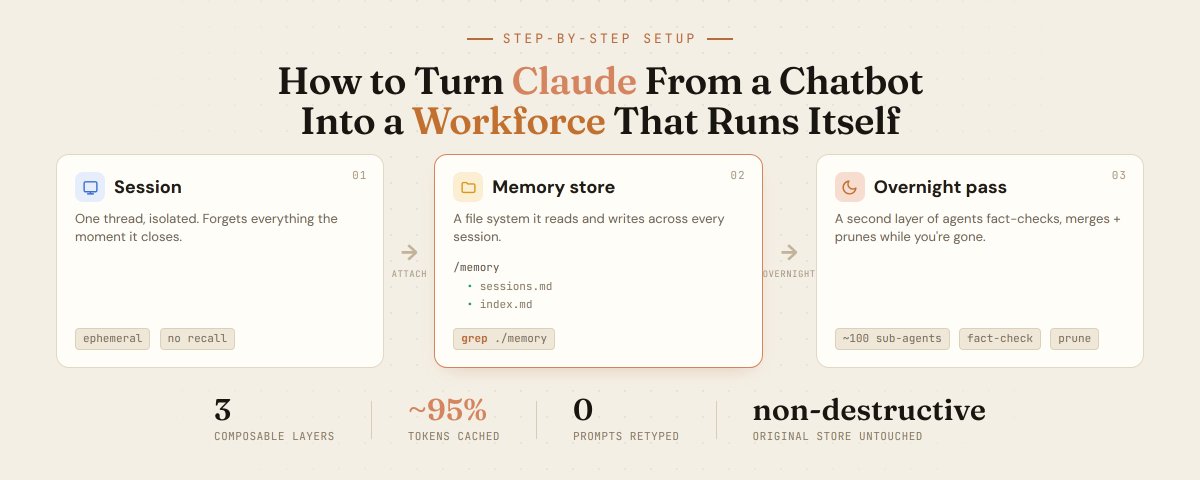
Open a tab, type a question, copy the answer, close the tab.
The next morning it remembers nothing. You re-explain the same project, the same preferences, the same constraints, every single time.
That works for quick questions. It falls apart the moment you want Claude to actually carry work forward.
The people building these agents stopped working that way. They don't sit and prompt one message at a time. They set up systems that remember across sessions and clean themselves up in the background.
Here is how that setup works, step by step.
A session forgets everything the moment you close it
The first shift is realizing a session is not the unit of work anymore.
A session is one conversation thread. Usually isolated, usually thrown away. The moment you close it, everything the agent learned is gone.
The fix is a memory store: a file system the agent can read and write to across every session, not just the one it's in.
Mounting it as a real file system matters more than it sounds. The agent can use bash to explore it, grep to search for a keyword, and open specific files instead of reloading everything into context.
You decide the boundary. One store per user, per project, or per workspace. There's no single right answer, it depends on what you're building.

Setup is two moves.
First, create the store and give it a name and a short description.
Then attach it to a session by passing the store ID, plus an optional prompt that steers what the agent should remember.
Building a research agent? Point it at sources and links. Building a coding agent? Tell it to remember architecture decisions, not every line of code.
One more parameter is worth knowing: access. It defaults to read-write, but you can set it to read-only so a session pulls from memory without ever overwriting it.
Read-only is the safe default for any agent you don't fully trust yet.
Now the behavior changes.
Tell one session something. Open a fresh session the next day. Ask about it.
The agent greps its own memory, finds the file, and answers from it. No re-explaining.
Memory works, and then it quietly turns into a junk drawer
The second problem appears once memory works: the store grows forever.
Agents dump information after almost every task. Files pile up. Duplicates stack. Old facts go stale and nobody clears them.
A memory store left alone slowly turns into a junk drawer.
This is where the real jump from chatbot to workforce happens. You add a second layer of agents whose only job is to improve the first layer.
It runs asynchronously, in the background, while you're doing something else.

It's structured like a team.
One orchestrator spins up one sub-agent per past session, up to around a hundred at a time. The design is deliberately exhaustive, so individual details don't get skipped.
Each sub-agent reopens its session and does a few things in order:
> fact-checks what the original agent wrote
> backfills missing details like dates and identifiers
> merges duplicates into one clean file
> removes information that's no longer true
The process is non-destructive. Your original store is never touched. The agents write to a fresh copy you can review before you switch to it.
The cost is lower than you'd expect. Because the work is agentic, most of the tokens get cached, reportedly around a 95% hit rate, so a full pass stays relatively cheap.
You can also run it on a cheaper model, or schedule it off-peak to bring the bill down further.
The output is the useful part.
The agent produces an index file, so future sessions can scan what's available instead of searching blind. And it tends to write down context the first agents never bothered to record.
The next morning, the agent effectively starts from a better version of its own memory.
The skill is no longer typing, it's deciding what the agents keep
Put the three layers together and the chatbot is gone.
Sessions do the work. Memory connects that work across time. The background layer organizes and enriches it on its own schedule.
You stop typing prompts one at a time and start running a system that holds its own context.
The skill that matters now isn't writing a clever message.
It's deciding what your agents should remember, what they should drop, and what they should fix without you sitting in the loop.
Watch the full workshop, then build the setup above.
Follow me and subscribe to my Telegram channel: