Docker Architecture & Components Overview → Docker is a...

Dhanian 🗯️@e_opore
17 views
Oct 27, 2025
~2 min read
Advertisement
1
Docker Architecture & Components
Overview
→ Docker is a containerization platform that allows developers to package applications and their dependencies into lightweight, portable containers.
→ These containers ensure consistent application behavior across different environments, from development to production.
Key Components
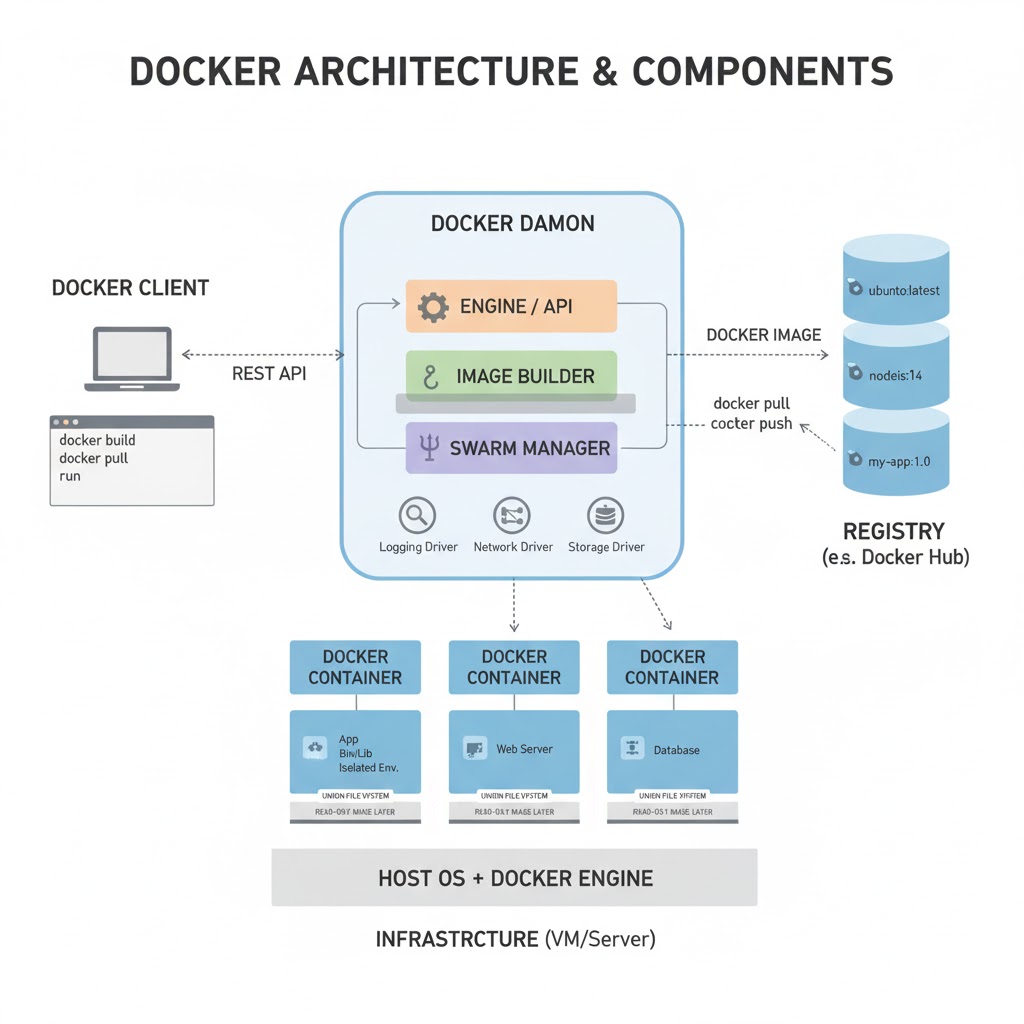
→ Docker architecture follows a client-server model, enabling smooth communication between the user and the Docker engine.
→ It includes core parts like the Client, Daemon, Images, Containers, and Registries.
1. Docker Client
→ The Docker Client is the user interface to interact with Docker.
→ It sends commands such as docker build, docker run, and docker pull to the Docker Daemon.
→ Communication happens through REST APIs, making it easy to manage Docker remotely or locally.
2. Docker Daemon (dockerd)
→ The Docker Daemon runs in the background and handles all Docker objects, including containers, images, networks, and volumes.
→ It listens for Docker API requests and executes the necessary container operations.
→ Multiple daemons can communicate for distributed application management.
3. Docker Images
→ Images are read-only blueprints used to create containers.
→ Built using a Dockerfile, they contain layers that define the software, libraries, and configurations needed to run an app.
→ Layered storage makes them efficient, lightweight, and easy to update.
4. Docker Containers
→ Containers are the running instances of Docker images.
→ They are isolated environments that include all necessary dependencies for execution.
→ Containers share the host OS kernel, resulting in minimal overhead and high performance compared to virtual machines.
5. Docker Registries
→ Registries store and distribute Docker images.
→ The Docker Hub is the default public registry, while private registries are used for secure enterprise projects.
→ Developers can push and pull images using commands like docker push and docker pull.
6. Docker Engine
→ The Docker Engine is the core system combining the Client, REST API, and Daemon.
→ It provides the environment for building and running containers efficiently.
→ Operates in both standalone and swarm (cluster) modes for scalability.
7. Docker Volumes
→ Volumes handle data persistence across containers.
→ Data stored in volumes remains intact even when containers are removed.
→ Ideal for storing databases, logs, and shared configurations.
8. Docker Networking
→ Docker supports multiple network drivers for container communication:
→ Bridge Network: Default mode for connecting standalone containers.
→ Host Network: Uses the host’s networking directly.
→ Overlay Network: Connects containers across multiple hosts in swarm mode.
9. Docker Compose
→ Docker Compose simplifies managing multi-container applications.
→ It uses a YAML file (docker-compose.yml) to define services, networks, and volumes.
→ Developers can spin up full application stacks with a single command: docker-compose up.
Tip
→ Docker architecture integrates various components to streamline application deployment and scaling.
→ By mastering these components, developers can create robust, efficient, and portable containerized environments.
For a complete deep-dive guide on Docker, including setup, workflow, and real-world deployment strategies, get this ebook:
codewithdhanian.gumroad.com/l/nbbjfm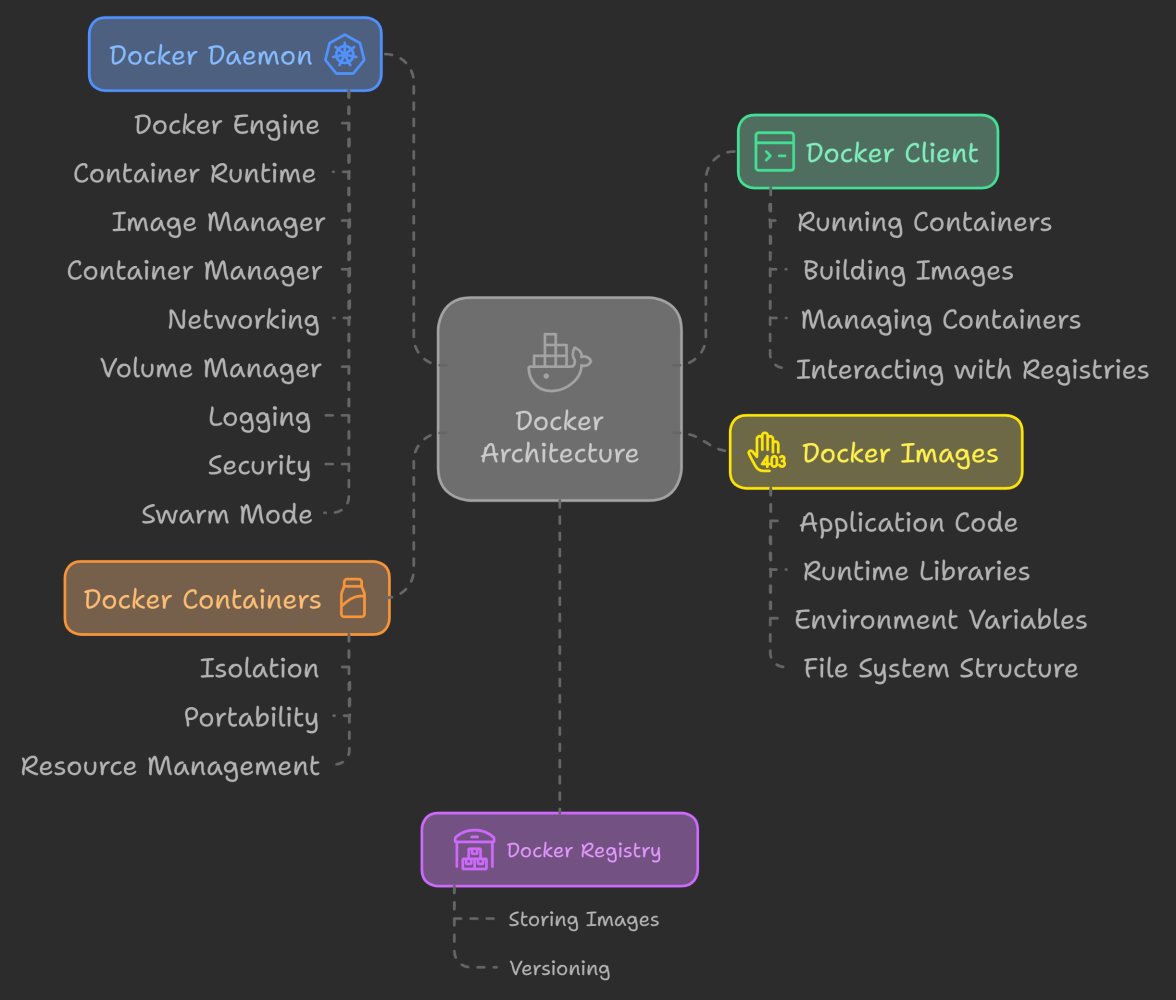
Overview
→ Docker is a containerization platform that allows developers to package applications and their dependencies into lightweight, portable containers.
→ These containers ensure consistent application behavior across different environments, from development to production.
Key Components
→ Docker architecture follows a client-server model, enabling smooth communication between the user and the Docker engine.
→ It includes core parts like the Client, Daemon, Images, Containers, and Registries.
1. Docker Client
→ The Docker Client is the user interface to interact with Docker.
→ It sends commands such as docker build, docker run, and docker pull to the Docker Daemon.
→ Communication happens through REST APIs, making it easy to manage Docker remotely or locally.
2. Docker Daemon (dockerd)
→ The Docker Daemon runs in the background and handles all Docker objects, including containers, images, networks, and volumes.
→ It listens for Docker API requests and executes the necessary container operations.
→ Multiple daemons can communicate for distributed application management.
3. Docker Images
→ Images are read-only blueprints used to create containers.
→ Built using a Dockerfile, they contain layers that define the software, libraries, and configurations needed to run an app.
→ Layered storage makes them efficient, lightweight, and easy to update.
4. Docker Containers
→ Containers are the running instances of Docker images.
→ They are isolated environments that include all necessary dependencies for execution.
→ Containers share the host OS kernel, resulting in minimal overhead and high performance compared to virtual machines.
5. Docker Registries
→ Registries store and distribute Docker images.
→ The Docker Hub is the default public registry, while private registries are used for secure enterprise projects.
→ Developers can push and pull images using commands like docker push and docker pull.
6. Docker Engine
→ The Docker Engine is the core system combining the Client, REST API, and Daemon.
→ It provides the environment for building and running containers efficiently.
→ Operates in both standalone and swarm (cluster) modes for scalability.
7. Docker Volumes
→ Volumes handle data persistence across containers.
→ Data stored in volumes remains intact even when containers are removed.
→ Ideal for storing databases, logs, and shared configurations.
8. Docker Networking
→ Docker supports multiple network drivers for container communication:
→ Bridge Network: Default mode for connecting standalone containers.
→ Host Network: Uses the host’s networking directly.
→ Overlay Network: Connects containers across multiple hosts in swarm mode.
9. Docker Compose
→ Docker Compose simplifies managing multi-container applications.
→ It uses a YAML file (docker-compose.yml) to define services, networks, and volumes.
→ Developers can spin up full application stacks with a single command: docker-compose up.
Tip
→ Docker architecture integrates various components to streamline application deployment and scaling.
→ By mastering these components, developers can create robust, efficient, and portable containerized environments.
For a complete deep-dive guide on Docker, including setup, workflow, and real-world deployment strategies, get this ebook:
codewithdhanian.gumroad.com/l/nbbjfm
