Linux Kernel Architecture 1. Introduction → The Linux Kernel is the...

Dhanian 🗯️@e_opore
19 views
Oct 25, 2025
~3 min read
Advertisement
1
Linux Kernel Architecture
1. Introduction
→ The Linux Kernel is the core part of the Linux operating system.
→ It acts as a bridge between hardware and software applications.
→ It manages processes, memory, devices, and system calls.
2. Core Responsibilities
→ Process Management — handles process creation, scheduling, and termination.
→ Memory Management — allocates and manages virtual and physical memory.
→ File System Management — provides access to files and directories through the Virtual File System (VFS).
→ Device Management — communicates with hardware via device drivers.
→ Network Management — manages network protocols and interfaces.
→ System Calls — provides interfaces for user-space programs to interact with the kernel.
3. Kernel Modes
→ User Mode: Applications run here with restricted access.
→ Kernel Mode: The kernel runs here with full access to system resources.
→ The system switches between these modes through system calls and interrupts.
4. Major Components
→ 1. Process Scheduler
→ Manages process execution order.
→ Balances CPU load efficiently.
→ Uses algorithms like CFS (Completely Fair Scheduler).
→ 2. Memory Manager
→ Handles paging, swapping, and memory allocation.
→ Manages physical and virtual memory.
→ Uses demand paging for optimization.
→ 3. Virtual File System (VFS)
→ Provides a common interface for different file systems.
→ Supports file systems like ext4, FAT, NTFS, etc.
→ Offers system calls such as open(), read(), and write().
→ 4. Device Drivers
→ Allow the kernel to communicate with hardware devices.
→ Each device type (block, character, network) has its own driver interface.
→ Operates via /dev entries.
→ 5. Network Stack
→ Implements TCP/IP, UDP, and other protocols.
→ Handles data transmission between applications and physical networks.
→ Uses sockets for communication.
→ 6. System Call Interface (SCI)
→ Acts as a gateway between user-space applications and kernel-space operations.
→ Converts API requests (e.g., printf, fork) into kernel-level tasks.
5. Kernel Types
→ Monolithic Kernel: All services run in kernel space for performance (Linux uses this model).
→ Microkernel: Minimal kernel; runs most services in user space.
→ Hybrid Kernel: Mixes both for flexibility (used in Windows and macOS).
6. Boot Process Overview
→ BIOS/UEFI initializes hardware.
→ Bootloader (like GRUB) loads the kernel into memory.
→ Kernel initializes devices, mounts the root file system, and starts init.
→ System transitions to user space and starts essential services.
7. Interprocess Communication (IPC)
→ Enables processes to communicate and synchronize.
→ Mechanisms include:
→ Pipes
→ Message Queues
→ Shared Memory
→ Semaphores
→ Signals
8. Kernel Modules
→ Dynamically loadable components extending kernel functionality.
→ Useful for device drivers, file systems, or system features.
→ Managed using commands:
→ insmod — load a module
→ rmmod — remove a module
→ lsmod — list loaded modules
9. Security and Permissions
→ Uses User IDs (UIDs) and Group IDs (GIDs) for access control.
→ Enforces permissions via file modes (read, write, execute).
→ Supports advanced systems like SELinux and AppArmor for enhanced security.
10. Tip
→ The Linux Kernel is modular, stable, and scalable.
→ It efficiently handles hardware, memory, processes, and communication.
→ Its open-source nature allows customization, performance tuning, and community-driven improvement.
✅ Learn More About Linux, System Architecture, and OS Concepts in This Ebook:
codewithdhanian.gumroad.com/l/dynwdc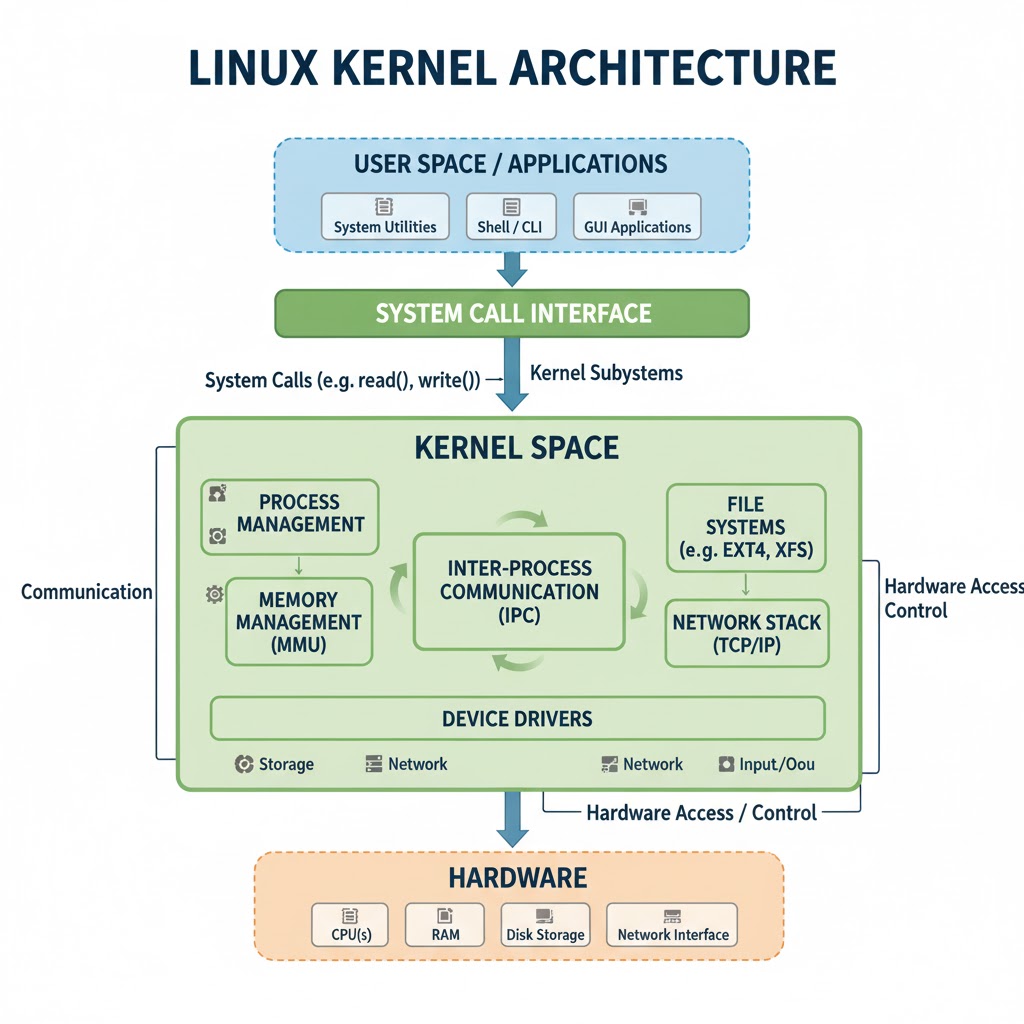

1. Introduction
→ The Linux Kernel is the core part of the Linux operating system.
→ It acts as a bridge between hardware and software applications.
→ It manages processes, memory, devices, and system calls.
2. Core Responsibilities
→ Process Management — handles process creation, scheduling, and termination.
→ Memory Management — allocates and manages virtual and physical memory.
→ File System Management — provides access to files and directories through the Virtual File System (VFS).
→ Device Management — communicates with hardware via device drivers.
→ Network Management — manages network protocols and interfaces.
→ System Calls — provides interfaces for user-space programs to interact with the kernel.
3. Kernel Modes
→ User Mode: Applications run here with restricted access.
→ Kernel Mode: The kernel runs here with full access to system resources.
→ The system switches between these modes through system calls and interrupts.
4. Major Components
→ 1. Process Scheduler
→ Manages process execution order.
→ Balances CPU load efficiently.
→ Uses algorithms like CFS (Completely Fair Scheduler).
→ 2. Memory Manager
→ Handles paging, swapping, and memory allocation.
→ Manages physical and virtual memory.
→ Uses demand paging for optimization.
→ 3. Virtual File System (VFS)
→ Provides a common interface for different file systems.
→ Supports file systems like ext4, FAT, NTFS, etc.
→ Offers system calls such as open(), read(), and write().
→ 4. Device Drivers
→ Allow the kernel to communicate with hardware devices.
→ Each device type (block, character, network) has its own driver interface.
→ Operates via /dev entries.
→ 5. Network Stack
→ Implements TCP/IP, UDP, and other protocols.
→ Handles data transmission between applications and physical networks.
→ Uses sockets for communication.
→ 6. System Call Interface (SCI)
→ Acts as a gateway between user-space applications and kernel-space operations.
→ Converts API requests (e.g., printf, fork) into kernel-level tasks.
5. Kernel Types
→ Monolithic Kernel: All services run in kernel space for performance (Linux uses this model).
→ Microkernel: Minimal kernel; runs most services in user space.
→ Hybrid Kernel: Mixes both for flexibility (used in Windows and macOS).
6. Boot Process Overview
→ BIOS/UEFI initializes hardware.
→ Bootloader (like GRUB) loads the kernel into memory.
→ Kernel initializes devices, mounts the root file system, and starts init.
→ System transitions to user space and starts essential services.
7. Interprocess Communication (IPC)
→ Enables processes to communicate and synchronize.
→ Mechanisms include:
→ Pipes
→ Message Queues
→ Shared Memory
→ Semaphores
→ Signals
8. Kernel Modules
→ Dynamically loadable components extending kernel functionality.
→ Useful for device drivers, file systems, or system features.
→ Managed using commands:
→ insmod — load a module
→ rmmod — remove a module
→ lsmod — list loaded modules
9. Security and Permissions
→ Uses User IDs (UIDs) and Group IDs (GIDs) for access control.
→ Enforces permissions via file modes (read, write, execute).
→ Supports advanced systems like SELinux and AppArmor for enhanced security.
10. Tip
→ The Linux Kernel is modular, stable, and scalable.
→ It efficiently handles hardware, memory, processes, and communication.
→ Its open-source nature allows customization, performance tuning, and community-driven improvement.
✅ Learn More About Linux, System Architecture, and OS Concepts in This Ebook:
codewithdhanian.gumroad.com/l/dynwdc
