New in Cline 3.7.0: The .clinerules folder -- a better way to...

Cline@cline
26 views
Mar 21, 2025
~1 min read
Advertisement
1
New in Cline 3.7.0: The .clinerules folder -- a better way to organize your project rules.
Here's how you can implement a modular rules system that transforms how Cline understands your projects: 🧵
Here's how you can implement a modular rules system that transforms how Cline understands your projects: 🧵
0:21
2
1/ How it works: Any markdown files placed in the .clinerules/ folder are automatically aggregated and appended to your system prompt - exactly like the single .clinerules file, but with the flexibility of multiple files.
3
2/ This opens up a powerful organizational pattern you can implement:
1. Create a .clinerules/ folder for active rules
2. Create a .clinerules-bank/ folder for inactive rules you might need later
Then simply move files between them as your context changes.
1. Create a .clinerules/ folder for active rules
2. Create a .clinerules-bank/ folder for inactive rules you might need later
Then simply move files between them as your context changes.
4
3/ This organization pattern isn't built-in, but it's how we recommend structuring your rules for maximum flexibility. Move files between folders to precisely control what context is loaded.
Remember: Only files in .clinerules/ are active and added to your prompt.
Remember: Only files in .clinerules/ are active and added to your prompt.
5
4/ Recommended implementation for teams working with complex repos:
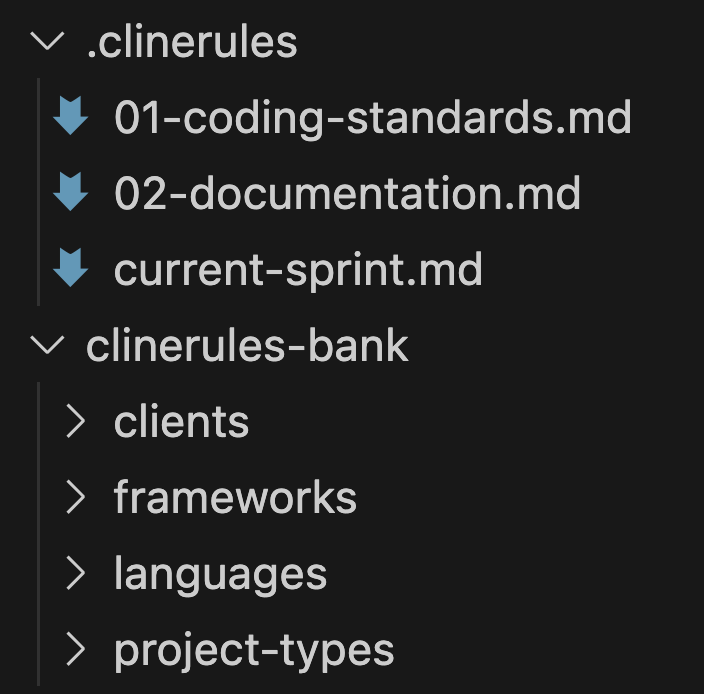
6
5/ When switching contexts, you could use file operations or simply drag files between folders to update your active rules:
# Moving to a new client project
mv .clinerules/current-client.md .clinerules-bank/clients/
cp .clinerules-bank/clients/client-b.md .clinerules/current-client.md
# Moving to a new client project
mv .clinerules/current-client.md .clinerules-bank/clients/
cp .clinerules-bank/clients/client-b.md .clinerules/current-client.md
7
6/ For even more organization, we recommend structuring your rules bank hierarchically:
- Global standards always stay active
- Technology-specific rules rotate based on current stack
- Client requirements change per project
- Sprint priorities update regularly
- Global standards always stay active
- Technology-specific rules rotate based on current stack
- Client requirements change per project
- Sprint priorities update regularly
8
7/ It's important to understand that all markdown files in the .clinerules/ folder are combined in alphanumeric order and appended to your system prompt, giving Cline comprehensive context.
9
8/ Use this pattern to dramatically improve context management across your team and make Cline more valuable for each specific task.
