How I made my Cursor/Windsurf workflow ultra productive with...

CJ Zafir@cjzafir
36 views
Mar 05, 2025
~3 min read
Advertisement
1
How I made my Cursor/Windsurf workflow ultra productive with "Context Boundary" Technique:
(Bookmark this for future reference) ↓
(Bookmark this for future reference) ↓
2
Even the Founder of @cursor_ai acknowledged that.
Let's dive into it:
Let's dive into it:
3
Cursor and Windsurf built around predictive coding models like Claude Sonnet 3.5 and GPT4o.
These models can only think about only 1 next step and that 1 possible step can be wrong 9/10 times.
When we make these predictive LLM models "think" they mess up the codebase.
These models can only think about only 1 next step and that 1 possible step can be wrong 9/10 times.
When we make these predictive LLM models "think" they mess up the codebase.
4
We need to use these AI models just to "implement" the Code and not to "plan" the code.
We can do that by providing them detailed coding plan as coding docs.
Documents include:
- PRD
- App Flow Doc
- Tech Stack Doc
- Frontent Guidelines
- Backend Structure Doc
- cursorrules/windsurfrules
and any other docs you might find useful.
We can do that by providing them detailed coding plan as coding docs.
Documents include:
- PRD
- App Flow Doc
- Tech Stack Doc
- Frontent Guidelines
- Backend Structure Doc
- cursorrules/windsurfrules
and any other docs you might find useful.
5
1. Project Requirements Document (PRD)
Ask AI to create a PRD for your AI coding project.
Add these sections:
- App Overview: A complete rundown of your app
- User Flow: Step-by-step flow of how users interact with your app.
- Tech Stack & APIs: What tech stack and APIs you'll use
- Core Features: List all core features of your app
- In-scope & Out-of-scope: What's included and what's specifically excluded.
This doc will provide high level overview to Cursor/Windsurf
Ask AI to create a PRD for your AI coding project.
Add these sections:
- App Overview: A complete rundown of your app
- User Flow: Step-by-step flow of how users interact with your app.
- Tech Stack & APIs: What tech stack and APIs you'll use
- Core Features: List all core features of your app
- In-scope & Out-of-scope: What's included and what's specifically excluded.
This doc will provide high level overview to Cursor/Windsurf
6
2. App Flow Document
This document works as a map for the AI coding model.
It describes clearly how a user moves through your app, from the landing page to every other page.
Few tips:
- Avoid bullet points
- use simple language
- do not miss any page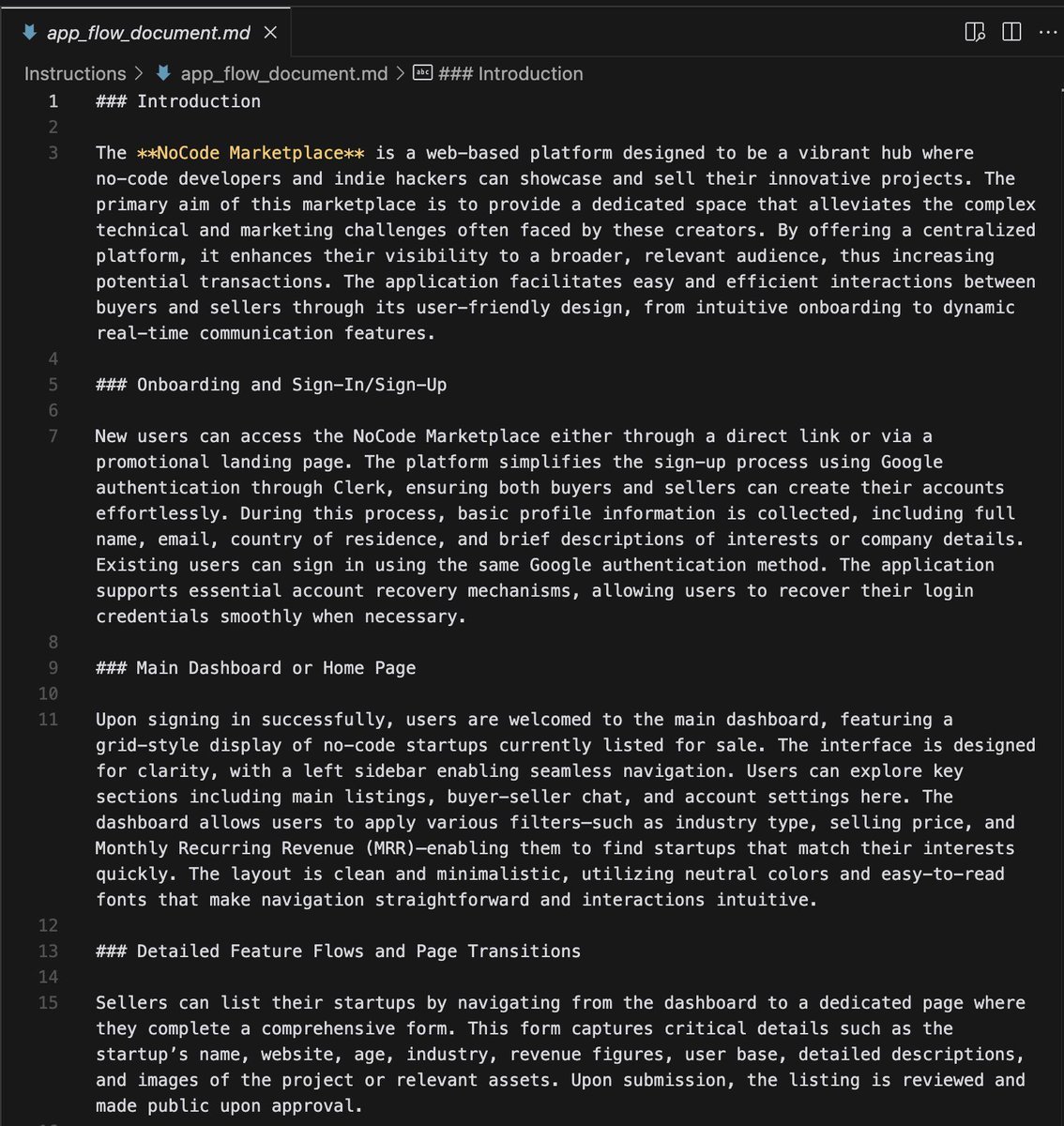
This document works as a map for the AI coding model.
It describes clearly how a user moves through your app, from the landing page to every other page.
Few tips:
- Avoid bullet points
- use simple language
- do not miss any page
7
3. Tech Stack Document
This doc explains all technical parts of your coding project.
It shows which packages and dependencies to install.
You can also add links to API docs here and Cursor/Windsurf will find details online if needed.
This doc explains all technical parts of your coding project.
It shows which packages and dependencies to install.
You can also add links to API docs here and Cursor/Windsurf will find details online if needed.
8
4. Frontend Guidelines Document
This doc should provide details about the UI, styling, design principles of the app.
To make to app design consistent add these too:
- colour palettes
- fonts
- icons
The better the UI, the better the trust score with users.
This doc should provide details about the UI, styling, design principles of the app.
To make to app design consistent add these too:
- colour palettes
- fonts
- icons
The better the UI, the better the trust score with users.
9
5. Backend Structure
Most devs use Supabase, because AI can understand PostgreSQL easily.
AI can write SQL queries, for your database tables in Supabase.
This document ensures your database, authentication, and storage are set up correctly and clearly.
Most devs use Supabase, because AI can understand PostgreSQL easily.
AI can write SQL queries, for your database tables in Supabase.
This document ensures your database, authentication, and storage are set up correctly and clearly.
10
These are the 5 core documents that are MUST for your coding projects
To make your coding workflow air-tight, add the "implementation Plan"
Implementation plan should list all (50+) steps to code this app
This will minimize AI hallucinations and force AI just to implement code
To make your coding workflow air-tight, add the "implementation Plan"
Implementation plan should list all (50+) steps to code this app
This will minimize AI hallucinations and force AI just to implement code
11
You can use ChatGPT/Grok to generate these documents.
I use @CodeGuidedev to generate these docs + some custom docs.
CodeGuide uses a mixture of models to write these docs:
- GPT o1
- GPT o3-mini-high
- Sonnet 3.5/3.7
I create docs and attach them in 1-click.
I use @CodeGuidedev to generate these docs + some custom docs.
CodeGuide uses a mixture of models to write these docs:
- GPT o1
- GPT o3-mini-high
- Sonnet 3.5/3.7
I create docs and attach them in 1-click.
0:18
12
Bottomline:
1. Context Boundary is must for coding production-ready apps with AI.
2. Your Coding Docs build this context boundary (PRD, App flow doc, etc)
3. Use @CodeGuidedev to generate coding docs. IT works with all AL model and AI tools)
4. Create "Implementation plan" to use Cursor Agent/Cascade smoothly.
1. Context Boundary is must for coding production-ready apps with AI.
2. Your Coding Docs build this context boundary (PRD, App flow doc, etc)
3. Use @CodeGuidedev to generate coding docs. IT works with all AL model and AI tools)
4. Create "Implementation plan" to use Cursor Agent/Cascade smoothly.