Windsurf might take over Cursor AI in few months. Designed to be...

CJ Zafir@cjzafir
41 views
Feb 06, 2025
~3 min read
Advertisement
1
Windsurf might take over Cursor AI in few months.
Designed to be simple and intuitive—ideal for beginners.
I'd rate Windsurf 7.5/10 and Cursor 8/10, so margins are very bleak.
But it is getting better with each new update.
Here's how you can use Windsurf to build your first SaaS:
Designed to be simple and intuitive—ideal for beginners.
I'd rate Windsurf 7.5/10 and Cursor 8/10, so margins are very bleak.
But it is getting better with each new update.
Here's how you can use Windsurf to build your first SaaS:
2
1. You need to Generate PCD {Project Coding Docs}
This step is vital, you need to provide deep context about your project.
What is your app about?
Tech stack?
App flow?
Backend?
APIs used?
etc
If you don't build a context boundary around AI models, it messes up your codebase
This step is vital, you need to provide deep context about your project.
What is your app about?
Tech stack?
App flow?
Backend?
APIs used?
etc
If you don't build a context boundary around AI models, it messes up your codebase
3
How to generate Project Coding Docs?
I've created @CodeGuidedev to automate the entire process.
In 5 steps, you get detailed PCDs which works with all AI coding tools.
Plus, I'm using the latest 03-mini- high model to generate these docs for you.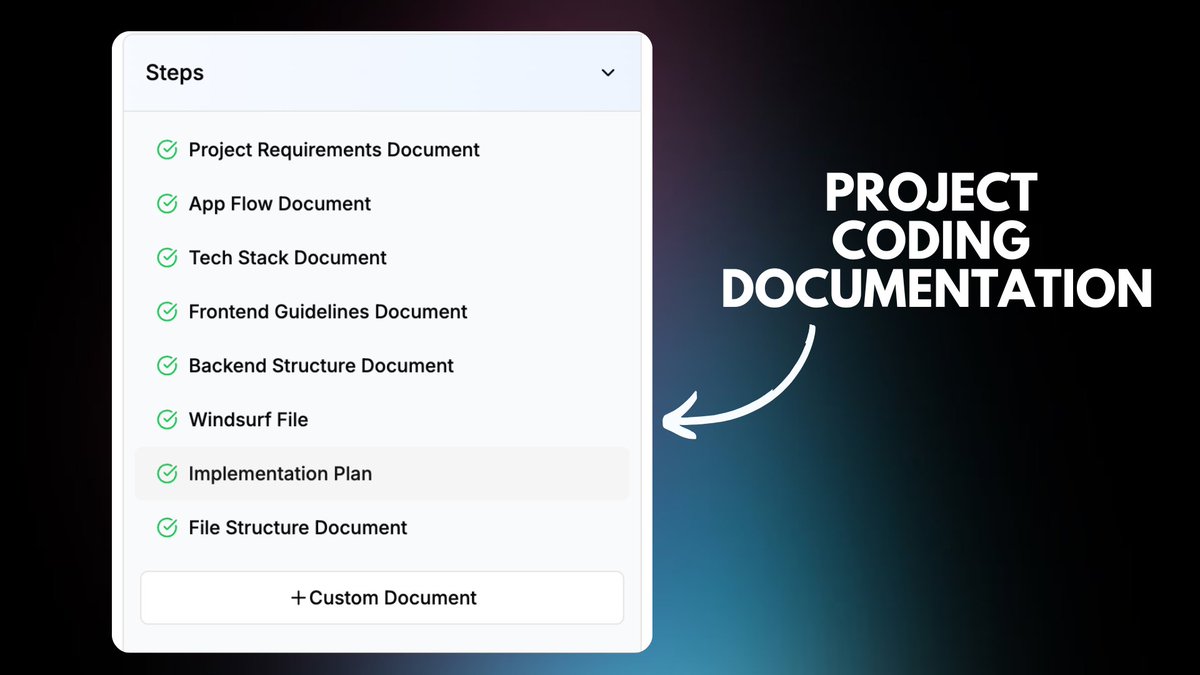
I've created @CodeGuidedev to automate the entire process.
In 5 steps, you get detailed PCDs which works with all AI coding tools.
Plus, I'm using the latest 03-mini- high model to generate these docs for you.
4
2. You use Codeguide Starter Kit.
It's a Boilerplate built for AI coding models,
with pre installed packages like NextJS, tailwindcss, typescript, shadcn, supabase and OpenAI SDK.
This will save you alot of time and errors.
We also have open sourced version too,
It's a Boilerplate built for AI coding models,
with pre installed packages like NextJS, tailwindcss, typescript, shadcn, supabase and OpenAI SDK.
This will save you alot of time and errors.
We also have open sourced version too,
5
Here's how you can claim your Starter Kit Pro if your CodeGuide Member.
If you're not a CodeGuide member, don't worry use our open-sourced starter kit (link in last tweet)
This will get you started in few clicks.
If you're not a CodeGuide member, don't worry use our open-sourced starter kit (link in last tweet)
This will get you started in few clicks.
0:33
6
3. Clone the repo to Windsurf to get started
Copy the HTTPs link "Clone using the web URL."
Note: This step is same for Pro and Lite Starter Kit users.
Now you have App Project Structure Installed (saved 2 hours)
Copy the HTTPs link "Clone using the web URL."
Note: This step is same for Pro and Lite Starter Kit users.
Now you have App Project Structure Installed (saved 2 hours)
0:14
7
4. Attach the project Coding Docs you generated from CodeGuide.
You need to click "Download All" button to download your docs.
It will download Zip folder on your computer.
Unzip it and attach it to "documentation" folder in root directory.
(follow the guide below)
You need to click "Download All" button to download your docs.
It will download Zip folder on your computer.
Unzip it and attach it to "documentation" folder in root directory.
(follow the guide below)
0:24
8
5. Build your app step by step.
Now you have a solid foundation for AI coding model. It's time to code now.
Now open Cascade. You need to ask Windsurf to understand your project by reading the Instructions folder.
Use the prompt below.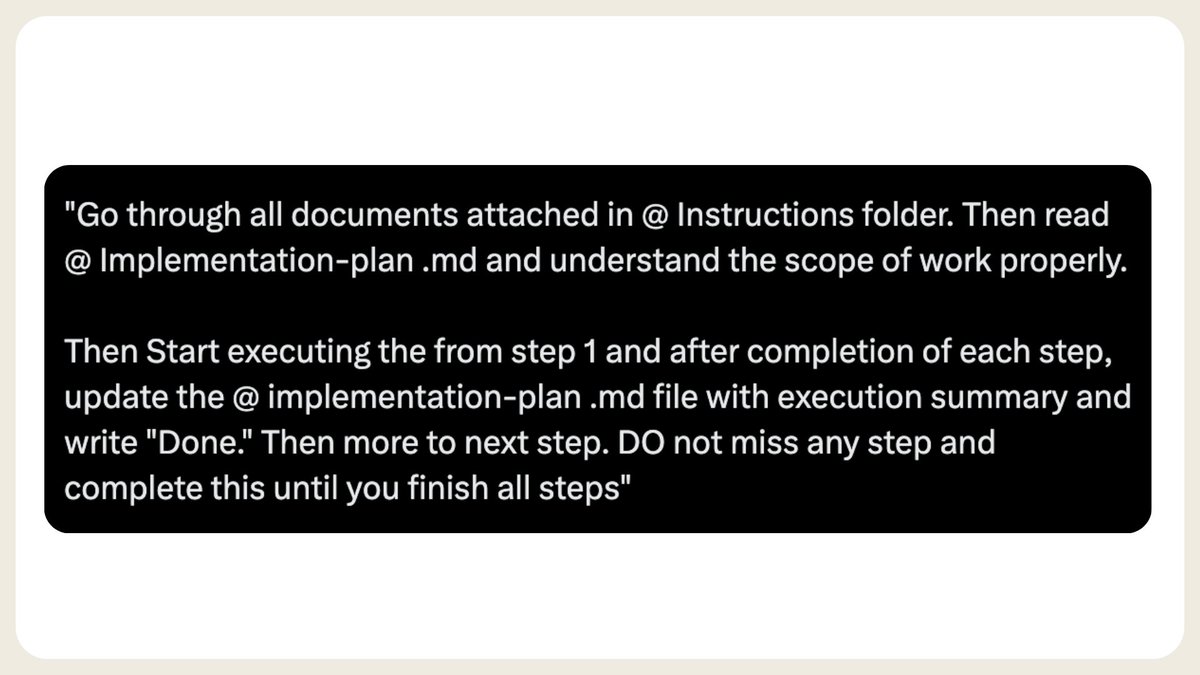
Now you have a solid foundation for AI coding model. It's time to code now.
Now open Cascade. You need to ask Windsurf to understand your project by reading the Instructions folder.
Use the prompt below.
9
This step will start the coding workflow in WIndsurf. Refer to {implentation-plan .md} file to find next steps.
Implementation plan is start-to-end coding plan for windsurf.
All you need to do is make sure it follows the steps and debug errors (because there will be errors)
Implementation plan is start-to-end coding plan for windsurf.
All you need to do is make sure it follows the steps and debug errors (because there will be errors)
10
When you get any errors.
Paste them in Cascade. and Windsurf will fix the errors with its agentic capabilities.
you can use o3-mini if you get stuck on some major error, but Sonnet 3.5 latest is also very good.
Make sure you provide some context if you can, about the error.
Paste them in Cascade. and Windsurf will fix the errors with its agentic capabilities.
you can use o3-mini if you get stuck on some major error, but Sonnet 3.5 latest is also very good.
Make sure you provide some context if you can, about the error.
0:20
11
Once you follow all steps, app will be good to go.
With the starter kit we added Supabase for Database and storage and Clerkdev for auth and Windsurf will understand that pretty easily.
so use the Starter kit, use Windsurf and vide code amazing SaaS.
With the starter kit we added Supabase for Database and storage and Clerkdev for auth and Windsurf will understand that pretty easily.
so use the Starter kit, use Windsurf and vide code amazing SaaS.
12
TL;DR:
1. generate project coding docs (must)
2. use @CodeGuidedev starter kit (save time & tokens)
3. attach docs to Windsurf
4. ask Cascade to go through {documentation} folder
5. start executing {implemenation-plan .md} file
6. debug by pasting the error in Cascade with context
7. complete all steps
8. deploy your app on (vercel, replit)
1. generate project coding docs (must)
2. use @CodeGuidedev starter kit (save time & tokens)
3. attach docs to Windsurf
4. ask Cascade to go through {documentation} folder
5. start executing {implemenation-plan .md} file
6. debug by pasting the error in Cascade with context
7. complete all steps
8. deploy your app on (vercel, replit)
13
Join codeguide.dev here. It's becoming home of AI Coders.
With our Yearly Membership now you'll get Exclusive 3-6 months Discounts from all major AI coding tools including @windsurf_ai
Total Discount value: $380
40% OFF on Yearly Membership right now.
With our Yearly Membership now you'll get Exclusive 3-6 months Discounts from all major AI coding tools including @windsurf_ai
Total Discount value: $380
40% OFF on Yearly Membership right now.