Turn any AI Model into Reasoning Model with Deepseek r1 <thinking>...

CJ Zafir@cjzafir
66 views
Jan 27, 2025
~2 min read
Advertisement
1
Turn any AI Model into Reasoning Model with Deepseek r1 <thinking> Architecture.
Models like GPT4o and Sonnet 3.5 are Implementation Models
But a new breakthrough with Deepseek can make them a Reasoning model.
Here's a step-by-step Explanation:
🧵
Models like GPT4o and Sonnet 3.5 are Implementation Models
But a new breakthrough with Deepseek can make them a Reasoning model.
Here's a step-by-step Explanation:
🧵
0:28
2
Deepseek r1 is an open source AI model competing against o1 model of OpenAI.
Which is the Top-Notch Reasoning Model.
How Reasoning Models work?
User message → Chain of Thought steps → Output
The CoT step is the main difference right now between r1 and o1
Which is the Top-Notch Reasoning Model.
How Reasoning Models work?
User message → Chain of Thought steps → Output
The CoT step is the main difference right now between r1 and o1
3
Deepseek reasoning is realtime, fast and more like human thoughts.
o1 is slow and takes 3-4 minutes on average.
But what if we use the reasoning power of r1 with model of our choice?
o1 is slow and takes 3-4 minutes on average.
But what if we use the reasoning power of r1 with model of our choice?
4
We can do that because r1 provivides the <thinking> </thinking> process in the API as reasoning_content.
So we can actually use (Only the reasoning part) of r1 and give this context to any model like (Sonnet 3.5, GPT4o or Gemini Flash 2.0)
So we can actually use (Only the reasoning part) of r1 and give this context to any model like (Sonnet 3.5, GPT4o or Gemini Flash 2.0)
5
The results will be alot better because
the Implementation Models now have the Thinking Monologue to understand the user query better.
And best part, Deepseek works with OpenAI SDK so you don't need anything extra.
Just follow the following steps.
the Implementation Models now have the Thinking Monologue to understand the user query better.
And best part, Deepseek works with OpenAI SDK so you don't need anything extra.
Just follow the following steps.
6
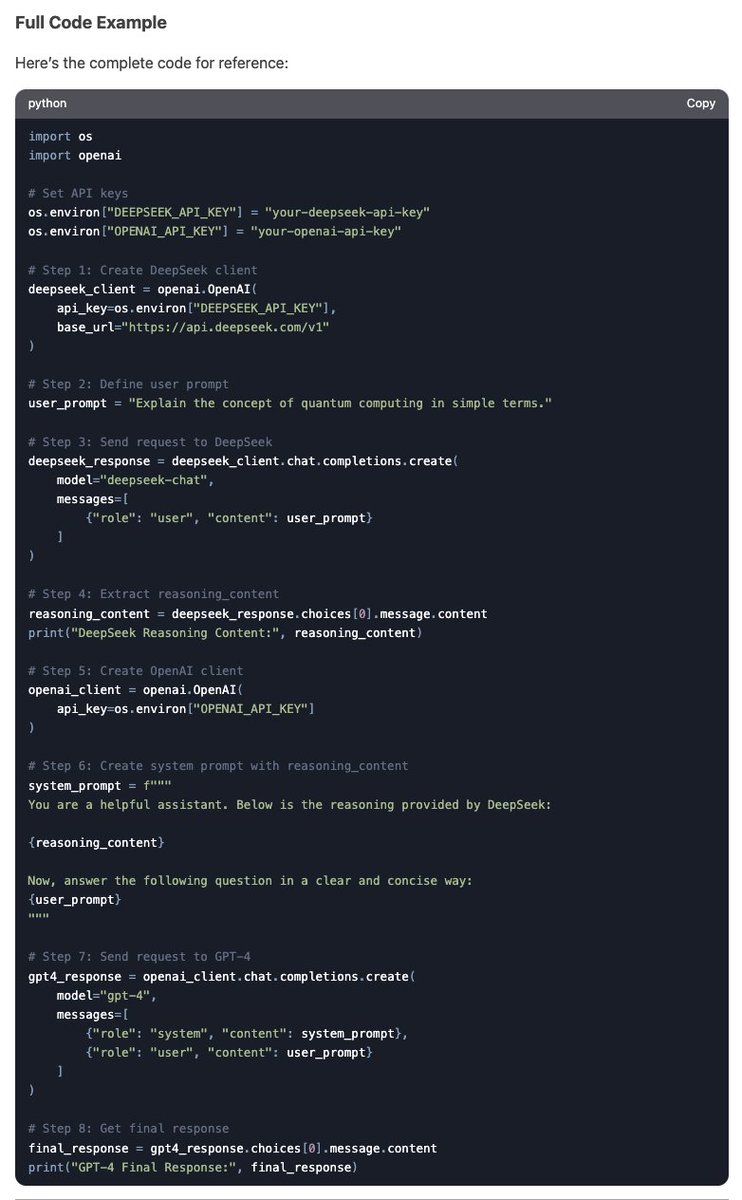
Step 1: Create DeepSeek Client Using OpenAI SDK
Initialize the DeepSeek client using the OpenAI SDK.
This allows you to send requests to the DeepSeek API.
Initialize the DeepSeek client using the OpenAI SDK.
This allows you to send requests to the DeepSeek API.
7
Step 2: Make a Request for DeepSeek Chat Completion
Send a request to DeepSeek to generate a response.
Include your input (e.g., a question or task) in the messages parameter.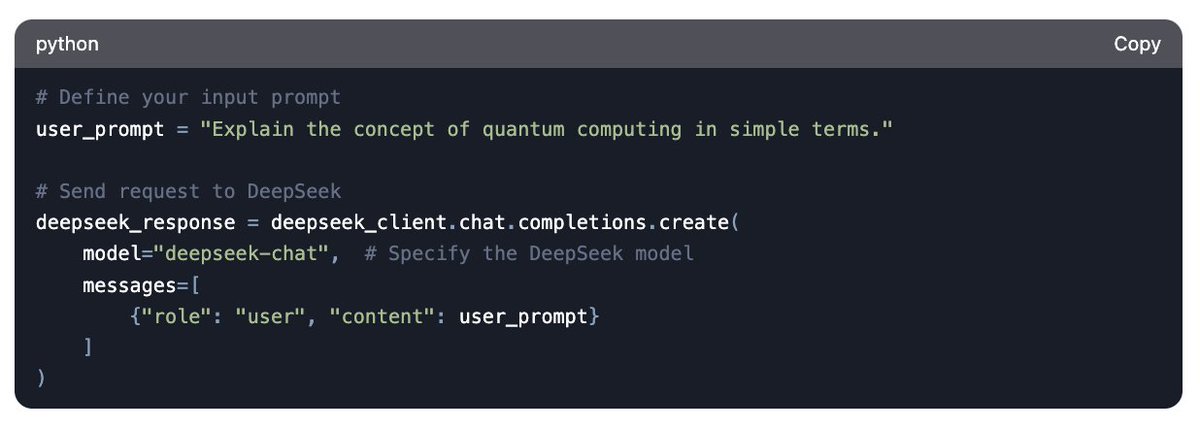
Send a request to DeepSeek to generate a response.
Include your input (e.g., a question or task) in the messages parameter.
8
Step 3: Extract reasoning_content from DeepSeek Response
The response from DeepSeek will include a field called reasoning_content, which contains the reasoning or explanation behind the answer.
The response from DeepSeek will include a field called reasoning_content, which contains the reasoning or explanation behind the answer.
9
Step 4:Create OpenAI Client for GPT-4o
Now, initialize the OpenAI client to use the GPT-4o model.
This will allow you to send requests to OpenAI’s API.
Now, initialize the OpenAI client to use the GPT-4o model.
This will allow you to send requests to OpenAI’s API.
10
Step 5:Add reasoning_content to System Prompt
Combine the reasoning_content from DeepSeek with your original prompt.
This will provide GPT-4o with additional context.
Combine the reasoning_content from DeepSeek with your original prompt.
This will provide GPT-4o with additional context.
11
Step 6: Get Final Response from GPT-4o
Send the combined prompt to GPT-4o and retrieve the final response.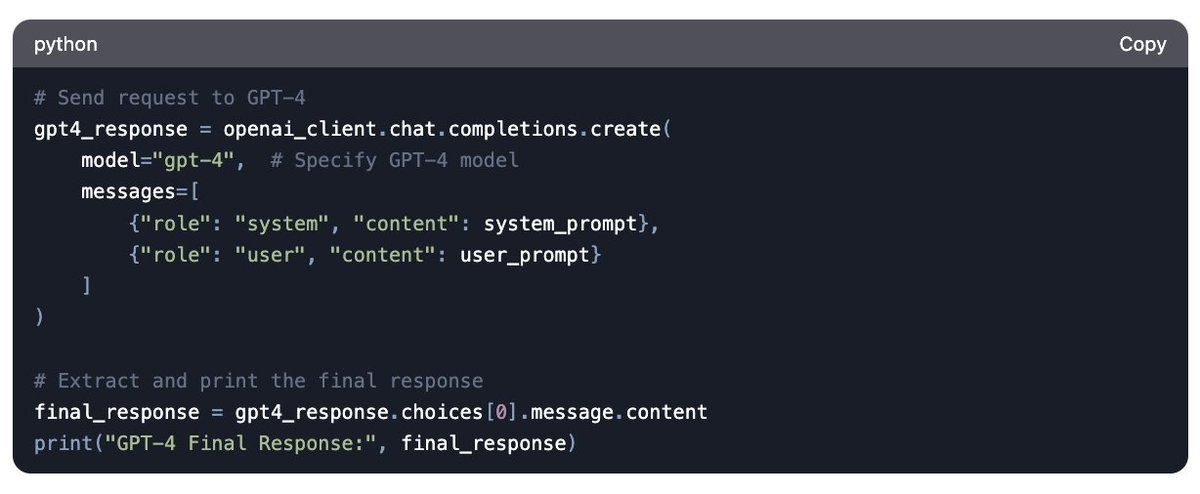
Send the combined prompt to GPT-4o and retrieve the final response.
12
Full Code for your reference.
13
This is a blessing in disguise for closed source models so they can enhance their performance.
Why do we need to use r1 just for reasoning part?
Because r1's output window is small (8k) and also it doesn't support tool calling and function calling right now.
Why do we need to use r1 just for reasoning part?
Because r1's output window is small (8k) and also it doesn't support tool calling and function calling right now.
14
So with this technique you can turn any AI model into a reasoning model.
We did this in codeguide.dev and removed o1 from the circuit now.
GPT4o with structured output is providing o1 level responses with r1 reasoning injection.
Try it out and Bookmark this.
We did this in codeguide.dev and removed o1 from the circuit now.
GPT4o with structured output is providing o1 level responses with r1 reasoning injection.
Try it out and Bookmark this.