How to Create a Modern Landing Page? → Plan it with CodeGuide →...

CJ Zafir@cjzafir
36 views
Jan 12, 2025
~4 min read
Advertisement
1
How to Create a Modern Landing Page?
→ Plan it with CodeGuide
→ Code it with Bolt .new
→ Deploy it on Netlify
Here's a Step by Step Guide:
🧵
→ Plan it with CodeGuide
→ Code it with Bolt .new
→ Deploy it on Netlify
Here's a Step by Step Guide:
🧵
2
1. Take Inspirations
You need to spend some time visualizing how your landing page would look like.
For this you can go to:
- Dribbble
- Landingfolio
- onepagelove
- saaslandingpage
Once you find a style you like. Take notes of hero section, color pallete, styling etc.
You need to spend some time visualizing how your landing page would look like.
For this you can go to:
- Dribbble
- Landingfolio
- onepagelove
- saaslandingpage
Once you find a style you like. Take notes of hero section, color pallete, styling etc.
3
2. Use CodeGuide Template
CodeGuide will help you write:
- Project Requirements Doc for your landing page
- Landing Page Copy
- Landing Page Styling Guide (Frontend Guidelines)
We'll attach these docs to Bolt and it'll save us tokens and time and landing page will look unique.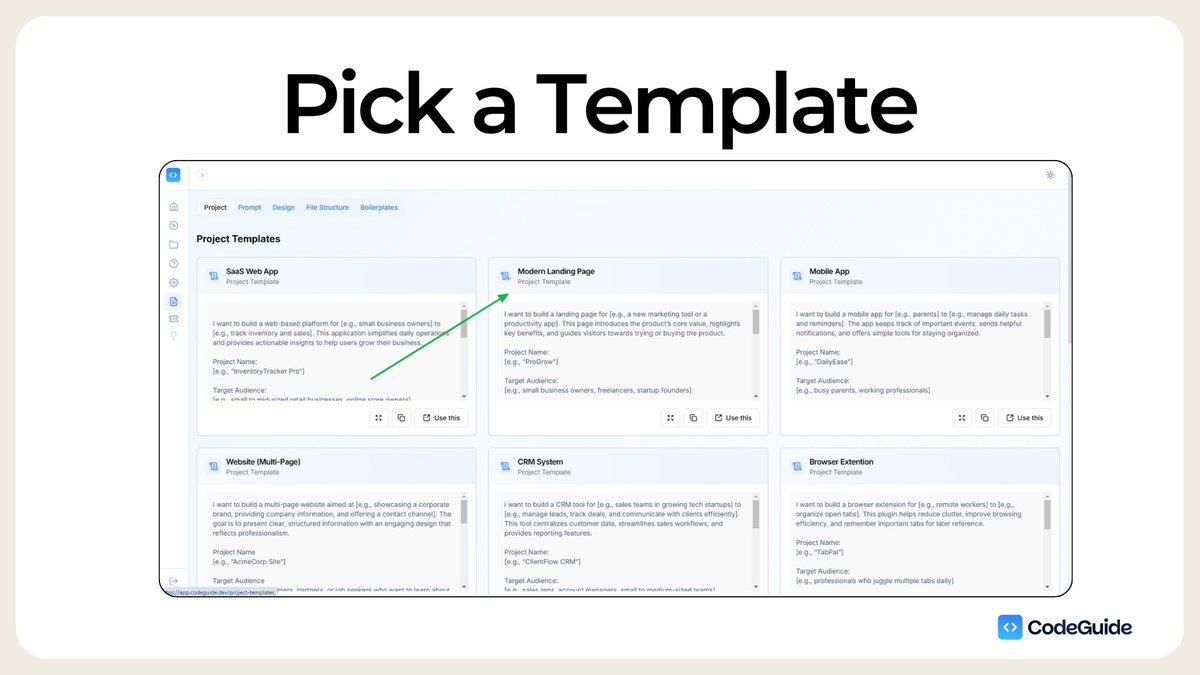
CodeGuide will help you write:
- Project Requirements Doc for your landing page
- Landing Page Copy
- Landing Page Styling Guide (Frontend Guidelines)
We'll attach these docs to Bolt and it'll save us tokens and time and landing page will look unique.
4
Follow these Steps:
1. Sign in to CodeGuide
2. Go to "New Project" Page on left sidebar
3. Click on "Use Template"
4. Select "Modern Landing Page" Template
5. Fill out your project details.
Tip: Provide as much detail as possible about sections, styling, color pattates, copy etc.
1. Sign in to CodeGuide
2. Go to "New Project" Page on left sidebar
3. Click on "Use Template"
4. Select "Modern Landing Page" Template
5. Fill out your project details.
Tip: Provide as much detail as possible about sections, styling, color pattates, copy etc.
0:38
5
3. Select AI tools you will use to code your landing page.
For Landing Pages I found Bolt to be very good.
Apart from bolt, you can also use lovable and v0 but flow is a bit different.
I select tools + either ChatGPT or Claude because I use them to help me debugg or brainstorming.
For Landing Pages I found Bolt to be very good.
Apart from bolt, you can also use lovable and v0 but flow is a bit different.
I select tools + either ChatGPT or Claude because I use them to help me debugg or brainstorming.
0:14
6
4. Answer the Questions to provide more context
CodeGuide scans your initial input and the tools you'd like to use and find if there's any missing information or clarity required.
Then it ask 10 questions.
- You can use "AI answer" to get initial answer and refine that answer yourself
- You can use "mic" to speak out your answer instead of typing.
- You can also "skip" a question if you feel that's not necessary.
Tip: Use simple language. Be as detailed as possible. Better the context, better the output.
CodeGuide scans your initial input and the tools you'd like to use and find if there's any missing information or clarity required.
Then it ask 10 questions.
- You can use "AI answer" to get initial answer and refine that answer yourself
- You can use "mic" to speak out your answer instead of typing.
- You can also "skip" a question if you feel that's not necessary.
Tip: Use simple language. Be as detailed as possible. Better the context, better the output.
0:37
7
5. Generate Project Docs that you will attach to Bolt
For Landing Pages You'll need:
1. Project requirements Document
2. Frontend Guidelines Doc.
3. Custom Doc: Landing Page Copy
For this Custom Doc, Ask CodeGuide To write a "Landing Page Copy" Document and write Content for all sections and pages.
For Landing Pages You'll need:
1. Project requirements Document
2. Frontend Guidelines Doc.
3. Custom Doc: Landing Page Copy
For this Custom Doc, Ask CodeGuide To write a "Landing Page Copy" Document and write Content for all sections and pages.
8
Once You get 3 Docs Ready. Download them by clicking "Download all" and it'll download a zip folder containing files in .md format.
Now we need to go to Bolt.
Now we need to go to Bolt.
1:54
9
6. Attach Project Requirements Doc to bolt.
Unzip the downloaded Docs folder.
Then Go to bold. Click on attachments icon, and attach "projects_requirement_document.md" file to Bolt.
And ask: "Before you code anything, tell me do you understand the requirements of my project??"
Unzip the downloaded Docs folder.
Then Go to bold. Click on attachments icon, and attach "projects_requirement_document.md" file to Bolt.
And ask: "Before you code anything, tell me do you understand the requirements of my project??"
0:28
10
Now You'll notice that Bolt beautifully understood the scope of the project.
Now we can go ahead and ask it to install NextJS app and other dependencies.
Now we can go ahead and ask it to install NextJS app and other dependencies.
0:15
11
8. Attach Frontend Guidelines Doc and Landing Page Copy Doc
This step will help Bolt to understand the styling in depth and all the section's content.
Then it'll start working on the next steps.
Tips: Work on section by section. Don't ask it to generate all sections at once.
Start with Hero Section, then Next section...... until you reach the footer.
This step will help Bolt to understand the styling in depth and all the section's content.
Then it'll start working on the next steps.
Tips: Work on section by section. Don't ask it to generate all sections at once.
Start with Hero Section, then Next section...... until you reach the footer.
0:53
12
It'll take you 30 min. to 1 hour to get all sections done as you want.
Some Tips:
1. Once you get initial results, you can also paste screenshots for inspirations and as it to just copy the styling not content.
2. Use "enhance Prompt" button throughout to make your inputs detailed.
3. You can also attach the docs under "instructions or Documentation" folder in root directory. This can help you make bolt reference docs anytime.
4. Bolt has integrated Supabase (for auth, database and sstorage). You can use this to create your backend structure.
5. Once you're done with your project and it's ready for deployment. Click on "Deploy" on the top right corner. This will help you deploy your app on netlify which is a good free hosting service.
Some Tips:
1. Once you get initial results, you can also paste screenshots for inspirations and as it to just copy the styling not content.
2. Use "enhance Prompt" button throughout to make your inputs detailed.
3. You can also attach the docs under "instructions or Documentation" folder in root directory. This can help you make bolt reference docs anytime.
4. Bolt has integrated Supabase (for auth, database and sstorage). You can use this to create your backend structure.
5. Once you're done with your project and it's ready for deployment. Click on "Deploy" on the top right corner. This will help you deploy your app on netlify which is a good free hosting service.
13
Also, If you're a @CodeGuidedev Member.
Enjoy 15% exclusive discounts on all Bolt packages.
Just sign in and Go to "Exclusive Deals" apge on Left sidebar.
You'll get a Discount Coupon. Use that and built amazing apps with Bolt.
Enjoy 15% exclusive discounts on all Bolt packages.
Just sign in and Go to "Exclusive Deals" apge on Left sidebar.
You'll get a Discount Coupon. Use that and built amazing apps with Bolt.
14
@CodeGuidedev If you haven't join CodeGuide Yet.
Sign up Today at codeguide.dev and enjoy 30% discount on yearly membership. ✨
It's turning out to be a home of AI Coders.
Also I have an exciting news to share with you tomorrow. (hint: 2.0 🎉)
Sign up Today at codeguide.dev and enjoy 30% discount on yearly membership. ✨
It's turning out to be a home of AI Coders.
Also I have an exciting news to share with you tomorrow. (hint: 2.0 🎉)