I've built 19 projects with Cursor AI without line a single line of...

CJ Zafir@cjzafir
38 views
Nov 25, 2024
~4 min read
Advertisement
1
I've built 19 projects with Cursor AI without line a single line of code myself.
But, the Truth is Cursor is dumb you don't add detailed docs around your project.
You need to build a strong <Context Boundary> around Cursor
Here what you can do to improve your Cursor workflow🧵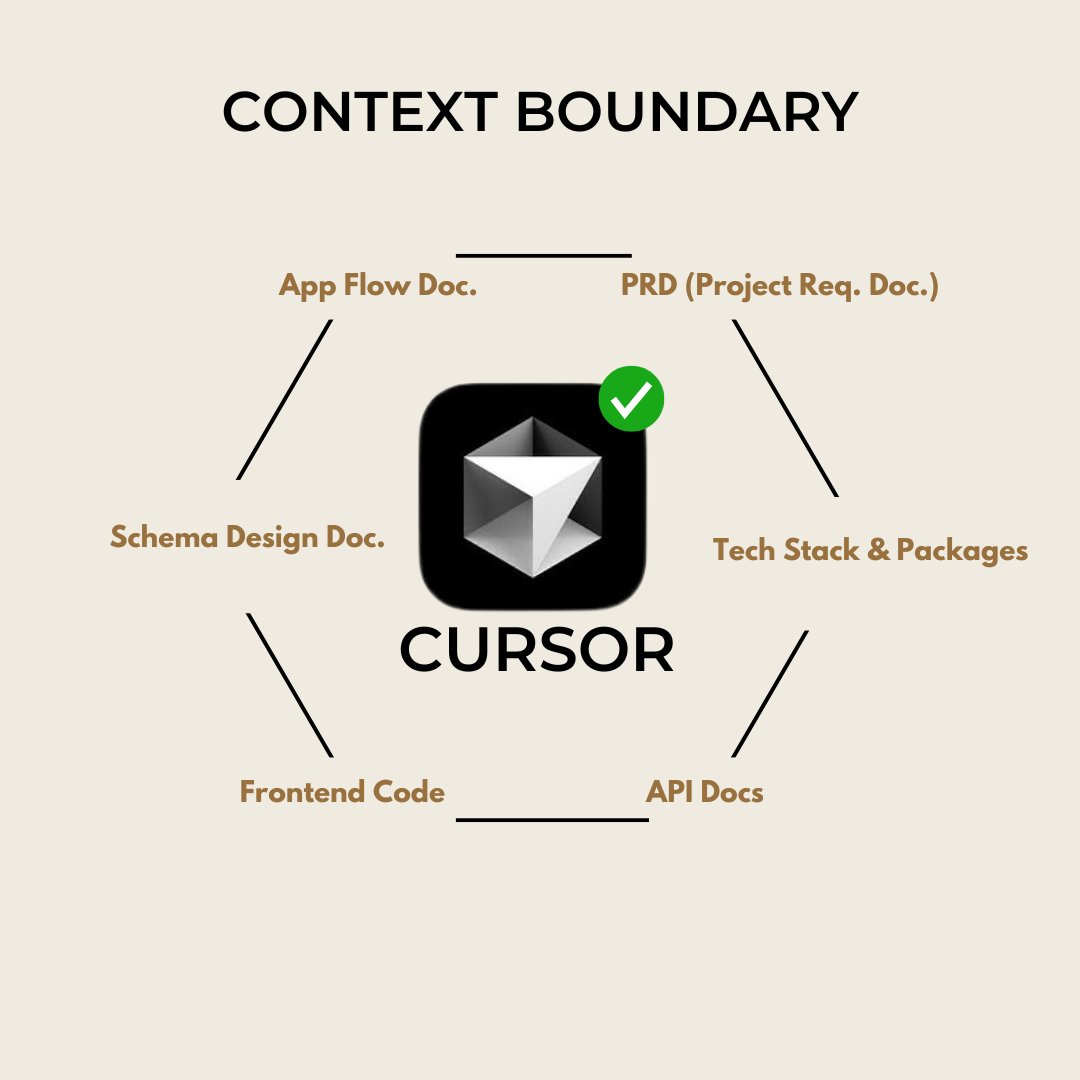
But, the Truth is Cursor is dumb you don't add detailed docs around your project.
You need to build a strong <Context Boundary> around Cursor
Here what you can do to improve your Cursor workflow🧵
2
1. Brain dump with Claude
You need to to share everything about your idea. The best way you open your mic and speak out everything about your project.
- What it is?
- Features?
- Layout?
- Inspirations?
Anything that comes to your mind. Context is the Key for AI.
You need to to share everything about your idea. The best way you open your mic and speak out everything about your project.
- What it is?
- Features?
- Layout?
- Inspirations?
Anything that comes to your mind. Context is the Key for AI.
3
2. Claude or ChatGPT o1
Claude is great to turn your thoughts into structured output.
You take this output to ChatGPT o1 model.
Ask it to create:
- Project requirements Doc.
- Tech Stack and Packages Doc.
- Schema Design Doc.
- Detailed App Flow Doc.
I do compare Claude and o1. Sometimes Claude outshines o1.
(If you don't have access to o1, you can get this done with Claude too)
Claude is great to turn your thoughts into structured output.
You take this output to ChatGPT o1 model.
Ask it to create:
- Project requirements Doc.
- Tech Stack and Packages Doc.
- Schema Design Doc.
- Detailed App Flow Doc.
I do compare Claude and o1. Sometimes Claude outshines o1.
(If you don't have access to o1, you can get this done with Claude too)
4
3. Once you got your Docs done.
Its time for Frontend Code.
You have 2 options:
1. For High Quality UI: use v0
2. For Standard UI: use Claude
If you pick v0, attach the created docs and ask it to start coding page by page.
If you work with claude, ask it to start coding frontend screens.
Its time for Frontend Code.
You have 2 options:
1. For High Quality UI: use v0
2. For Standard UI: use Claude
If you pick v0, attach the created docs and ask it to start coding page by page.
If you work with claude, ask it to start coding frontend screens.
5
4. Now have Docs done, frontend code done.
Let's move to the code assambly part.
Now you have 2 options:
1. For fast project setup: use bolt .new
2. For manual setup: use Cursor
With bolt you can install Nextjs + all dependencies in just 2 prompts.
With cursor, you follow the claude instructions to set up your project.
(I use bolt for this step to save time but if you don't have access to bolt claude will help you setup with cursor)
Let's move to the code assambly part.
Now you have 2 options:
1. For fast project setup: use bolt .new
2. For manual setup: use Cursor
With bolt you can install Nextjs + all dependencies in just 2 prompts.
With cursor, you follow the claude instructions to set up your project.
(I use bolt for this step to save time but if you don't have access to bolt claude will help you setup with cursor)
6
5. Ask Claude to create "File Structure"
I am pasting the file structure that works the best with AI code.
copy this file and ask Claude to use this as a reference and create a file straucture for your project.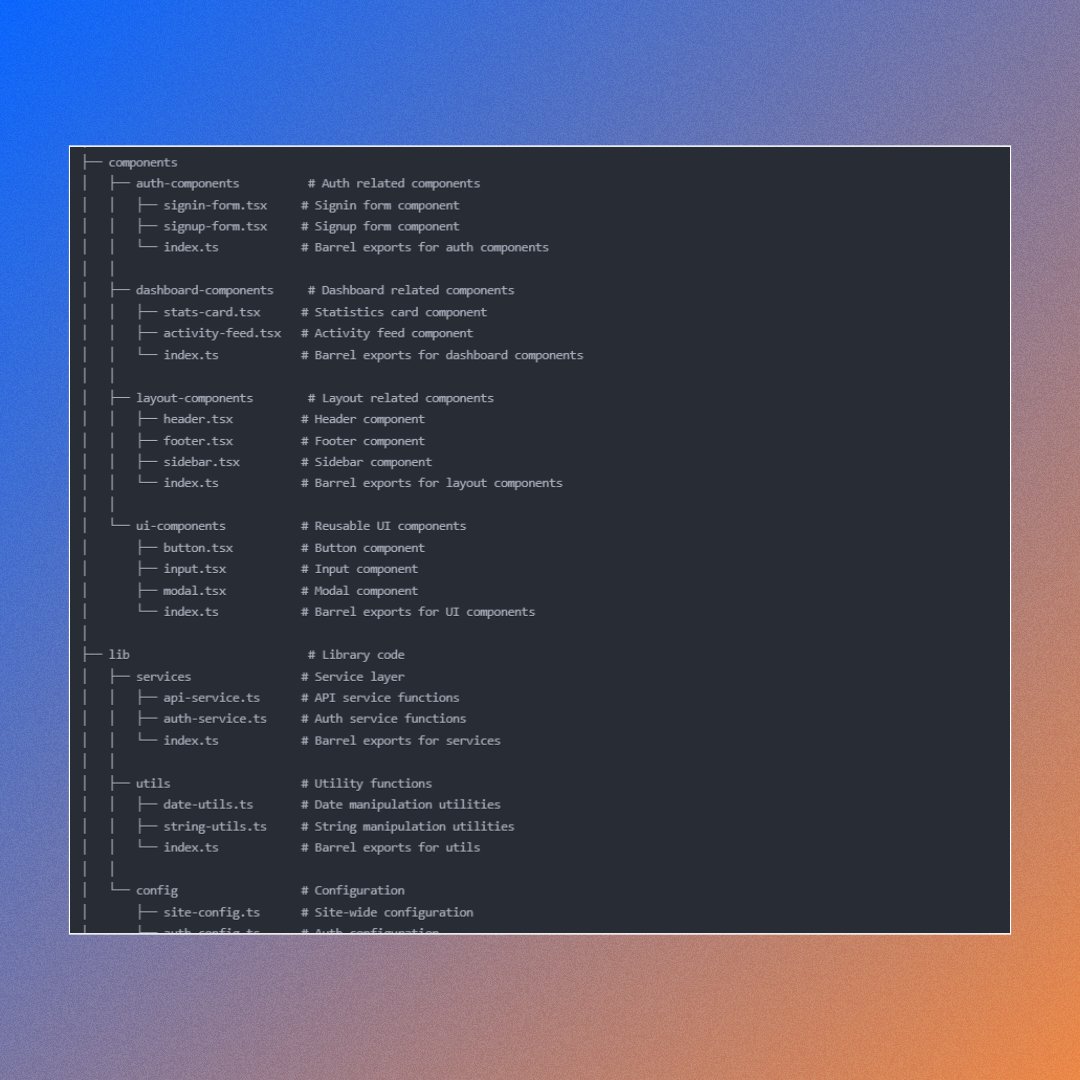
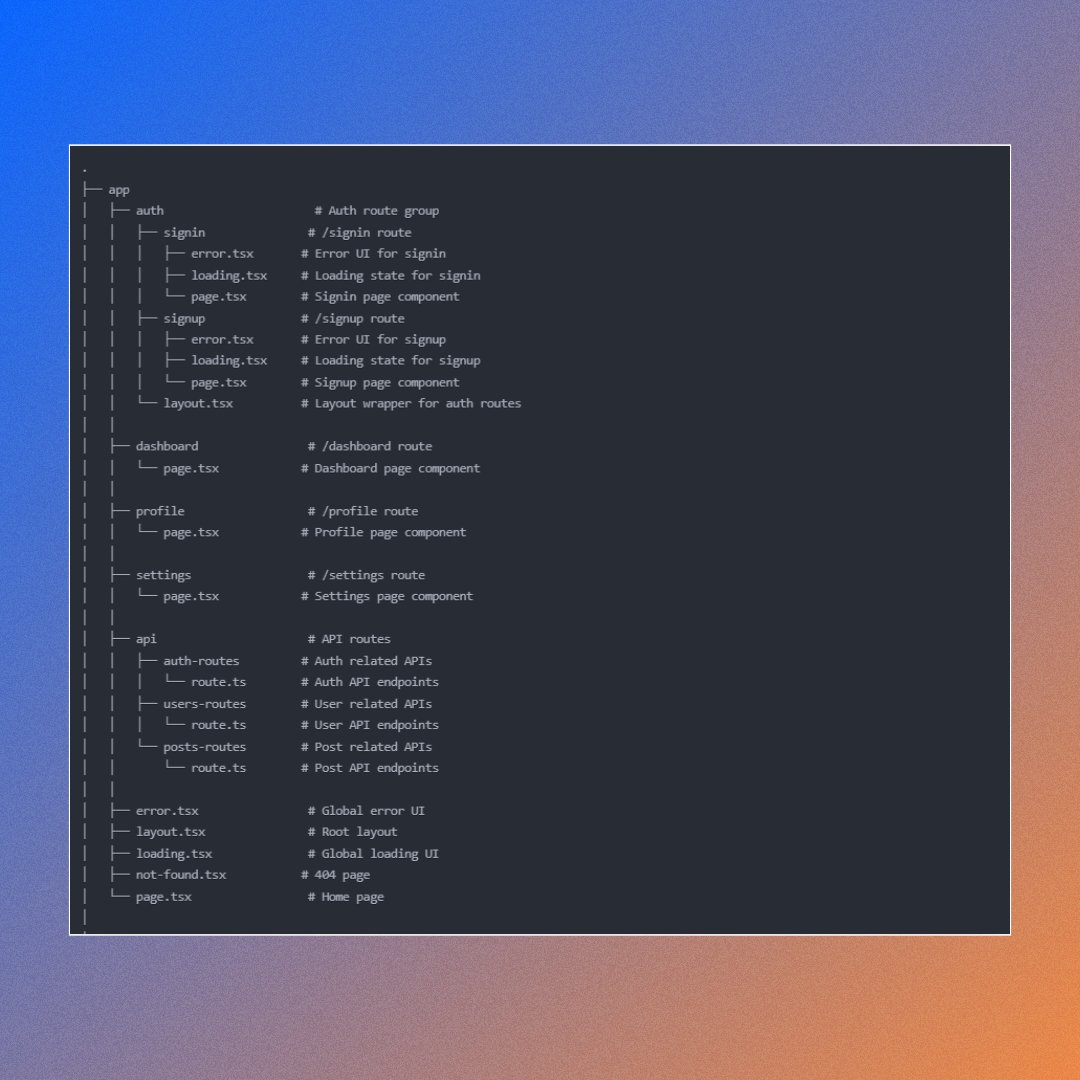
I am pasting the file structure that works the best with AI code.
copy this file and ask Claude to use this as a reference and create a file straucture for your project.
7
6. Run code now.
Now upload that file stucture to:
1. bolt (bolt can create you folder & files in 2 prompts
2. to cursor.
with bolt its easy and fast.
For cursor. you need to now attach all docs in .md foramt in root folder.
Then Open composer. Install Nextjs and all dependencies and then paste the file structure.
Now upload that file stucture to:
1. bolt (bolt can create you folder & files in 2 prompts
2. to cursor.
with bolt its easy and fast.
For cursor. you need to now attach all docs in .md foramt in root folder.
Then Open composer. Install Nextjs and all dependencies and then paste the file structure.
8
7. Assemble frontend
Now lets add frontend code to right files.
Claude is great to guide you on that. Ask Claude.
"Let's implement frontend code page-by-page. From the code I attcahed and my requirements, provide me the production ready code that I can paste"
Now follow Claude's instructions to copy code and paste it in right file path.
Now lets add frontend code to right files.
Claude is great to guide you on that. Ask Claude.
"Let's implement frontend code page-by-page. From the code I attcahed and my requirements, provide me the production ready code that I can paste"
Now follow Claude's instructions to copy code and paste it in right file path.
9
8. Create Backend
Now once your frontend pages are running smoothly with demo data and all features are working.
It's time to create auth (sign-in, sign-up) , database and storage.
I use supabase because AI you code (SQL queries) to setup the backend.
Just follow Claude's instructions and tag relevant schema design files in cursor to get it done.
Start with:
1. auth
2. database tables
3. storage
Now once your frontend pages are running smoothly with demo data and all features are working.
It's time to create auth (sign-in, sign-up) , database and storage.
I use supabase because AI you code (SQL queries) to setup the backend.
Just follow Claude's instructions and tag relevant schema design files in cursor to get it done.
Start with:
1. auth
2. database tables
3. storage
10
9. Debugging.
Now your frontend is storing data in the backend. Test all features.
There might be few bugs, Use Claude to debug those and you'll be good to go.
for debugging: Open new composer for each update, attach files that are having issues and paste errors.
New Claude on cursor is great at this (with context boundary)
Now your frontend is storing data in the backend. Test all features.
There might be few bugs, Use Claude to debug those and you'll be good to go.
for debugging: Open new composer for each update, attach files that are having issues and paste errors.
New Claude on cursor is great at this (with context boundary)
11
Now you have a working app that you coded with AI.
80% of my time goes into creating Docs and then in 20% of time I can code that app with minimal errors.
If you don't build a concrete boundary around cursor, it will hallucinate and mess up your project easily.
80% of my time goes into creating Docs and then in 20% of time I can code that app with minimal errors.
If you don't build a concrete boundary around cursor, it will hallucinate and mess up your project easily.
12
To save my 80% time and to automate the Documentation, I've built an app.
I added all my templates (27 in total) to run in an agentic workflow and create me all required documentation.
This way I can just download docs, attach it to cursor and start coding.
I added all my templates (27 in total) to run in an agentic workflow and create me all required documentation.
This way I can just download docs, attach it to cursor and start coding.
13
If this post get 400+ reposts. I'll build it for you guys.
The best way to validate the idea is to share it with right audience.
Check out the app flow below.
It can create:
✅ System prompts
✅ PRDs
✅ App flow Docs
✅ Schema Design
✅ v0 System Prompts
and so on/
The best way to validate the idea is to share it with right audience.
Check out the app flow below.
It can create:
✅ System prompts
✅ PRDs
✅ App flow Docs
✅ Schema Design
✅ v0 System Prompts
and so on/
0:42
14
We did it!!!
400 Reposts in 24 hours. That's just crazy. 🎉
I heard you. Introducing codeguide.dev
Join the waitlist to get early access. 🙌
400 Reposts in 24 hours. That's just crazy. 🎉
I heard you. Introducing codeguide.dev
Join the waitlist to get early access. 🙌