How to Use Gemini 4 Neon to Build a Full Quant Setup

I will break down the EXACT framework to build a full quant setup with Gemini 4 Neon that researches, forecasts, backtests & paper trades for you.

Let's get straight to it.
Bookmark This -
I build quant setups with AI agents and test them on live market data. DMs are open for ideas and partnerships.
If you are building a quant setup with Gemini or Claude Code/Grok Bot, send me your setup in DMs and i will go through the first 20 myself. MOVE FAST.
Google just shipped the AI model that ranks #1 in finance, and the trading timeline has barely noticed.
Gemini 4 Neon came out on November 18. It now ranks #1 of 46 models on the Vals Finance Index at 68.31%, ahead of Claude Opus 5.5 at 65.34%.
It is also cheaper to run. Each finance test cost $4.88 on Neon against $10.88 on Opus, less than half.
Sundar Pichai says Neon set a new day-one usage record on Google's paid APIs.
A quant who says he worked inside the largest systematic hedge funds wrote that Neon solved the hardest problems he gave it. No earlier model had cleared that bar for him.
I went through the biggest trading accounts on X this week, and I could not find one trading setup built on it yet.
There is a second story almost nobody has noticed. Google now makes nearly every other piece of a quant desk too: a forecasting model, a data warehouse, an agent workbench and a scheduler that runs agents on its own servers.
THIS IS THE SETUP YOU WILL BUILD TODAY

Now picture a research desk that never logs off.
Neon reads the filings, the news and the papers, and it writes the code. Google's forecasting model tells you how wild tomorrow is likely to be.
The data sits in Google's warehouse, the agents wake up on a schedule, and one paper account takes the trades.
A fund builds this with a data vendor, a research team, a forecasting group and a few engineers. You can rent almost every layer from one company, and the data and forecasting layers start free.
Before we go further, you need to know what this setup will never do, because I tested it myself.
No model in this article can tell you where the price goes tomorrow. I ran Google's own forecasting model on a year of real BTC and ETH data, and on direction it was a coin flip.
It was very good at something else, though, and that result decides how the whole desk is built.
This article is the full build, from a Google account to a desk that researches, forecasts, backtests and paper trades on a schedule.
By the end of this article you will know:
Let's get into it.
Part 1: What Gemini 4 Neon Actually Is
You probably still think of Gemini as the assistant inside Gmail. Neon is the model Google built for long, hard work.
It sits between Gemini 4 Carbon, Google's deepest reasoning model, and Gemini 4 Hydrogen, the fast default. Five things make it matter for quant work.
1. It ranks #1 in finance:
The Vals Finance Index scores agentic finance work like analyst research, financial modeling and corporate tax research. Neon is #1 of 46 models there at 68.31%. Claude Fable 5.2 sits 8th at 63.58%.
Vals called it on launch day.
2. It is built for quant math:
Google says Neon is best in class at quantitative analysis and mathematics. It reports 84.0% on RiemannBench and 70.5% on Terminal-Bench Science.
3. It reads a million tokens at once:
Through the API, Neon takes 1,048,576 tokens of context. That is room for a year of a company's filings or a whole trading repo in one prompt.
4. It is cheap enough to run every day:
It costs $3 per million input tokens and $15 per million output tokens. Repeated context is cached at $0.15, and the Batch API halves the price.
5. It comes with real tools:
Through the API it can run Python, search Google and read any URL you give it. It can also call your own functions and return clean JSON.
Now put that next to what a quant desk needs.
WHAT A QUANT DESK NEEDS           WHAT YOU USE

an analyst who reads everything   Gemini 4 Neon, 1M tokens
engineers who write the code      Antigravity agents
a forecasting model               TimesFM
a data warehouse                  BigQuery
a desk that never sleeps          Gemini API triggers
a broker connection               Alpaca MCP
Only the last row is not made by Google, and it plugs straight into Google's agent workbench.
Part 2: The 8 Layers of a Full Quant Setup
Here is the MISTAKE almost everyone makes with a new model. They paste a chart into the chat and ask where the price goes next.
A model that reads faster than any analyst still cannot see tomorrow. The edge comes from the setup around it, so that is what we build.
Here are the 8 layers, one job each.
LAYER  TOOL              ITS JOB

1      Gemini 4 Neon     the analyst: reads, reasons, writes code
2      Antigravity       the engineers: agents that build it
3      TimesFM 2.5       the forecaster: tomorrow's volatility
4      BigQuery          the warehouse: your data, TimesFM in SQL
5      TradingAgents     the research desk: 4 specialist agents
6      RD-Agent + Qlib   the factor lab: proposes and tests factors
7      Alpaca MCP        the hands: paper trading by default
8      Gemini triggers   the clock: runs the desk on a schedule
Four details decide how you use them.
In Antigravity, Neon can work as an orchestrator. It plans the work, and faster Hydrogen subagents carry it out in parallel.
The TimesFM 3.0 weights you download are licensed for non-commercial use only, so anything you trade runs on 2.5, or on 3.0 inside BigQuery.
TradingAgents has 123K stars and already lists Gemini 4 Neon in its model catalog. It researches and answers, and it never places trades.
BigQuery's free tier covers 10 GiB of storage and 1 TiB of queries a month. Gemini API triggers are still in beta.
This is how the layers hand work to each other every morning.
TRIGGER          wakes the desk at 06:00
     ↓
BIGQUERY         new prices land in your tables
     ↓
TIMESFM          forecasts tomorrow's volatility
     ↓
TRADINGAGENTS    researches every name, with sources
     ↓
RD-AGENT         tests new factors on Qlib
     ↓
GEMINI 4 NEON    writes the plan and the sizes
     ↓
ALPACA PAPER     takes the trades you approve
Part 3: The Exact Build Steps
You can ship the whole setup this week, in eight steps.
Step 1: Get Neon and install Antigravity.

In Antigravity, Neon needs a Google AI Pro or Ultra plan. The Gemini API needs a paid-tier project, which takes a billing account and a $5 prepay.
Install the Antigravity CLI with one command:
macOS / Linux:
curl -fsSL https://antigravity.google/cli/install.sh | bash

Windows PowerShell:
irm https://antigravity.google/cli/install.ps1 | iex
Open an empty folder and start it on Neon at its highest thinking level:
agy --model gemini-4-neon-xhighBefore anything else, write the rulebook. Every agent reads it before every task.
DESK RULES (every agent reads these before it acts)

MARKETS    [BTC and ETH on Binance spot / US stocks / both]
MONEY      [paper only] until I say otherwise in chat
DATA       every price lives in my BigQuery dataset "quant"
FORECAST   TimesFM 2.5 sets the volatility for every size
SIZING     risk per trade [0.5%] of the account, scaled by forecast vol
ORDERS     none without my yes in chat
NUMBERS    every number points to the table or file it came from
LABELS     every result is marked SIM or REAL
PING ME    only for approvals, rule breaches and the morning brief
Paste this as your first message in agy:
You are the lead quant of my desk. Save the DESK RULES below to
AGENTS.md in this folder and follow them in every task.

[paste your Desk Rules]

Then reply with the folder layout you plan for data/, forecast/,
research/, factors/ and backtests/, and wait for my yes.
Step 2: Build the data layer.

Give agy this prompt next:
Create a BigQuery dataset called "quant" in my project. Use the
BigQuery sandbox if billing is off.

Write data/refresh.py that:
- pulls hourly klines for BTCUSDT and ETHUSDT from Binance's public
  REST API (no key) and daily OHLCV for SPY, QQQ and NVDA from yfinance
- appends only new bars to quant.prices_1h and quant.prices_1d
- rebuilds quant.daily_vol(symbol, day, realized_vol), where realized
  vol is the square root of the sum of squared hourly log returns

Run it once for the last 2 years and show me the row counts.
When it finishes, you have one table per timeframe and a daily volatility table to forecast.
Step 3: Add the forecaster.

Run TimesFM right where the data lives, with one query in BigQuery:
SELECT *
FROM AI.FORECAST(
  TABLE `quant.daily_vol`,
  data_col => 'realized_vol',
  timestamp_col => 'day',
  id_cols => ['symbol'],
  model => 'TimesFM 2.5',
  horizon => 1)
You get tomorrow's volatility for every symbol, with a prediction interval around it.
You can also run it on your own machine, and it needs no GPU:
pip install "timesfm[torch]"

import numpy as np, timesfm
model = timesfm.TimesFM_2p5_200M_torch.from_pretrained("google/timesfm-2.5-200m-pytorch")
model.compile(timesfm.ForecastConfig(max_context=2048, max_horizon=128,
              normalize_inputs=True, infer_is_positive=True))
point, quantiles = model.forecast(horizon=1, inputs=[daily_vol_array])
Use 2.5 for anything you trade. The 3.0 weights you download are licensed for non-commercial use only.
Step 4: Hire the research desk.
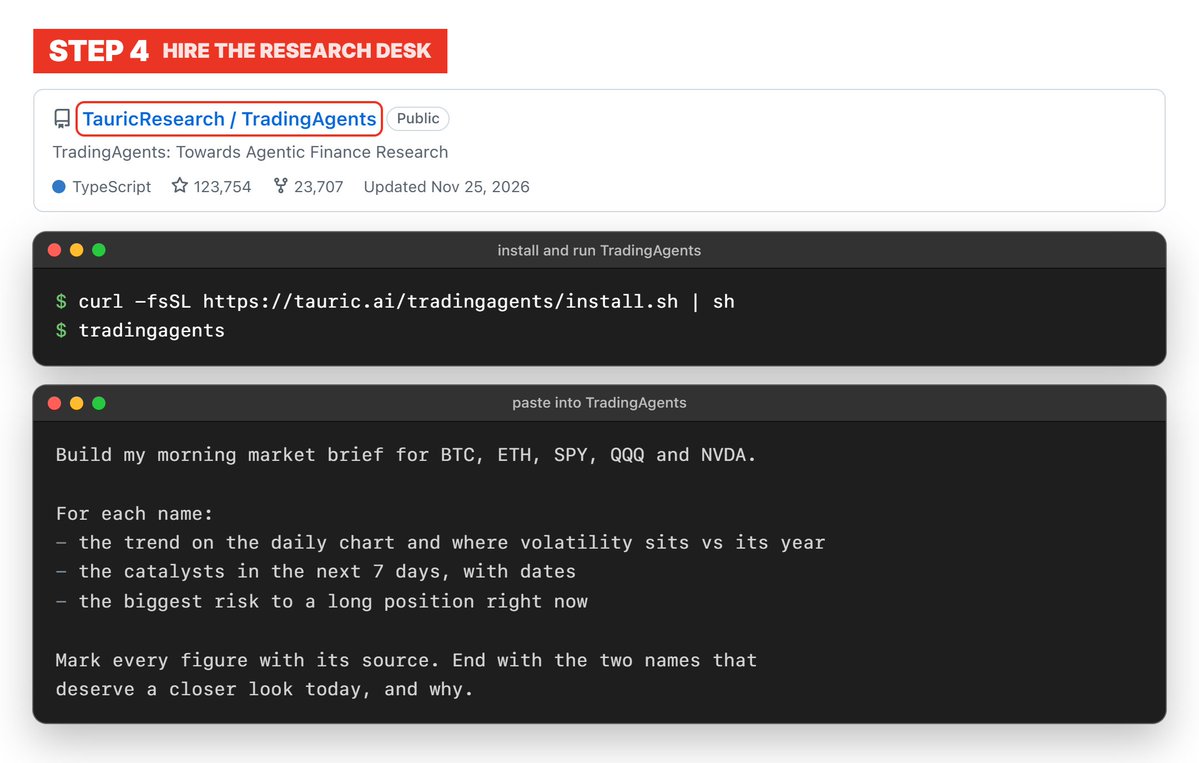
Install TradingAgents with one line, then run it:
curl -fsSL https://tauric.ai/tradingagents/install.sh | sh
tradingagents
Set GEMINI_API_KEY to your key, type /model and pick Gemini 4 Neon at high reasoning. Its own filings and news data needs a Tauric API key, which /login adds.
Then paste this research question:
Build my morning market brief for BTC, ETH, SPY, QQQ and NVDA.

For each name:
- the trend on the daily chart and where volatility sits vs its year
- the catalysts in the next 7 days, with dates
- the biggest risk to a long position right now

Mark every figure with its source. End with the two names that
deserve a closer look today, and why.
RD-Agent runs on Linux with Docker, so on Windows you run it inside WSL. Set it up with these lines:
pip install rdagent

# .env in your RD-Agent folder
CHAT_MODEL=gemini/gemini-4-neon
EMBEDDING_MODEL=gemini/gemini-embedding-2
GEMINI_API_KEY=[your key]

rdagent fin_factor
RD-Agent proposes a factor, writes the code, backtests it on Qlib and keeps a log of what worked. You read the log, not the code.
Step 6: Turn the forecast into position sizes.

This is where the forecaster earns its place on the desk. Give agy this prompt:
Write backtests/vol_sizing.py with vectorbt.

Rule: every day, size the position in BTC and ETH as
  size = (0.5% of equity) / (TimesFM forecast of tomorrow's vol)
capped at 1x leverage. Compare it with a fixed-size position.

Use the last 2 years from quant.prices_1h, Binance fees of 0.1% per
side, and walk forward: each day's forecast may only use data that
existed that day.

Report for both versions: return, Sharpe, max drawdown and turnover.
Step 7: Connect the broker.

Create a free Alpaca paper account and copy its paper API keys. Then add Alpaca's MCP server to ~/.gemini/antigravity-cli/mcp_config.json:
{
  "mcpServers": {
    "alpaca": {
      "command": "uvx",
      "args": ["alpaca-mcp-server"],
      "env": {
        "ALPACA_API_KEY": "[your paper key]",
        "ALPACA_SECRET_KEY": "[your paper secret]",
        "ALPACA_PAPER_TRADE": "true"
      }
    }
  }
}
Start agy with --sandbox from now on, so its commands run inside a sandbox.
Step 8: Put the desk on a clock.

Give agy this last prompt:
Put the desk on a schedule:

1. Package data/refresh.py and the TimesFM forecast as a Cloud Run
   job, and run it every day at 05:30 UTC with Cloud Scheduler.
2. Create a Gemini API trigger that runs the Antigravity agent every
   day at 06:00 UTC with model gemini-4-neon and this task: read
   today's forecasts, the RD-Agent log and the TradingAgents brief,
   then write today's sizes and at most two paper orders for my yes.
3. Show me what each one will cost per month before you create it.
Cloud Run jobs come with 240,000 free vCPU-seconds a month, and Cloud Scheduler gives you 3 free jobs.
Here is what a normal day looks like once the clock runs.
05:30  the Cloud Run job pulls new bars into BigQuery
05:40  TimesFM forecasts tomorrow's volatility for every symbol
06:00  the trigger wakes Neon with the morning task
06:15  Neon reads the forecasts, the factor log and the brief
06:20  today's sizes and two paper orders wait for your yes
09:30  you approve, and Alpaca fills them on paper
You read one message and tap yes or no, and the desk does the rest.
Then climb to real money one stage at a time.
STAGE 1  DATA        two years of clean bars in BigQuery
STAGE 2  FORECAST    TimesFM beats "same as today" on your symbols
STAGE 3  BACKTEST    vol sizing beats fixed size after fees
STAGE 4  PAPER       a month on Alpaca paper that matches the test
STAGE 5  TINY LIVE   one symbol, a hard cap, every order approved
Part 4: What Happened When I Tested Google's Forecaster
So can Google's forecasting model predict the market?
I ran TimesFM 2.5 on real hourly Binance data. It made 365 daily forecasts each for BTC and ETH, from November 2025 to November 2026, and each one used only the 2,048 hours before it.
It ran on a plain CPU with no GPU, and both coins took about nine minutes.
On direction, it was a coin flip. It called the next 24 hours right 51.2% of the time on BTC and 49.6% on ETH.
Its return forecasts were slightly worse than simply assuming no change. Trading its up-or-down call for the whole year would have ended near zero before fees, at -2.65% on BTC and +3.7% on ETH.
The reason it is still on this desk surprised me.
On volatility, it clearly beat the simple rules most traders use. Its forecast of tomorrow's realized volatility had 33% less error than "same as today" on BTC and 26% less on ETH.
It also beat the 7-day average by 24% on BTC and by 19% on ETH.
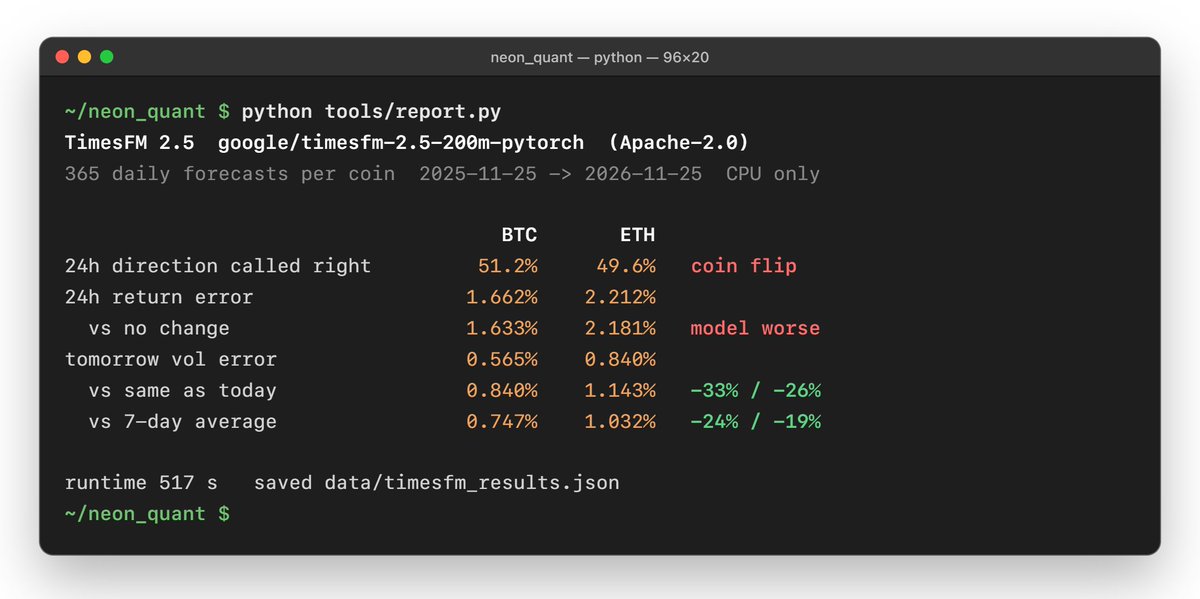
So the forecaster's job on this desk is sizing, not calling direction. That is exactly why Step 6 uses it to set the size of every trade.
These are the 5 mistakes that break a Gemini quant setup:
1. ASKING FOR TOMORROW'S PRICE    it was a coin flip in my test
2. TRADING ON TIMESFM 3.0 WEIGHTS  non-commercial, use 2.5 or BigQuery
3. RUNNING NEON IN GEMINI CLI      it is not tuned for Gemini 4, use agy
4. SIZING EVERY TRADE THE SAME     let the vol forecast set the size
5. SKIPPING PAPER                  Alpaca paper is the default, keep it
What This Setup CAN & CANNOT Do. Screenshot This.
This setup CAN:
This setup CANNOT:
Read the second list twice, because it tells you which layer to trust with what.
Closing
Google spent last week topping benchmark charts, and the finance chart is the one that matters for traders.
Neon is the analyst. It reads everything, writes the code and ranks #1 in finance right now.
TimesFM is the forecaster, and my test showed you what to ask it for. Ask it about volatility, not direction.
BigQuery holds the data, TradingAgents and RD-Agent do the research, Alpaca takes the paper trades, and a trigger keeps the desk running while you sleep.
Start with Step 3 tonight. One query in BigQuery gives you tomorrow's volatility for every coin you track.
Get Antigravity at antigravity.google, pick Neon, and go build it.
If you build it, reply under this article with your first forecast table or send it to me in DMs. I want to see which symbols it reads best.
In my previous post i put the bots that won Jane Street's trading contests on a live Binance book. This one gives you the desk that tests any idea like that every morning.
So here is the question
Are you still asking a chatbot where BTC goes tomorrow, or is your desk already sizing tomorrow's trades by the forecast?
Only one of those questions has an answer you can test