Ok, since the technology freak out has wandered into my exact area...

Chef Joe Gera 🏳️🌈🏳️⚧️🇮🇹@redhotnerd
8 views
Nov 18, 2026
~7 min read
Advertisement
1
Ok, since the technology freak out has wandered into my exact area of expertise, including some stuff I actually worked on, I’m going to explain in excruciating detail how Apple’s cloud services work & why the reporting on this is wrong. And if you have experience in other software, or services you don’t have a clue. 🧵
2
I spent years as a software engineer at Apple, including working in platform engineering. So let me explain something about Apple’s cloud infrastructure, because we’ve reached the point where people think iCloud, Apple Pay, Apple ID, and every other Apple service live inside one giant fucking computer. They don’t.
3
Apple’s infrastructure is a collection of independently engineered services, with separate responsibilities, data stores, authentication mechanisms, security boundaries, and service dependencies. That’s not just an architectural preference. It’s a fundamental component to scalability, security, fault isolation, and reliability.
One service having a problem does not automatically mean everything else is falling over. Not does it mean, that something is “down”
One service having a problem does not automatically mean everything else is falling over. Not does it mean, that something is “down”
4
Let’s start with iCloud:
iCloud isn’t one database. It’s a collection of services responsible for things like photos, backups, documents, contacts, calendars, passwords, messages, and application data.
Apple uses technologies including CloudKit to organize application data into containers, databases, and zones. Applications can have separate containers, private databases, public databases, and shared databases. That’s deliberate data separation by design.
iCloud isn’t one database. It’s a collection of services responsible for things like photos, backups, documents, contacts, calendars, passwords, messages, and application data.
Apple uses technologies including CloudKit to organize application data into containers, databases, and zones. Applications can have separate containers, private databases, public databases, and shared databases. That’s deliberate data separation by design.
5
Why does this matter?
Because a problem affecting one application or database doesn’t necessarily affect another. A synchronization problem with Photos doesn’t automatically mean iCloud Drive is unavailable. A problem with Contacts doesn’t automatically mean Messages can’t authenticate.
A problem with an application specific CloudKit container doesn’t mean every other application using CloudKit is experiencing the same failure. These are different workloads and different failure domains. They are not tied together.
Because a problem affecting one application or database doesn’t necessarily affect another. A synchronization problem with Photos doesn’t automatically mean iCloud Drive is unavailable. A problem with Contacts doesn’t automatically mean Messages can’t authenticate.
A problem with an application specific CloudKit container doesn’t mean every other application using CloudKit is experiencing the same failure. These are different workloads and different failure domains. They are not tied together.
6
And there’s another distinction people consistently miss: encryption and isolation aren’t interchangeable terms.
Apple encrypts data in transit and at rest. Some categories are end-to-end encrypted by default. With Advanced Data Protection enabled, considerably more iCloud categories are end-to-end encrypted, with the relevant encryption keys retained by trusted devices rather than being available to Apple. The distinction is very important to understand.
Apple encrypts data in transit and at rest. Some categories are end-to-end encrypted by default. With Advanced Data Protection enabled, considerably more iCloud categories are end-to-end encrypted, with the relevant encryption keys retained by trusted devices rather than being available to Apple. The distinction is very important to understand.
7
Now let’s talk about Apple Pay, because this is where the architectural separation becomes particularly interesting. Your actual payment credentials aren’t sitting in an iCloud backup waiting to be downloaded.
Apple Pay uses a hardware security component called the Secure Element/Enclave. When your bank provisions a card, it creates a device specific Device Account Number, encrypts it, and sends it through the provisioning process. That number is stored in the Secure Element/Enclave
Apple Pay uses a hardware security component called the Secure Element/Enclave. When your bank provisions a card, it creates a device specific Device Account Number, encrypts it, and sends it through the provisioning process. That number is stored in the Secure Element/Enclave
8
The Device Account Number is isolated from the operating system. It isn’t stored on Apple’s servers, and it isn’t backed up to iCloud.
Apple cannot decrypt that number. AT ALL.
Your payment credential is not another piece of information sitting in your Apple Account or your iCloud Drive. It has a dedicated hardware security boundary.
Apple cannot decrypt that number. AT ALL.
Your payment credential is not another piece of information sitting in your Apple Account or your iCloud Drive. It has a dedicated hardware security boundary.
9
When you tap your phone at a payment terminal, the Secure Element/Enclave provides the Device Account Number and a transaction specific dynamic security code.
The actual card number isn’t transmitted to the merchant. Your bank, card issuer, or payment network verifies the transaction information.
This is tokenization, hardware backed security, and transaction authentication working together. It is not the same thing as uploading a credit card to a cloud database.
The actual card number isn’t transmitted to the merchant. Your bank, card issuer, or payment network verifies the transaction information.
This is tokenization, hardware backed security, and transaction authentication working together. It is not the same thing as uploading a credit card to a cloud database.
10
Now, before someone inevitably misunderstands this: Apple Pay DOES have server-side infrastructure.
Apple operates services that handle card provisioning, device enrollment, and communication with payment networks and card issuers.
Adding a card, managing a card, and making an in-store payment are different operations.
A problem with provisioning infrastructure does not automatically mean an already provisioned payment credential has disappeared from the Secure Element/Enclave is not working.
Apple operates services that handle card provisioning, device enrollment, and communication with payment networks and card issuers.
Adding a card, managing a card, and making an in-store payment are different operations.
A problem with provisioning infrastructure does not automatically mean an already provisioned payment credential has disappeared from the Secure Element/Enclave is not working.
11
There is a distinction between Apple Pay and Wallet, too.
Wallet can synchronize certain information through iCloud. Passes, for example, are not the same thing as payment credentials.
Apple EXPLICITLY distinguishes the two.
Your Device Account Number is not backed up to iCloud. Wallet information can be. If you’re going to discuss the architecture, at least understand which component you’re talking about.
Wallet can synchronize certain information through iCloud. Passes, for example, are not the same thing as payment credentials.
Apple EXPLICITLY distinguishes the two.
Your Device Account Number is not backed up to iCloud. Wallet information can be. If you’re going to discuss the architecture, at least understand which component you’re talking about.
12
So NOW lets get to the word everyone keeps throwing around: DOWN.
In distributed systems, DOWN is not a sufficiently precise technical description. There are several different conditions, and confusing them is how you get a whole lot of spectacularly confident bullshit.
In distributed systems, DOWN is not a sufficiently precise technical description. There are several different conditions, and confusing them is how you get a whole lot of spectacularly confident bullshit.
13
The layers are:
1.Complete service outage.
The service cannot successfully perform its intended function. Requests fail, the service is unavailable, and users cannot complete the operation. This is DOWN. Anything other than this is not down.
2.Partial outage.
Some functionality works, while other functionality doesn’t. It could affect particular regions, account types, devices, or operations.
3.Degraded performance.
The service is responding, but slowly, inconsistently, or with elevated error rates. Slow is not the same as unavailable.
4.Authentication failure.
The underlying service might be perfectly healthy, but the authentication or authorization system required to access it is failing. You can have a functioning database and a functioning application server while users cannot log in. Again, this is NOT down.
1.Complete service outage.
The service cannot successfully perform its intended function. Requests fail, the service is unavailable, and users cannot complete the operation. This is DOWN. Anything other than this is not down.
2.Partial outage.
Some functionality works, while other functionality doesn’t. It could affect particular regions, account types, devices, or operations.
3.Degraded performance.
The service is responding, but slowly, inconsistently, or with elevated error rates. Slow is not the same as unavailable.
4.Authentication failure.
The underlying service might be perfectly healthy, but the authentication or authorization system required to access it is failing. You can have a functioning database and a functioning application server while users cannot log in. Again, this is NOT down.
14
Continued:
5.Synchronization failure.
Your device might be working perfectly. Your locally stored information might be perfectly intact. But the service responsible for propagating changes between devices isn’t completing its work. That’s a synchronization problem, not necessarily a storage outage.
6.Dependency failure.
A service can be healthy in isolation but unable to complete its job because something it depends on isn’t responding. Think DNS, identity services, network routing, a payment processor, an external API, or a regional infrastructure component.
The application might be running. The database might be running. The user might still be unable to complete the transaction. Thats why dependency mapping is extremely important.
5.Synchronization failure.
Your device might be working perfectly. Your locally stored information might be perfectly intact. But the service responsible for propagating changes between devices isn’t completing its work. That’s a synchronization problem, not necessarily a storage outage.
6.Dependency failure.
A service can be healthy in isolation but unable to complete its job because something it depends on isn’t responding. Think DNS, identity services, network routing, a payment processor, an external API, or a regional infrastructure component.
The application might be running. The database might be running. The user might still be unable to complete the transaction. Thats why dependency mapping is extremely important.
15
The part that people who have never actually worked on distributed platforms seem to struggle with (and the one that pisses me off the most):
A service can be operational while a particular feature is broken. A service can be degraded without being unavailable. A service can be unavailable in one geographic region while functioning normally elsewhere.A service can fail to authenticate a user while the underlying data remains perfectly safe and intact.
These are not ‘semantics’, they’re very real operational realities. That people continually mis identify.
A service can be operational while a particular feature is broken. A service can be degraded without being unavailable. A service can be unavailable in one geographic region while functioning normally elsewhere.A service can fail to authenticate a user while the underlying data remains perfectly safe and intact.
These are not ‘semantics’, they’re very real operational realities. That people continually mis identify.
16
This is also why engineers design for fault isolation. You don’t want a failure in one subsystem cascading through an entire ecosystem.
You isolate workloads, limit dependencies, separate permissions, establish redundancy, monitor independent service health, and build graceful degradation into the system.
You want a failure to remain a failure in the component that actually failed. Not become an extinction level event for everything connected to it. This is precisely how Apple’s services differ from almost everyone else’s.
You isolate workloads, limit dependencies, separate permissions, establish redundancy, monitor independent service health, and build graceful degradation into the system.
You want a failure to remain a failure in the component that actually failed. Not become an extinction level event for everything connected to it. This is precisely how Apple’s services differ from almost everyone else’s.
17
And no, this doesn’t mean Apple’s infrastructure is magically immune to outages.
Shared networking, identity infrastructure, regional facilities, service dependencies, and common control systems can absolutely create correlated failures. Isolation basically reduces the blast radius of the bomb. It doesn’t eliminate every possible common mode failure. That’s why you examine the actual failure path instead of inventing one.
Shared networking, identity infrastructure, regional facilities, service dependencies, and common control systems can absolutely create correlated failures. Isolation basically reduces the blast radius of the bomb. It doesn’t eliminate every possible common mode failure. That’s why you examine the actual failure path instead of inventing one.
18
When somebody says “Apple is down,” the first question should be:
WHAT IS DOWN?
Apple Account authentication? CloudKit? iCloud Photos synchronization? iCloud Drive? Apple Pay provisioning? Payment authorization? A regional network dependency?
Those are entirely different engineering problems requiring entirely different diagnoses. Apple even publishes an individual System Status listing for its services. That’s not decorative, and it’s not bullshit. It’s an acknowledgment that these services have distinct operational states, and they are very transparent.
And to be clear: a green status indicator doesn’t guarantee that every individual user or transaction is working. It means the reported service status is normal, not that every possible dependency and edge case has been eliminated. Or, 99.99% uptime.
WHAT IS DOWN?
Apple Account authentication? CloudKit? iCloud Photos synchronization? iCloud Drive? Apple Pay provisioning? Payment authorization? A regional network dependency?
Those are entirely different engineering problems requiring entirely different diagnoses. Apple even publishes an individual System Status listing for its services. That’s not decorative, and it’s not bullshit. It’s an acknowledgment that these services have distinct operational states, and they are very transparent.
And to be clear: a green status indicator doesn’t guarantee that every individual user or transaction is working. It means the reported service status is normal, not that every possible dependency and edge case has been eliminated. Or, 99.99% uptime.
19
I’ve spent enough time building and working with platforms to know that the difference between a functioning system and a failed system is often one very specific dependency. But I also know that competent engineers don’t diagnose infrastructure by looking at one error message and announcing that the entire ecosystem has collapsed. Please stop this nonsense and freaking people out.
20
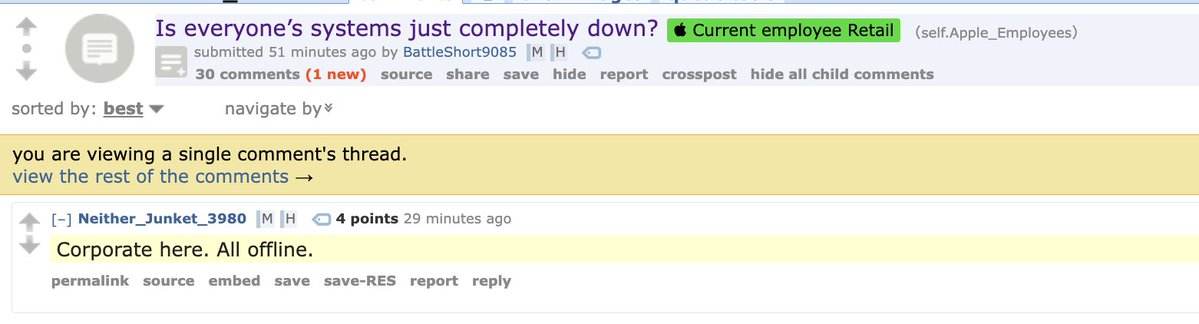
Bullshit. You know why? AppleCare is the only corporate system they’d be talking about. And Reddit isn’t any accurate. You could just call someone at Apple or ask someone who used to work there to let y’all know you’re lying or feeling out over nothing.

Aaron@aaronp613
Apple employees are sharing on Reddit that Apple corporate offices are all offline as well
This outage is massive
This outage is massive

