How To Reverse Engineer Any Device With Claude Code (Full Setup Included)

Inside: REA as your agent's hub, GhidraMCP for firmware, and mitmproxy for seeing what devices send.

Set it up once and any device gets mapped in an afternoon with free, open-source tools.
Here's the full setup 👇
Before we dive in, I publish full guides like this on my Substack: https://substack.com/@cabbitar 🧠

What "any device" means in this guide
Every device runs software. A smart plug runs firmware, a phone runs APKs, a desktop app is a native binary or an Electron bundle, and almost all of them talk to a server somewhere. Reverse engineering is reading that software when nobody gave you the docs.
Real reasons people do this:
How the stack fits together
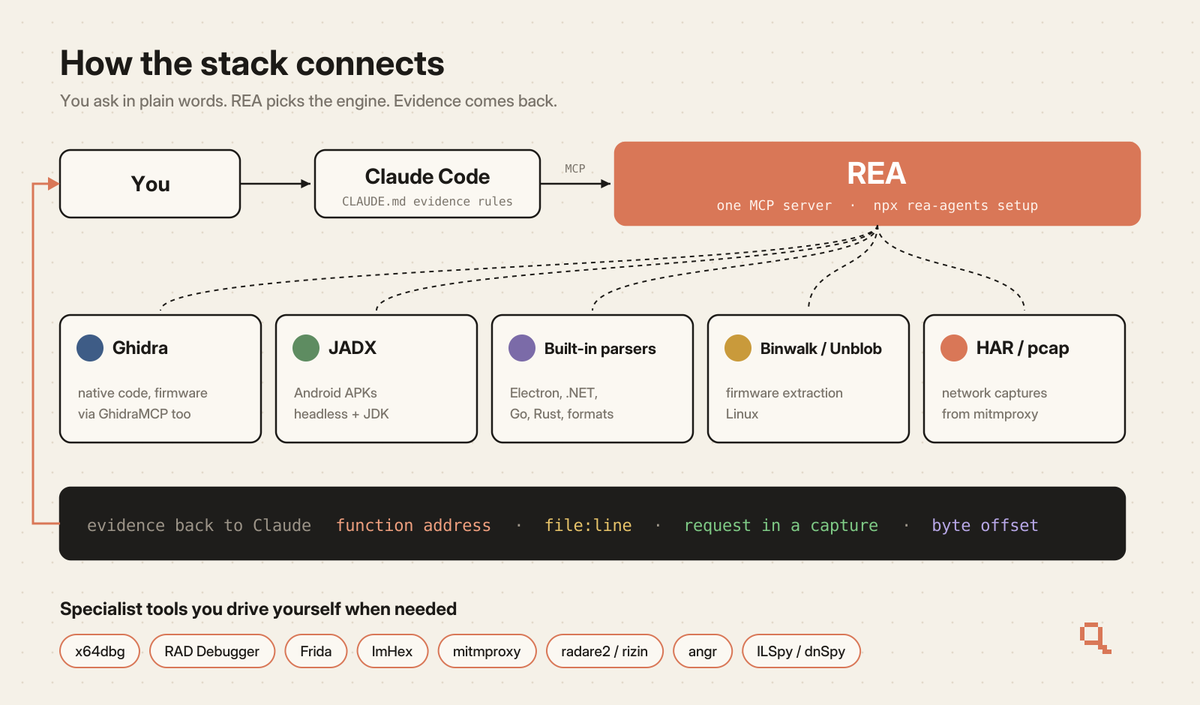
You ask Claude Code a question, Claude Code passes it to REA through MCP, and REA calls the engine that fits the target: Ghidra for native code and firmware, JADX for Android, its own parsers for Electron, .NET and dozens of file formats. Every answer comes back with evidence attached, so Claude can show you the function address or the request that proves a claim.
You only touch the specialist tools (x64dbg, Frida, ImHex) when the agent asks for them or when you want to poke around yourself.
Step 1: Install REA (2 minutes)
REA is one MCP server that plugs your agent into most of this stack. You need Node.js 22.x (22.23.4 or newer), 24.x (24.22.1 or newer) or 26.12.1+.
npx rea-agents setupPick Claude Code, review the changes it proposes, approve, and restart Claude Code. Setup backs up your existing config before it touches anything.
Quick test that it works:
Use REA to tell me what kind of app is in ./target and which parts are worth reading first.To keep it current later:
npx rea-agents@latest setupStep 2: Add Ghidra and GhidraMCP (5 minutes)
Ghidra is the NSA's free decompiler. It turns machine code for x86, ARM, MIPS and many other chips back into readable C-like pseudocode, so you can read firmware from a router or smart plug. GhidraMCP (11.8K stars) lets Claude drive it directly.
claude mcp add ghidra -- uvx --from git+https://github.com/LaurieWired/GhidraMCP ghidra-mcp --ghidra-server http://127.0.0.1:8080/Open a binary in Ghidra, then ask Claude to list its functions. If it answers with real names and addresses, the bridge works.
Ghidra's plugin listens on port 8080 by default. mitmproxy uses the same port, so in Step 4 you'll move mitmproxy to 8082.
Step 3: Build the workspace (Full Files Included)
One folder per device keeps findings from leaking between projects.
re-workspace/
├── target/      # firmware, APK, app bundle, captures (read only)
├── scratch/     # copies you're allowed to modify
├── notes/       # Claude writes findings here
├── CLAUDE.md
└── .claude/settings.json
.claude/settings.json
{
  "$schema": "https://json.schemastore.org/claude-code-settings.json",
  "model": "claude-opus-5-5",
  "permissions": {
    "allow": [
      "Read(./target/**)",
      "Edit(./notes/**)",
      "Edit(./scratch/**)",
      "Bash(file *)",
      "Bash(strings *)",
      "Bash(xxd *)",
      "Bash(rg *)"
    ],
    "deny": [
      "Edit(./target/**)",
      "Read(./.env)",
      "Read(~/.ssh/**)",
      "Bash(curl *)",
      "Bash(wget *)"
    ]
  }
}
Claude can read everything in target/ and has no write access to it, so your original firmware or APK stays clean for comparisons later. The deny list also blocks network calls from the shell, which helps when the code you're reading might try to phone home.
CLAUDE.md
# Reverse engineering rules

## Scope
- Everything in ./target is hardware or software I own or am authorized to examine.
- Read from ./target only. Copy to ./scratch before modifying anything.

## Evidence
- Every claim needs proof: function address, file path and line, a request
  from a capture, or a byte offset.
- Tag each finding CONFIRMED, LIKELY or UNKNOWN.
- If two explanations fit, list both and say what would tell them apart.

## Output
- Findings go to ./notes/findings.md, open questions to ./notes/unknowns.md.
- Before any rebuild, write ./notes/SPEC.md describing behavior in plain words.

## Tools
- Start with REA. Use Ghidra only when native code needs pseudocode.
- Ask me before running anything from ./target.
Decompiled code is full of missing names and types, and without the evidence rules Claude fills those holes with guesses. The CONFIRMED / LIKELY / UNKNOWN tags show you which parts to double-check.
Step 4: Pick the right tool for each device
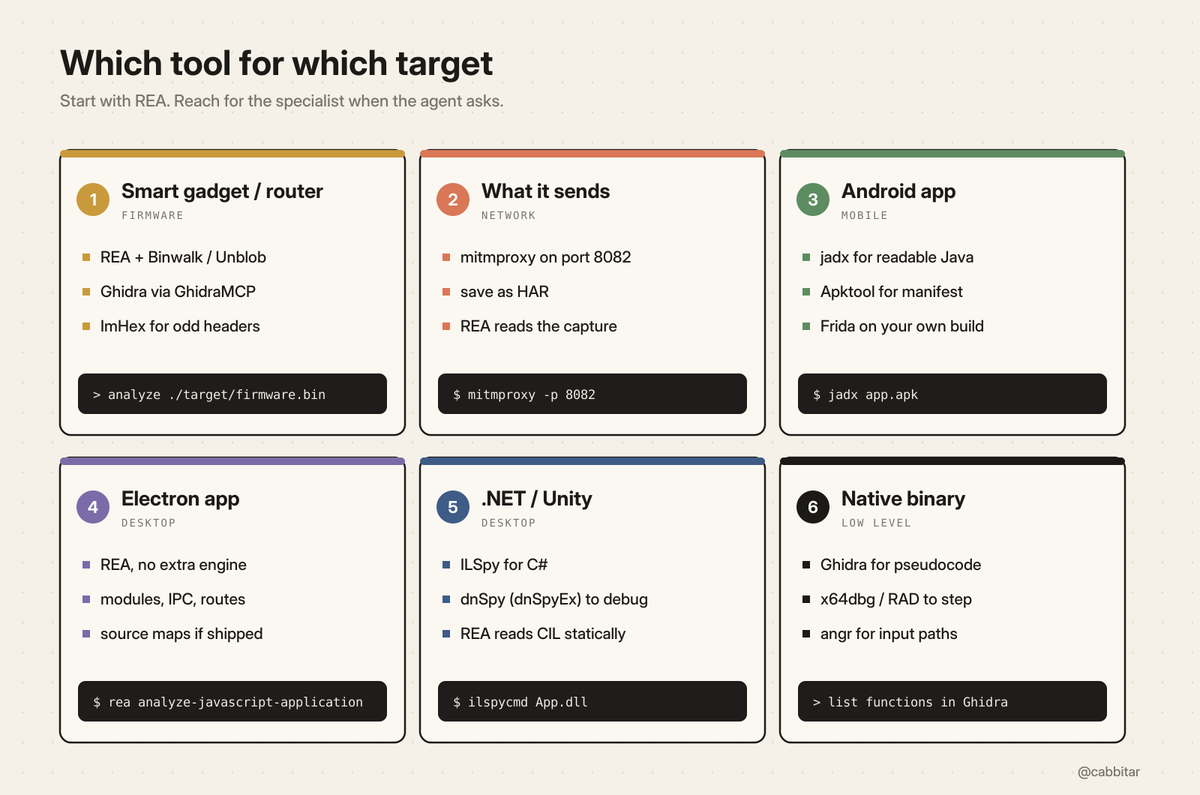
Smart home gadgets and routers (firmware)
Most vendors publish firmware updates on their support page, so you usually start with a download. Drop the file into target/ and ask:
Use REA to analyze ./target/firmware.bin. List the regions, extract what you can,
and hand any native binaries to Ghidra. Then tell me which hostnames and URLs
appear in the extracted files.
On Linux, REA uses Binwalk or Unblob for extraction, then passes native code to Ghidra. When a header doesn't match any known format, open it in ImHex: its pattern language lets you describe the layout once and every byte gets labeled and colored.
What your device sends (network)
mitmproxy sits between your device and the internet and shows every request. Since Ghidra already owns port 8080, start it on another port:
mitmproxy -p 8082Point your phone or gadget's Wi-Fi proxy at your laptop's IP on port 8082, then open mitm.it on that device to install the certificate. Some devices pin their certificates, and then you'll only see which hostnames they connect to. Often that list is enough to see which companies the device reports to.
To hand a session to Claude, save it as a HAR file:
mitmdump -p 8082 --set hardump=./target/capture.harREA reads HAR captures directly and returns requests, responses and the source locations behind them.
Android apps
REA covers the static side too: with headless JADX and a full JDK installed it returns manifest declarations, classes and decompiled methods, and it can talk to an emulator or your own phone through adb.
Desktop apps
npx -y rea-agents@latest analyze-javascript-application /absolute/path/to/app --jsonStep 5: Rebuild and verify with Craft Anything
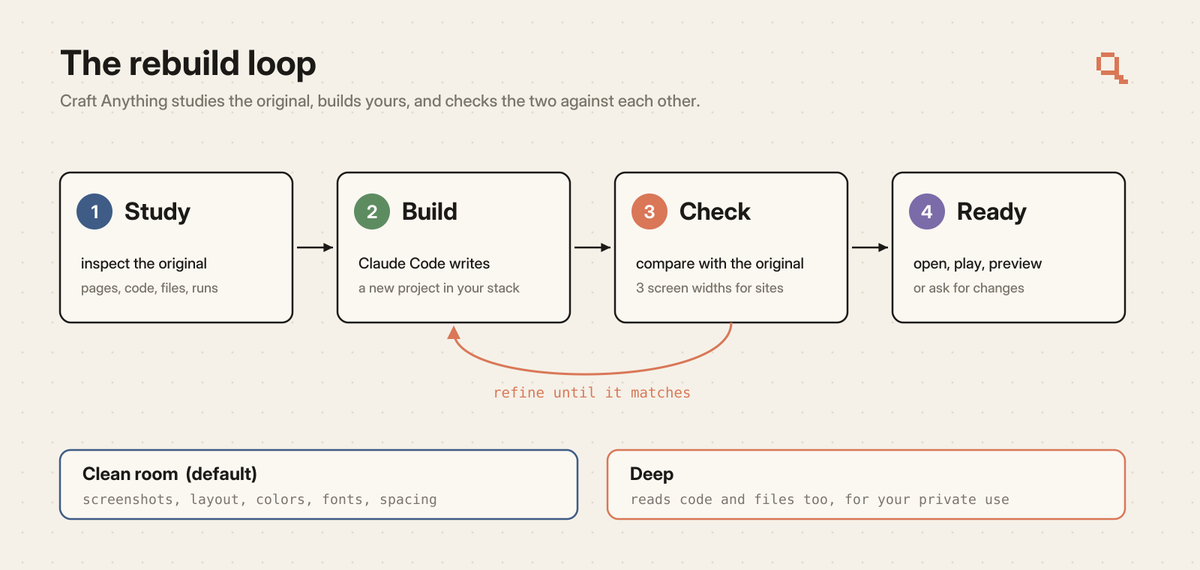
Once you know how a feature works, you can build your own version. Craft Anything (16.8K stars, early alpha) runs the whole loop: it studies the original, has Claude Code build a new project, compares the two and refines until they match. It ships 320 tools, each one a CLI command and an MCP tool.
git clone https://github.com/storytold/craft-anything && cd craft-anything
cargo install --path apps/craft-anything-cli
craft-anything-cli doctor
craft-anything-cli rebuild https://example.com "Recreate this website"
It needs Rust 1.97 or newer. Two modes:
To copy the look and layout of a site or app UI, clean room mode is enough.
In REA's DX-Ball case study, the agent rebuilt the game's sound-pan function in C, and the reconstruction passes 3,205 test cases against the original x86 code.
3 copy-paste prompts
1. Map a new target
Use REA to inventory ./target. Tell me what it is (format, architecture, framework),
the 10 most interesting functions or modules, every hostname or URL you find,
and what you could not identify. Save it to ./notes/findings.md with evidence for each line.
2. Trace one feature
I want to understand how [feature] works in ./target. Find the entry point,
follow the calls to where the real work happens, and explain it step by step.
Tag every step CONFIRMED, LIKELY or UNKNOWN and cite the address or file for each.
3. Spec it, then rebuild it
From ./notes/findings.md, write ./notes/SPEC.md: inputs, outputs, edge cases,
in plain words with no copied code. Then build my own version in ./scratch/rebuild
in [language], with tests that compare its output to the original on 20 inputs.
15-minute setup
Add mitmproxy, jadx or Craft Anything later, when a specific device needs them.
Common mistakes
Running mitmproxy on port 8080. Ghidra's plugin already sits there, and the clash looks like a broken MCP server. Use -p 8082.
Starting with the hardest tool. If you open x64dbg first, you spend hours in raw assembly before learning anything useful. Start with REA and let the agent call the low-level tools when a task needs them.
Trusting pseudocode blindly. Decompiler output is a best guess. Check anything tagged LIKELY or UNKNOWN by hand, and let Craft Anything's check step compare your rebuild with the original.
Running unknown binaries on your main machine. Use a VM for anything you didn't build yourself.
Working on your only copy of the firmware. Keep originals in target/ (read only) and experiment in scratch/.
Skipping the ground rules. Keep every tool here pointed at devices and software you own or are allowed to examine. Both REA and Craft Anything are built for that.
All 18 tools in one place
1. REA: one MCP that connects your agent to most of these tools
github.com/morluto/rea

2. Ghidra: free decompiler for native code and firmware
github.com/NationalSecurityAgency/ghidra

3. GhidraMCP: lets your agent drive Ghidra
github.com/LaurieWired/GhidraMCP

4. Craft Anything: study, rebuild, verify in one loop
github.com/storytold/craft-anything

5. radare2: reverse engineering in your terminal
github.com/radareorg/radare2

6. rizin: the radare2 fork, engine behind Cutter
github.com/rizinorg/rizin

7. x64dbg: Windows debugger
github.com/x64dbg/x64dbg

8. RAD Debugger: Epic Games' debugger for huge programs
github.com/EpicGames/raddebugger

9. ImHex: hex editor with its own pattern language
github.com/WerWolv/ImHex

10. angr: symbolic execution engine
github.com/angr/angr

11. jadx: turns Android APKs back into Java
github.com/skylot/jadx

12. Apktool: decodes and rebuilds APK resources
github.com/iBotPeaches/Apktool

13. Frida: hooks into apps while they run
github.com/frida/frida

14. ILSpy: decompiles .NET to C#
github.com/icsharpcode/ILSpy

15. dnSpy: debugs and edits .NET apps
github.com/dnSpyEx/dnSpy

16. mitmproxy: reads your devices' traffic
github.com/mitmproxy/mitmproxy

17. awesome-reverse-engineering: curated list from the REA creator
github.com/morluto/awesome-reverse-engineering

18. awesome-ai-reverse-engineering: 117 AI RE repos, each security-graded
github.com/zhuyansen/awesome-ai-reverse-engineering
Thanks for reading!
More full guides on my Substack: https://substack.com/@cabbitar