i wrote 20+ atomic writing rules ( see 🧵 ) each in its own md file...

Heinrich@arscontexta
49 views
Oct 02, 2026
~9 min read
Advertisement
1
i wrote 20+ atomic writing rules ( see 🧵 )
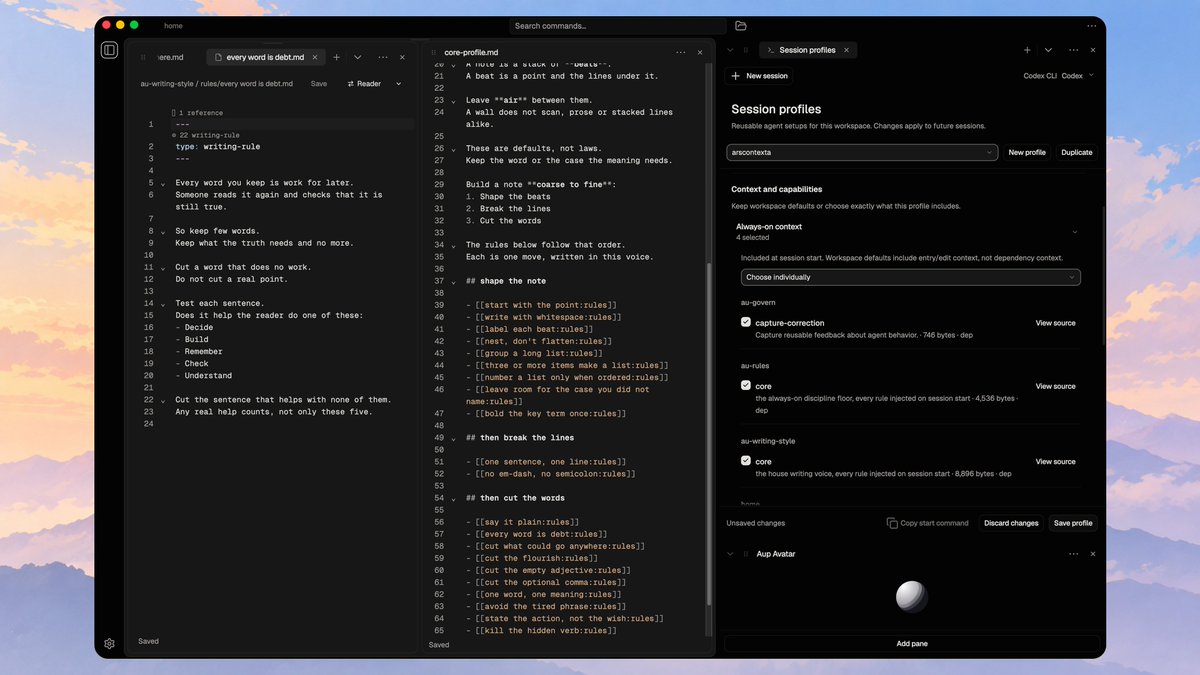
each in its own md file explaining what matters to me and why
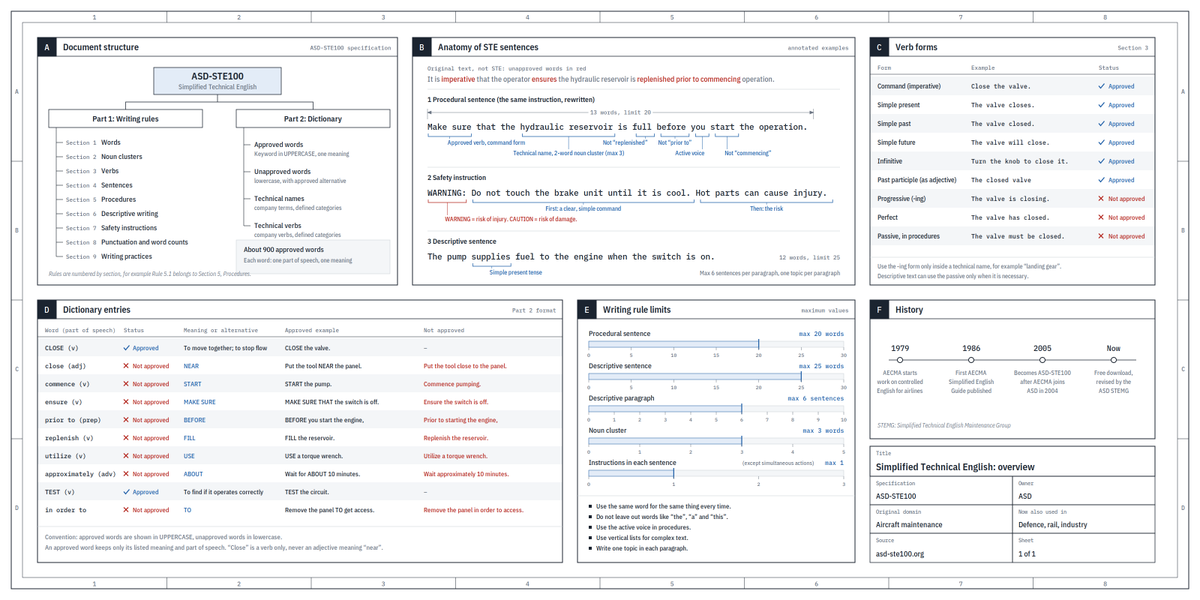
i mean “explain this in ASD-STE100” is a start...
but i want to define my own writing style and carry it across models and sessions
session profiles select which rules get injected through the session start hook
i rather work with small composable rules instead of one giant agents md
btw the same rules also power two skills:
/apply-writing-style to rewrite existing text
/check-writing-style to review it against the rules
so i can add one rule, reuse it across profiles and have the next session work with the updated version
the types, rules and skills are bundled as one reusable repo
i can add it as a dependency to my current workspace to make use of it
or i just depend on the types to build a different rule set / profile and reuse the skills
( so in love with composable repos for knowledge work )
check out my writing rules and steal what you like

each in its own md file explaining what matters to me and why
i mean “explain this in ASD-STE100” is a start...
but i want to define my own writing style and carry it across models and sessions
session profiles select which rules get injected through the session start hook
i rather work with small composable rules instead of one giant agents md
btw the same rules also power two skills:
/apply-writing-style to rewrite existing text
/check-writing-style to review it against the rules
so i can add one rule, reuse it across profiles and have the next session work with the updated version
the types, rules and skills are bundled as one reusable repo
i can add it as a dependency to my current workspace to make use of it
or i just depend on the types to build a different rule set / profile and reuse the skills
( so in love with composable repos for knowledge work )
check out my writing rules and steal what you like
Andrej Karpathy@karpathy
We'll be spending a lot more time trying to understand the outputs of language models. A few thoughts, tips & tricks:
Writing. Something I've had success with: Ask your LLM to explain something in ASD-STE100, it's a controlled language specification originally developed for aerospace maintenance documentation. LLMs well-versed in this language and it comes with heavy constraints on clean writing style that I often find a lot more readable. Sometimes I've tried to soften it a bit e.g. ask for "80% of the way to ASD-STE100" because the spec is quite stringent. But even better:
Diagrams / images. Instead of writing, ask your LLM to create a diagram. These can be a lot easier to process, parse, and understand. But even better:
Web pages. Ask for output "in HTML" to get a beautiful, interactive webpage. LLMs are getting really good at frontend and can create beautiful experiences, animations, etc. But even better:
Explainer videos. The output format I am most bullish on is fully custom / bespoke explainer videos generated on any arbitrary topic. Experiment with things like "Create a 3b1b style video explainer on X. Use my ElevenLabs API key for audio narration". (you'd need an API key for the latter or you can ask your LLM to find you decent free alternatives that use your local compute). This is actually starting to work!
In summary:
- As LLMs get better, they will do more and more of the legwork autonomously, and a lot more of our work will rise up the abstractions into oversight and understanding.
- Luckily, LLMs can help here too because as intelligence and code are increasingly abundant, you can ask for large, custom, discardable software artifacts (e.g. web apps, video explainers) that would have never made sense to create before. Push the boundaries here and you'll be surprised.
Writing. Something I've had success with: Ask your LLM to explain something in ASD-STE100, it's a controlled language specification originally developed for aerospace maintenance documentation. LLMs well-versed in this language and it comes with heavy constraints on clean writing style that I often find a lot more readable. Sometimes I've tried to soften it a bit e.g. ask for "80% of the way to ASD-STE100" because the spec is quite stringent. But even better:
Diagrams / images. Instead of writing, ask your LLM to create a diagram. These can be a lot easier to process, parse, and understand. But even better:
Web pages. Ask for output "in HTML" to get a beautiful, interactive webpage. LLMs are getting really good at frontend and can create beautiful experiences, animations, etc. But even better:
Explainer videos. The output format I am most bullish on is fully custom / bespoke explainer videos generated on any arbitrary topic. Experiment with things like "Create a 3b1b style video explainer on X. Use my ElevenLabs API key for audio narration". (you'd need an API key for the latter or you can ask your LLM to find you decent free alternatives that use your local compute). This is actually starting to work!
In summary:
- As LLMs get better, they will do more and more of the legwork autonomously, and a lot more of our work will rise up the abstractions into oversight and understanding.
- Luckily, LLMs can help here too because as intelligence and code are increasingly abundant, you can ask for large, custom, discardable software artifacts (e.g. web apps, video explainers) that would have never made sense to create before. Push the boundaries here and you'll be surprised.
2
# Start with the point
The reader may stop after the first line.
Put the point in that line.
Cut the words that only delay the point:
- The summary that repeats what is below
- The "this matters because" that tells the reader how to feel
- The "maybe" or "probably" that the note already shows
- Any wind-up before the point
The title and the description already frame the note.
Write the point in the body.
The reader may stop after the first line.
Put the point in that line.
Cut the words that only delay the point:
- The summary that repeats what is below
- The "this matters because" that tells the reader how to feel
- The "maybe" or "probably" that the note already shows
- Any wind-up before the point
The title and the description already frame the note.
Write the point in the body.
3
# Write with whitespace
A block of text is hard to scan.
A wall of one-per-line sentences is just as hard.
The reader cannot find the one line they need.
Put a blank line between beats.
Keep each beat to a few lines.
The longer the lines, the fewer per beat.
Whitespace lets the reader jump to the line they need.
A block of text is hard to scan.
A wall of one-per-line sentences is just as hard.
The reader cannot find the one line they need.
Put a blank line between beats.
Keep each beat to a few lines.
The longer the lines, the fewer per beat.
Whitespace lets the reader jump to the line they need.
4
# Label each beat
A multi-beat body needs a label on each beat.
The label chunks the body for a scanner.
Size the label to the beat:
- A long beat, a study or a spec section, takes a heading
- A medium beat, a proposal section, takes a bold lead-in
- A short beat, a finding or a receipt, takes no label
A short beat and the first beat need no label.
Their first line carries the point.
To check, the labels alone map the body.
A multi-beat body needs a label on each beat.
The label chunks the body for a scanner.
Size the label to the beat:
- A long beat, a study or a spec section, takes a heading
- A medium beat, a proposal section, takes a bold lead-in
- A short beat, a finding or a receipt, takes no label
A short beat and the first beat need no label.
Their first line carries the point.
To check, the labels alone map the body.
5
# Nest, don't flatten
Push detail down under a summary line, not across as more top-level lines.
A reader scans the top level.
They drill into the branch they need.
Each parent line stands for its children.
A reader who trusts a parent skips its whole subtree.
Prefer a deep, narrow tree to a wide, flat list.
Each level stays inside the few items a reader holds.
To check, the top level alone reads as a summary.
Push detail down under a summary line, not across as more top-level lines.
A reader scans the top level.
They drill into the branch they need.
Each parent line stands for its children.
A reader who trusts a parent skips its whole subtree.
Prefer a deep, narrow tree to a wide, flat list.
Each level stays inside the few items a reader holds.
To check, the top level alone reads as a summary.
6
# Group a long list
The reader holds only a few items at once.
A flat list of more than about five is too many.
Group a long list into a few labeled parts.
Each part holds a few items.
For example, group eight fields into three parts:
- Identity
- Timing
- Payload
The reader holds only a few items at once.
A flat list of more than about five is too many.
Group a long list into a few labeled parts.
Each part holds a few items.
For example, group eight fields into three parts:
- Identity
- Timing
- Payload
7
# Three or more items make a list
If a sentence names three or more items in a row, make them a list.
Lift them out:
- One item per line
- A lead-in that ends with a colon
- The same grammar in each item
A list is easy to scan.
The same items inside a sentence are not.
If a sentence names three or more items in a row, make them a list.
Lift them out:
- One item per line
- A lead-in that ends with a colon
- The same grammar in each item
A list is easy to scan.
The same items inside a sentence are not.
8
# Number a list only when ordered
A number carries a meaning a bullet does not, an order.
Number a list only when the number does work.
Number it when the items run in a sequence, or when the reader points back to one by its number:
- Steps taken in turn
- A ranked series
- An item the reader will cite, "do 2 and 4"
Otherwise use a bullet.
A number on an unordered set is a false signal, it implies an order that is not there.
To check, renumber the list at random, if nothing is lost it should be a bullet.
A number carries a meaning a bullet does not, an order.
Number a list only when the number does work.
Number it when the items run in a sequence, or when the reader points back to one by its number:
- Steps taken in turn
- A ranked series
- An item the reader will cite, "do 2 and 4"
Otherwise use a bullet.
A number on an unordered set is a false signal, it implies an order that is not there.
To check, renumber the list at random, if nothing is lost it should be a bullet.
9
# Leave room for the case you did not name
End a list of examples with an item that covers the rest.
Your examples never cover every case.
A list that stops at them reads as the whole class.
The reader then meets a case you left out and stops.
Put the catch-all in the list, not in the lead-in.
The reader scans the bullets and skips the line above them.
A closed set needs no catch-all.
An enum's members and a sealed family's leaves are the whole set.
Leave them closed.
Read your list.
Name a case it leaves out.
If the reader would stall there, add the item.
End a list of examples with an item that covers the rest.
Your examples never cover every case.
A list that stops at them reads as the whole class.
The reader then meets a case you left out and stops.
Put the catch-all in the list, not in the lead-in.
The reader scans the bullets and skips the line above them.
A closed set needs no catch-all.
An enum's members and a sealed family's leaves are the whole set.
Leave them closed.
Read your list.
Name a case it leaves out.
If the reader would stall there, add the item.
10
# Bold the key term
Bold the one term the reader's eye should land on first.
It is the anchor the scan finds.
Bold at most one term per beat.
Two bold terms compete.
Neither anchors the eye.
A bold label is that beat's one bold term.
Do not bold another term inside it.
To check, a beat has at most one bold term.
Bold the one term the reader's eye should land on first.
It is the anchor the scan finds.
Bold at most one term per beat.
Two bold terms compete.
Neither anchors the eye.
A bold label is that beat's one bold term.
Do not bold another term inside it.
To check, a beat has at most one bold term.
11
# One sentence, one line
Put a line break after every sentence.
Each sentence stands on its own line.
Give each fact its own line too.
A sentence that joins two thoughts with "and" or "so" holds two facts.
When a line holds two facts, break it in two.
A block of sentences hides where one ends and the next starts.
A line each lets the reader find, move and cut any line on its own.
Put a line break after every sentence.
Each sentence stands on its own line.
Give each fact its own line too.
A sentence that joins two thoughts with "and" or "so" holds two facts.
When a line holds two facts, break it in two.
A block of sentences hides where one ends and the next starts.
A line each lets the reader find, move and cut any line on its own.
12
# No em-dashes, no semicolon
Both marks join two thoughts that read better apart.
Split them.
An em-dash becomes a period and a new line.
A semicolon becomes two sentences.
When you want a dash, write the second thought as its own sentence.
Both marks join two thoughts that read better apart.
Split them.
An em-dash becomes a period and a new line.
A semicolon becomes two sentences.
When you want a dash, write the second thought as its own sentence.
13
# Say it plain
Write for a smart coworker, not to sound clever.
Use the plain choice every time:
- The short word, not the long one
- The plain word, not the jargon
- The active voice, not the passive
- The positive statement, not the negative
- The short sentence, not the long one
A long word chosen to sound smart means the same as the short one.
Use the short one.
Keep the precise term when no plain word carries the meaning.
Define it once.
Reuse it.
Write for a smart coworker, not to sound clever.
Use the plain choice every time:
- The short word, not the long one
- The plain word, not the jargon
- The active voice, not the passive
- The positive statement, not the negative
- The short sentence, not the long one
A long word chosen to sound smart means the same as the short one.
Use the short one.
Keep the precise term when no plain word carries the meaning.
Define it once.
Reuse it.
14
# Every word is a debt
Every word you keep is work for later.
Someone reads it again and checks that it is still true.
So keep few words.
Keep what the truth needs and no more.
Cut a word that does no work.
Do not cut a real point.
Test each sentence.
Does it help the reader do one of these:
- Decide
- Build
- Remember
- Check
- Understand
Cut the sentence that helps with none of them.
Any real help counts, not only these five.
Every word you keep is work for later.
Someone reads it again and checks that it is still true.
So keep few words.
Keep what the truth needs and no more.
Cut a word that does no work.
Do not cut a real point.
Test each sentence.
Does it help the reader do one of these:
- Decide
- Build
- Remember
- Check
- Understand
Cut the sentence that helps with none of them.
Any real help counts, not only these five.
15
# Cut what could go anywhere
A sentence that fits any note says nothing about this one.
Test each line.
Could it move unchanged to another project or product?
If it could, it is filler.
Cut it or make it specific to this note.
A sentence that fits any note says nothing about this one.
Test each line.
Could it move unchanged to another project or product?
If it could, it is filler.
Cut it or make it specific to this note.
16
# Cut the flourish
A flourish is a sentence shaped for effect rather than the point.
Common flourishes:
- The false contrast, "It's not X. It's Y."
- The fake-insight setup, "What nobody tells you"
- The grand kicker, a closing line that sounds deep and says nothing
- The recap that repeats what the reader just read
- Any shape that sounds deep and adds nothing
The shape hides a thin or missing point.
State the point plainly or cut the sentence.
"It's not the model, it's the eval" becomes "the eval matters more than the model".
A flourish is a sentence shaped for effect rather than the point.
Common flourishes:
- The false contrast, "It's not X. It's Y."
- The fake-insight setup, "What nobody tells you"
- The grand kicker, a closing line that sounds deep and says nothing
- The recap that repeats what the reader just read
- Any shape that sounds deep and adds nothing
The shape hides a thin or missing point.
State the point plainly or cut the sentence.
"It's not the model, it's the eval" becomes "the eval matters more than the model".
17
# Cut the empty adjective
A flourish is a sentence shaped for effect rather than the point.
Common flourishes:
- The false contrast, "It's not X. It's Y."
- The fake-insight setup, "What nobody tells you"
- The grand kicker, a closing line that sounds deep and says nothing
- The recap that repeats what the reader just read
- Any shape that sounds deep and adds nothing
The shape hides a thin or missing point.
State the point plainly or cut the sentence.
"It's not the model, it's the eval" becomes "the eval matters more than the model".
A flourish is a sentence shaped for effect rather than the point.
Common flourishes:
- The false contrast, "It's not X. It's Y."
- The fake-insight setup, "What nobody tells you"
- The grand kicker, a closing line that sounds deep and says nothing
- The recap that repeats what the reader just read
- Any shape that sounds deep and adds nothing
The shape hides a thin or missing point.
State the point plainly or cut the sentence.
"It's not the model, it's the eval" becomes "the eval matters more than the model".
18
# Cut the optional comma
If a comma changes no meaning, drop it.
It slows the reader down.
Drop the comma you do not need:
- Before an "and" or "or" that joins one subject
- Before an extra phrase the sentence reads fine without
Keep a comma that stops a wrong reading.
Cut the rest.
If a comma changes no meaning, drop it.
It slows the reader down.
Drop the comma you do not need:
- Before an "and" or "or" that joins one subject
- Before an extra phrase the sentence reads fine without
Keep a comma that stops a wrong reading.
Cut the rest.
19
# One word, one meaning
Pick one word for a thing.
Use it every time.
Do not use a synonym to vary the prose.
A reader who meets a second word asks if you mean a second thing.
Use "check" every time.
Do not mix it with "verify" or "confirm".
Scan a note for two words that name one thing.
One of them is redundant.
Pick one word for a thing.
Use it every time.
Do not use a synonym to vary the prose.
A reader who meets a second word asks if you mean a second thing.
Use "check" every time.
Do not mix it with "verify" or "confirm".
Scan a note for two words that name one thing.
One of them is redundant.
20
# Avoid the overused phrase
A overused phrase is one you have read many times.
The reader skims past it.
Write it in your own words instead.
If a phrase comes to you too easily, it is worn out.
Cut it or replace it.
A overused phrase is one you have read many times.
The reader skims past it.
Write it in your own words instead.
If a phrase comes to you too easily, it is worn out.
Cut it or replace it.
21
# State the action, not the wish
A weak directive names a state to reach, not the action to take.
It wraps the verb in "make sure" or "ensure".
Write the action as a command.
"Make sure the valve is open" becomes "Open the valve".
"Make sure the file is read" becomes "Read the file".
The wrapper adds words.
It hides the verb.
Drop it.
A weak directive names a state to reach, not the action to take.
It wraps the verb in "make sure" or "ensure".
Write the action as a command.
"Make sure the valve is open" becomes "Open the valve".
"Make sure the file is read" becomes "Read the file".
The wrapper adds words.
It hides the verb.
Drop it.
22
# Kill the hidden verb
A hidden verb is a verb turned into a noun.
The noun form is longer.
It needs a weak helper verb like "make" or "conduct".
Turn the noun back into a verb.
"make a decision" becomes "decide".
"conduct an analysis" becomes "analyze".
Watch these endings:
- -tion
- -ment
- -sion
- -ance
- -ness
Other endings do it too.
A hidden verb is a verb turned into a noun.
The noun form is longer.
It needs a weak helper verb like "make" or "conduct".
Turn the noun back into a verb.
"make a decision" becomes "decide".
"conduct an analysis" becomes "analyze".
Watch these endings:
- -tion
- -ment
- -sion
- -ance
- -ness
Other endings do it too.
23
# No period on a list item
A list item takes no terminal period.
The bullet and the line break already close it.
So the period is a redundant mark.
Drop it from every bullet and every numbered step.
Running prose keeps its periods.
A sentence still needs its end.
The bullet "read the note." becomes "read the note".
To check, no list item ends in a period.
A list item takes no terminal period.
The bullet and the line break already close it.
So the period is a redundant mark.
Drop it from every bullet and every numbered step.
Running prose keeps its periods.
A sentence still needs its end.
The bullet "read the note." becomes "read the note".
To check, no list item ends in a period.
24
jump to the first post in case you want to bookmark this
Heinrich@arscontexta
i wrote 20+ atomic writing rules ( see 🧵 )
each in its own md file explaining what matters to me and why
i mean “explain this in ASD-STE100” is a start...
but i want to define my own writing style and carry it across models and sessions
session profiles select which rules get injected through the session start hook
i rather work with small composable rules instead of one giant agents md
btw the same rules also power two skills:
/apply-writing-style to rewrite existing text
/check-writing-style to review it against the rules
so i can add one rule, reuse it across profiles and have the next session work with the updated version
the types, rules and skills are bundled as one reusable repo
i can add it as a dependency to my current workspace to make use of it
or i just depend on the types to build a different rule set / profile and reuse the skills
( so in love with composable repos for knowledge work )
check out my writing rules and steal what you like
each in its own md file explaining what matters to me and why
i mean “explain this in ASD-STE100” is a start...
but i want to define my own writing style and carry it across models and sessions
session profiles select which rules get injected through the session start hook
i rather work with small composable rules instead of one giant agents md
btw the same rules also power two skills:
/apply-writing-style to rewrite existing text
/check-writing-style to review it against the rules
so i can add one rule, reuse it across profiles and have the next session work with the updated version
the types, rules and skills are bundled as one reusable repo
i can add it as a dependency to my current workspace to make use of it
or i just depend on the types to build a different rule set / profile and reuse the skills
( so in love with composable repos for knowledge work )
check out my writing rules and steal what you like
