JEV 101: The Complete 10-Step Setup

Every agent runs into the same problem. A model that costs $0.03 per call spends its time answering yes-or-no questions, picking the next worker, or scoring relevance. None of that needs generation. It needs a model built specifically to decide.

This is the 10-step setup that gives your agents a dedicated decision brain. Set it up once, measure it, then replace every costly fork.
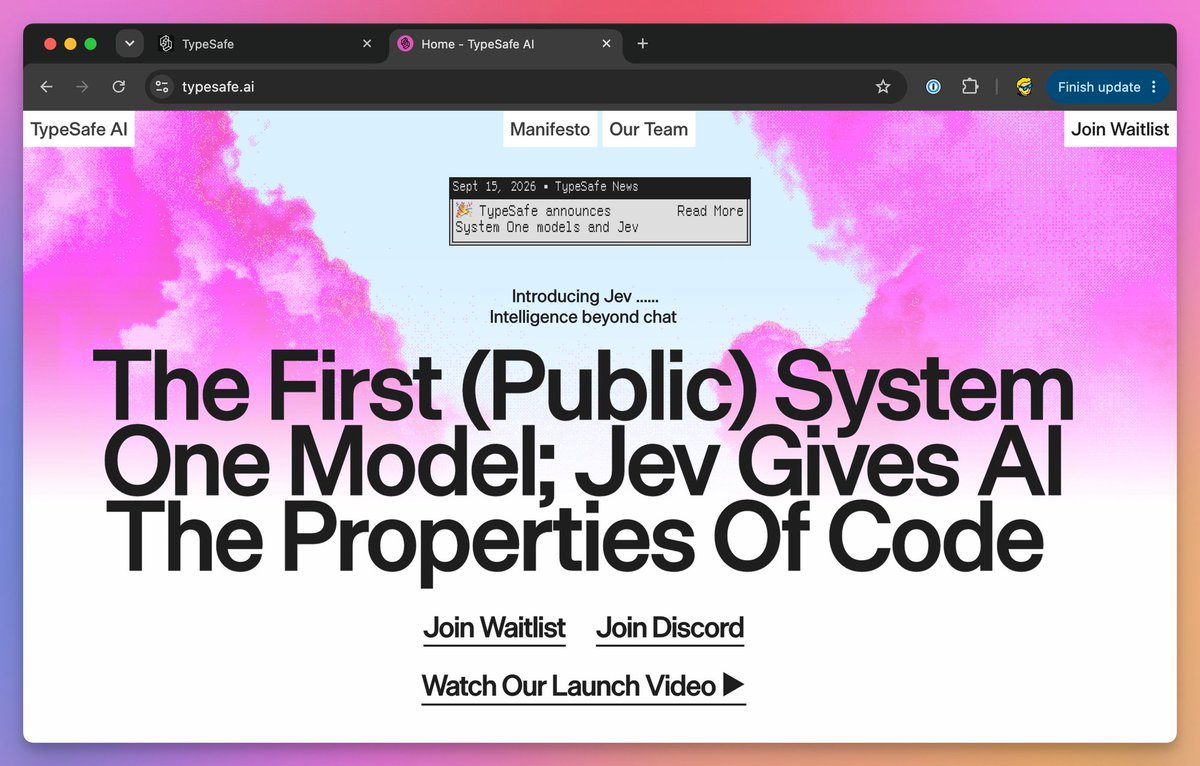
The Jevons Paradox comes from 1865: when a steam engine burns coal more efficiently, total coal use goes up, not down.
The same pattern shows up with AI. Tokens get cheaper every quarter, usage grows even faster, and the bill stays flat or climbs. Jev, built by TypeSafe AI, is designed to break that cycle.
Subscribe to my Beehiiv: simplifyingai.co for more AI content like this
It's a System One model. Send it a state and a set of predefined questions, and it returns typed answers with probabilities, no text generation, no chat, no autoregressive loop.
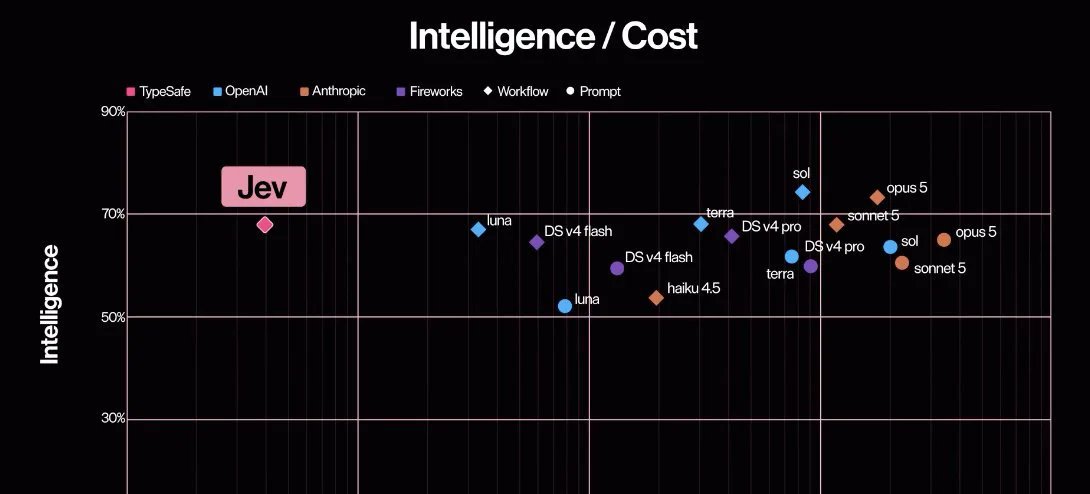
It does one thing: it decides, and it does it 200 times faster and 400 times cheaper than an LLM doing the same job.
01. Split: find the decisions, not the text
Jev is TypeSafe AI's System One model. You give it information and predefined questions. It returns typed answers with probabilities. It can't write your briefing, generate code, or explain its reasoning in prose.
Start with a job like this:
Research three new AI-agent tools and draft tomorrow's briefing. Save the draft for my review.That job contains several decisions: Do we have enough sources? Which worker goes next? Is the draft ready for review?
Those are candidates for Jev. Fetching sources, writing paragraphs, and saving files still belong to your tools and generative models. An exact rule, like stopping after ten actions, belongs in code.

The split is simple. If the operation creates text, it stays with the LLM. If the operation picks an option from a list, scores a value, or answers yes or no, it goes to Jev.
02. Playground: test one question before code
Open the TypeSafe Playground. Sign in and complete the access process if your account requires it.
Use this as your state, and add a question: "Which worker should act next?"
{
  "goal": "Compare three AI-agent tools in a morning briefing.",
  "completed_work": "No sources collected yet.",
  "available_workers": ["Researcher", "Writer"],
  "constraint": "Save drafts for review. Do not publish."
}
Define three options: research for missing evidence, write for drafting from sufficient evidence, review for unclear requests or completed work.
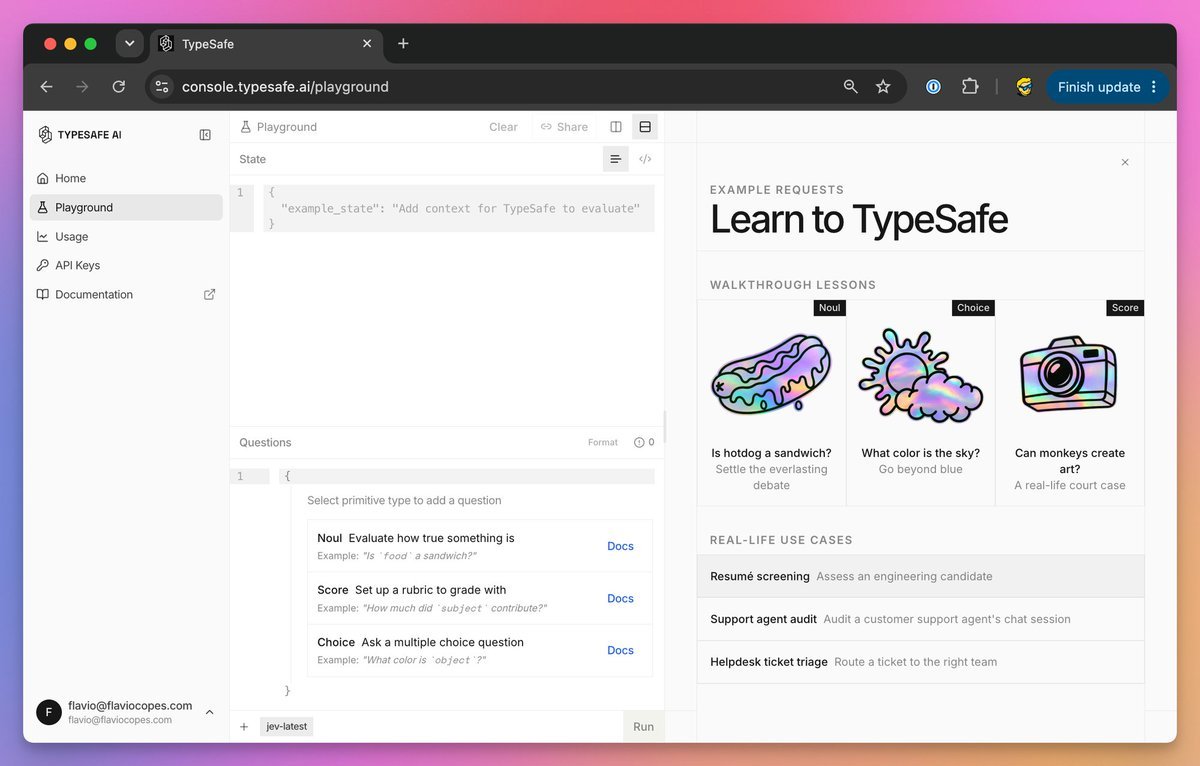
Run it. Then replace the completed-work field with real research notes and compare the decision. This is the basic interaction described in the official Quickstart.
03. SDK: install and connect the API
You need a TypeSafe account with API access enabled and a key from key settings. API calls are billed to that account.
Install Python 3.12 or newer, then open Terminal.
$ mkdir jev-starter
$ cd jev-starter
$ python3 -m venv .venv
$ .venv/bin/python -m pip install --upgrade typesafe-sdk
> mkdir jev-starter
> cd jev-starter
> py -3 -m venv .venv
> .\.venv\Scripts\python.exe -m pip install --upgrade typesafe-sdk
With Node.js and npm installed, add TypeSafe's official skill:
npx skills add typesafe-ai/skills --skill typesafe-aiSelect your supported agent when prompted. The skill gives it integration instructions. Jev itself runs through the API.
04. Handoff: save decisions as local JSON queues
Create chief.py inside jev-starter, outside .venv. This is the standalone decision router: enter a job, let Jev choose its destination, save the handoff on your computer.
import json
import os
from getpass import getpass
from pathlib import Path
from uuid import uuid4
from typesafe_sdk import Choice, TypeSafeAPIError, TypeSafeClient

if not os.environ.get("TYPESAFE_API_KEY"):
    os.environ["TYPESAFE_API_KEY"] = getpass("TypeSafe API key: ").strip()

goal = input("Goal: ").strip()
if not goal:
    raise SystemExit("Enter a goal.")
notes = input("Completed work: ").strip() or "Nothing yet."
state = {"goal": goal, "completed_work": notes}

try:
    with TypeSafeClient(model="jev-1.13.0") as client:
        result = client.system_one(
            state=state,
            questions={
                "next_worker": Choice(
                    instructions="Choose the next step for a research briefing.",
                    criteria={
                        "research": "Collect evidence still needed for the goal.",
                        "write": "Draft the briefing from sufficient evidence.",
                        "review": "Goal unclear, outside scope, or work complete.",
                    },
                )
            },
        )
except TypeSafeAPIError as error:
    raise SystemExit(f"API error {error.status}; see Step 8.")

answer = result.choices["next_worker"]
destination = "review"
if answer.choice in {"research", "write"} and answer.confidence >= 0.85:
    destination = answer.choice

folder = Path(__file__).resolve().parent / "queue" / destination
folder.mkdir(parents=True, exist_ok=True)
job = folder / f"{uuid4().hex}.json"
payload = dict(state, choice=answer.choice, confidence=answer.confidence,
               destination=destination, status="queued")
job.write_text(json.dumps(payload, indent=2, ensure_ascii=False), encoding="utf-8")
print("Saved handoff:", job)
$ .venv/bin/python chief.py
TypeSafe API key: ••••••••••
Goal: Compare three AI-agent tools for tomorrow's briefing
Completed work: No sources collected yet
Saved handoff: /Users/you/jev-starter/queue/research/a3f8...jsonOpen that JSON file. It contains your request, progress, Jev's choice, confidence, and destination. Each run creates a new file under queue/research, queue/write, or queue/review. These are local task queues. A saved job waits for a worker to pick it up.

The confidence threshold is set to 0.85. Adjust it using labeled examples from your workflow. Confidence is not the same thing as accuracy.
05. Questions: Choice, Score, and Noul
Jev gives you three question types, each built for a different kind of decision.

A detail worth knowing: Jev doesn't see your question ID. Naming a field safe_to_publish adds no instructions on its own. Put the actual requirement in the question text and describe each option clearly.
Supply evidence too. "The researcher finished" tells Jev less than the sources, findings, and remaining gaps would. Keep those fields separate from the original request.
System One models evaluate every question in a request in parallel. Adding questions barely changes response time and only costs the tokens for the extra questions.
06. Dynamic menu: rebuild options every turn
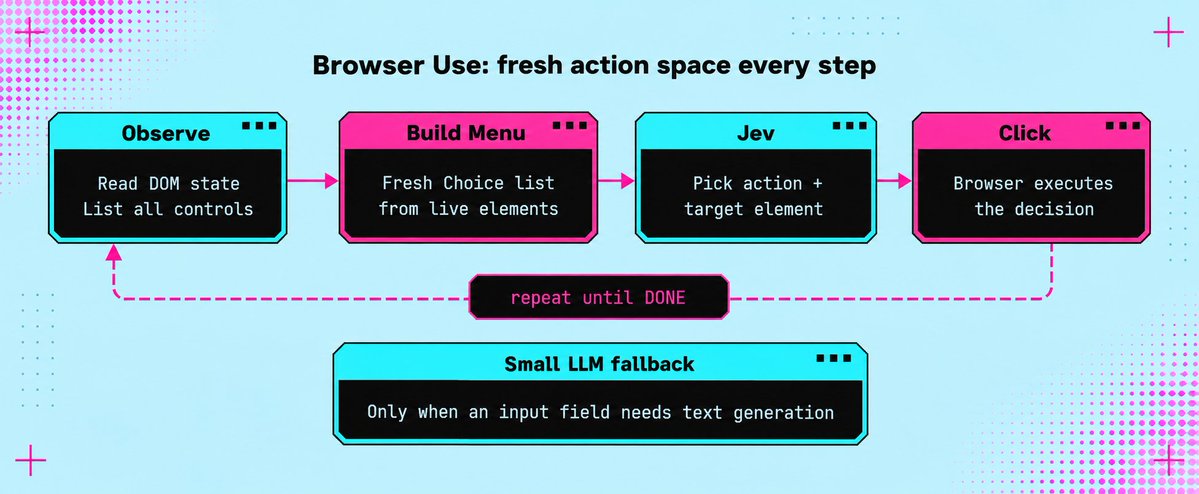
A browser's available actions change after every click. Browser Use builds a fresh list of observed controls and lets Jev choose from that list. A small LLM generates text only when an input field needs filling.
Apply that design to your own Chief of Staff. Build the choices from workers that exist and are available right now. Include the current source IDs when selecting research material. Refresh the options after a tool changes the state, otherwise your decision model is choosing from an old menu.
07. Parallel: batch questions in one call
Your dispatcher may need a worker, an urgency score, and an approval check. If all three can inspect the same state, send them together.
TypeSafe supports parallel questions and speculative branches: ask about possible next actions, then use only the answer relevant to the selected branch.
Questions can't read one another's answers. If a decision needs a fresh search result, run the search first.
result = client.system_one(
    state=state,
    questions={
        "next_worker": Choice(
            instructions="Choose the next step.",
            criteria={...}
        ),
        "urgency": Score(
            instructions="Rate request urgency.",
            labels=["low", "medium", "high", "critical"]
        ),
        "safe_to_run": Noul(
            instructions="The requested action is safe to execute without human review."
        ),
    },
)
The Browser Use example points to another bottleneck. Its optimized runtime cut median browser protocol calls from 1,092 to 101, while median task time fell 25% across three matched pairs. Both versions used the same models.
The changes included collecting the page state in one read and skipping fresh predictions for irrelevant animations. Check for repeated tool calls before paying for a faster model.
08. Guardrails: set limits and stop conditions
For a morning briefing, allow source collection and draft creation, then stop at review. Publishing should need a separate permission check.
The application also needs an action limit, a spending limit, and saved progress. After an interruption, it should check the last completed action before repeating anything. A confident answer can't prove a file was saved or a message was sent on its own.
Browser Use independently checks the outcome after Jev selects DONE. Borrow that same separation for your own completion checks.
AGENT HANDOFF BRIEF

Read the TypeSafe skill and inspect my worker interfaces. Connect
chief.py's JSON queues to existing research and writing handlers.

Prevent duplicate processing. Save progress after each action. Add
call and spending limits, review on uncertainty, and a draft-exists
completion check. Keep publishing behind approval. Identify missing
connectors explicitly.
If the starter fails, use the error to pick the fix.

Closer look: the Jev harness
Agents run in a loop: a model decides what to do, a tool executes, a model evaluates the result, and the loop continues until the task is done. Two building blocks made this easier: tool calling for structured requests and structured outputs for structured results.
But even with both in place, every decision in that loop still costs a full model call.
That's where the harness matters more than the model.
The harness is the difference between 78% and 42% on the same model. Same weights, different loop design. The harness decides the performance.

Coding harnesses like Claude Code, Codex, and Cursor have shipped some way to classify dangerous actions before they happen. That classifier step has slowly built trust in agents. Until now, it stayed locked inside the closed-source parts of the harness.
Now that a cheap, fast classifier model exists, the same pattern can be applied to any agent.
Same model. Same tools. Different harness. Different results.
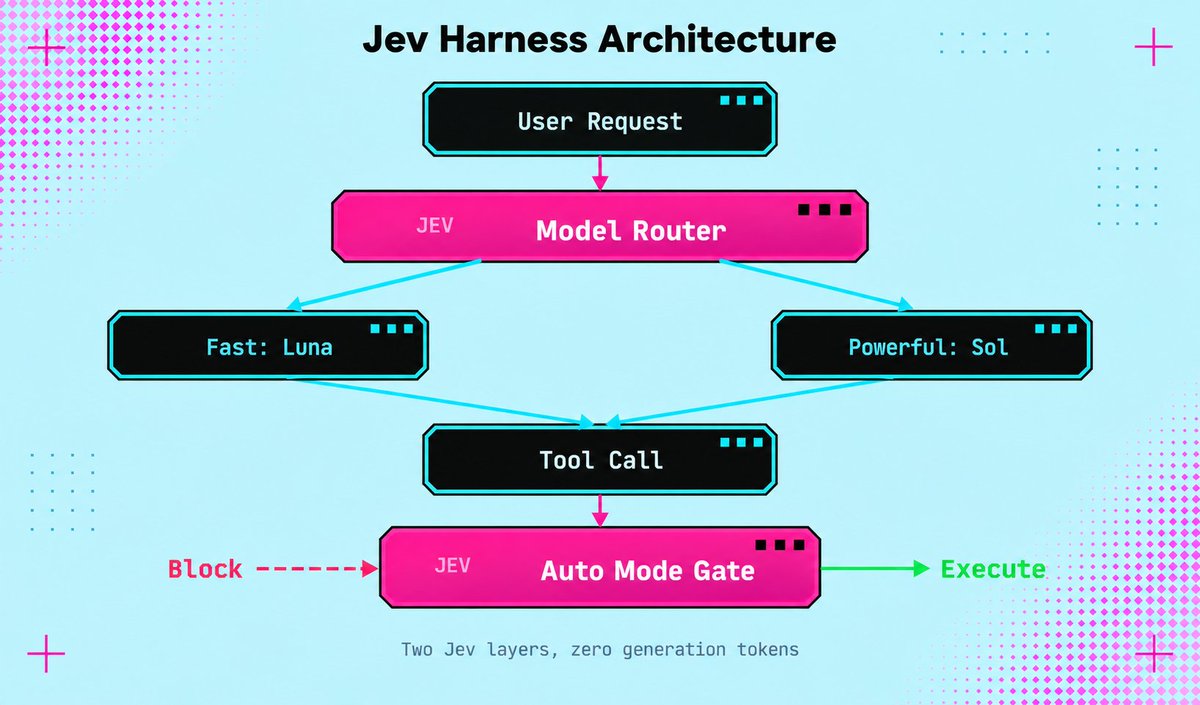
LangChain's AutoModeMiddleware uses Jev to check every tool call for risky decisions before the tool runs. One line of middleware, zero generation tokens spent on safety checks.
from langchain.agents import create_agent
from langchain_typesafe.experimental.middleware import (
    AutoModeMiddleware,
)

# Jev checks every tool call before execution
# Blocks risky actions, approves safe ones
guardrail = AutoModeMiddleware(tools=["bash"])

agent = create_agent("openai:gpt-5.6-luna", middleware=[guardrail])
The harness gives you two layers of Jev. The model router at the top picks the cheapest model that can handle the request. The Auto Mode gate at the bottom blocks dangerous tool calls before they run.
Neither layer generates text. Neither layer adds noticeable latency. Both run on the same $0.042-per-million pricing.
09. Cost: what $0.042 per million buys
Jev 1.13 costs $0.042 per million input tokens, with no output-token charge. At 1,000 billed input tokens per decision, 10,000 decisions cost $0.42 in Jev inference.

The flight demo's reported $0.0039 lines up with its recorded 90,558 Jev input tokens plus the text helper's reported charge. Browser costs sit outside that number. Its roughly seven-second clock starts after the initial page observation and excludes a fresh post-run check.
It finds flight results. It doesn't book tickets.
For a different workload, Vercel's fx team reported roughly 5 to 18 times faster safety classification than GPT-5.6-Luna, along with improved accuracy. That comparison concerns the classifier specifically, not the length of an entire agent run.
Track the bill per completed task. A cheap decision that sends a worker down the wrong branch can end up costing more than the decision itself.
10. Deploy: five production use cases
Once the basic setup is running, Jev can already read the state of a task and choose between predefined options. From there, the only remaining question is which repeated decision to automate next.
1. Control a browser
Browser Use used Jev to select the next action and the correct page element. The agent found flights in 7 seconds for $0.0039.
How to repeat: run the official Browser Use project, add your TypeSafe and OpenRouter keys, then give the agent a website and a goal. Jev selects the action and target. The browser executes the decision.
2. Classify research
Jev was used to classify 1,018 AI research papers. The entire classification cost $0.08, with a 256ms median end-to-end latency per paper.
How to repeat: send the title and summary of each paper to Jev, then define your topics as Choice options. Save the selected category and send the strongest papers to your writing agent.
3. Triage your inbox
Jev has been used to classify incoming emails and decide what should happen next, 500 emails classified for 3.5 cents.
How to repeat: pass each email as the state, then add reply, research, wait, and review as Choice options. Connect each answer to the corresponding folder or email agent.
4. Route tasks between models
LangChain uses Jev to choose between cheaper and more capable models based on the task. Simple tasks go to a fast model. Complex tasks go to a reasoning model.
from langchain.agents import create_agent
from langchain_typesafe.experimental.middleware import (
    ModelChoice, ModelRouterMiddleware,
)

router = ModelRouterMiddleware(
    choices={
        "fast": ModelChoice(
            model="openai:luna",
            criteria="Direct lookups, extraction, localized changes.",
        ),
        "powerful": ModelChoice(
            model="openai:sol",
            criteria="Architecture and high-stakes decisions.",
        ),
    },
    instructions="Choose the least costly model that can complete the task.",
)

agent = create_agent("openai:gpt-5.6-luna", middleware=[router])
5. Instant context compaction
One builder found a strong use case in instant compaction. In 2026, compaction is still usually handled as a summarization prompt. Jev can make it instant instead, by scoring every tool call and dropping what's irrelevant.
One test compacted a Claude session from nearly 1 million tokens down to 86,000 in about a second. That's a relevance filter running at Jev's speed, not a summarization pass.
Conclusion
Jev isn't another chatbot. It's a fast decision layer that reads the current state of a system and chooses between the options you define.
And the real upside isn't the 7-second flight demo or the $0.08 paper classification.
It's realizing how many expensive LLM calls inside your agents never needed generation in the first place:
Let the LLM research, plan, and write. Let Jev route, score, approve, or escalate. Let code execute the decision.
That split changes the entire agent stack.
You now have the setup, a working decision router, and five real ways to deploy it. Start with one repeated decision, measure it, then replace the next one.
Plenty of builders will keep spending frontier-model tokens on every yes, no, route, and score. The ones who separate thinking from deciding will build faster agents at a fraction of the cost.