Ultimate AI Content Engine: How to make 2-minute AI videos for $1



You pay to generate an AI video. Then you pay again because some of the scene looks wrong. Another attempt, another charge, and you still don't have anything you'd post.
Now imagine doing that for a two-minute video. Every day. You'd probably burn hundreds of dollars each day.
I spent months trying to make that affordable. I wanted enough time to explain something useful, the kind of video you'd save for later or send to a friend (Not the 15-30 seconds slops you see on the timeline). But every extra scene meant more chances to get something wrong and pay to fix it.
The video above is two minutes long and cost me about a dollar to make.
What finally worked was letting AI write the code behind the video. Here's how I got there.
Why listen to me
I'm a content creator. I do AI organic content full time, and I've tested basically every format there is: micro-blog text posts, carousels, AI UGC, explainer videos. In two months that put up over 100 million impressions and 180,000 new followers, without me appearing on camera once.

I'm telling you this so you know I've paid for all of these formats myself. I'm not guessing at what they cost or what they give back.
This video format is the first one I've found that I can actually keep doing. Two minutes, every day, for about a dollar.
The idea: generate the code, not the pixels
Everybody is pointing a video model at the whole frame. That's why it costs so much. You're paying per second for all of it, including the 90% that's just type, layout, screenshots and movement.
Programmatic video turns that around. The video is an HTML page with a timeline on it, rendered out to MP4. Kinetic type, real app screenshots, an illustrated presenter: all code, all free, and you can re-render it as many times as you want. Generated footage only goes where a real moment has to land in someone's body. In a two-minute explainer that's about eight seconds of the whole thing.
The renderer is HyperFrames. You hand it an HTML file with a paused GSAP timeline, it hands back a 1080x1920 MP4. It doesn't care who wrote the HTML, which is the part that matters: an agent can write it.
That's the whole unlock. The AI writes code, not pixels. Code is cheap, it's deterministic, and changing one line and rendering again costs you nothing.
The video
The one at the top is real, off my Instagram: what to set up on your iPhone before somebody takes it. 113 seconds, four steps, eleven real iOS screenshots, three photoreal shots in the hook, one voice-over take.
That's the shape I want. Long enough to actually hand someone something, short enough that they finish it. Anything under 30 seconds and you're posting a trailer for advice you never give.
What it cost
The asterisks, because everybody quotes a low number and hides these:
And re-rendering is free, which is the part that actually changes how you work. I rebuilt this video four times today. Try that when every render costs you nine dollars.

The workflow
0. Install the skill
I packaged the whole thing as a free skill pack for Claude Code/Codex.
/plugin marketplace add buildwithhanif/hyperframe-pro
/plugin install hyperframe-pro
There's a working example in example/ that renders out of the box. Run that one first. If you get an MP4 out of it, your setup is fine and everything below will work.

1. Write the script out loud
About 300 spoken words per two minutes. Two rules I learned the expensive way.
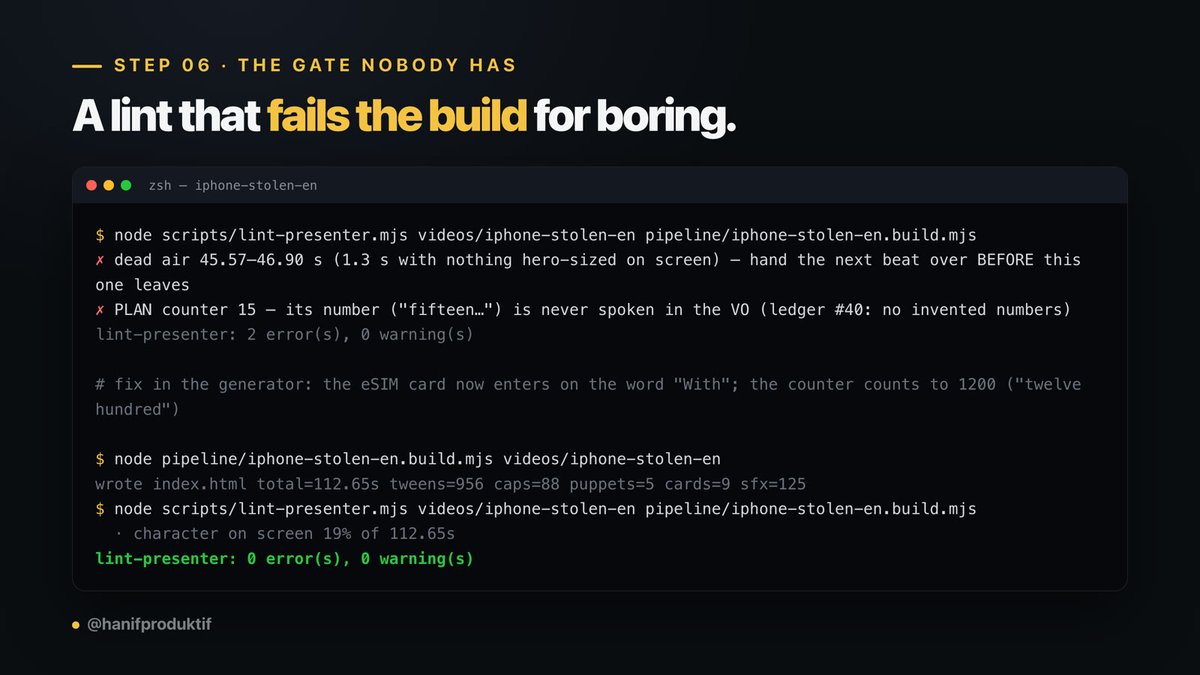
Every number on screen has to be spoken. If a card says "15 GB" and the voice never says fifteen, people feel the mismatch even if they can't name it. My linter fails the build over that now.
Hard stop at 2 minutes 59. Past three minutes Instagram quits pushing a video to people who don't follow you. If a script runs long, cut a step. Never speed up the voice.
The prompt I use:
"Write a 300-word spoken script for a 9:16 explainer about [topic]. First sentence puts the viewer inside the problem, no 'in this video'. Four numbered steps, each one thing they can do on their phone tonight. Say every number out loud. Second person, no filler adjectives. End with one action."
2. Record the voice once, and keep the timestamps
This is the step everyone skips and it's the one that makes the rest work.
Use ElevenLabs' /with-timestamps endpoint instead of the normal one. It gives you the audio and the start and end of every single word:
{ "text": "stolen", "start": 1.04, "end": 1.39 },
{ "text": "The", "start": 1.72, "end": 1.81 },
{ "text": "thief", "start": 1.89, "end": 2.24 }
That JSON is your timeline. Not one you built in an editor. The one the narration already had.
This video: eleven_v3, voice Liam, 1,687 characters, one take, 110.8 seconds. Zero re-records.
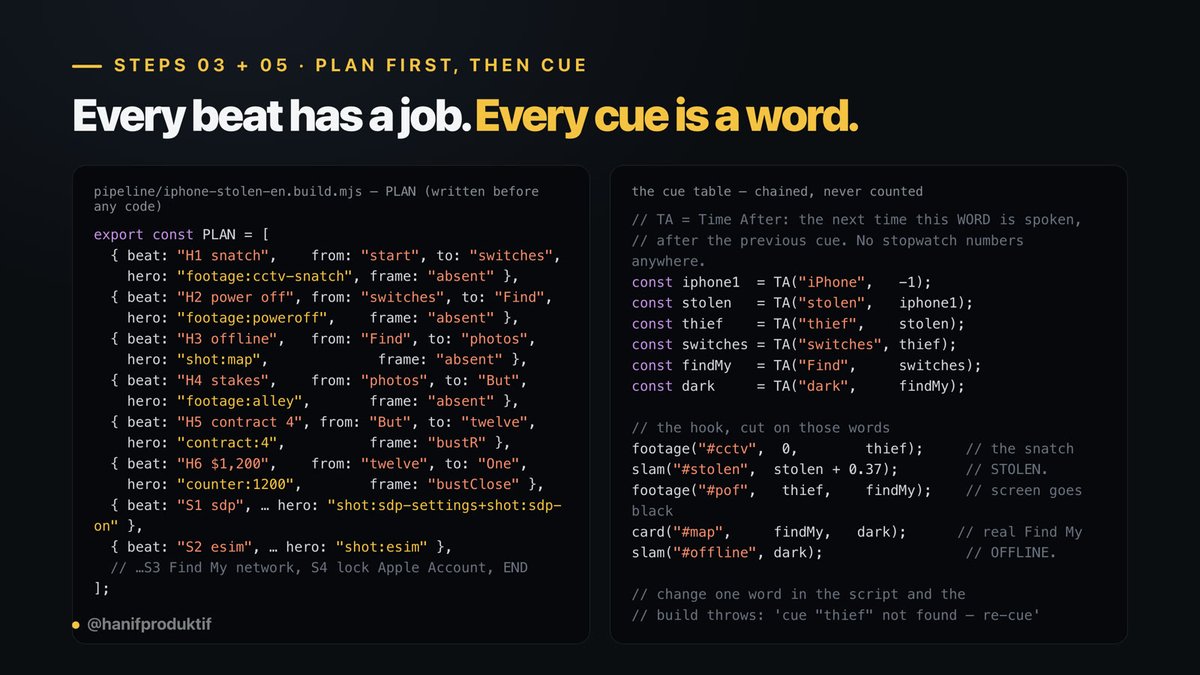
3. Plan the beats before you write code
One row per beat. Each row answers four things: what is this beat's job, what's the one hero on screen, how is the character framed, which parts of the frame get used.
Writing it as a table first is what makes the problems visible. Two beats in a row with the same framing means it's boring, change it. A beat with two heroes needs splitting. A beat with no hero is where people skip.
4. Pick the right register for each beat
This is where the money goes and where most people waste it. Three registers, only three.
Generated footage belongs in the first row and nowhere else. In a 113-second video that was 18 seconds, all of it the hook. Everything else is free.
Two calls per shot. An image model makes the first frame, then an image-to-video model moves it. I cap every clip at 10 seconds.
I run both through WaveSpeedAI, which is one API key for about a thousand image and video models, so you can price-shop per shot instead of being stuck with whatever your provider hosts. (That's an affiliate link.) openai/gpt-image-2 for the first frames.
Don't agonise over which video model. This is b-roll. The shot is two seconds long, it sits under a scrim, it gets cropped to 9:16 and re-encoded at 30fps. Kling 3.0 Standard runs $0.42 for a 5-second clip, Gemini Omni Flash is right there too, and for a two-second cutaway neither of them is doing anything the expensive model would do better. Pick on price.
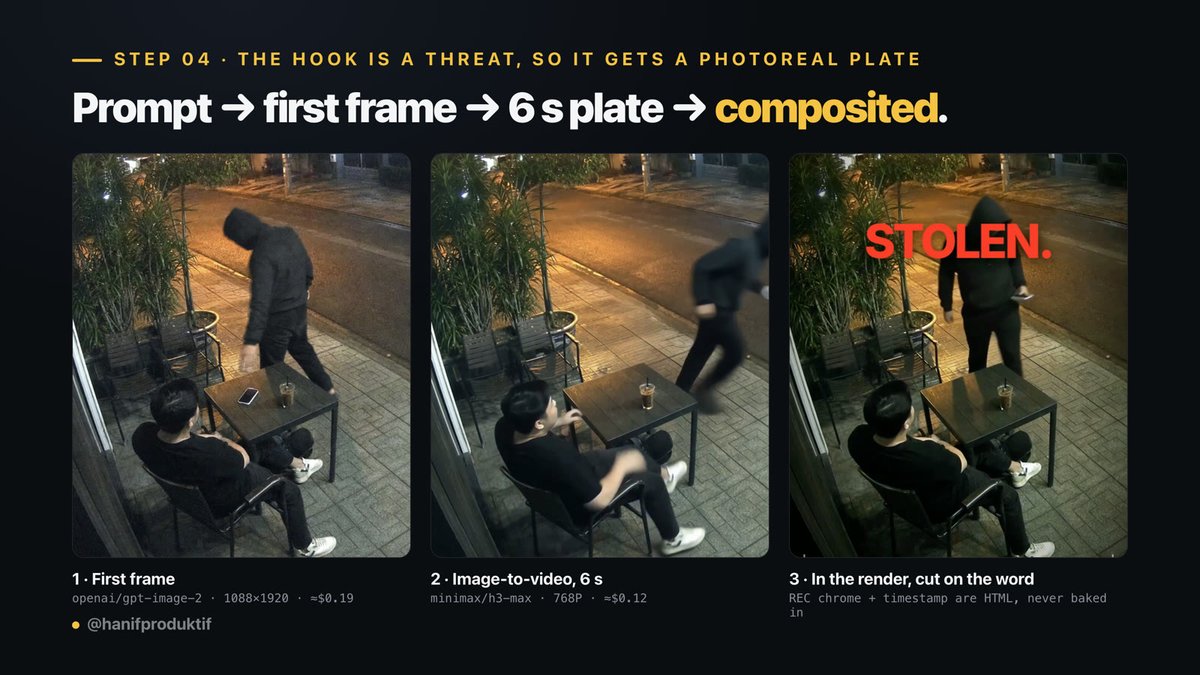
Describe the camera, not the scene. "Cinematic, beautiful, 8K" gets you AI stock. Name the rig, the glass, the sensor:
"Still frame from a fixed outdoor security camera, high mounted angle looking down at a street-side cafe terrace at night. [...] Authentic CCTV image quality: wide-angle lens with barrel distortion, heavy low-light sensor noise and grain, crushed shadows, blown-out orange streetlight highlights, slightly soft focus, muted desaturated colour, mild motion blur on the walking figure. Documentary surveillance realism, not cinematic, no text or watermarks, faces indistinct and not identifiable."
For the motion call, one line matters more than the rest of the prompt:
"Fixed security camera, completely locked off, the camera never moves, pans or zooms."
Leave that out and the model adds a slow push-in and the whole thing stops reading as security footage.
Use 768P, never 1080P. It's exactly double the price per second. After the shot is graded, put under a scrim, cropped to 9:16 and re-encoded at 30fps, I couldn't tell them apart at 100% crop.
And if there's a screen anywhere in the shot, say it's off. The model will invent a lock screen and it will be wrong. Wrong clock, wrong icons, garbled text. I paste this into every prompt with a phone in it:
"The phone screen is completely black, dead and switched off for the entire shot, it never lights up, and no clock, icons, text, lock screen or interface of any kind ever appears on it."
One more, because this one cost me a rejection. A hand is a real object, so generate it instead of drawing it. Cartoon hands look like mittens and they wreck any frame that also has a real screenshot in it. Generate a hand on a pure black background and cut it out as a reusable part. Two things that cost me a render: a switched-off phone is as black as the background, so a naive key erases it and you end up with a hand holding nothing; and if the wrist runs off the edge of the source image, fade the alpha out or the straight crop line reads as a sticker.
5. Build it with word cues, not stopwatch numbers
Not one timing in my generator is a number I typed:
const stolen = TA("stolen", iphone1); // the next time "stolen" is spoken
const thief = TA("thief", stolen);
const switches = TA("switches", thief);
footage("#cctv", 0, thief); // the snatch shot runs until "thief"
slam("#stolen", stolen + 0.37); // STOLEN. lands just after it's said
card("#map", findMy, dark); // the real Find My screenshot
TA means "time after": the next time this word is spoken, after the previous cue. You chain them. You never count occurrences.
Change a word in the script and the video re-times itself. Delete a word some cue depends on and the build throws cue "thief" not found, re-cue this beat. You can't quietly go out of sync.
6. Let a linter fail your build
These are the gates that actually protect retention, and they all exit non-zero:
About thirty of them. A failed lint costs you seconds, a failed render costs minutes, and a post that flops costs a day of reach.
7. Render, then actually look at it
MP4 at 1080x1920, loudness normalised to -14 LUFS, true peak under -0.5 dBTP.
Then pull a contact sheet at one frame per second and read it before anybody else sees the video. A render exiting successfully proves nothing. Twice I've shipped a video where a whole beat came out pure black and the logs were spotless.
8. Revise without re-recording
Swap one line: generate only the new sentence, pass the sentences either side of it as previous_text and next_text so the delivery matches, level-match it, splice it in sample-exactly, then re-time everything after it by the length that actually got inserted. I replaced this video's entire call to action after it was finished. One sentence regenerated. You can't hear the seam.
Too long? Cap every pause between words at about 0.24 seconds in the take you already have. That pulled a 2:57 video down to 2:36 and it sounded better, because TTS leaves 0.5 to 0.8 seconds between sentences and it drags.
Never speed up the audio to hit a number. People hear it.
Proof that register is the whole game
Same script, same voice take, same timing to the frame. The only thing different is the first ten seconds.
v1 isn't badly made. Same timing, same type, same care went into it. It just doesn't do anything to you. A graphic of a phone is information. v2 makes you think wait, that could be my phone, and that thought is what buys the next ten seconds.
Ninety-four cents. Put your money on the beats that carry a feeling and nothing on the rest.

##
The loop
Tools
If you want this running on your account
The skill is free and the example renders out of the box. Take it and go build something.
If you'd rather have it set up around your niche and your voice, DM me. I run 1-on-1 consultations where we pull apart your content engine and your distribution, build a custom AI workflow in your brand voice, and get the automation running so it doesn't eat your whole day. Limited seats, because it's one at a time.
For Indonesian readers, you can book the session here: s.id/hanifose
@hanifproduktif