How to protect your agent harness from abuse with Firebase

First came the LLM, then came the agent. And now we have the harness: essentially everything that surrounds an AI model, including the infrastructure and resources that increase its capabilities along with the guardrails to keep it from running amok.
by Roger Martinez, Cloud Developer Relations Engineer

You can keep an AI harness secure in a number of ways, like creating isolated sandbox environments with resource caps or making sure there’s write protection on production data. But these strategies go out the window if you can’t get a handle on who can access your harness and from where. Without these controls, your backend agent endpoints are left vulnerable to automated bots, credential stuffing, spam account creation, and imposter clients looking to exploit your agent's tools.
That’s why securing the human-to-agent boundary is an important first line of defense against external threats and abuse. And this is where Firebase Authentication and Firebase App Check work in tandem to help protect your harness from abuse.
Identify users with Firebase Authentication
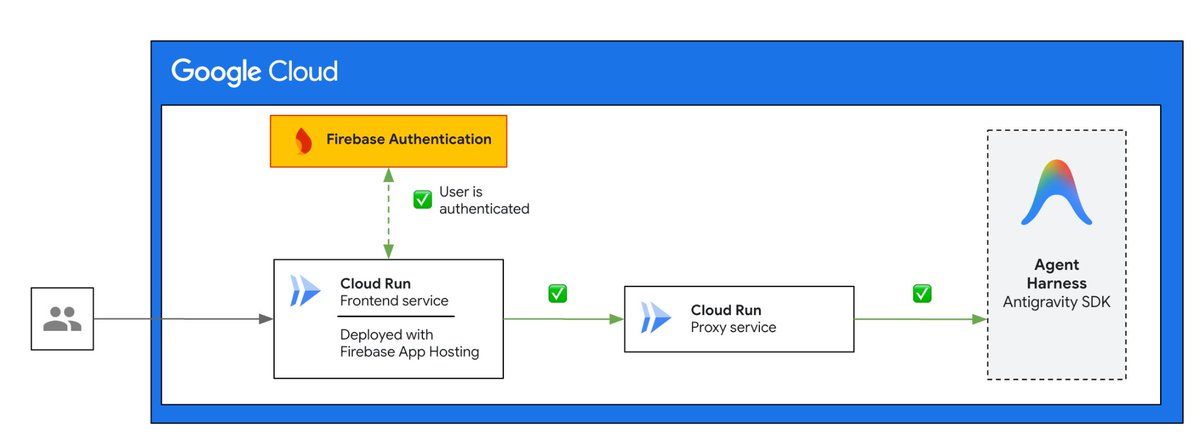
If you’ve deployed a custom harness using the Antigravity SDK (or really any other framework or library) to Google Cloud and it has a client facing endpoint, like a chat interface,you can useFirebase Authentication to help you verify the user’s identity using popular and trusted federated identity providers like Sign in with Google, Facebook, and GitHub. As a managed service, you’re able to drop in authentication into your client application with no additional infrastructure to set up or manage.
Attest approved devices with Firebase App Check
While Firebase Authentication verifies who the user is, Firebase App Check provides device and application attestation to help prove where the request is coming from. This helps ensure that the request originates from your authentic, untampered app on a real device. App Check issues a unique App Check token that a client can use to attest that it’s a legitimate source. This token is passed along via the Firebase client SDK to protected Firebase services, like Cloud Firestore and SQL Connect, as well as custom backends, like a proxy service set up in front of an agent. If a token is present, and the risk score is below the threshold, the connection is allowed. Otherwise, access is blocked.
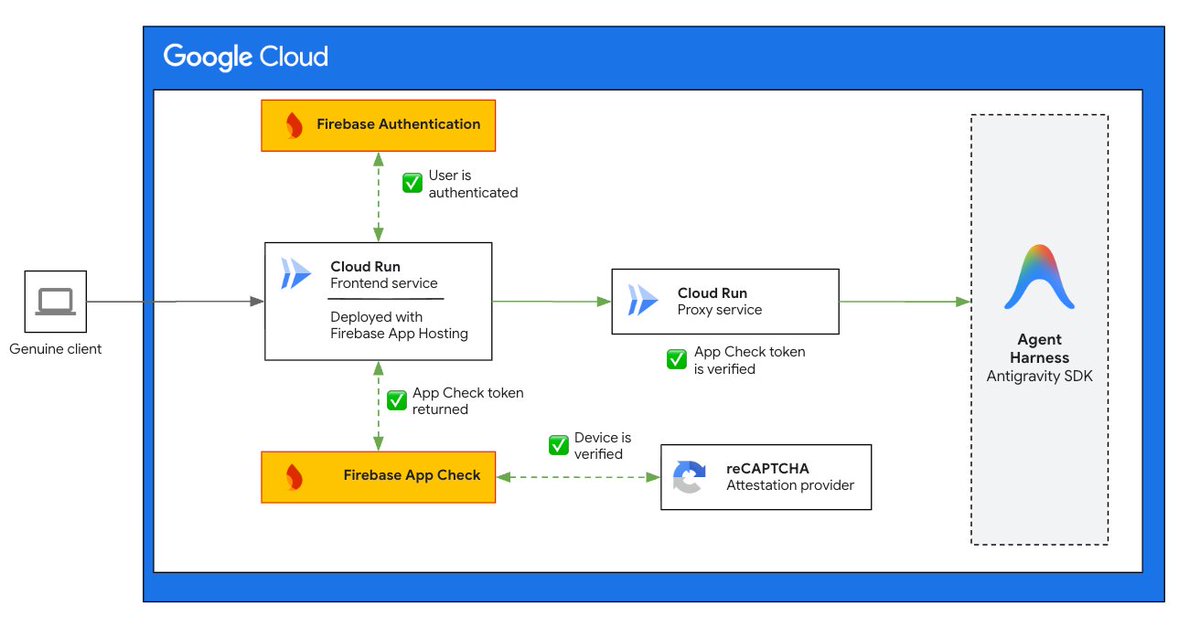
App Check is able to achieve device verification by offloading this heavy lift to trusted platform-native attestation providers like DeviceCheck and App Attest for iOS, Play Integrity for Android, and reCAPTCHA Enterprise for web apps. These providers are constantly evolving behind the scenes to keep pace with new emerging attack patterns. That means that the entry to your agent continues to stay protected against device impersonation techniques that may not have existed when you first deployed your agentic workflows. If those providers don’t meet your needs, you can even add a custom attestation provider to mint your own App Check tokens.
Replay Protection for extra-sensitive endpoints
App Check tokens are the way App Check communicates whether a client device is approved and genuine. Session-based App Check tokens are valid according to a configured time-to-live (TTL) value that can be set to last from 30 minutes to 7 days. Session-based tokens allow a developer to balance latency with security, since acquiring a token has an encryption latency cost. After expiration, the client will silently acquire a new App Check token by calling the attestation provider (encryption cost). For additional protection for especially sensitive endpoints, tokens can be changed from session-based (which are reused) to one-time-use by setting up replay protection.
Replay protection works in two parts. First, on the client, an App Check token is requested using the getLimitedUseToken() method from the Firebase Client SDK, instead of getToken(). Next, on the backend where the Firebase Admin SDK checks that the token is valid, it is also marked as consumed. With that designation, the backend is able to reject any request that attempts to reuse that token.

Ultimately, your AI agent’s harness is only as safe as the gateway that governs the access to it. The combination of Firebase Authentication and Firebase App Check go a long way in helping to establish a secure boundary between the human and your AI agent. They work hand in hand to help ensure that your agents are protected from external exploits and threats while you can focus on building your agent harness.