System Design Essentials - Part 3

Designing a highly scalable and efficient system is easy when you know all the core building blocks and how to use them. This part is the third and final part of the System Design Essentials Series and focuses more on the optimization techniques like Caching and Rate Limiting algorithms.
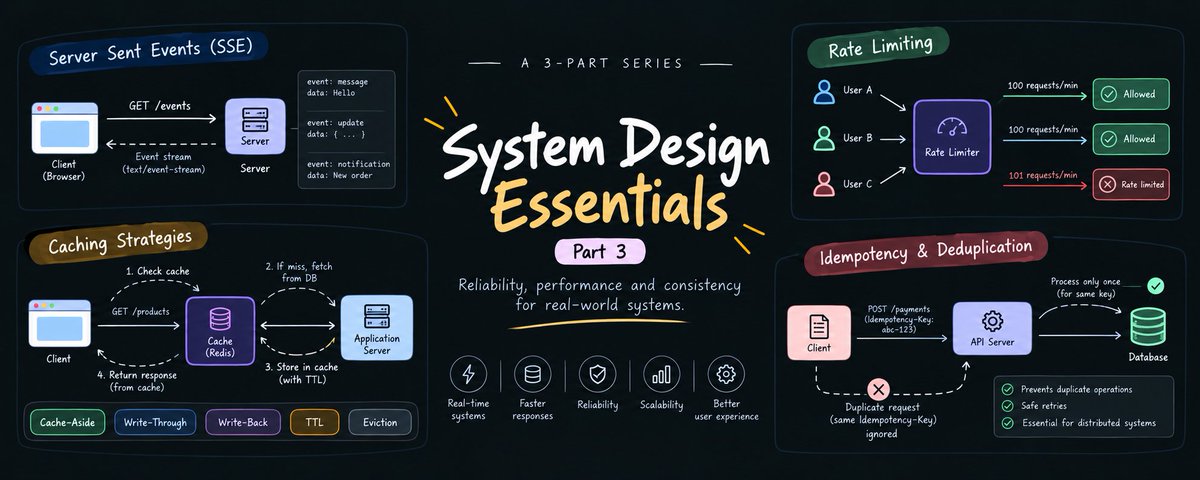
You an read the previous part here
41. Cache or Caching
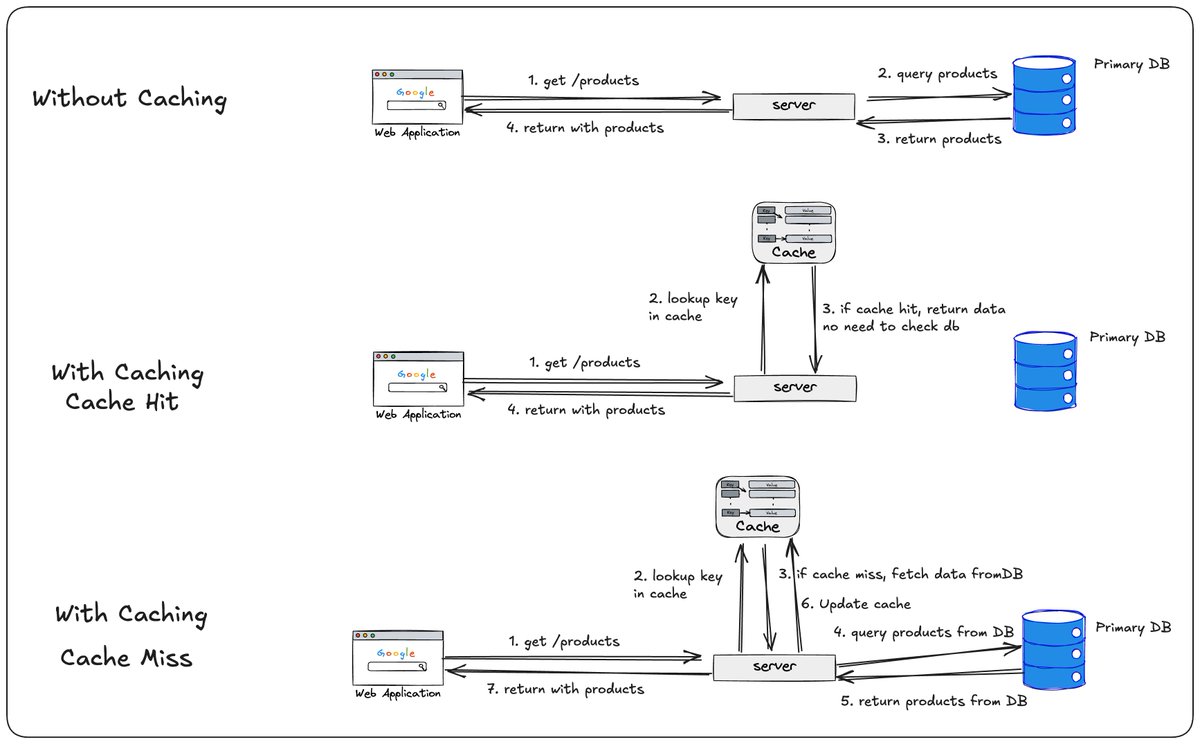
Caching is the process of storing frequently accessed data in a fast storage layer so it can be served quickly without repeatedly querying the primary database.
Instead of this:
Client(browser) → Product Service → Database.
We do:
Client(browser) → Product Service → Check in Cache → if present(Cache Hit) → Respond with data; no need to query the database.
Cache Hit: The requested data already exists in the cache. The service returns it immediately without querying the database.
Cache Miss: The data isn't in the cache. The service has to fetch from Database.
Cache Invalidation: Invalidate the cache data if the data is stale.
Advantages of Caching:
42. Caching Strategies - Cache Aside
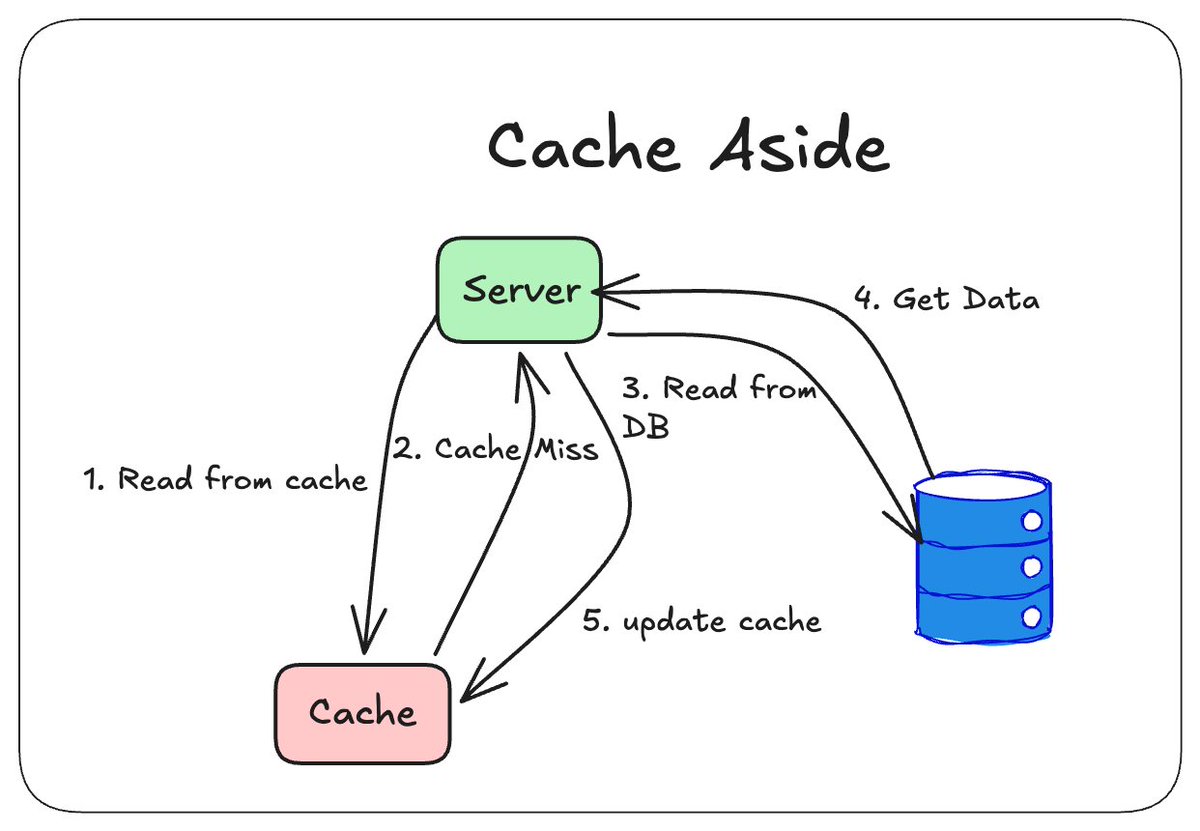
In this strategy, the server manages the cache.The client sends a request to the server, and the server first queries the cache. If the requested data is found in the cache, then result is CACHE HIT so no need to check data in database, return directly from cache. If no data is found, then the result is CACHE MISS; the server returns the data from the DB and updates the cache.
43. Caching Strategies - Read Through
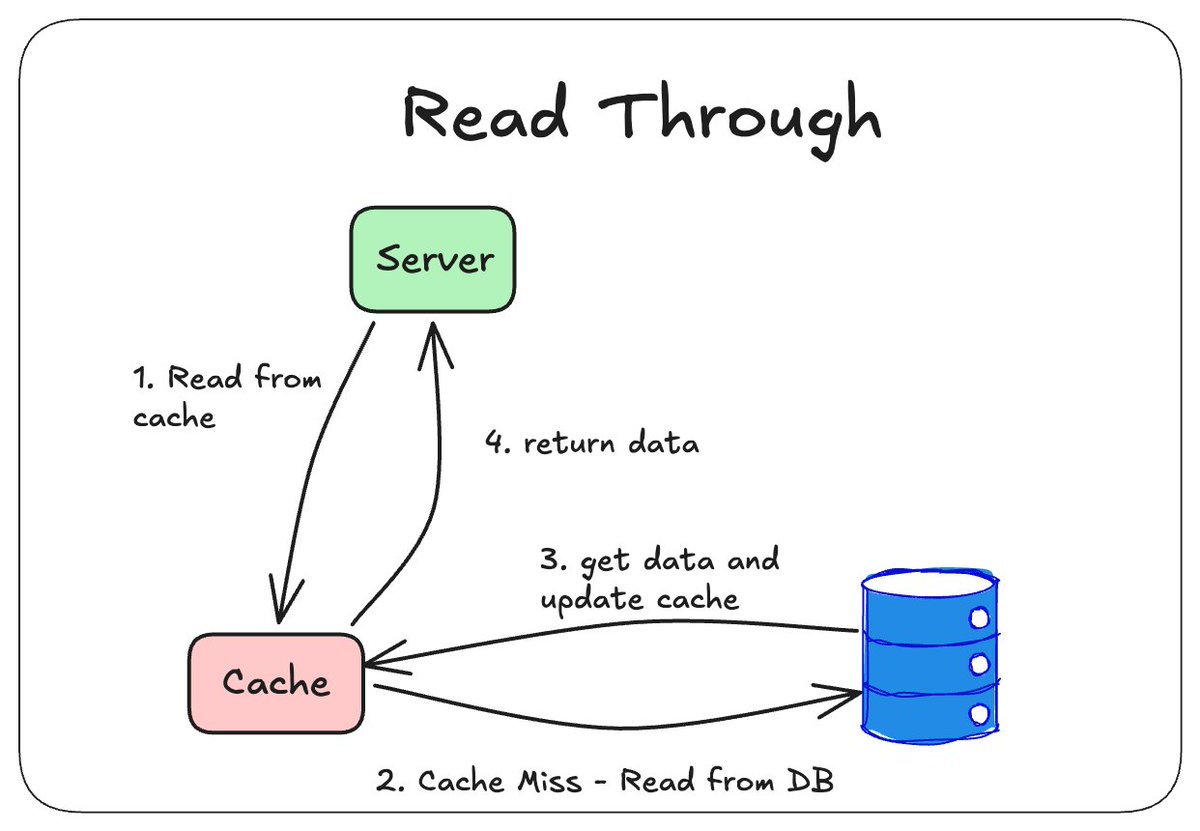
In this strategy, the cache sits between the server and database. The server never queries the database directly; instead, the cache keeps itself updated.
44. Caching Strategies - Write Through
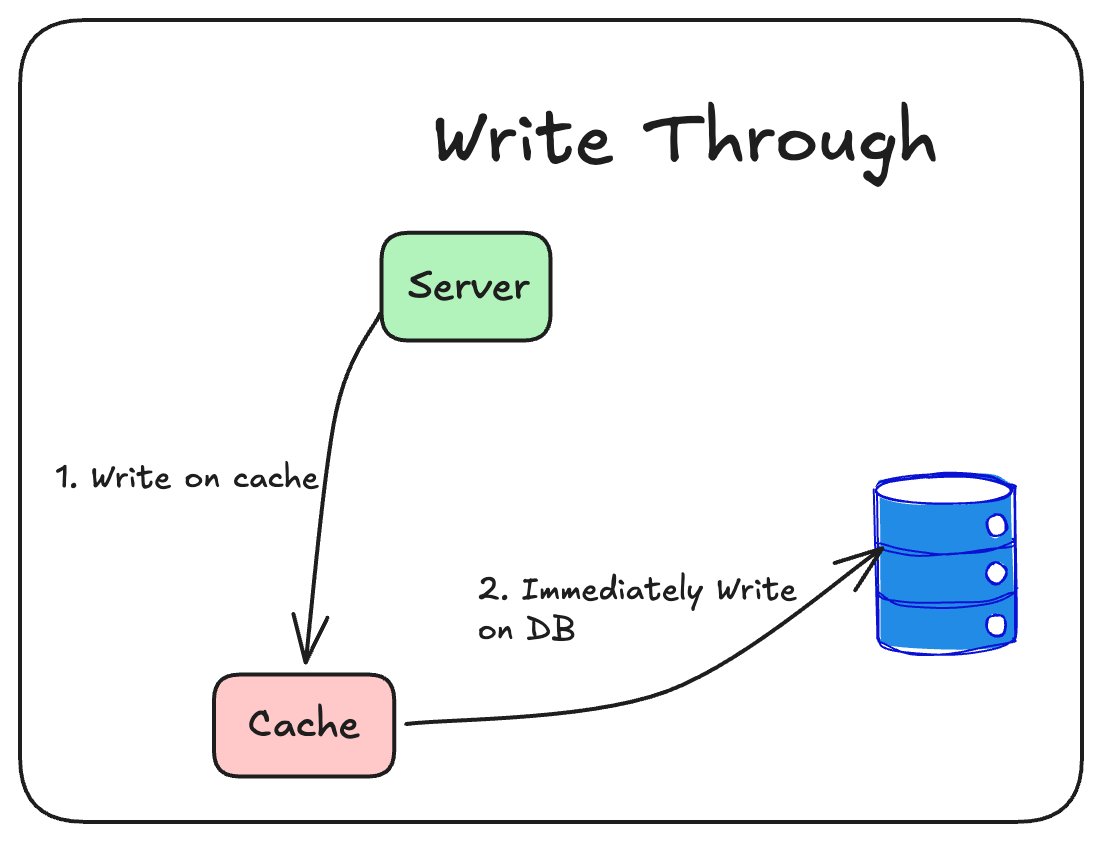
In this strategy, every write/update data operation happens on the cache first, then on the database.
45. Caching Strategies - Write Around
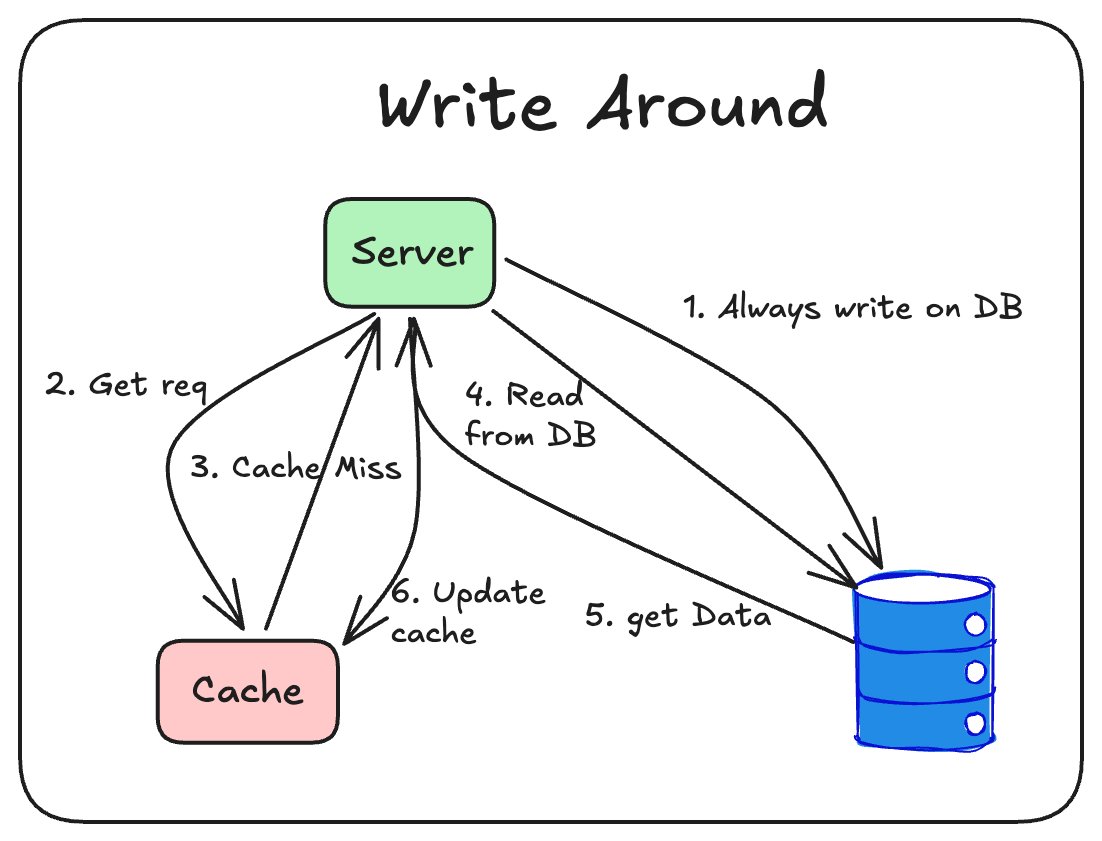
In this strategy, every write happens on the DB; the server updates the cache whenever there is a Cache Miss.
46. Caching Strategies - Write Back
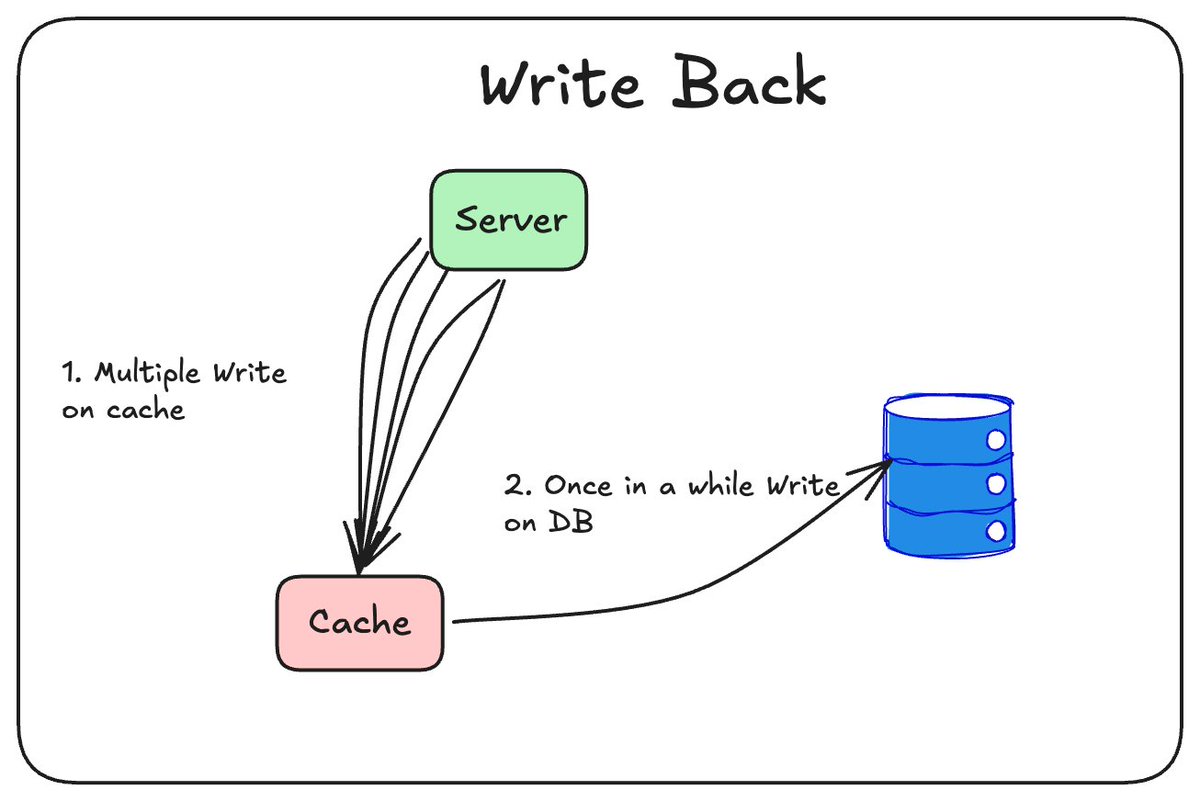
In this strategy, every write happens in the cache. Periodically, the cache updates the DB with all the operations.
47. Idempotency
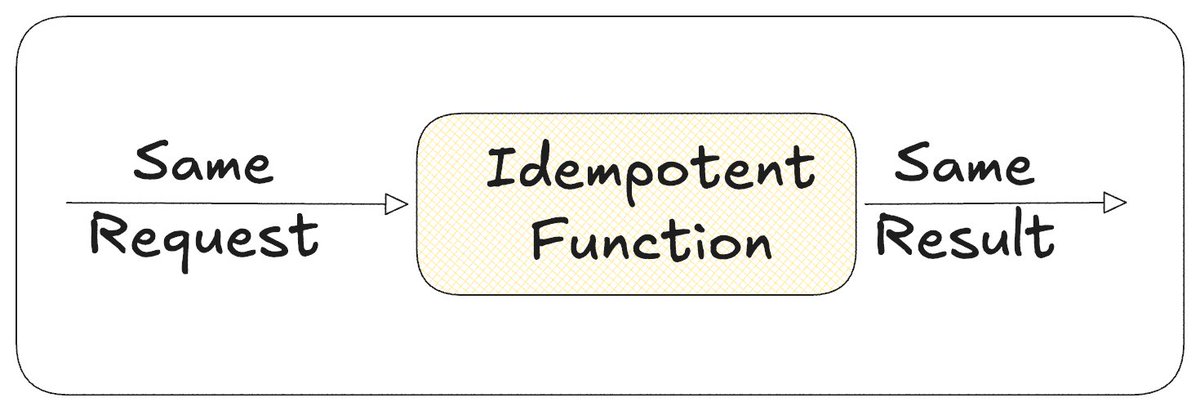
Idempotency means performing the same operation multiple times produces the same result as doing it once. This matters a lot in distributed systems, where retries happen constantly due to network failures, timeouts, or duplicate messages. An operation is idempotent if performing it repeatedly produces the same result. GET, PUT, and DELETE are naturally idempotent, but POST usually isn't, since it creates something new on every call.
Example: A payment request times out before the response reaches the client. The client retries, assuming it failed, but the server had already processed the first one. Without idempotency, the user gets charged twice.
In distributed system architecture with multiple Consumers and Providers, Idempotency is critical because a producer can deliver the same event multiple times.
48. Idempotency Key

An idempotency key is a unique value the client generates and sends with a request, letting the server recognize retries of the same operation. The server stores the keys it has already processed, so if the same key arrives again, it returns the original result instead of repeating the action. This is what actually makes operations like POST safe to retry.
49. Deduplication
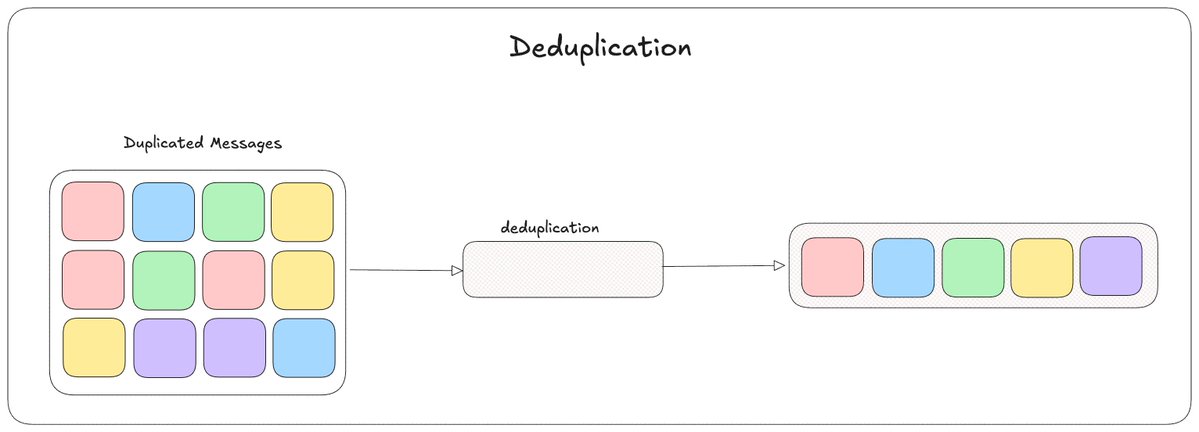
Deduplication detects and discards repeated copies of the same message or event, so it is processed only once. This matters in systems like message queues and event streams, which often guarantee at least once delivery, meaning the same message can arrive more than once. A common approach is tracking a unique message ID and skipping any message whose ID has already been seen.
For example: a payment event gets published to a queue, but a network blip causes it to be delivered twice. The consumer checks the message ID against what it has already processed, recognizes the duplicate, and skips it instead of processing the payment again.
Deduplication and idempotency solve a similar problem from different ends. Deduplication happens on the sender or infrastructure side, detecting that a message is a repeat and discarding it before processing. Idempotency happens on the receiver's logic itself, designed so that even if a duplicate slips through and gets processed, the result stays the same. Systems often use both together, deduplication to catch most repeats early, idempotency as a safety net for anything that gets through anyway.
50. Distributed Systems
A Distributed System is a collection of independent machines that work together, appearing to the user as a single system, even though the work is actually spread across many computers. The moment you add a second server, a replica, or a separate database, you have a distributed system, whether you planned it that way or not.
Why Distributed Systems?
A single machine will have storage limits, compute, and traffic handling limits. A Distributed Systems architecture removes that limit. Your app can now scale and will not fail even if a single server is down.
Challenges in Distributed Systems:
51. Consistent Hashing
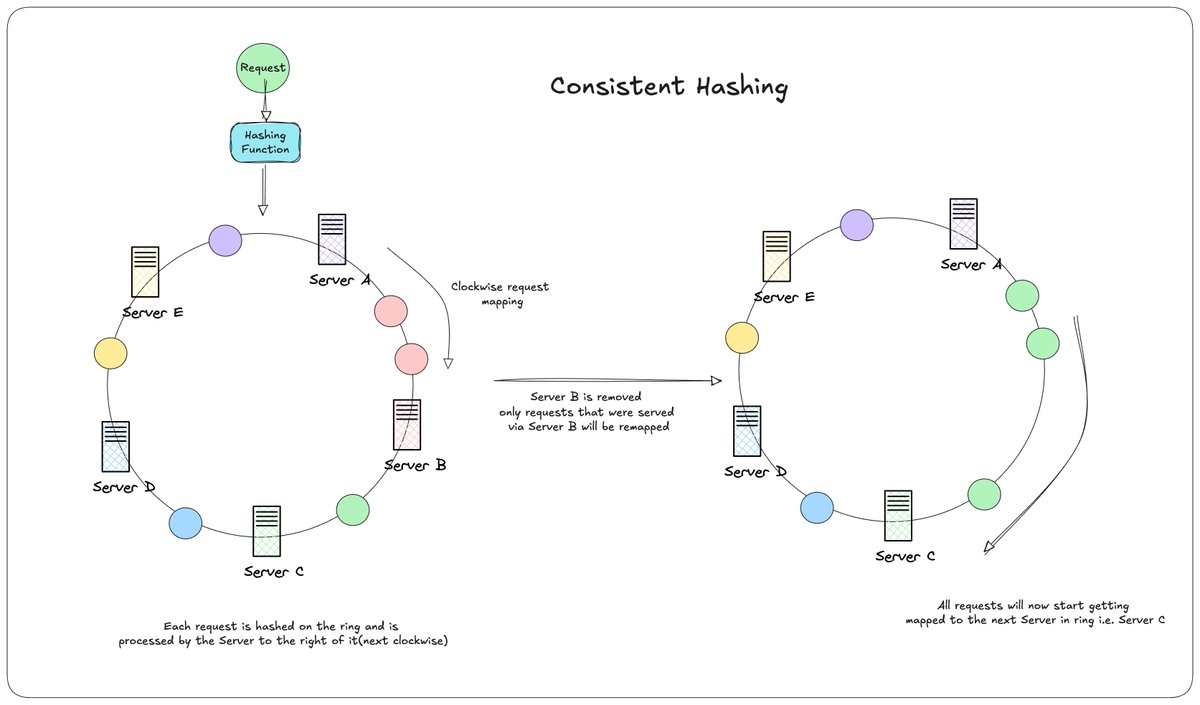
In Distributed Systems, a common way to decide which server will handle a request is consistent hashing.
A simple approach is hash(requestKey) % numberOfServers. This works until the number of servers changes.
5 servers, hash(request) % 5
Remove one server; now it's hash(request) % 4
Almost every request now maps to a different server than before, since the modulo has changed. Nearly all requests get reassigned, just because one server was removed.
How Consistent Hashing solves this?
Servers and requests are both placed on a ring, using a hashing function. Each request is hashed onto a position on this ring and gets processed by the server to its right, the next one clockwise.
Request comes in -> Hashing Function -> lands on a position on the ring. That position → mapped clockwise to the nearest server
When a server is removed:
Only the requests that were being served by that server get remapped to the next server clockwise. Every other server keeps handling exactly the requests it already was.
Server B is removed
Requests that mapped to Server B -> now map to Server C, the next one clockwise
Server A, D, E -> completely unaffected
The same theory applies to database sharding, where shards sit on the ring instead of servers, and only the data between a removed shard and its neighbor needs to move.
52. Vector Database
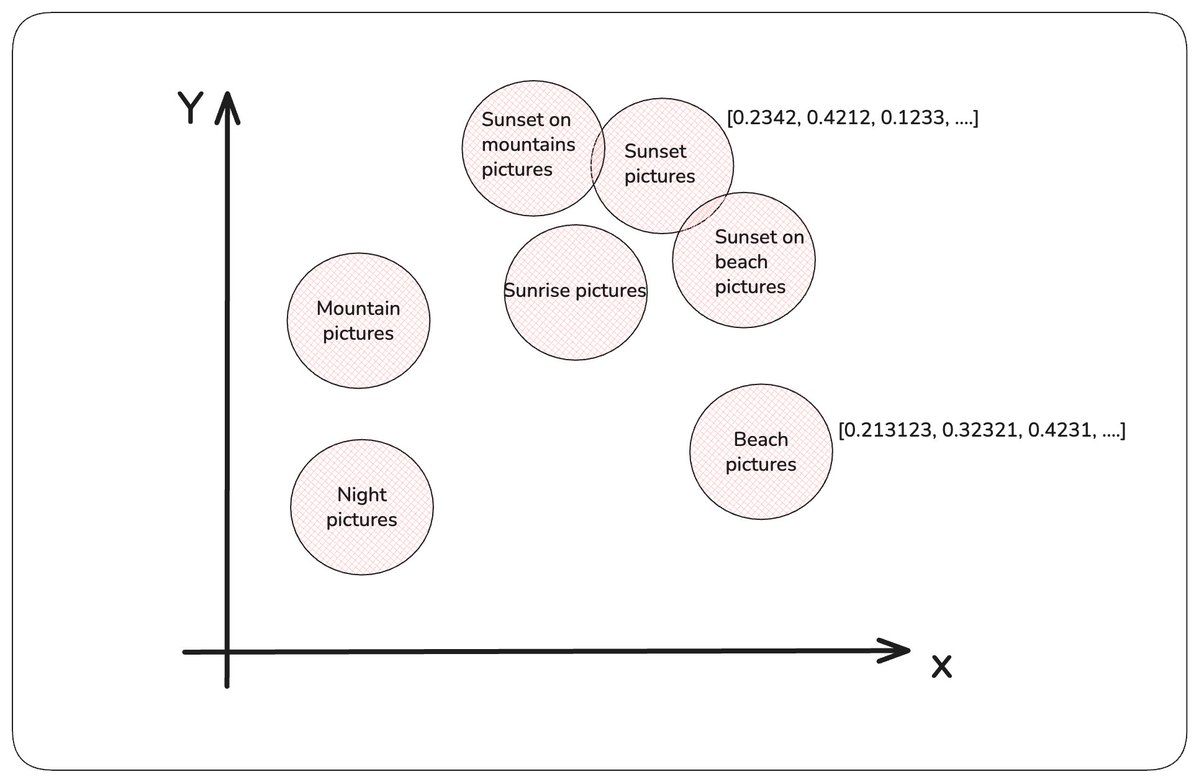
Traditional databases find exact matches. A SQL query like WHERE name = 'Anurag' either matches or it doesn't. But what if you want to find things that are similar in meaning, not identical in value? Something like searching "mountain pictures". A traditional database can't do this. A vector database can.
A Vector database is built to store and search data as vectors, which are lists of numbers representing the meaning of that data, generated by an AI model.
"mountain pictures" ->  [0.12, -0.45, 0.88, ...]
"sunset mountain pictures" -> [0.15, -0.42, 0.91, ...]
Similar meanings end up as similar vectors, close together in this numerical space. The vectors are called as embeddings and are generated by passing texts, images and other tdata through an embedding model.
Common usecases:
53. Rate limiting
Rate limiting is a technique used to control the number of requests a client can send to a server within a given time period. Its primary goal is to protect services from abuse and ensure fair usage.
Imagine you're building an AI API. Generating a response is expensive. Without rate limiting, a malicious client could send thousands of requests per second, resulting in:
Rate limiting solves this by restricting the number of requests a client can make.
For example: GET /api/chat
Limit: 100 requests/minute.
If a client exceeds the limit, the server responds with: HTTP/1.1 429 Too Many Requests.
Rate limiting can be applied:
There are several algorithms used to implement rate limiting:
54. Rate limiting algorithm: Fixed Window
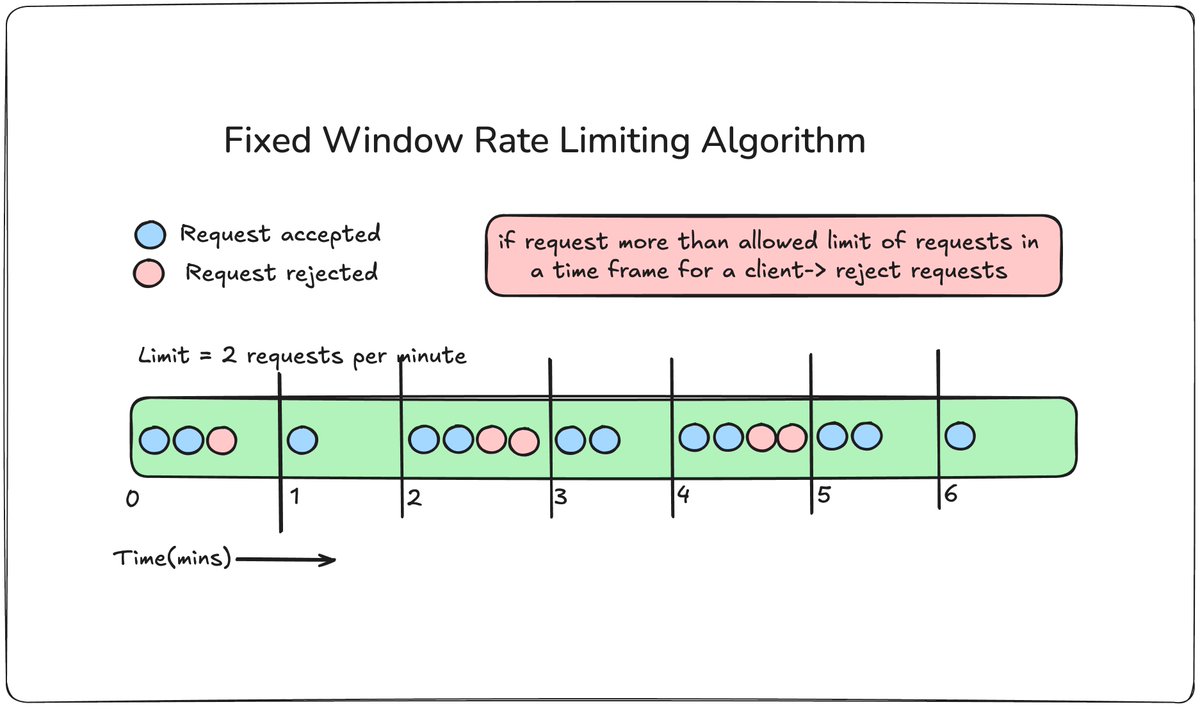
The timeline is divided into fixed time windows (e.g., 1-minute blocks from 12:00 to 12:01, 12:01 to 12:02). A simple counter tracks the requests within that window. If the limit is 100 requests per minute, the counter resets to 0 at the start of every new minute.
Key Takeaways
55. Rate limiting algorithm: Sliding Window
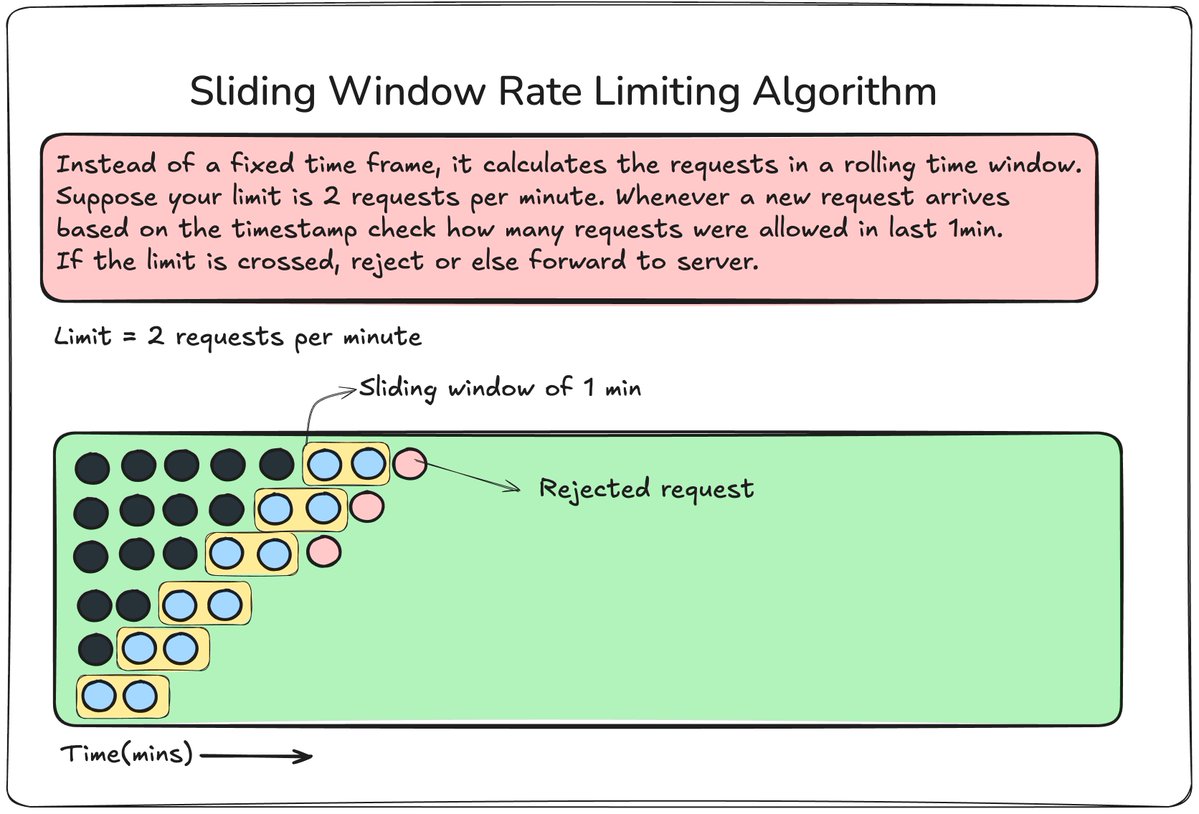
In this algorithm, instead of a fixed window, we store the timestamp of every request and always check the last N seconds.
Key Takeaways
56. Rate limiting algorithm: Token Bucket
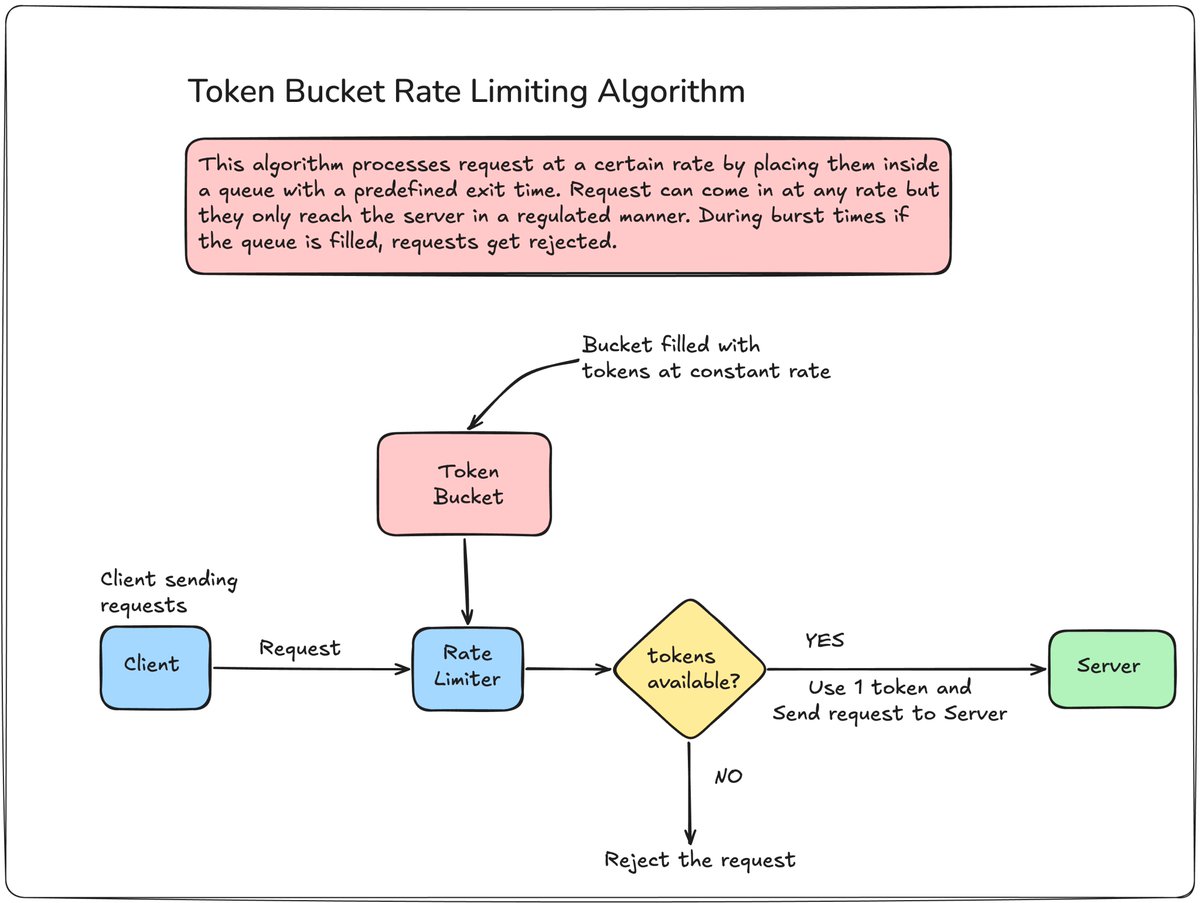
Clients receive tokens at a fixed rate. Every request consumes one token. The bucket is filled with tokens at a fixed rate. Allows short bursts of traffic while still enforcing an average request rate.
Key Takeaways
57. Rate limiting algorithm: Leaky Window

Requests are sent to a queue that leaks requests at a constant rate. No matter the frequency of requests from the clients, the server always receives requests at a fixed rate.
Key Takeaways
58. Domain Name System
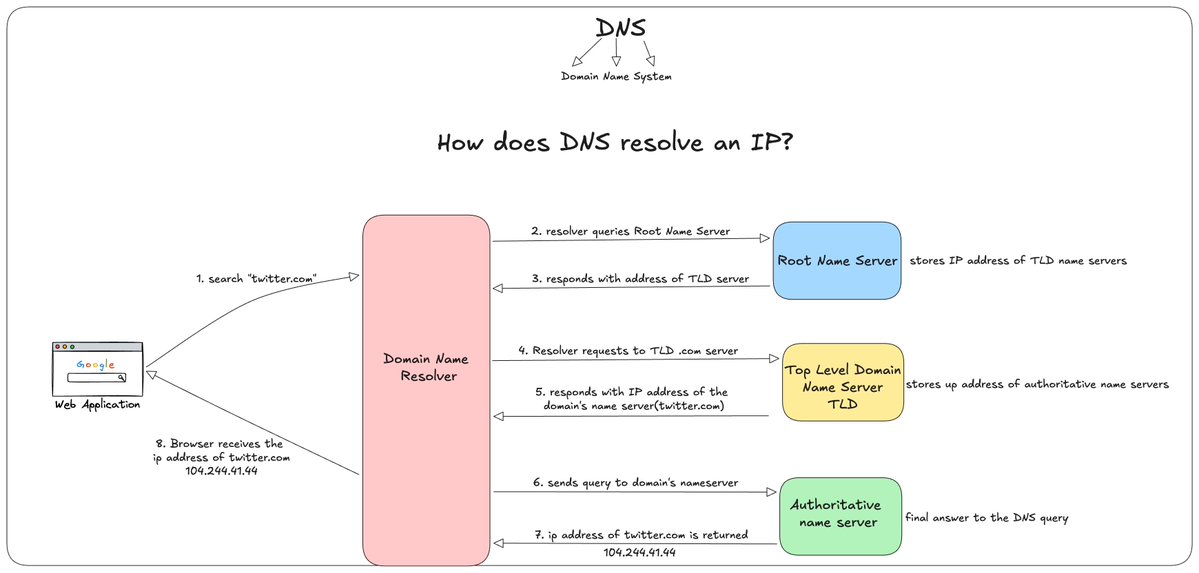
Computers talk to each other using IP addresses and not names. For example, twitter.com is understandable to humans but not computers. Computers understand 143.250.183.46. This number is called an IP address.
Domain Name System is a distributed directory that maps human-readable domain names to IP addresses.
twitter.com → 142.250.183.46
How a lookup process takes place
Common DNS Record types
A record: maps a domain to an IPv4 address
AAAA Record: maps a domain to an IPv6 address
CNAME: maps a domain to another domain name
MX record: Specifies mail servers for that domain.
59. Server-Sent Events (SSEs)

Server-Sent Events is a way for a server to push a continuous stream of updates to the client over a single, long-lived HTTP connection. The client opens the connection once, and the server keeps sending events whenever it has something new.
Client -> Opens connection with the server
Server -> Keeps connection open and sends events as they happen
What happens under the hood?
Server-Sent Events use the HTTP protocol just like WebSockets. The server sets the response content type to text/event-stream and keeps the connection open, writing new events as plain text, formatted in a simple way the browser understands natively.
60. Circuit Breaker
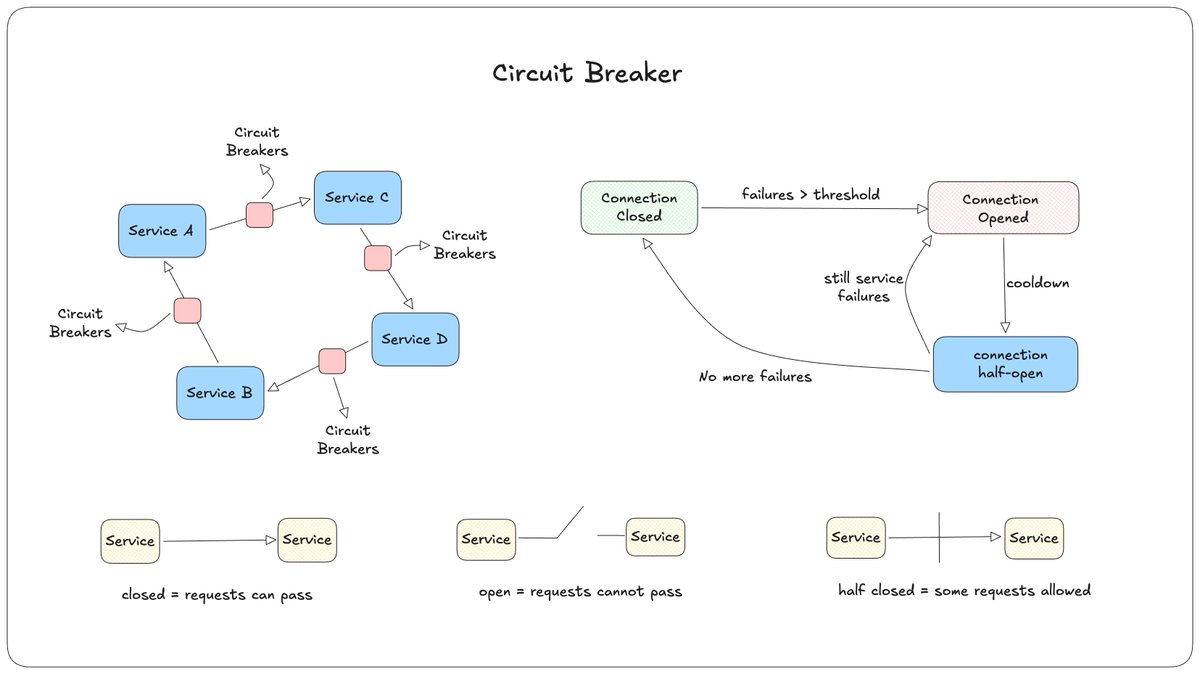
In microservices, one service calling a failing or slow service can cause problems to spread, since requests pile up waiting on something that's already dead.That
Order Service calls Payment Service.
Payment Service is down, every call times out after 30 seconds.
Order Service keeps calling it anyway, for every incoming request.
Order Service slows down too, even though the actual problem is somewhere else.
How Circuit Breaker solves this
A Circuit Breaker is a wrapper around a service call that tracks failures. Once failures cross a threshold, it stops calling that service entirely for a while, and fails fast instead.
Closed: Requests pass through normally, failures are counted.
Open: Errors > threshold, too many failures hence all requests are blocked.
Half Open: After a cooldown period(after opening the circuit), a few requests are passed to check if the service is recovered.
Here's how a usual flow works
Closed -> failures cross a threhold -> Opened -> cooldown period passes -> Half open -> check if service is back healhty -> if Not -> Open again -> If Yes -> Closed
That's it with this part and we now have completed all 3 parts of System Design Essentials. I have covered all the building blocks needed to learn about System Design. I hope this has helped you. If you feel that I have missed anything, please add it in the comments. I will create another part for this series. That's all for now! Happy coding!