KV, Prefix, Prompt and Semantic Caching in LLMs, clearly explained

Everything you need to understand where your input tokens are being recomputed and what to do about it. It covers the four cache layers from first principles, their trade-offs, what happens when they interact, and the five most common problems that inhibit cache reuse.

Four things in an LLM stack store four different objects, and all of them get called caching.

The first three are exact-match and correctness-neutral, so a miss costs you money and latency. The fourth is fuzzy-match, and it will hand you a wrong answer with a 200.
So today, let’s go through all four, what each one stores, and what quietly breaks it.
Everything here runs on one machine, CPU included, with a 360M parameter model. There is also one Anthropic API example and one small semantic cache built on sentence-transformers. Where a mechanism only exists inside a serving engine, we walk the logic in pseudocode instead of pretending it is reproducible on a laptop.
Also, the cache API changed shape in transformers v5, so the snippets below assume v5 or later. On v4, the equivalents are DynamicCache() with no config argument and torch_dtype= instead of dtype=.
pip install "transformers>=5.0" torch

# only for the quantized cache example
pip install optimum-quanto

# only for the semantic cache example
pip install sentence-transformers

# only for the prompt caching example
pip install anthropic
1) The KV cache
During prefill, the model computes a key and value vector for every prompt token at every layer and stores them.
Decoding then attends over those stored vectors and appends one new pair per generated token, instead of recomputing the whole sequence each step.

Queries don’t get cached, and the reason is causal masking. A token’s query vector is used once, at the step that token is processed, and never read again. Its key and value are read by every token that comes after it, so those are the two most important vectors to save.
The video below depicts LLM inference with and without KV caching:
While this reduces the computation on each token, you have to load the entire cache from HBM on every single step, so decode is no longer compute-bound but rather becomes memory bandwidth-bound.
Attention kernels finish faster than the cache can be streamed in, and the GPU spends most of a decode step waiting on memory.

KV cache growth with each token
The `transformers` library exposes the cache as a first-class object, so you can hold it, inspect it, and pass it back in.
Here is a minimal code demo of it:
import torch
from transformers import AutoTokenizer, AutoModelForCausalLM, DynamicCache

model_id = "HuggingFaceTB/SmolLM2-360M-Instruct"
tokenizer = AutoTokenizer.from_pretrained(model_id)
model = AutoModelForCausalLM.from_pretrained(
    model_id, dtype=torch.bfloat16, device_map="auto"
)

inputs = tokenizer("The capital of France is", return_tensors="pt")
inputs = inputs.to(model.device)

past_key_values = DynamicCache(config=model.config)

out = model.generate(
    **inputs,
    do_sample=False,
    max_new_tokens=20,
    past_key_values=past_key_values,
)

>>> print(tokenizer.decode(out[0], skip_special_tokens=True))
"""The capital of France is Paris. It is the largest city in
France and the second-largest city in the European Union."""

>>> print("prompt tokens: ", inputs["input_ids"].shape[1])
"prompt tokens: 5"

>>> print("total tokens: ", out.shape[1])
"total tokens:  25"

>>> print("cache length: ", past_key_values.get_seq_length())
"cache length:  24"
Normally, you invoke the `generate` method and the cache is created and destroyed internally, invisible to you. Here we construct a DynamicCache ourselves and hand it in, which means we still hold a reference to it after generation finishes.
`get_seq_length()` then reports how many token positions the cache holds. When you run this, the output contains the prompt length plus the tokens generated, minus one.
The final token's key and value are computed but never attended over by anything.
This code shows the cache holds one entry per token seen, and it grows by exactly one entry per decode step.
DynamicCache is used as the default because it grows as generation proceeds rather than pre-allocating, so short requests don't reserve memory they will never use.

The cache decides how many requests can fit on a GPU. Its size is fixed by the model shape and grows linearly with token count, since every layer holds a key and value tensor for every KV head.
For a 70B model at BF16, a single 128K context holds around 40 GB of cache, comparable to the entire model at 4-bit weights.
These are some ways to reduce this. For instance, Grouped-query attention shares one key and value head across a group of query heads, which shrinks the cache and raises FLOPs per byte of data loaded.

Multi-head latent attention in the DeepSeek line compresses the whole thing into a latent vector.
Cache quantization trades a little numerical accuracy for roughly double the capacity, and transformers implements it:
# requires: pip install optimum-quanto
out = model.generate(
    **inputs,
    do_sample=False,
    max_new_tokens=20,
    cache_implementation="quantized",
    cache_config={"nbits": 4, "backend": "quanto"},
)
print(tokenizer.decode(out[0], skip_special_tokens=True))
Two arguments replace the default cache with a quantized one.
The KV values are stored at reduced precision, which reduces memory at the cost of quantizing and dequantizing on every access.
The backend also requires the group size to divide the model's head dimension evenly, so an unusual architecture can reject the config outright.
On short contexts, that overhead can make things slower rather than faster, so it is best used when running low on memory.
The cache is freed with the request
Everything above happens inside one call. The engine frees those blocks when the request finishes, so a 20-turn chat prefills turns 1 through 19 again on turn 20, at full cost.
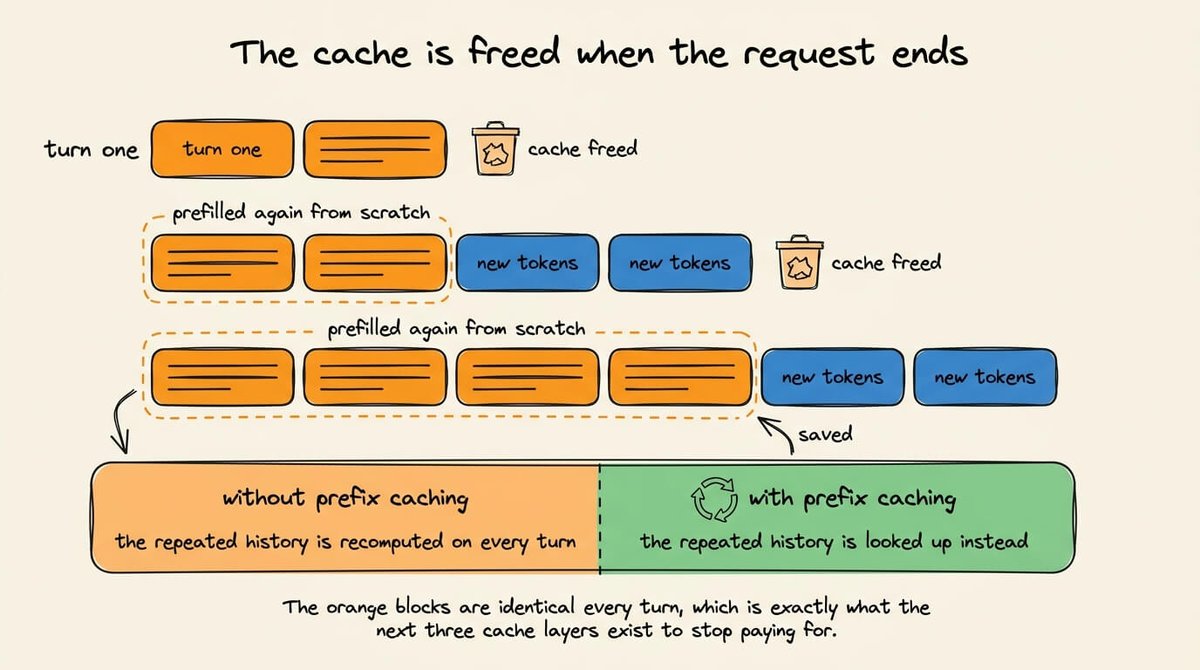
You can see the alternative by keeping the cache alive yourself across turns.
import torch
from transformers import AutoTokenizer, AutoModelForCausalLM, DynamicCache

model_id = "HuggingFaceTB/SmolLM2-360M-Instruct"
tokenizer = AutoTokenizer.from_pretrained(model_id)
model = AutoModelForCausalLM.from_pretrained(
    model_id, dtype=torch.bfloat16, device_map="auto"
)

past_key_values = DynamicCache(config=model.config)
messages = []

questions = ["What is the capital of France?", "And its population?"]

for prompt in questions:
    # Add to the history
    messages.append({"role": "user", "content": prompt})

   # Tokenize
    inputs = tokenizer.apply_chat_template(
        messages,
        add_generation_prompt=True,
        return_tensors="pt", return_dict=True
    ).to(model.device)

    # Generate
    input_length = inputs["input_ids"].shape[1]
    outputs = model.generate(
         **inputs, do_sample=False,
         max_new_tokens=64,
         past_key_values=past_key_values
    )

    # decode
    completion = tokenizer.decode(outputs[0, input_length:], skip_special_tokens=True)

    # Append to message history
    messages.append({"role": "assistant", "content": completion})
    print(f"turn tokens in: {input_length} | cache now: {past_key_values.get_seq_length()}")

# Output:
"turn tokens in: 42 | cache now: 55"
"turn tokens in: 71 | cache now: 92"Reuse only works because turn two's token sequence starts with turn one's token sequence, absolutely identical, bit by bit. If you edit anything earlier in the history, the cache becomes invalid.
In this code demo, the cache belongs to one Python variable in one process. In a serving engine, it belongs to a shared pool that thousands of requests look up against. Let's learn about that next.
2) Prefix caching
The shared pool discussed above comes from one change in behavior.
When a request finishes, the engine keeps its KV blocks in memory instead of freeing them, and leaves them indexed so a later request can find them. That is prefix caching.
The index has to enforce the same rule covered in the chat loop, where reuse is only valid if the earlier tokens are identical.
vLLM does that by storing the cache of 16 tokens by default and identifying each block by a hash over the parent block's hash plus the token IDs inside it.

Chaining the parent hash into the child turns a block lookup into a prefix lookup, since a block only matches if everything before it matched too.
The scheduler iterates over the incoming blocks in order and stops at the first miss. A hit increments that block’s reference count, which also pins it against eviction while a request is using it.
Everything from the miss onward gets fresh allocation and a fresh prefill.
The lookup code
vLLM runs this inside its scheduler, wrapped in the memory management that owns the actual tensors.
The code below keeps only the two parts that decide reuse, i.e., the function that turns a token sequence into block keys and the function that walks those keys to work out how much of the prefix it can skip prefilling.
BLOCK_SIZE = 16

def block_hashes(token_ids, salt=None):
    """Chain-hash a token sequence into per-block keys."""

    hashes, parent = [], hash(salt)

    # Only complete blocks are hashed. A partial tail block is skipped.
    for start in range(0, len(token_ids) - BLOCK_SIZE + 1, BLOCK_SIZE):
        block = tuple(token_ids[start : start + BLOCK_SIZE])
        parent = hash((parent, block))
        hashes.append(parent)

    return hashes

def schedule(token_ids, cache):

    """Return how many tokens are reusable, and allocate the rest."""

    matched_blocks = 0

    for h in block_hashes(token_ids):
        if h not in cache:
            break                      # first miss ends all reuse
        cache[h].ref_count += 1        # pin it against eviction
        matched_blocks += 1

    reused_tokens = matched_blocks * BLOCK_SIZE
    to_prefill = token_ids[reused_tokens:]

    return reused_tokens, to_prefill
There's one more important thing in the code we just discussed:
BLOCK_SIZE = 16

def block_hashes(token_ids, salt=None):
    """Chain-hash a token sequence into per-block keys."""

    hashes, parent = [], hash(salt)

    # Only complete blocks are hashed. A partial tail block is skipped.
    for start in range(0, len(token_ids) - BLOCK_SIZE + 1, BLOCK_SIZE):
        block = tuple(token_ids[start : start + BLOCK_SIZE])
        parent = hash((parent, block))
        hashes.append(parent)

    return hashes
Notice the `salt` argument in the function above.
When two requests send identical text, they produce identical block keys, so they end up pointing at the same physical KV blocks in GPU memory. There is one copy of those tensors, and both requests read it.
That is the behavior you want when both requests come from the same application.
But it may need a decision when they come from different customers. So passing a per-tenant value as the salt changes the first parent hash, so identical text now produces different keys for each tenant and their requests never land on the same blocks.
This way, every tenant gets its own copy, which costs memory and hit rate but provides separation.
Implementation in transformers
transformers lets you prefill a prompt once and reuse the resulting cache across several different continuations.
import copy
import torch
from transformers import AutoModelForCausalLM, AutoTokenizer, StaticCache

model_id = "HuggingFaceTB/SmolLM2-360M-Instruct"
tokenizer = AutoTokenizer.from_pretrained(model_id)
model = AutoModelForCausalLM.from_pretrained(
    model_id, dtype=torch.bfloat16, device_map="auto"
)

SHARED_PREFIX = """You are a careful assistant.
                   Answer in one short sentence."""

prompt_cache = StaticCache(config=model.config, max_cache_len=1024)

prefix_inputs = tokenizer(SHARED_PREFIX, return_tensors="pt")
prefix_inputs = prefix_inputs.to(model.device)

# Prefill the shared prefix exactly once. No token is sampled here.
with torch.no_grad():
    prompt_cache = model(**prefix_inputs, past_key_values=prompt_cache)
    prompt_cache = prompt_cache.past_key_values

questions = ["What is the capital of France?", "Name one ocean."]

for question in questions:
    inputs = tokenizer(SHARED_PREFIX + question, return_tensors="pt")
    inputs = inputs.to(model.device)

    # each request gets its own copy
    past_key_values = copy.deepcopy(prompt_cache)

    outputs = model.generate(
        **inputs, past_key_values=past_key_values, do_sample=False
    )
print(tokenizer.decode(outputs[0], skip_special_tokens=True))The impact of eviction on hit rate
As discussed above, only complete blocks get indexed, so a trailing partial block is recomputed every time.
This means the block size should be tuned appropriately

Eviction reduces hit rates, as expected.
The cache and the running batch draw from the same GPU memory pool, so a larger cache leads to fewer concurrent sequences, and under pressure vLLM drops unreferenced blocks by least recent use.
Mixed traffic makes this worse, because long shared prefixes occupy the most blocks and are the ones whose loss actually hurts.
Before you turn this on, you should know two things
There’s a third problem, which is workload dependent, and it impacts RAG the most.
A RAG prompt includes a system instruction, then retrieved chunks, then the query, and the chunks change per request and change order between requests. Two requests that retrieve the same documents in a different order share nothing at all under the chain hash.

Prefilling each chunk on its own and stitching the caches together does not work.
The stitched tensors carry the wrong positional encoding. No chunk ever attended to any other chunk. And every chunk contributes its own attention sink at what the model thinks is position zero. Making it work needs partial recomputation at the boundaries rather than plain concatenation.

Btw, the solution already exists in open source.
LMCache (open-source) implements CacheBlend, wherein, instead of gluing the chunk caches end to end, it reuses them at any position and recomputes only a small subset of tokens, chosen by where the precomputed values deviate most from what full attention would have produced.

That subset restores the cross-chunk attention and fixes up the positional encoding, so the output holds at full-prefill quality.
This leads to an improvement in the time to first token by roughly two to three times compared to recomputing everything, with the recompute cost pipelined against fetching the cached chunks from slower storage.
It plugs into vLLM and reads the chunk boundaries out of your prompt, so retrieval traffic gets reused even when the retrieved documents arrive in a different order each time.

Here's the repo: https://github.com/LMCache/LMCache
3) Prompt caching
On a hosted model, you don’t get any block table or the eviction policy. Instead, you get a price sheet over the provider’s own prefix reuse, plus two knobs for control.
The cached object is still KV tensors, not your prompt text, and it still requires an exact prefix match on the fully rendered context.

The rendered context includes provider-side system content you never wrote, which is part of why the minimum lengths and the invalidation rules look arbitrary from the outside.
Here's a version of prompt caching demonstrated with code:
import anthropic

client = anthropic.Anthropic()   # reads ANTHROPIC_API_KEY from the environment

# Must clear the model's minimum cacheable length or nothing is cached at all.
LONG_INSTRUCTIONS = "You are a precise technical editor. " * 400

def ask(question: str):
    return client.messages.create(
        model="claude-sonnet-4-6",
        max_tokens=512,
        system=[
            {
                "type": "text",
                "text": LONG_INSTRUCTIONS,
                "cache_control": {"type": "ephemeral"},   # everything above is cacheable
            }
        ],
        messages=[{"role": "user", "content": question}],
    )

for question in ["Summarize section 3.", "Now rewrite it for a beginner."]:
    resp = ask(question)
    u = resp.usage
    print(
        f"write={u.cache_creation_input_tokens} "
        f"read={u.cache_read_input_tokens} "
        f"uncached={u.input_tokens}"
    )

# Output:
"write=2823  read=0     uncached=14"
"write=0     read=2823  uncached=17"
Only one line in that snippet touches the cache.
Where you specify `cache_control` decides which part of the request gets an entry written for it, and the usage counters tell you whether a later call read that entry back.
Intuitively (and as discussed above), if we move cache_control down onto the user message, the read counter will always be zero, because the marked block changes on every call.
The economics of prompt caching
Anthropic charges 1.25x the base input rate to write an entry and 0.1x to read it, with a higher write multiplier if you want it for a longer time. OpenAI applies the same two multipliers on its current models.
The premium cost is recovered in subsequent requests since anything reused inside the TTL will avoid any recomputation.
A read can only find an entry that some earlier request wrote, and writes happen only at a breakpoint you placed.

Each call checks your breakpoint, and on a miss it walks backward through a limited number of blocks looking for an older write.
Anthropic caps that at 20 blocks, so adding more than 20 blocks of conversation between two calls pushes the last write out of range and the hits stop.
4) Semantic caching
The three techniques above save prefill work and still run the model.
A semantic cache embeds the incoming prompt, runs a nearest-neighbor search over stored prompts, and returns a stored response outright when the similarity exceeds a threshold.

That’s why it saves output tokens as well as input. It’s also why every request must bear an embedding round trip, including every miss.
Here's a working semantic cache demo in a few lines of code:
# requires: pip install sentence-transformers
import numpy as np
from sentence_transformers import SentenceTransformer

encoder = SentenceTransformer("all-MiniLM-L6-v2")

class SemanticCache:
    def __init__(self, threshold=0.95):
        self.threshold = threshold
        self.vectors = np.empty((0, encoder.get_sentence_embedding_dimension()))
        self.prompts, self.responses = [], []

    def _embed(self, text):
        return encoder.encode([text], normalize_embeddings=True)[0]

    def lookup(self, prompt):
        vec = self._embed(prompt)
        if len(self.prompts) == 0:
            return None, 0.0, vec
        scores = self.vectors @ vec           # cosine sim, vectors are unit length
        best = int(np.argmax(scores))
        if scores[best] >= self.threshold:
            return self.responses[best], float(scores[best]), vec
        return None, float(scores[best]), vec

    def store(self, prompt, response, vec):
        self.vectors = np.vstack([self.vectors, vec])
        self.prompts.append(prompt)
        self.responses.append(response)

cache = SemanticCache(threshold=0.95)

def answer(prompt, call_model):
    hit, score, vec = cache.lookup(prompt)
    if hit is not None:
        return hit, f"HIT  (score {score:.3f})"
    response = call_model(prompt)             # the expensive path
    cache.store(prompt, response, vec)
    return response, f"MISS (best {score:.3f})"

# Stand in for the model so this runs without an API key.
fake_model = lambda p: f"<answer for {p!r}>"

for q in ["How do I reset my password?",
          "How can I reset my password?",
          "Is the API rate limited?"]:
    _, status = answer(q, fake_model)
    print(f"{status}  {q}")


# Output:
"MISS (best 0.000)  How do I reset my password?"
"HIT  (score 0.961)  How can I reset my password?"
"MISS (best 0.112)  Is the API rate limited?"
Every method in the class above maps onto a decision you have to make in production:
The code below depicts the last point:
pairs = [
    ("How do I reset my password?", "How can I reset my password?"),
    ("Is the API rate limited?",     "Is the API not rate limited?"),
    ("Refund policy for annual plans", "Refund policy for monthly plans"),
]

for a, b in pairs:
    va, vb = encoder.encode([a, b], normalize_embeddings=True)
    print(f"{float(va @ vb):.3f}   {a!r}  vs  {b!r}")
This is the output we get:
0.961   'How do I reset my password?'  vs  'How can I reset my password?'
0.952   'Is the API rate limited?'  vs  'Is the API not rate limited?'
0.887 'Refund policy for annual plans' vs 'Refund policy for monthly plans'Despite some mismatches, the scores for all three are close together. The paraphrase and the negation are separated by less than a hundredth of a point, which is far too thin a margin to hold across real traffic.
This is not a fully reliable technique per se since some failures (as demonstrated above) can bypass any threshold value, because they come from what embeddings represent.
Recap of all four techniques

Three of the four techniques discussed above are correctness-neutral, so their misses show up in cost and latency and nowhere else.
The semantic cache works in a different way, so hit rate is not the right metric to report here.
There is a fifth, lesser-used layer as well. It's exact-match response cache that returns a stored answer when the request is byte identical. It saves input and output like a semantic cache and carries no false positive risk, because it does no similarity matching at all. You just measure your byte-identical repeat rate before reaching for embeddings. There are problems, of course, as you can probably identify by now. Post them in replies.
Takeaways for production
Every technique has some failure point that you should note before using them in production:


To determine exactly where two prompts stop matching, compare their token IDs directly rather than the text you logged. Here's a demonstration:
messages_turn_1 = [{"role": "user", "content": "What is the capital of France?"}]
messages_turn_2 = [{"role": "system", "content": "Today is Tuesday."},
                   {"role": "user", "content": "What is the capital of France?"}]

# tokenize=True is the default and returns a plain list of token ids
a = tokenizer.apply_chat_template(messages_turn_1)
b = tokenizer.apply_chat_template(messages_turn_2)

shared = 0
for x, y in zip(a, b):
    if x != y:
        break
    shared += 1

print(f"shared prefix: {shared} tokens of {len(a)} and {len(b)}")
print(f"first divergence at index {shared}: {a[shared:shared+8]} vs {b[shared:shared+8]}")

# Output:
"""
shared prefix: 3 tokens of 35 and 26
diverges at index 3
  turn 1: [2683, 418, 253, 11173, 9042, 14260] You are a helpful AI assistant
  turn 2: [11814, 314, 27758, 30, 2, 198] Today is Tuesday.<|im_end|>
"""
Two prompts that look identical in your logs can differ by a beginning-of-sequence (BOS) token, a trailing newline, or a re-serialized tool schema.
Comparing token IDs instead of rendered text finds the exact index where reuse stops, and decoding the few IDs on either side usually finds the exact text.
The run above shows a common one.
Turn one specified no system message, so the chat template filled in the model's default, and the two prompts looked different at index 3, so no reuse was possible.
The first three layers cover one idea, applied at three scopes.
The semantic cache works differently. It stores response text keyed by embedding similarity, so if there's a hit, it skips the model entirely and saves output tokens along with input tokens. A hit can also be wrong, and it returns with a normal success status when it is.
Over to you: which of these four layers has cost you the most debugging time?
That's a wrap!
If you enjoyed this tutorial:
Find me → @_avichawla
Every day, I share tutorials and insights on DS, ML, LLMs, and RAGs.