How to get your iOS app approved in under 48hrs.

My initial reviews take 48 hrs.
Follow ups all within a day.

This is everything I know.
1: App Best Practices.
A few essentials to getting any app approved.
• Of course you can achieve good results with Expo.
• Surface area for excellence is greater natively.
• Better automatic adaptation across iPhone/iPad sizes.
• Native keyboard, sheets, navigation and safe-area.
• Better Dynamic Type and accessibility defaults.
• Fewer strange spacing or touch issues.
• Easier access: widgets, Live Activities and Apple APIs.
• Codex / OpenAI models really understand iOS.
• There's now built in live iOS dev tools for Codex.
• This could be a whole article: feed your agent the docs.
• Add report & blocking functionalities.
• Contact support button / function.
• Have some system to moderate UGC.
• There's a free OpenAI API for this.
• Payments, features etc.
Reviews are purposefully subjective.
Keep this in mind when reading this chapter.
2. What not to do.
If you want your app approved do not do ANY of these.
• Making a remote paywall non-compliant after review.
• Requesting review during onboarding (now patched 🥀).
• Fake social proof (#1 on the app store).
• Controversial claims (Fixes 100% of xyz)
Contrary to the advice on here, this is allowed. However, it's very subjective from the reviewer. Don't risk your initial review being triaged to the 2nd pile. Submit it in a later review.
This is your "manage subscription" button within the app. Typically you'll deep link to the app store subscriptions page, but you can show a questionnaire and offer a cheaper plan. This is less risky than the transaction abandon, but still submit it in a later review.
Take inspiration around general patterns, core ideas and positioning. But if you're app is a 1:1 copy, you will likely be rejected.
3. Help your Reviewer!
As mentioned: Reviews are subjective by design. It is ultimately a gamble as to whether you'll get someone lenient or very strict. But, you can do a lot to increase your surface area for luck.
A few things for a smooth review:
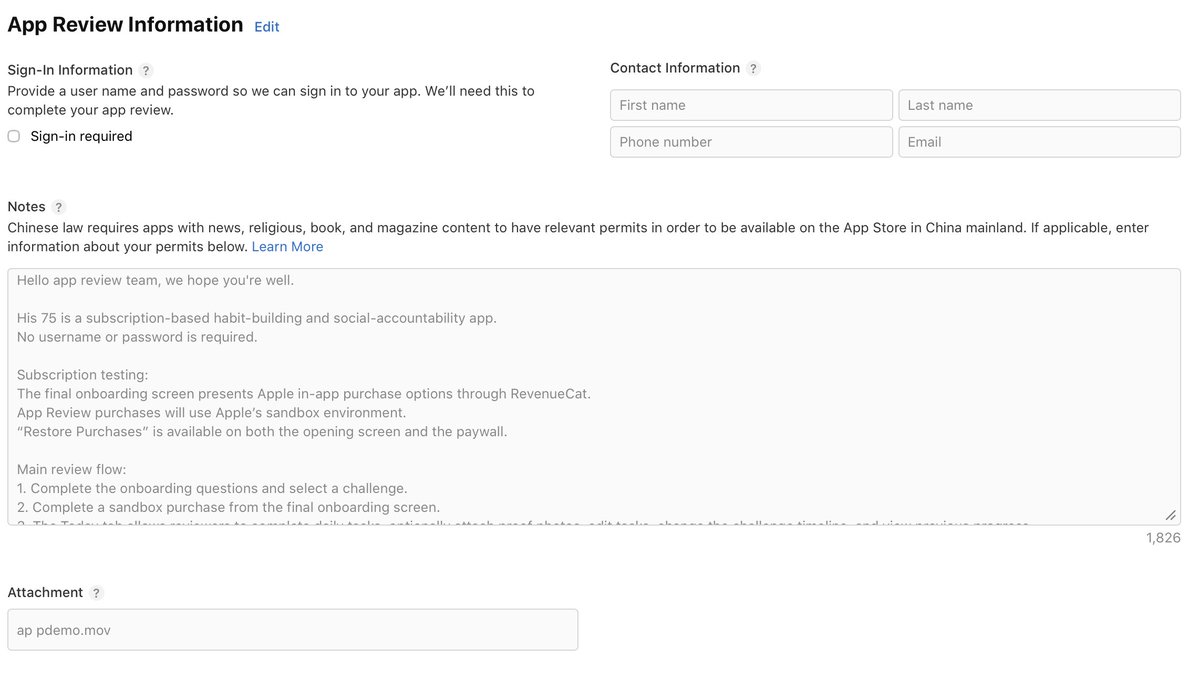
• On an initial review, use concise bullet points.
• I would not use AI, because it needs to understandable.
• Read it from a total beginner POV.
• These were my initial review notes for His 75.
Hello app review team, we hope you're well.

His 75 is a subscription-based habit-building and social-accountability app.
No username or password is required.

Subscription testing:
The final onboarding screen presents Apple in-app purchase options through RevenueCat.
App Review purchases will use Apple’s sandbox environment.
“Restore Purchases” is available on both the opening screen and the paywall.

Your main review flow:
1. Complete the onboarding questions and select a challenge.
2. Complete a sandbox purchase from the final onboarding screen.
3. The Today tab allows reviewers to complete daily tasks, optionally attach proof photos, edit tasks, change the challenge timeline, and view previous progress.
4. Calendar and progress controls are available from the "edit button" on the Today screen.

Social feature test:
1. Open the Friends tab.
2. Tap the add-person button.
3. Enter friend code, APPL 7500
4. Tap Search and add Alex. This dedicated reviewer account accepts immediately.
5. Alex will appear with a colored halo around the profile image.
6. Tap the profile icon to view today’s proof photos. Tap the left or right side of the screen to move between photos.

Photo handling:
Profile and proof photos are optional.
Existing photos are selected using Apple’s private system photo picker, which does not require broad photo-library access.
Camera permission is requested only if the reviewer explicitly selects “Take Photo.”
Before the first photo upload, the app explains that the selected image is uploaded to private storage and sent temporarily to OpenAI for automated safety moderation.
Proof photos are removed from active systems after 24 hours. The current profile photo remains until it is replaced or the account is deleted.

Account and safety controls:
Profile contains Manage Subscription, Restore Purchases, Support, Privacy Policy, Terms of Service, Delete Photos, and Delete Account.
Account and legal controls remain accessible even if a subscription expires.
The Friends screen includes Remove, Report, and Block actions with confirmation.
Blocking removes the friendship and prevents further visibility between those users.• This has insane ROI.
• Screen record a demo.
• Add text overlay explaining each section.
I'm not 100%, but signals I've seen lead me to believe initial app submissions are auto rejected if they don't contain review notes and an app demo.
Your goal: Make the review effortless and boring.
4. Fast Tracking a Review
First: you can request an expedited review for a few reasons.
It's not outlined in the criteria, but I believe if you're having a viral moment ahead of an intial app launch, it'd be legitimate to request an expedited review. But again, this isn't explicitly listed, so I can't say for sure.
You do not need to give a reason for expediting a review.
Second: You can request a call from apple.
Third: Back and forth rejections.
A common thing I see: app is rejected, you fix it, and then it's rejected again for ANOTHER reason. To avoid this, always ask for all the rejection reasons in one go. Requesting a call is the best way to get out of this loop if it's happening to you.
5. Scope Creep.
This is the BIGGEST mistake I see.
If you want a fast review (i.e submitting for shipaton), ship an mvp.
Initial reviews often take the longest.
Add features in later submissions.
The more features you have, the more complex the review.
This matters because reviews have tiers.
1. Straightforward review = first pile: done in 48hrs.
2. Complex issues / questions = escalation to senior specialist.
Unless you're shipping something with legitimate complexity (a banking app, health/biometric data, marketplace, etc) you should avoid the 2nd tier at all costs, because that's where the 14 day wait time happens.
6. Closing Thoughts
App review can feel random and unfair. Complaining is mostly useless. If you feel a review is wrong then challenge it, but do so in a constructive way citing guidelines and evidence. There is never a guarantee of success, a lot may depend on region, account age, and other variables we can only guess. But, if you follow everything here, you'll likely get approved in 48hrs.
In reviews, you should always be extremely clear and honest.
Apple only cares that the user is treated well; if your app misleads or confuses the user at any point you're likely to be rejected.
So, for the initial submission, play it safe.
For later updates, push. Apple wants us to find the line. Try a transaction abandon offer. Be bold, be imaginative, but ALWAYS do so in a CLEAR and HONEST way. Explain what you're doing in review notes. Give them a demo of the feature. Do not try and sneak anything past the review team.
if you're joining #shipaton you'll wanna read this
cc @RevenueCat 🤝