Building and launching an app changed my life I promise you can do...

Alex Finn@AlexFinn
114 views
Oct 04, 2025
~3 min read
Advertisement
1
Building and launching an app changed my life
I promise you can do the same thing, even with no programming experience at all
By far the best tool to do this right now is Claude Code
Here is your complete beginner's guide to building your first app with Claude Code: 🧵
I promise you can do the same thing, even with no programming experience at all
By far the best tool to do this right now is Claude Code
Here is your complete beginner's guide to building your first app with Claude Code: 🧵
2
Make sure to bookmark the post above to save it for later!👆
In this post we are going to cover:
• Choosing an idea
• Installing Claude Code
• Using Claude Code
• Testing and debugging
• CLAUDE rules
• Pro tips
Let's get it 👇
In this post we are going to cover:
• Choosing an idea
• Installing Claude Code
• Using Claude Code
• Testing and debugging
• CLAUDE rules
• Pro tips
Let's get it 👇
3
🔶Choosing an idea
Before we start building, we need to choose an idea to build
Pop open Grok or your favorite LLM and list all of your interests
Then ask for the top 10 challenges of those interests
Then ask for 10 ways you can solve those challenges with an app
Choose one
Before we start building, we need to choose an idea to build
Pop open Grok or your favorite LLM and list all of your interests
Then ask for the top 10 challenges of those interests
Then ask for 10 ways you can solve those challenges with an app
Choose one
4
🔶Installing Claude Code
Claude Code runs in your terminal. But it's even more powerful when you run it inside Cursor
Download and install Cursor
Then open a terminal in Cursor and use this command:
npm install -g
@anthropic
-ai/claude-code
Then type 'claude' and you're ready
Claude Code runs in your terminal. But it's even more powerful when you run it inside Cursor
Download and install Cursor
Then open a terminal in Cursor and use this command:
npm install -g
@anthropic
-ai/claude-code
Then type 'claude' and you're ready
5
🔶Building your app
Describe to Claude in plain english what you want to build (ask to have it built in NextJS)
Ask to build it out step by step using the smallest steps possible
That's the key to using AI to code, have it break everything down into small simple tasks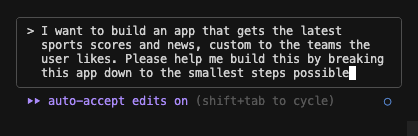
Describe to Claude in plain english what you want to build (ask to have it built in NextJS)
Ask to build it out step by step using the smallest steps possible
That's the key to using AI to code, have it break everything down into small simple tasks
6
🔶Testing and debugging
Open up another terminal in Cursor. Type npm run dev
This will run your app
After every step Claude builds, test it out. If you run into any bugs, copy and paste the entire error back into Claude Code.
Claude is great at taking errors and fixing them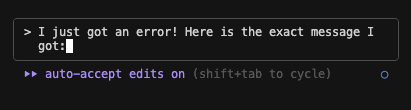
Open up another terminal in Cursor. Type npm run dev
This will run your app
After every step Claude builds, test it out. If you run into any bugs, copy and paste the entire error back into Claude Code.
Claude is great at taking errors and fixing them
7
🔶Have great CLAUDE rules
The CLAUDE .md file in your project has the rules for Claude
Having a great ruleset will make Claude perform even better
Create a CLAUDE .md file in the root of your project and paste in these rules:
1. First think through the problem, read the codebase for relevant files, and write a plan to tasks/todo.md.
2. The plan should have a list of todo items that you can check off as you complete them
3. Before you begin working, check in with me and I will verify the plan.
4. Then, begin working on the todo items, marking them as complete as you go.
5. Please every step of the way just give me a high level explanation of what changes you made
6. Make every task and code change you do as simple as possible. We want to avoid making any massive or complex changes. Every change should impact as little code as possible. Everything is about simplicity.
7. Finally, add a review section to the todo .md file with a summary of the changes you made and any other relevant information.
8. DO NOT BE LAZY. NEVER BE LAZY. IF THERE IS A BUG FIND THE ROOT CAUSE AND FIX IT. NO TEMPORARY FIXES. YOU ARE A SENIOR DEVELOPER. NEVER BE LAZY
The CLAUDE .md file in your project has the rules for Claude
Having a great ruleset will make Claude perform even better
Create a CLAUDE .md file in the root of your project and paste in these rules:
1. First think through the problem, read the codebase for relevant files, and write a plan to tasks/todo.md.
2. The plan should have a list of todo items that you can check off as you complete them
3. Before you begin working, check in with me and I will verify the plan.
4. Then, begin working on the todo items, marking them as complete as you go.
5. Please every step of the way just give me a high level explanation of what changes you made
6. Make every task and code change you do as simple as possible. We want to avoid making any massive or complex changes. Every change should impact as little code as possible. Everything is about simplicity.
7. Finally, add a review section to the todo .md file with a summary of the changes you made and any other relevant information.
8. DO NOT BE LAZY. NEVER BE LAZY. IF THERE IS A BUG FIND THE ROOT CAUSE AND FIX IT. NO TEMPORARY FIXES. YOU ARE A SENIOR DEVELOPER. NEVER BE LAZY
8
🔶Pro tips
You have the basics down of using Claude Code
Here are some other key things you should know:
• Commit to github every step of the way
• Don't doomscroll while Claude works. It will slow you down
• Use nextJS for front end, Supabase for database, Clerk for auth
• Pay attention to Claude Code news. They are constantly adding new features like sub agents
• Have your favorite LLM open in another window. Use it as your CEO. Whenever you have questions or need guidance ask the CEO.
• As long as your gut instinct is to ask the AI, you'll never run into issues. The AI can fix literally any issue you can think of
You have the basics down of using Claude Code
Here are some other key things you should know:
• Commit to github every step of the way
• Don't doomscroll while Claude works. It will slow you down
• Use nextJS for front end, Supabase for database, Clerk for auth
• Pay attention to Claude Code news. They are constantly adding new features like sub agents
• Have your favorite LLM open in another window. Use it as your CEO. Whenever you have questions or need guidance ask the CEO.
• As long as your gut instinct is to ask the AI, you'll never run into issues. The AI can fix literally any issue you can think of
9
Claude Code is the most powerful AI tool in the world right now
If you use it properly, you can build and launch money making apps without ANY experience
99% of people will bookmark this post and do nothing with it
Be the 1% that takes action
If you use it properly, you can build and launch money making apps without ANY experience
99% of people will bookmark this post and do nothing with it
Be the 1% that takes action