Build your AI app in 10 minutes with Cursor and v0 Full Tutorial...

Kevin Kern@kevinkern
86 views
Dec 03, 2024
~2 min read
Advertisement
1
Build your AI app in 10 minutes with Cursor and v0
Full Tutorial Thread 🧵
Full Tutorial Thread 🧵
2
Preview
Here you can see what we will build:
Here you can see what we will build:
0:06
3
1/ Start with Expo
Expo is like a toolbox that helps you build apps for Android, iOS, and the web. Think of it as a bridge between coding and making your app work on real devices.
Sign up for a free account to quickly test your app on your phone
Expo is like a toolbox that helps you build apps for Android, iOS, and the web. Think of it as a bridge between coding and making your app work on real devices.
Sign up for a free account to quickly test your app on your phone
0:02
4
2/ Install Expo
1. Install Node.js
Node.js is required to use Expo.
Windows:
- install node js from offical website
- use windows terminal
Mac OS
- "brew install node"
Install expo
1. Install Node.js
Node.js is required to use Expo.
Windows:
- install node js from offical website
- use windows terminal
Mac OS
- "brew install node"
Install expo
0:07
5
3/ Open Cursor and start your app! 📲
- Cursor is a code editor with AI coding capabilities.
- Open the integrated terminal in Cursor
- Type "npm run web"
- You app runs already
- Cursor is a code editor with AI coding capabilities.
- Open the integrated terminal in Cursor
- Type "npm run web"
- You app runs already
0:07
6
4/ Use Cursorrules
You can install my Cursorrules Manager Extension to find and load them quickly.
This helps the AI follow your rules and guidelines.
You can install my Cursorrules Manager Extension to find and load them quickly.
This helps the AI follow your rules and guidelines.
0:16
7
7/ Open v0 dev
Insert your design and build your frontend design.
Refine until you're happy.
Insert your design and build your frontend design.
Refine until you're happy.
0:14
8
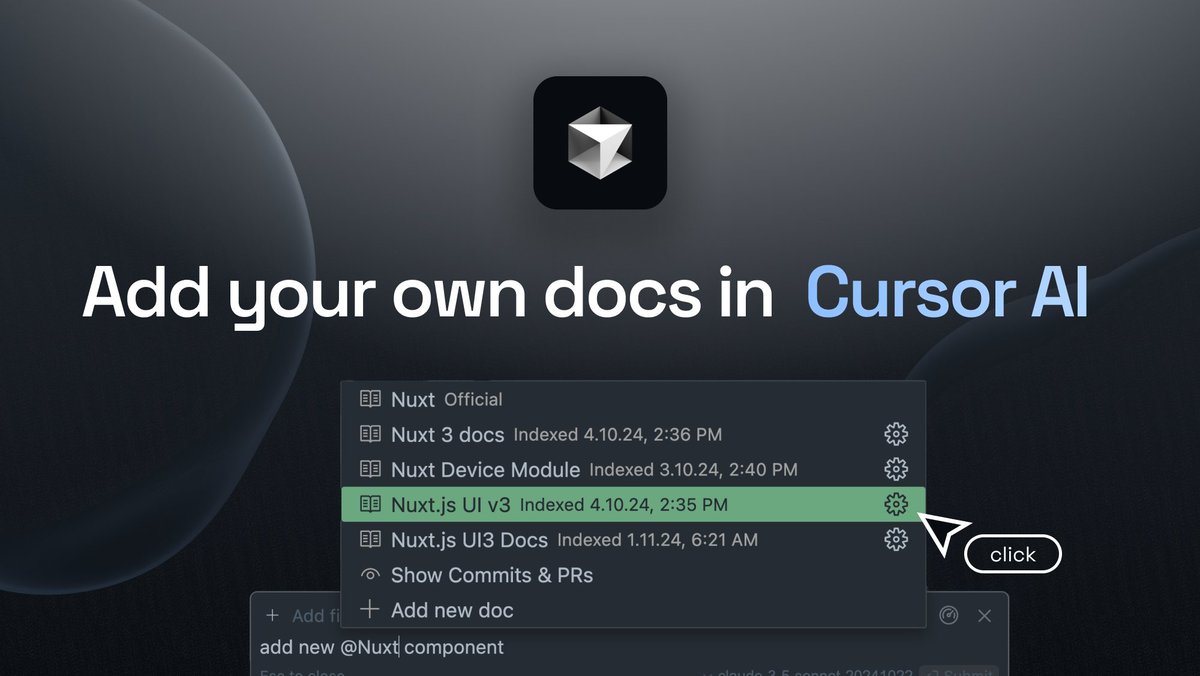
8/ Back to Cursor - Add docs
Before we use our v0 design in Cursor add expo docs
(Note: The React Native documentation is preloaded)
How? I've written a full guide here:
Before we use our v0 design in Cursor add expo docs
(Note: The React Native documentation is preloaded)
How? I've written a full guide here:
9
9/ Combine everything and build app
1. Open Cursor Composer.
2. Insert Full Prompt (see 10.)
3. Add docs for expo and react native
4. add api key from fal ai
5. stop and restart server with npm run web
1. Open Cursor Composer.
2. Insert Full Prompt (see 10.)
3. Add docs for expo and react native
4. add api key from fal ai
5. stop and restart server with npm run web
0:30
10
10/ Prompt
you are building the following react native app with expo
- Use expo-image cross platform component
- avoid using react-native-dotenv and use Expo's inbuilt .env file support.
- you create a beautiful but minimal ai chat interface - it will be a chat application where a user can input a text which will act as prompt and will be sent an api. generateImage() - this api handles image generation with fal ai service which i have written above. - after the image is finished it will be shown above the chat as response. Code Snippet for the Frontend in React Take this Code as baseline and rewrite it to 100% working react native.
- Insert Code from v0 here
- Insert Fal Api Documentation Code here.
you are building the following react native app with expo
- Use expo-image cross platform component
- avoid using react-native-dotenv and use Expo's inbuilt .env file support.
- Insert Code from v0 here
- Insert Fal Api Documentation Code here.
11
11/ Summary:
As always, these videos are very nice to watch, but remember that you still need to know what you're doing.
You will get off to a good start. But from there you are more or less "on your own".
This means that you have to take Cursor as your coding assistant and go on a journey of refining, debugging and testing.
All these settings will make things run smoother and faster, but in the end you will still have to learn coding and tooling.
Keep this in mind and have fun!
As always, these videos are very nice to watch, but remember that you still need to know what you're doing.
You will get off to a good start. But from there you are more or less "on your own".
This means that you have to take Cursor as your coding assistant and go on a journey of refining, debugging and testing.
All these settings will make things run smoother and faster, but in the end you will still have to learn coding and tooling.
Keep this in mind and have fun!
12
If you enjoyed this thread, make sure to check out my newsletter for more tips and insights!
instructa.ai
instructa.ai