5 Types of CSS Positions for Better Layouts🔥 Open this🧵

Shefali@Shefali__J
42 views
Dec 06, 2024
~2 min read
Advertisement
1
5 Types of CSS Positions for Better Layouts🔥
Open this🧵
Open this🧵
2
💠static
This is the default value for all HTML elements’ positioning. In this positioning, elements are positioned in the normal flow of the document.
Applying the top, right, bottom, or left properties and z-index to a statically positioned element will have no effect.
In the below example, position: static; property is applied only to the second box, and it doesn’t differ the layout of the second box because static is the default value.
This is the default value for all HTML elements’ positioning. In this positioning, elements are positioned in the normal flow of the document.
Applying the top, right, bottom, or left properties and z-index to a statically positioned element will have no effect.
In the below example, position: static; property is applied only to the second box, and it doesn’t differ the layout of the second box because static is the default value.
3
💠relative
With position: relative; elements follow their normal document flow but can be shifted from their original position, using the top, right, bottom and left properties.
With this property, surrounding elements won’t be affected, but there will be space where the element would have been in the static position.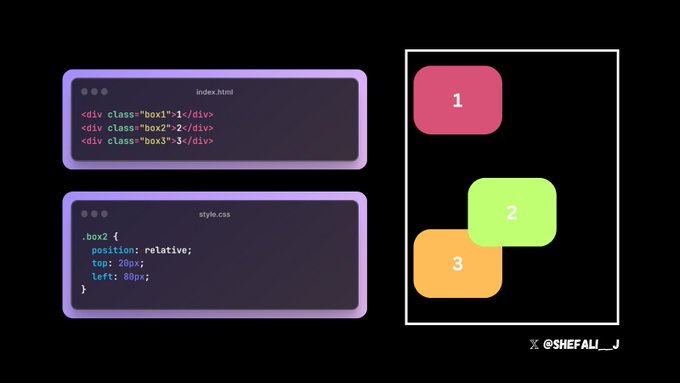
With position: relative; elements follow their normal document flow but can be shifted from their original position, using the top, right, bottom and left properties.
With this property, surrounding elements won’t be affected, but there will be space where the element would have been in the static position.
4
💠absolute
With position: absolute; elements do not follow the normal flow of the document. The element is positioned relative to its closet positioned ancestor (an element with the positioning of relative, absolute, fixed, or sticky).
And if there is no ancestor, then the element will be positioned relative to the viewport.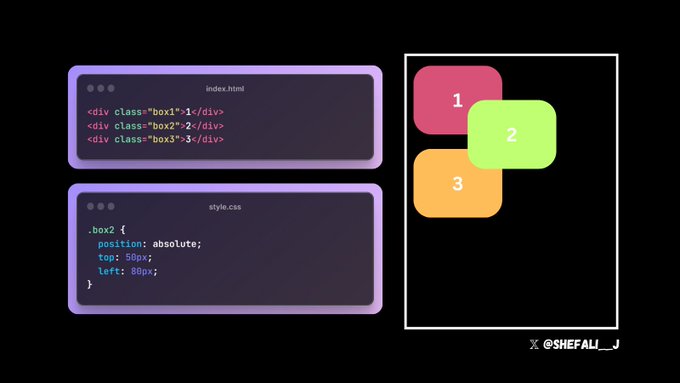
With position: absolute; elements do not follow the normal flow of the document. The element is positioned relative to its closet positioned ancestor (an element with the positioning of relative, absolute, fixed, or sticky).
And if there is no ancestor, then the element will be positioned relative to the viewport.
5
💠fixed
With position: fixed; elements are positioned relative to the viewport and remain fixed even when the page is scrolled.
With this property, unlike position: relative; there will be no space where the element would have been in the static position.
With position: fixed; elements are positioned relative to the viewport and remain fixed even when the page is scrolled.
With this property, unlike position: relative; there will be no space where the element would have been in the static position.
6
💠sticky
With position: sticky; elements are positioned based on the user’s scroll position.
It behaves like a relative element until the user scrolls to a certain position, after which it becomes fixed relative to its containing element or the viewport.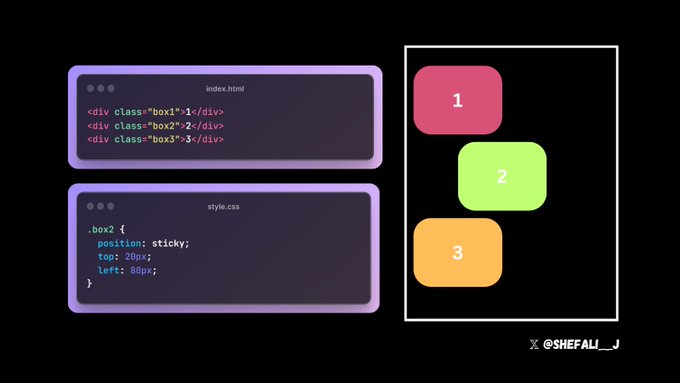
With position: sticky; elements are positioned based on the user’s scroll position.
It behaves like a relative element until the user scrolls to a certain position, after which it becomes fixed relative to its containing element or the viewport.
7
You can read the complete article on CSS Positions here👇
shefali.dev/css-positions/
shefali.dev/css-positions/
8
CSS Positions Cheatsheet👇
github.com/WebdevShefali/…
github.com/WebdevShefali/…
9
That's a wrap.
Thanks for checking out.
If you find this helpful, then consider:
❤️Like
✅Follow me @Shefali__J for more content like this.
🔁Repost the below quote👇
x.com/Shefali__J/sta…
Thanks for checking out.
If you find this helpful, then consider:
❤️Like
✅Follow me @Shefali__J for more content like this.
🔁Repost the below quote👇
x.com/Shefali__J/sta…
