Sitting through 4-6 positive earnings reactions in leading stocks...

Deepvue@Deepvue
83 views
Nov 04, 2024
~3 min read
Advertisement
1
Sitting through 4-6 positive earnings reactions in leading stocks will change your life.
As legendary trader @Upticken says, this is how you go from first class to private.
Here are 5 screens to run during earnings season to stay on top of the leaders & change your life:
As legendary trader @Upticken says, this is how you go from first class to private.
Here are 5 screens to run during earnings season to stay on top of the leaders & change your life:
2
@Upticken 1) Identifying leading stocks
You can't hold through positive earnings reactions unless you're trading leading stocks.
We've created a present screen to ensure you never miss a leader:
You can't hold through positive earnings reactions unless you're trading leading stocks.
We've created a present screen to ensure you never miss a leader:
3
@Upticken Here's a quick walkthrough from Richard as he covers the high level reasons behind each of the screener groups:
1:55
4
@Upticken 2) What stocks have upcoming earnings?
Once you're in a leadership name, you should know when it reports earnings.
Running the "Upcoming Earnings" screen allows you to track names reporting over the next 5 days & keep a close eye on the best technical setups into the number.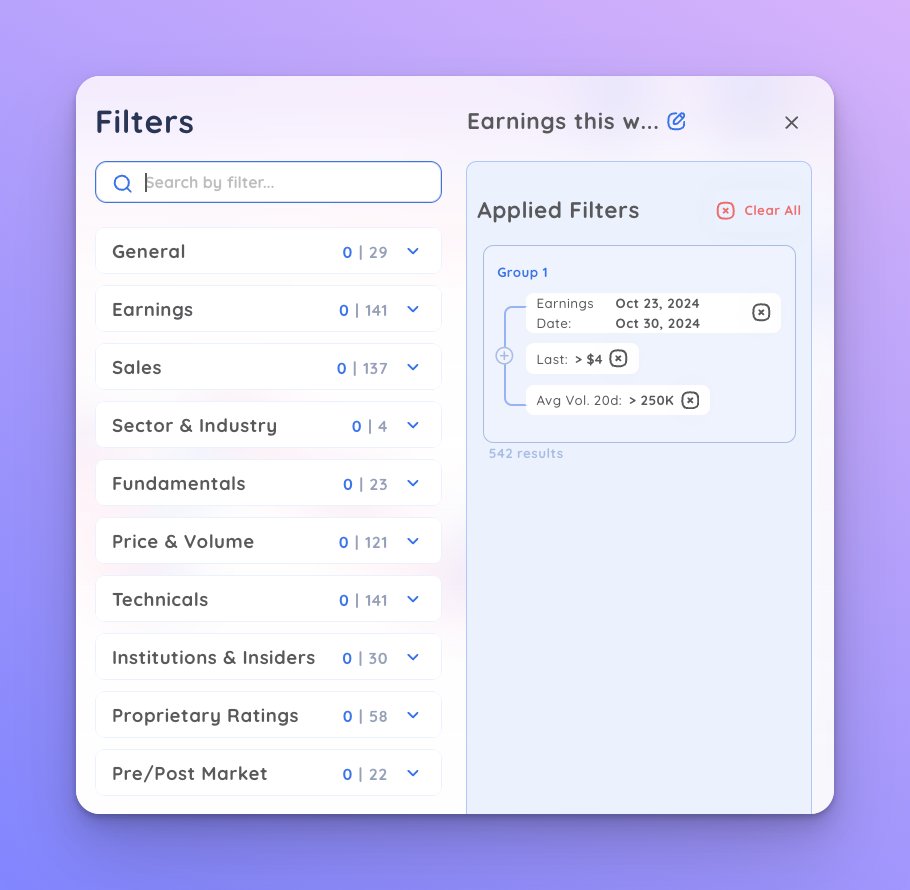
Once you're in a leadership name, you should know when it reports earnings.
Running the "Upcoming Earnings" screen allows you to track names reporting over the next 5 days & keep a close eye on the best technical setups into the number.
5
@Upticken One bonus feature with screening for earnings reports in Deepvue is that we have both look forward and look backward periods.
You can find names that are going to report over your desired time period, as well as find names that have already reported over any time period!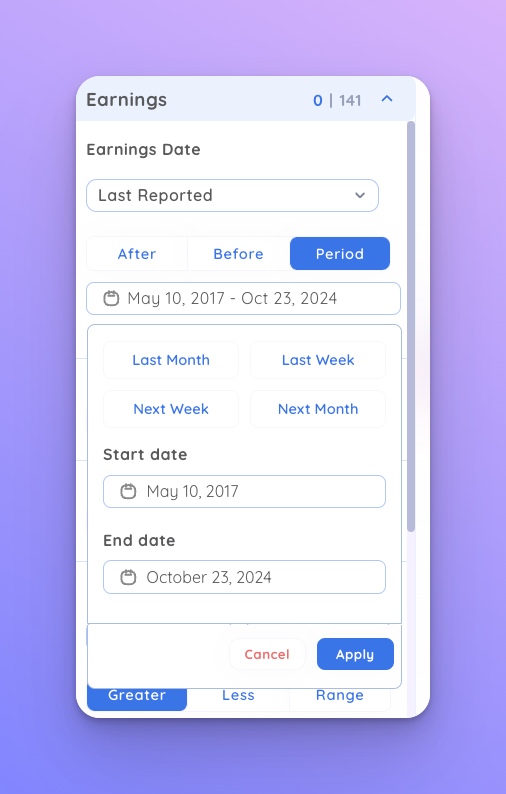
You can find names that are going to report over your desired time period, as well as find names that have already reported over any time period!
6
@Upticken 3) Premarket Gap Ups
Some companies report earnings before the market opens, and these reactions are impossible to catch if you're not prepared.
Run this scan every single morning around 8:30AM EST (it'll also catch regular news reactions as well):
Some companies report earnings before the market opens, and these reactions are impossible to catch if you're not prepared.
Run this scan every single morning around 8:30AM EST (it'll also catch regular news reactions as well):
7
@Upticken To run the above screen to its fullest capabilities, you must set up your data columns correctly.
Look for:
→ Premarket % Gain
→ Premarket Volume vs. 50DMA
→ Premarket Volume vs. Shares Float
Here's what $UPWK and $LRN looked like yesterday premarket:
Look for:
→ Premarket % Gain
→ Premarket Volume vs. 50DMA
→ Premarket Volume vs. Shares Float
Here's what $UPWK and $LRN looked like yesterday premarket:
8
@Upticken 4) Post Market Gap Ups
Just as we saw with $TSLA yesterday, it's also very important to be tracking positive earnings reactions post market.
This is the easiest scan to run:
Just as we saw with $TSLA yesterday, it's also very important to be tracking positive earnings reactions post market.
This is the easiest scan to run:
9
@Upticken Again, make sure you have your columns set up correctly.

Deepvue@Deepvue
Here are the exact column settings to visualize the most important post-market gap data:
10
@Upticken 5) High Volume Edge Screen
The best way to track names seeing major accumulation is through the HV Edge.
This screen looks for stocks that have registered:
· Highest Volume Ever
· Highest Volume in 1 Year
· Highest Volume Since IPO
· Highest Volume Since Last EPS Report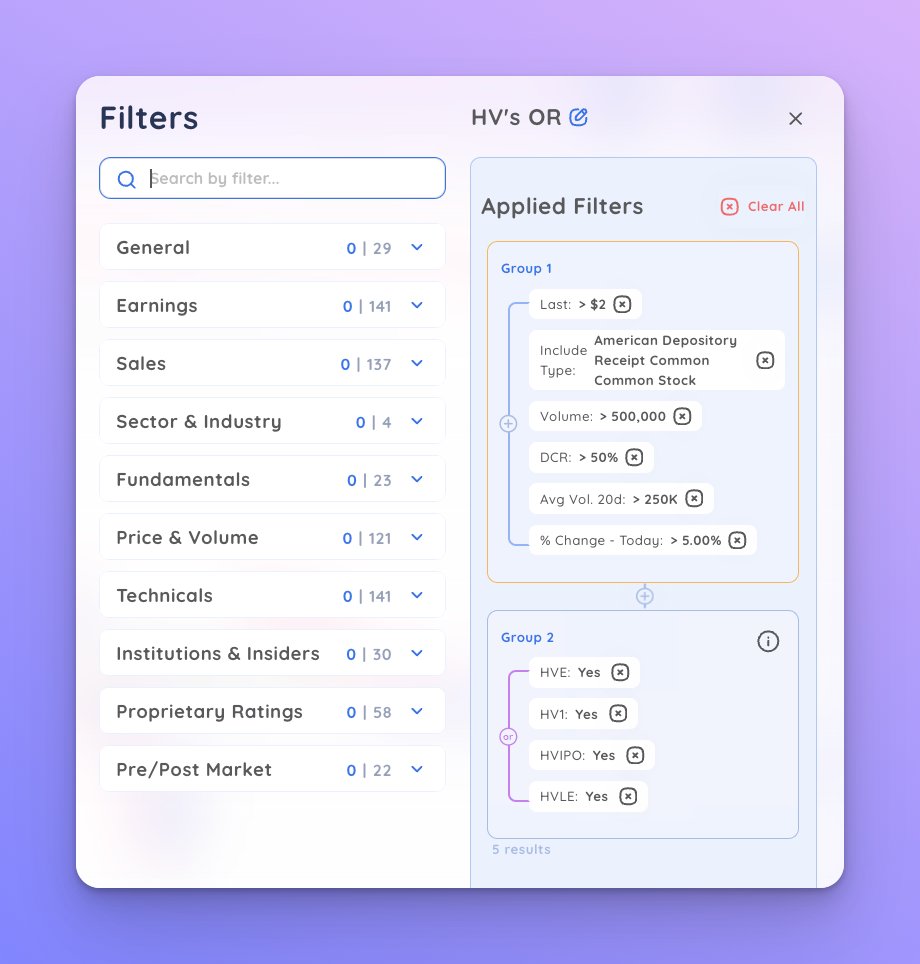
The best way to track names seeing major accumulation is through the HV Edge.
This screen looks for stocks that have registered:
· Highest Volume Ever
· Highest Volume in 1 Year
· Highest Volume Since IPO
· Highest Volume Since Last EPS Report
11
@Upticken Again, we've made it easy for you to quickly analyze what level of volume the stocks that triggered the HV Edge criteria displayed by end of day:
· $LRN registered the Highest Volume Ever
· $UPWK registered Highest Volume 1 Year
· $LRN registered the Highest Volume Ever
· $UPWK registered Highest Volume 1 Year
12
@Upticken Boom! Here are the 5 screens you must run during earnings season (to catch & trade life changing moves):
1. Deepvue Leaders Scan
2. Upcoming EPS Reports
3. Premarket Gap Ups
4. Postmarket Gap Ups
5. High Volume Edge
Run these daily & watch what happens to your account balance.
1. Deepvue Leaders Scan
2. Upcoming EPS Reports
3. Premarket Gap Ups
4. Postmarket Gap Ups
5. High Volume Edge
Run these daily & watch what happens to your account balance.
13
@Upticken There we go! Tons of value packed in today's post.
If you found a new screen to run on a daily basis...
1. Follow @Deepvue for more weekly breakdowns like this!
2. Share the tweet below to help another trader track & trade the market's strongest stocks
If you found a new screen to run on a daily basis...
1. Follow @Deepvue for more weekly breakdowns like this!
2. Share the tweet below to help another trader track & trade the market's strongest stocks
14
@Upticken If you found value in the post above, you'll definitely find value in our Ultimate Screening Guide.
Over 10,000 have already learned the best practices behind screening for & catching the market's strongest stocks.
It's completely free ↓
deepvue.com/screening-guid…
Over 10,000 have already learned the best practices behind screening for & catching the market's strongest stocks.
It's completely free ↓
deepvue.com/screening-guid…