Gmail has 4.2 billion users. But only 0.1% know how to use it...

Alif Hossain@alifcoder
16 views
Mar 31, 2024
~2 min read
Advertisement
1
Gmail has 4.2 billion users.
But only 0.1% know how to use it effectively.
Unlock their secrets with these 10 hidden tips: 🧵
But only 0.1% know how to use it effectively.
Unlock their secrets with these 10 hidden tips: 🧵
2
1) Undo the email you just sent.
See below how to undo it:
→ Settings icon (top right).
→ Settings > General
→ Activate the "undo sending" option
→ Choose 30 seconds
See below how to undo it:
→ Settings icon (top right).
→ Settings > General
→ Activate the "undo sending" option
→ Choose 30 seconds
0:13
3
2. Get rid of promotional emails.
→ Type "unsubscribe" in the Gmail search bar.
→ Now, select all emails with the unsubscribe label.
→ Now just tap on the delete button to delete them all.
→ Type "unsubscribe" in the Gmail search bar.
→ Now, select all emails with the unsubscribe label.
→ Now just tap on the delete button to delete them all.
0:15
4
3. Send confidential email.
You can make your email confidential by disabling the copying, printing and forwarding functions.
To activate them, click on the padlock symbol when sending a new email.
You can make your email confidential by disabling the copying, printing and forwarding functions.
To activate them, click on the padlock symbol when sending a new email.
0:18
5
4. Check your Gmail offline.
Follow these simple steps to enable Gmail offline mode:
→ Log in to your Gmail account.
→ Click the gear icon or "Quick Settings".
→ See all settings and click on them.
→ Select "Offline".
Follow these simple steps to enable Gmail offline mode:
→ Log in to your Gmail account.
→ Click the gear icon or "Quick Settings".
→ See all settings and click on them.
→ Select "Offline".
0:18
6
5. Use Gmail with keyboard shortcuts
Shift + I: mark as read.
✔ ⌘ or Ctrl + Enter: send an email.
✔ ⌘ or Ctrl + K to insert a link.
C to compose
✔ / to search your emails
D to write in a new tab
Shift + I: mark as read.
✔ ⌘ or Ctrl + Enter: send an email.
✔ ⌘ or Ctrl + K to insert a link.
C to compose
✔ / to search your emails
D to write in a new tab
7
6. Send your email later
Want to look like you're at your desk at 10 o'clock at night?
you can do exactly that:
→ Click the down arrow next to "submit".
→ Choose "Schedule send".
→ Choose the date and time you want
Want to look like you're at your desk at 10 o'clock at night?
you can do exactly that:
→ Click the down arrow next to "submit".
→ Choose "Schedule send".
→ Choose the date and time you want
0:15
8
7. Snooze an email.
Do you have an email you don't want to deal with right away?
→ Click on the clock icon on the right.
→ Choose how long you want to snooze the email.
→ It will reappear in your inbox on that date.
Do you have an email you don't want to deal with right away?
→ Click on the clock icon on the right.
→ Choose how long you want to snooze the email.
→ It will reappear in your inbox on that date.
0:10
9
8. Use labels
Create custom labels for different types of emails,
such as "Work", "Personal" or "Travel".
→ Simply click the "Labels" button in the toolbar and select the label you want to use.
that you want to use.
Create custom labels for different types of emails,
such as "Work", "Personal" or "Travel".
→ Simply click the "Labels" button in the toolbar and select the label you want to use.
that you want to use.
0:23
10
9. Create templates
→ Select Compose.
→ Enter the text you want to use for the template in the email field.
→ Select the three-dot menu and then Templates.
→ Select Save draft as template.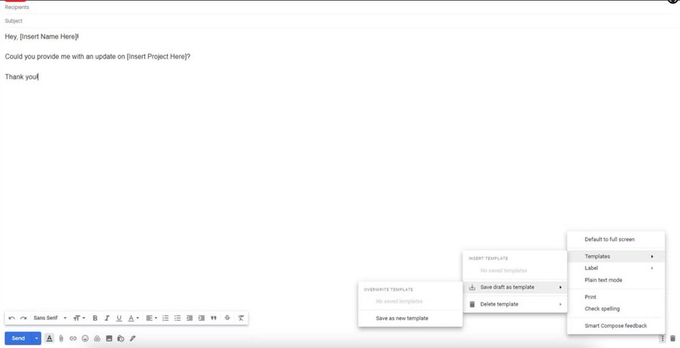
→ Select Compose.
→ Enter the text you want to use for the template in the email field.
→ Select the three-dot menu and then Templates.
→ Select Save draft as template.
11
10. Archive important emails (don't delete them!)
0:07
12
If you found this post helpful follow me @alifcoder
Subscribe to my daily newsletter.
Join here: devbytes.beehiiv.com/subscribe
Subscribe to my daily newsletter.
Join here: devbytes.beehiiv.com/subscribe