How to Build a Second Brain With Claude and Obsidian That Gets Smarter With Every Source You Save

You read thousands of pages this year. Articles, threads, docs, transcripts. Now think of one you could use today.
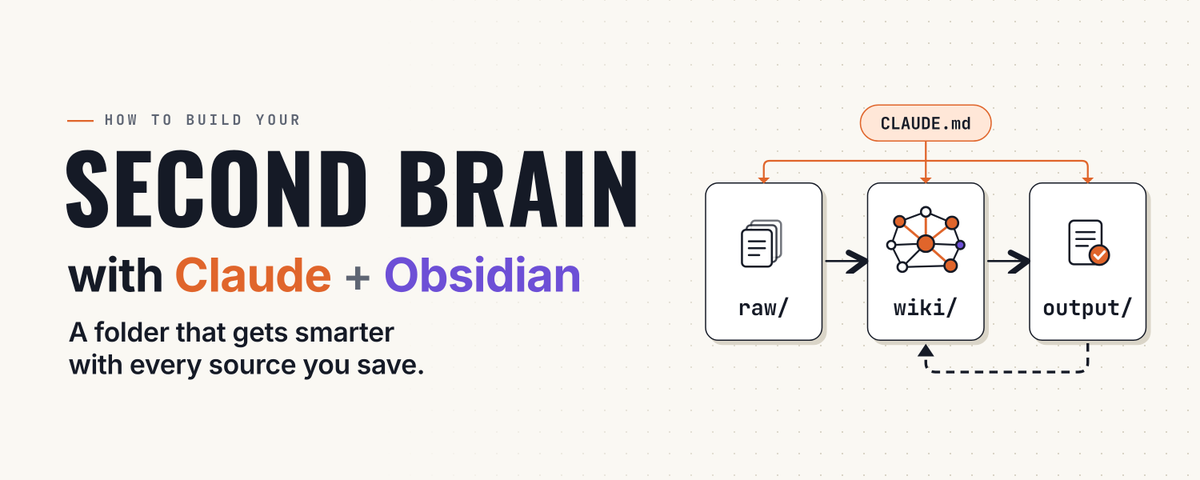
Hard, right? Everything you read went into tabs, bookmarks and chats that nothing ever connected. Next week you will read more, and none of it will talk to the rest.
Here is what changes in one evening. You build a folder where everything you save gets read, summarized, linked to your other notes and kept. Then you ask Claude a question and it answers from all of it. It files new material while you sleep. And when you open it tomorrow, it already knows who you are and what you're working on.
If you can copy and paste, you can build it. The first five steps take about 20 minutes and end with a working brain. Steps 6 to 10 make it smarter.
The structure comes from the LLM Wiki pattern Andrej Karpathy published in April 2026 as a short markdown file on GitHub. The idea: stop making the model dig through raw notes on every question. Let it build a wiki from your sources once, keep it tidy, and answer from that.
Save this. You'll want it open while you build.
What you need
Two things to know before you start
What Claude reads is sent to the model. It can only answer from files it opens, and opening a file means its content is processed by the model. Keep confidential material out of raw/ unless your plan and your workplace rules allow it.
Usage limits are shared. Pro and Max limits apply across Claude and Claude Code together. A first ingest of hundreds of files uses them fast, so start with five to ten files.
What you're building
Two tools, two jobs.
Obsidian is where you look. A free notes app that stores everything as plain text files on your own computer. Notes link with double brackets, and the links draw a map of how your ideas connect.
Claude Code does the work. It sits in the same folder, reads the files, writes new ones and keeps order.
The folder has three rooms and one rulebook:
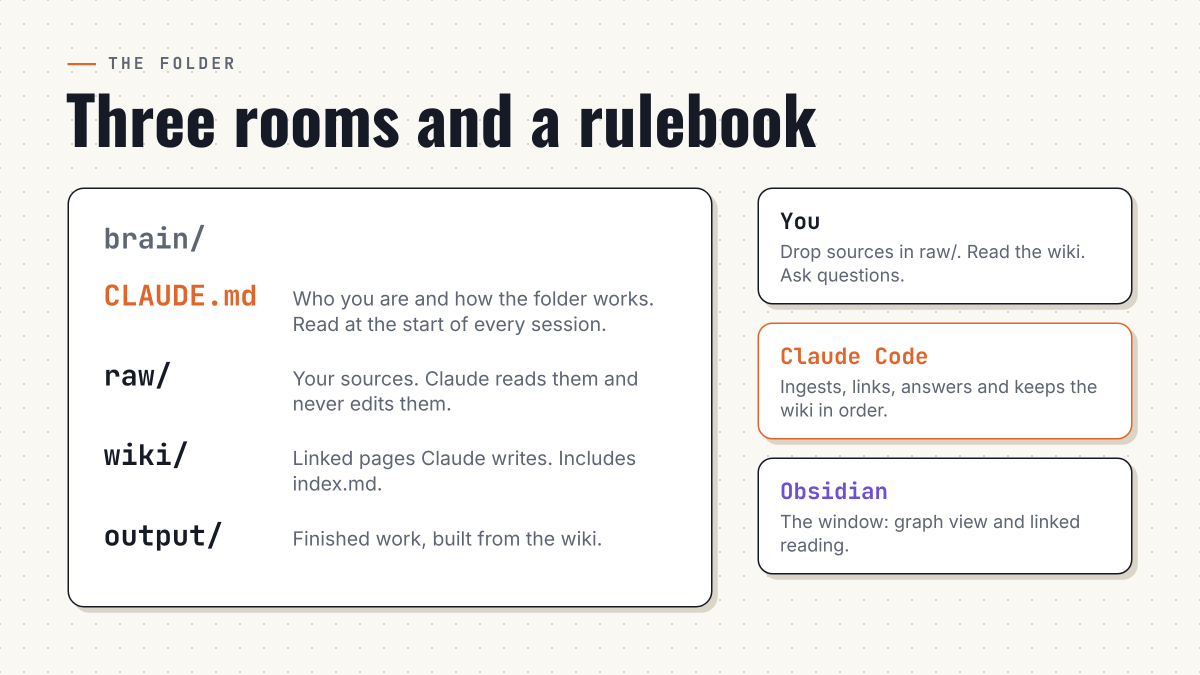
Do you need Obsidian? Claude works with any folder. Obsidian is the window and the graph view, so you can build this without it, but you lose the map.

It's all plain text, so nothing is locked in. Point a different model at the same folder next year and it still works. The brain is yours.
Step 1: Get Claude Desktop (3 minutes)
Go to claude.com/download, install the app and sign in. Open the Code tab. That's the version of Claude that can read and write files on your computer.
Result: the Code tab is open.
Step 2: Make the vault (5 minutes)
Download Obsidian from obsidian.md and open it. Click Create new vault, name it brain, choose where it lives and confirm.
In the left sidebar, right-click the empty space, choose New folder, and create three folders: raw, wiki, output.
One quick test of the core mechanic: make a note, type a sentence, then type [[goals]]. That word is now a link. Claude will soon be creating links by the hundred.
Result: an empty vault with three folders.
Step 3: Open the folder in Claude (2 minutes)
A vault is only a folder, so Claude Code can work inside it directly. No plugin needed.
In the Code tab, choose your brain folder as the working folder and start a session. If it asks whether to trust the folder, say yes. Then type:
List the folders here and tell me what each one is for.
Result: Claude names raw, wiki and output. Keep Obsidian open beside it. Whatever Claude writes shows up there within seconds.
Step 4: Tell it who you are (5 minutes)
Claude Code starts every session with a blank memory. The way it knows you is a file called CLAUDE.md, which it loads from the working folder each time. Don't write it yourself. Let Claude interview you:
Set up my second brain. Interview me one question at a time about: who I am and what I do, what I'm building this year, how I want you to talk to me, and what I want this brain to help me produce. Wait for each answer.
Then write CLAUDE.md in this folder with these sections: About me, Current projects, How to talk to me, How this folder works (raw/ is sources and never edited, wiki/ is pages you write and keep linked, output/ is finished work built from wiki/), Wiki rules (one idea per page, link with [[double brackets]], keep wiki/index.md listing every page with one line). Keep it under 200 lines.
Answer like you're briefing a new partner. Specific beats polished.
Result: a CLAUDE.md file in your vault. From now on, every session starts with Claude already knowing you.
Step 5: Feed it your first source (5 minutes)
This is the moment the brain starts to exist.
Save one thing you want to keep as a text or markdown file in raw/. Then paste:
Ingest the new file in raw/. Write a one-page summary in wiki/. Create or update every concept, person and project page it touches, link them all with [[double brackets]], and add the new pages to wiki/index.md. Don't edit anything in raw/. List what you created or changed.
Switch to Obsidian and open the graph view.
Not sure what to ingest first? Start with one of these:
Result: your first linked pages are on the map, and some of them didn't exist five minutes ago. You now have a working second brain. Everything below makes it sharper.
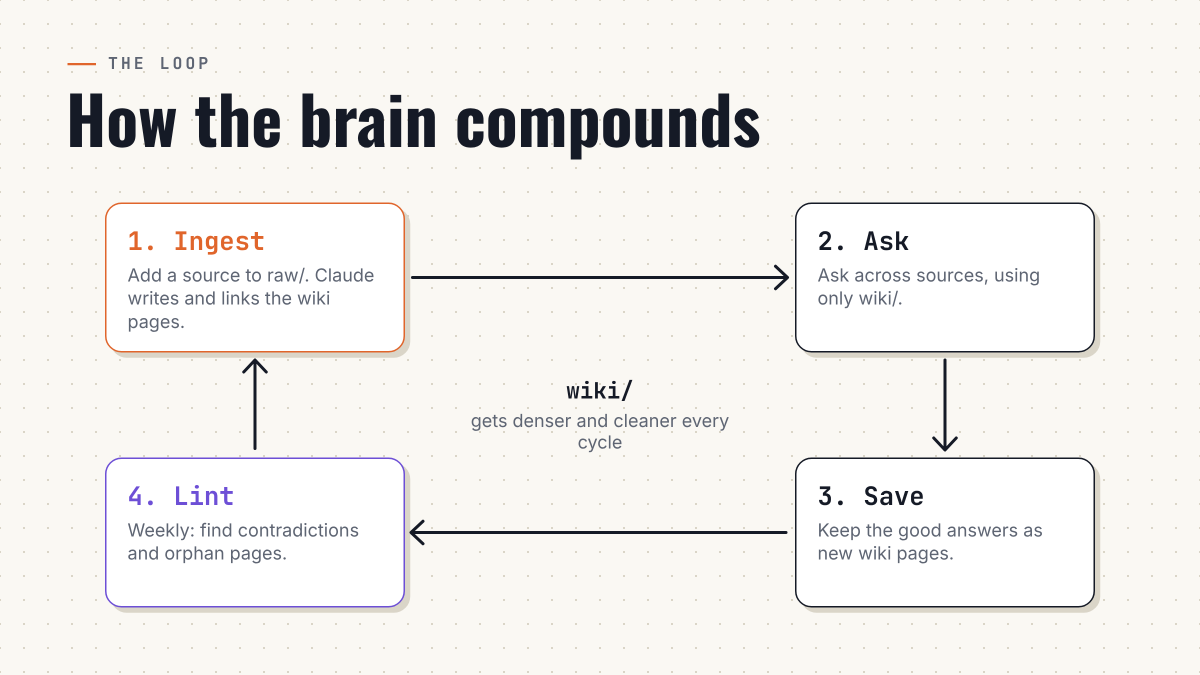
Step 6: Ask it questions
Now use it. Ask a question that crosses sources:
Using only wiki/, what are the three best arguments I've collected about [topic]? Name the page each comes from. If the wiki doesn't cover part of it, say so.
The last sentence matters. It keeps Claude from filling gaps with general knowledge and handing it back as yours.
When an answer is good, keep it:
Save that answer as a new page in wiki/, link it to the pages it used and add it to the index.
Result: your questions turn into pages, and those pages answer your next questions. This is the compounding.
Step 7: Work on one project at a time
A big vault is good for thinking and bad for focus. Give each project its own room:
Create wiki/youtube-channel/ with its own CLAUDE.md: what this project is, the one goal, how you should help, and which wiki pages matter most for it. Interview me if you need details.
Swap youtube-channel for anything. Claude Code loads CLAUDE.md files from your working folder and the folders above it at launch, and loads one in a subfolder when it starts working there. The project's rules apply exactly when you're in that project.
Result: a project that carries its own instructions.
Step 8: Save what you repeat
Anything you do more than twice becomes a skill, a saved workflow Claude runs on command. Anthropic's own advice is to move multi-step procedures out of CLAUDE.md and into skills so the rulebook stays short.
Turn a workflow I repeat into a reusable skill. Here's how I do it: [steps and one example]. Create it as a skill with a clear name and a short description of when to use it.
Good first ones: ingest a YouTube transcript, turn three wiki pages into a post draft, run a Friday review.
Result: one command replaces a ten-minute routine.
Step 9: Add live data (calendar)
Notes are half a brain. The other half is what's happening today.
Claude can read your Google Calendar through an MCP server called workspace-mcp. One honest detour: it needs OAuth credentials from Google Cloud. You create a project, enable the Google Calendar API, create an OAuth client, then set both values before adding the server:
export GOOGLE_OAUTH_CLIENT_ID="your-client-id"
export GOOGLE_OAUTH_CLIENT_SECRET="your-client-secret"
claude mcp add google-workspace uvx workspace-mcp --tools calendar
On first use a Google sign-in opens. Approve it. Then try:
Read my calendar for today. For each meeting, add a line to wiki/meetings.md with what was decided or what I owe someone. Flag any meeting with no clear next step.
This is the longest setup in the guide and the only one you can skip with no loss to the rest.
Result: your day feeds the brain automatically.
Step 10: Put it on autopilot
Scheduled tasks start a fresh Claude session on a timer. This is how the brain files itself while you sleep.
In the Code tab, click Scheduled, then New task (choose Set up manually if a menu appears). Fill in:
Check raw/ for files not yet ingested. Ingest each one: write the wiki summary, update related pages, link everything, add to wiki/index.md. Never edit raw/. Then write output/daily-log.md with three lines: what you added, what you changed, what needs my decision.
Click Create, then Run now once. Watch for permission prompts and choose "always allow" for what the task needs, or a night run will stall waiting for an answer.
Two facts to plan around. Local tasks only fire while the desktop app is open and your computer is awake, and a run is skipped if the machine sleeps through it. Switch on Keep computer awake in Settings → This computer → System if you want it to run overnight. Cloud scheduled tasks can't see your local vault, so use the local kind.
Add a second, weekly task for upkeep:
Review wiki/. List pages that contradict each other, pages with no links, ideas that appear in several places but have no page, and claims with no source in raw/. Don't change anything. Give me the list with a suggested fix for each.
Result: the brain ingests and audits itself. You wake up to a log.
Four ways this breaks (and the fix)
One rule that protects it: permissions, not promises
Writing "never delete files" in CLAUDE.md is a request. Anthropic's documentation says plainly that CLAUDE.md is context, not enforced configuration. To block an action no matter what Claude decides, use permissions or a PreToolUse hook.
So keep the folder backed up (a synced copy or a git repo makes any bad edit one undo away), give scheduled tasks the narrowest permission mode that works, and if you enable the Obsidian MCP server, know that it includes a delete tool and approve it deliberately.
Skip the build: two repos worth knowing
If you'd rather start from something packaged, two open-source projects are built on this same idea.
claude-obsidian by AgriciDaniel is a self-organizing second brain for Obsidian and Claude Code, based on Karpathy's LLM Wiki pattern. It runs as a Claude Code plugin with commands like /claude-obsidian:wiki-ingest and /claude-obsidian:wiki-query. The install is more hands-on than the steps above, so read its README first.
obsidian-second-brain by eugeniughelbur is a skill for Claude Code with 43 slash commands. It also works with Codex CLI, Gemini CLI and OpenCode, so you aren't tied to one tool. Its Google Calendar commands work in Claude Code only.
Both are text files and scripts. Clone one, then bend it into your own.
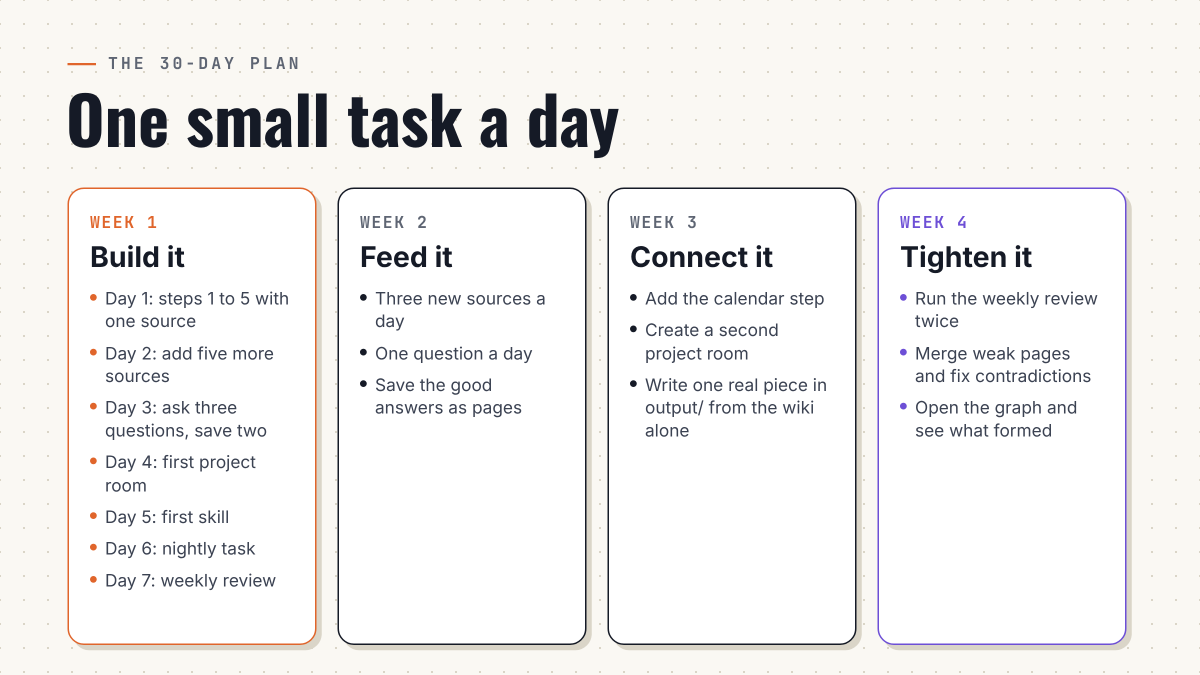
The 30-day plan
One small task a day beats one big weekend.
Week 1: build it
Day 1: steps 1 to 5 with one source. Day 2: add five more sources. Day 3: ask three questions and save the two best answers. Day 4: create your first project room. Day 5: save your first skill. Day 6: schedule the nightly task. Day 7: run the weekly review.
Week 2: feed it
Three new sources a day. Ask one question a day and save the good answers.
Week 3: connect it
Add the calendar step and a second project room. Write one real piece of work in output/ from the wiki alone.
Week 4: tighten it
Run the weekly review twice. Merge weak pages, fix contradictions, then open the graph and look at what formed.
What happens next
On day one you get your first linked pages. Within a week, with ten sources in, you can ask questions that cross all of them. Within a month, open the graph and you'll see clusters you didn't plan, and pages that connect things you saved months apart and forgot you knew.
Before this, Claude forgets you when the tab closes. After this, every session starts with Claude knowing you, your projects and everything you've stored. Search finds what you stored. Compiling builds what you understand.
Reading this took ten minutes. The first five steps take twenty. Only one of those changes how you work. Pick one source right now, ingest it, ask one question and save the answer. Everything else in this guide is that loop, repeated.
Save this guide, and follow me for more setups like this. I write about AI, Claude and systems that actually run.
Notes on what I checked. The wiki structure (raw sources, a model-written wiki, a schema file, and the ingest, query and lint operations) follows published summaries of Karpathy's April 2026 gist. How CLAUDE.md loads, the 200-line guidance, the "context, not enforced" point and the details of Desktop scheduled tasks come from Anthropic's Claude Code documentation, read on October 27, 2026. The mcp-obsidian, workspace-mcp (including the OAuth requirement) and both repositories are described from their published pages. Claude Code's inclusion in Pro and Max comes from Anthropic's support article. The time estimates are mine. I have not run this walkthrough end to end, and menu names can differ between app versions.