Grok Bot + Opus 5.5: The Ultimate Agent Harness in 10 Steps

Every agent you have used so far came as one package. The harness - the computer, the logins, the memory, the routines - and the brain that drives it were built by the same company and sold together.

On October 7, Grok Bot split them:
from now on, SpaceX routes every task to the best back-end model - and the first name on the list is Claude Opus 5.5. SpaceX kept the harness. The brain is now Anthropic's.
That combination is the strongest version of the product so far: an agent that owns its own computer and works while you sleep, driven by the model that leads independent benchmarks for multi-step agentic work.
This is the 10-step tutorial from understanding what changed to running a crew of Opus-powered specialists that hand work to each other - and pull you in only for the calls that need a human.
01. Understand what just changed
It started with one post. Late on October 6 US time, Musk wrote on X that SpaceX will use the best back-end model for any given task - naming Claude Opus 5.5, Midjourney and Suno. His closing line: "Whatever is most likely to give you the best outcome."
Hours later, Lauren (@poteto) from the Grok Bot team made it concrete: all bots will be powered by Opus 5.5, and they can spawn cloud agents running Cursor's models. 9to5Mac reported it live as of October 7.
Why a rival's model? Because on the work an agent actually does, the gap is large. Artificial Analysis measured both labs on the same harness:
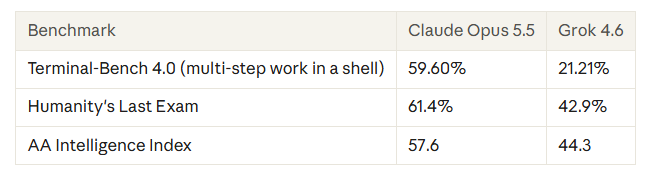
One caveat: that is Grok 4.6, not September's Grok 4.7, and the two were measured a month apart. But Terminal-Bench is the number that predicts whether you can hand a model a job instead of a question - and there the gap is almost 3x.
X reacted before the press did:
On October 7, Grok Bot split themk to the best back-end model - and the first name on the list is Claude Opus 5.5. SpaceX kept the harness. The brain is now Anthropic's.
| Who | What they said |
|---|---|
| Theo - t3.gg (@theo) | "Bad news guys: Grok Bot is actually really good" - 4.4M views, posted hours before the news. Lauren replied the next day that it had just gotten even better. |
| Lauren (@poteto) | Quote-posted Musk to announce that Grok Bot is getting an upgrade. |
| Iorel (@Iorel_X) | Framed it as Grok Bot opening up to outside models instead of staying locked to one. |
02. Install it and meet the Chief
Grok Bot is an app, not a browser tab. It runs on Mac, iPhone and iPad. You sign in with your Grok or Cursor account - it is not sold on its own, it comes bundled with most SuperGrok and paid Cursor plans.
You land in something closer to a messaging client than a chatbot: named bots on the left, a conversation on the right. Each bot gets its own computer in the cloud.

You do not need to switch anything to get Opus 5.5. According to the Grok Bot team, it is the default for every bot. There is no separate Claude subscription.
Start with one general-purpose bot - call it the Chief. Its job is to be the one you message when you do not yet know which specialist should own a task.
Give it a real errand with a result you can check in thirty seconds. Every step after this is about trusting it with bigger jobs - so start with one you can verify.
03. Write a charter for a stronger brain
A prompt is a request. A bot is a role - it persists, builds memory, and owns a domain. So name it after a job: Inbox Manager, Research Lead, Sales Outbound.
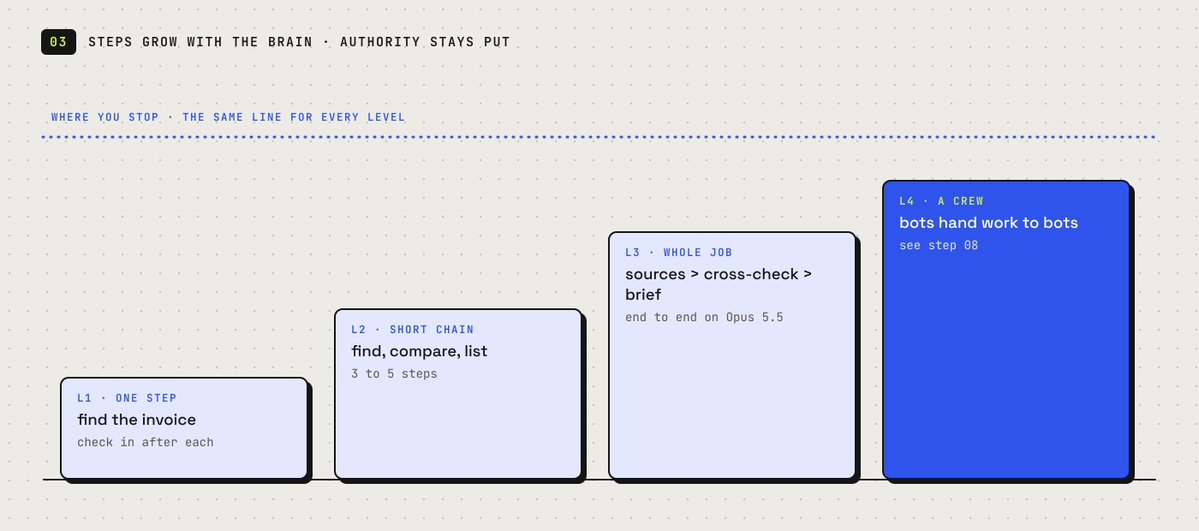
Then brief it like a new hire: what it owns, what good looks like, and where it must stop and ask you.
Here is what changes with Opus 5.5. Charters written for the old default were defensive - short chains, frequent check-ins - because the model stalled a few steps in. With a brain that scores almost 3x higher on multi-step work, you can hand over the whole job, not just the first step.
Opus 5.5 also supports a 1M-token context window and up to 128K output tokens on the API. How much of that Grok Bot exposes is not published - but longer jobs are now the point.
The charter prompt — built for Opus 5.5
You are my Research Lead.

// what you own
Given a topic, run the whole job end to end: find primary
sources, open every page you cite, cross-check numbers across
at least two sources, and draft a 1,500-word brief.

// what good looks like
Every number has a link next to it. Conflicting sources are
flagged, not averaged. Draft lands in my Drive folder, not chat.

// where you stop
Never publish. Never email anyone. Draft only.
If two sources disagree and you can't resolve it, park it and ask.
The rule: a smarter brain gets more steps, not more authority. The "where you stop" block stays exactly as strict as before.
04. Connect tools once - and draw the data line
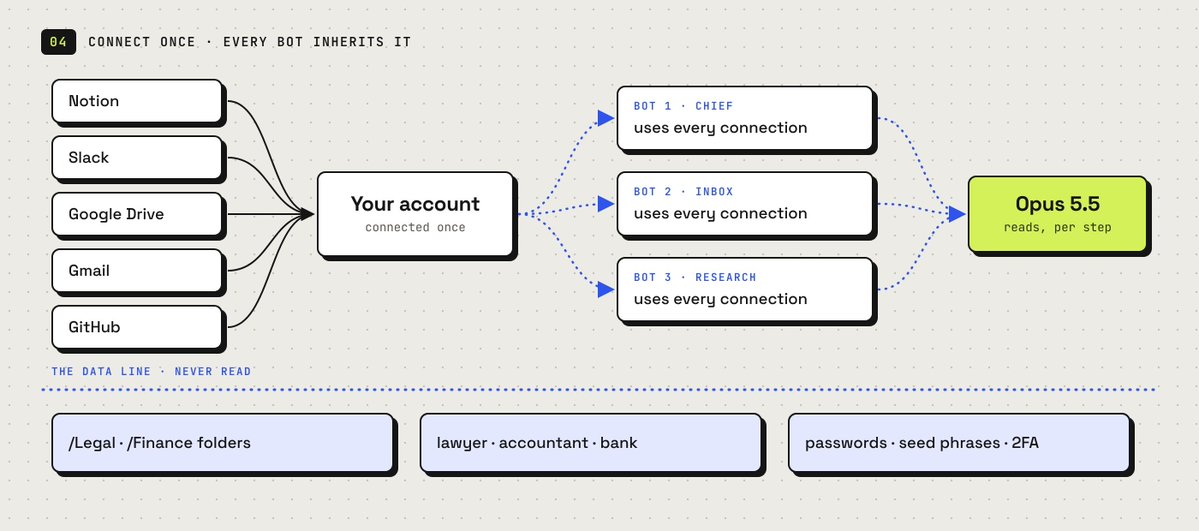
Grok Bot ships a plugin panel with one-click connections: Notion, Slack, Google Drive, AWS Agents, AWS SageMaker, Browserbase, Composio and Context7, plus custom ones.
Connections are account-level. Connect Gmail once, and every bot you create can use it. Your fifth bot is productive in seconds.
The new part: your data now has a second destination. When a bot thinks with Opus 5.5, what it reads goes to Anthropic for that step. Tom's opt-out question under Musk's post has no answer yet, and SpaceXAI has not published terms for what is shared.
You cannot choose where the model runs. You can choose what the bot touches. Add this to every charter:
// the data line — add to every charter
Do not open, read, or summarize:
  - anything in my /Legal or /Finance Drive folders
  - emails from my lawyer, accountant, or bank
  - any message with passwords, seed phrases, or 2FA codes

If a task needs one of these, stop and ask me first.
When you work with a document, use only what the task needs.
Connect what you actually need, leave the rest alone. During a beta, every connection reaches every bot - and now more than one company.
05. Hand off the login, never the password
Most software inside a real company has no API and no MCP server. This is the mechanic that makes Grok Bot work on it anyway.
The bot navigates its own cloud browser until it hits a login wall. Then it hands you the screen. You sign in, click done, and the bot picks up on the same browser session where it left off.
The bot gets a session, not a secret. You never type a credential into chat - and with a third-party model now in the loop, that matters more than ever. A password pasted into a conversation is text the model reads. A login done on the handed-off screen is not.
The rule to insist on: if any tool ever asks you to paste a password into a message, that is the wrong path.
06. Show it once, then make it a routine
You can teach a bot a workflow by doing it once while it watches. It saves the steps and runs them on its own next time.
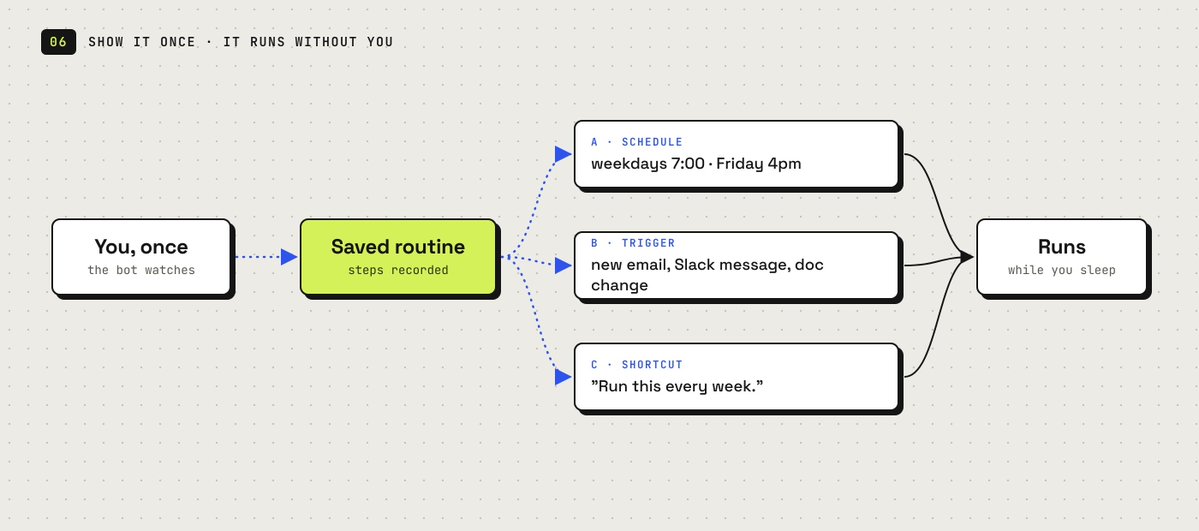
The best first recording is recurring, multi-tool and stable: something you do weekly, across two or more apps, where the steps rarely change. Tedious to describe, forty seconds to show.
Then give the routine a reason to fire. Two options, both set in plain language - no node canvas, no workflow builder:
// schedule — the morning brief
Every weekday at 7am, check my calendar, my inbox, and the
#launches Slack channel. One short brief: what's on today,
what needs a reply, what changed overnight.

// trigger — the inbound catcher
Whenever an email arrives from a domain not in my contacts and
it mentions pricing, draft a reply from the template and park it.

// the shortcut that creates most routines
Run this every week.
   ^ said right after a task you liked.
Where Opus 5.5 earns its keep: routines break when a site changes its layout or an input looks slightly different. A model that is stronger at multi-step work is more likely to recover from a changed page instead of silently failing.
07. Hire specialists that spawn Cursor agents
Run several bots in parallel, each owning one domain. Separate bots mean separate memory, separate context and a clean thread to check when something goes wrong. SpaceXAI says its own teams run bots for sales outreach, marketing, office operations and bug fixes.
Split by domain, not by task size. An Expense Manager that only thinks about receipts gets good at your receipts.
The new layer is the quieter half of the Grok Bot team's announcement: bots can spawn cloud agents running any of Cursor's models. That fits the ownership map - SpaceX bought Cursor in August in a $60 billion deal.
So a coding bot becomes a manager. The Opus-powered bot plans the job and holds the context. Cursor agents do the heavy lifting in parallel. The bot reviews what comes back.
// the Repo Maintainer — a bot that manages agents
You are my Repo Maintainer.

When an issue is labeled "bug" on GitHub:
1. Reproduce it on your computer and write a failing test.
2. Spawn a Cursor cloud agent to fix it on a new branch.
3. Run the full test suite on the result.
4. Open a draft PR with the test, the fix, and a 3-line summary.

Never merge. Never push to main.
If the fix touches auth, billing, or a migration, park it for me.
Users on X were already doing a version of this before the announcement - posted in late September about spinning up Cursor cloud agents from Grok Bot
08. Put them in a group chat
Bots can message each other and share context in threads. Put several in one group chat and they coordinate on their own - passing work, assigning ownership, and pulling you in only for judgment calls.
SpaceXAI's own example: an engineering bot reproduces a bug, files a ticket, and hands it to a second bot to debug. One bot deciding another is better suited - and passing ownership - is the thing no single-chat tool does.
Since late September, teams can also publish a shared bot that colleagues use in the app or in Slack.
The trick is to give the group an objective, not a task list. A task list means you already did the decomposition. An objective lets them split the work - and decomposition is exactly the kind of multi-step reasoning Opus 5.5 is strongest at.
// objective, not tasks
Goal: launch the October newsletter by Friday 5pm.

Research Lead owns facts and sources.
Inbox Manager owns subscriber replies.
Chief owns the timeline and tells me what's blocked.

Split the work yourselves. Park anything public for me.
09. Draw the approval line
Grok Bot's premise is that a bot finishes jobs end to end and comes back only when something needs your approval. That puts the burden on you to define "needs approval" - because the bot's default may not match yours.

The line that works is not about task size. It is about reversibility. Anything the bot can undo, it finishes alone. Anything the outside world sees, that moves money, or that cannot be taken back, gets parked for you.
This matters more now, not less. A stronger brain will push further into a job before it hits your line - so the line has to be explicit.
// finish these alone, always
draft · file · tag · summarize · research · prepare · reconcile
   everything reversible. don't ask, just do it and log it.

// park these for me, always
send anything to a person outside the company
spend or move money, or commit to a price
publish anything public
delete anything that isn't obvious junk
accept any terms or sign up for anything

// when unsure
If you can't undo it in under a minute, park it and ask.
The shape to aim for on every bot: 36 drafts queued, 0 sent. Every reversible step done, a hard stop at the first irreversible one.
10. Watch the cost, review weekly
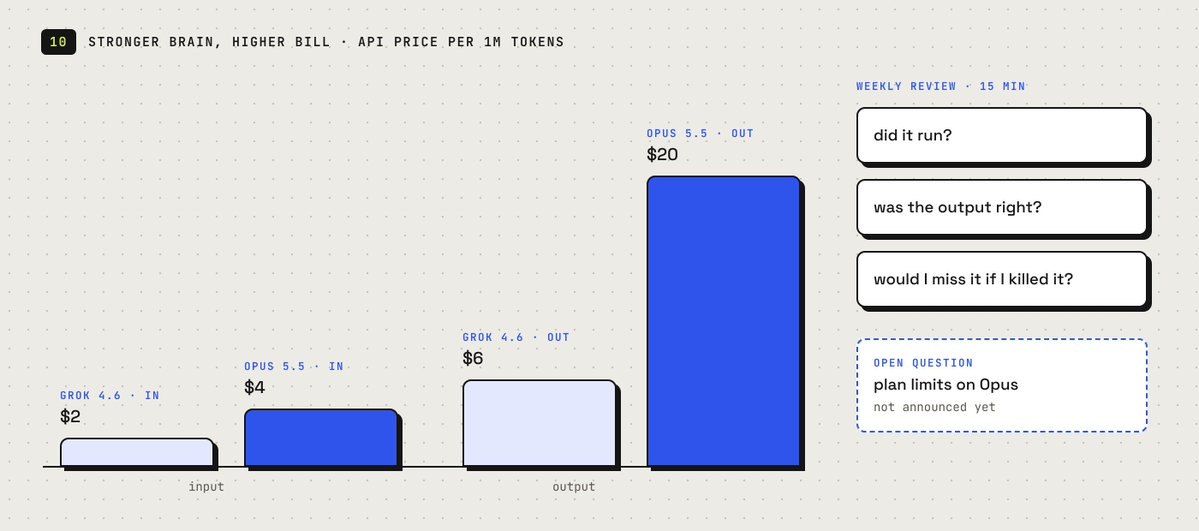
Opus 5.5 is not a cheap brain. On the API it is priced well above Grok:

On a small job - 30K tokens in, 8K out - that is roughly 28 cents against 11. On very long context the order flips, because Grok's rates double above 200K tokens and Opus stays flat.
You do not pay per token in Grok Bot - it is bundled in your plan. The open question, the one Adam Hincu asked on X, is whether Opus-powered jobs burn through plan limits faster. SpaceXAI has not said. So watch usage for the first week before you add routines.
And not everything announced is live. Midjourney and Suno have no date, and at least one user's bot said Suno was not available on day one. Build on Opus 5.5 - it is confirmed. Wait on the rest.
Then put fifteen minutes a week on the calendar and let the bots report on themselves:
List every routine you ran this week. For each one:

  - how many times it fired
  - what it produced
  - anything it skipped, failed, or had to guess at
  - anything you parked for me that I never answered

Then tell me which one is least useful, and why.
If you can't tell which model handled a step, say so.
Spot-check one output per routine by hand. A bot grading its own work has the same blind spot you do.
Conclusion: the harness is the product
For three years the question was which model is best. This week the most aggressive model-builder in the market answered a different one: which harness is best - and then put a rival's brain inside it.
That is the shift. The harness owns the computer, the logins, the memory and the routines. The brain is swappable underneath, and right now the best one for agent work is Opus 5.5.
Your job does not change. You decide what to delegate, where the bot's authority ends, and what data it may touch. Write all three into the charter - and let the strongest brain on the market do the clicking.